Introduction
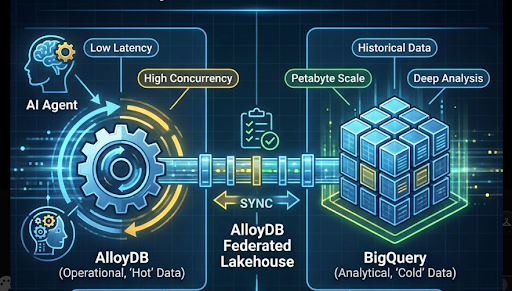
While Google Cloud’s Lakehouse Federation feature is seamless and requires minimal manual infrastructure setup, this document offers a comprehensive checklist to jumpstart your AlloyDB Lakehouse Federation setup to power high-scale, Agentic Applications in production. We cover the core Architectural Matrix, optimization best practices across both execution engines (AlloyDB and BigQuery), and recommend critical monitoring knobs to ensure you have visibility of your Federation system health at scale. To ground these concepts, we use demo code based on a real-world use case: a security threat intelligence agent that needs to rapidly correlate “hot,” low-latency operational data in AlloyDB with massive volumes of “cold,” historical data sitting in BigQuery. While our demo code centers on a security threat intelligence agentic app, this checklist applies to any enterprise application scaling on AlloyDB federated queries.
Architectural Recommendation Matrix
When architecting your data platform, choosing between AlloyDB Lakehouse Federation (bigquery_fdw) and BigQuery Federated Query (EXTERNAL_QUERY) depends primarily on whether your agentic application workload is operational or analytical.
- AlloyDB Lakehouse Federation serves as the ideal choice for an application backend or an agentic app which has high concurrency and low latency requirements. AlloyDB provides a high concurrency ceiling natively managed based on PostgreSQL connection pooling. AlloyDB Federated Lakehouse safely regulates outbound remote requests to BigQuery while fully utilizing the ultra-fast caching layers to maximize performance.
- Conversely, BigQuery Federated Query is the right choice for business intelligence tools or agentic applications which need deep, historical ad-hoc analysis on PetaBytes of data along with access to real-time data residing in a transactional database like AlloyDB. Because BigQuery Federated Query operates from BigQuery downward, it features a lower concurrency ceiling compared to AlloyDB based on BigQuery’s API quotas but is capable of enabling you to run analytical queries on PBs of data with quick turnaround.
Google Cloud’s Agentic Data Cloud offers seamless options for both types of workloads. Start with understanding your latency and concurrency requirements to make the architecture choice based on the above factors.
Architecture
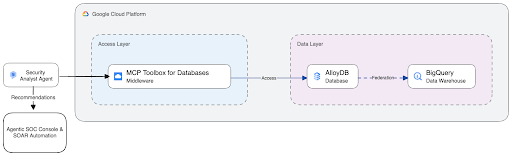
In this production framework, the Agent utilizes the Agent Development Kit (ADK) for orchestration and maps its tooling capabilities via the MCP Toolbox for Databases. The toolbox securely executes requests against the AlloyDB primary or read-pool instances, which handle real-time queries locally while seamlessly federating historical lookups out to BigQuery.
Best Practices
Predicate Pushdown Optimization in BigQuery
AlloyDB Lakehouse Federation offers predicate pushdown while querying data at run-time from BigQuery. The predicate pushdown enables efficient data retrieval at scale from BigQuery. This section covers important factors to facilitate predicate pushdown on BigQuery.
- Partitioning and Clustering: Have partitioning and clustering in place on your high frequency filtering keys (e.g., timestamp, tenant_id) in BigQuery. Design your federated queries to use these specific columns into its filters whenever possible to prune scanned data efficiently.
- Function Volatility (VOLATILE, STABLE, IMMUTABLE): PostgreSQL relies on these categories to determine if a function can be safely pre-evaluated. If your WHERE clause relies on a function defaulting to VOLATILE, the optimizer may block predicate pushdown entirely in order to keep your result set accurate. If you find out while monitoring that predicate pushdown is not being applied this is one of the important things to check. You may have to wrap non-deterministic values (like dates) inside a custom function marked explicitly as IMMUTABLE. This forces the query planner to compile the expression into a static constant, letting BigQuery execute the filter natively and return a razor-thin dataset. Example here.
AlloyDB Scale & Connection Management
- Isolate via Read Pools: Run your agentic read traffic entirely on AlloyDB Read Pool instances. This allows you to scale read capacity dynamically using autoscale without exhausting the resources of your primary transactional instance.
- Managed Connection Pooling: Leverage Managed Connection Pooling on your Read Pools. For low-latency, high-concurrency agent workflows, utilize Transaction Pool Mode to ensure highly efficient session reuse across rapid, parallel connections.
- Tag your Queries: Ensure you tag all your queries used by the agentic app so that you can monitor and debug the queries easily. The tags can work based on your organization’s business model. One sample here.
- CI/CD Schema Sync: Programmatically update AlloyDB foreign table schema whenever the underlying BigQuery analytical schema changes to prevent runtime mapping failures.
- Isolate Vector Embeddings: Avoid streaming large vector embeddings over the FDW from BigQuery. Keep your vector semantic searches completely native to AlloyDB, and fetch larger text or metadata components from BigQuery via lightweight reference IDs instead of transferring the vectors.
Local Cache & Ingestion Pipelines
- Automate Sync BigQuery to AlloyDB: For queries where live federation latency may be higher than expected, use the automated sync BigQuery to AlloyDB feature which offers a one time or periodic sync option to sync data from BigQuery directly into AlloyDB tables. Code sample here.
- Accelerate with the Columnar Engine: If your imported historical cache inside AlloyDB grows sizable, induct the table into the **AlloyDB Columnar Engine** (`google_columnar_engine_add`). The Columnar Engine’s background auto-refresh process will automatically vectorize incoming synced batches without requiring manual refresh cron jobs.
Resiliency & Circuit Breaking
- Error handling in the Agentic Application: Always catch FDW related exceptions in your code. If a federated network stall occurs or BigQuery throws an explicit HTTP 403 Rate Limit / Quota Exceeded error, the application code should gracefully trip a circuit breaker and route the request to an AlloyDB only fallback table containing a local replica of cached historical indicators. Code sample here.
Monitoring & Alerting Knobs
Leveraging Lakehouse Federation successfully requires continuous visibility into both sides of the data boundary. Your agentic application can perform effectively if the underlying data engines are synchronized and clear of bottlenecks. Monitor the following operational indicators to monitor the health of the data platform at scale:
The AlloyDB Tier
- Track P95 and P99 Latencies Separately: Utilize AlloyDB Query Insights which offers built in track of p95 and p99 latencies. You can also track standard PostgreSQL performance tracking via pg_stat_statements. Ensure you tag or filter your federated queries separately from local operational reads so that you can monitor the relevant queries specifically based on their tags.
- Monitor sustained CPU Saturation: Monitor AlloyDB node CPU utilization closely. Spikes in CPU on your read pools or primary instances could imply a broken or unpushed predicate filter, forcing AlloyDB to process millions of raw, un-filtered text blocks locally in engine memory instead of offloading them to BigQuery.
- Guard the Cache Hit Ratio: Establish automated alerts if the local AlloyDB buffer cache hit ratio drops below 99%. A downward trend here indicates that your historical caching or data-materialization footprints are spilling over, blowing out local instance memory allocations and dragging down performance.
- Manage Connection Exhaustion: Monitor your managed connection pool usage and trigger alerts if concurrent connection depth breaches 90%. Use node-capacity documentation to map out the exact concurrency thresholds each node in your read pool can handle before scaling out.
- Validate Background Synchronization via AlloyDB Sync: Actively monitor the `alloydb_sync.job_status` view for your BigQuery sync schedules. If an incremental sync fails, fire an immediate critical alert. Sample monitoring code here.
- Replication Lag: To track how far behind is the read pool from the primary instance.
- Warning Threshold: > 10 seconds. Indicates a high volume of transactions is flooding the primary instance, creating a temporary ingestion bottleneck on the read pools.
- Critical Threshold: > 60 seconds. Indicates the replication stream is functionally stalled. At this point, the application-level circuit breaker should consider temporarily routing hyper-sensitive transactional reads back to the primary instance to avoid acting on stale data.
The BigQuery Tier
- Audit Volumetric Data Egress: Track total_bytes_processed and structural row counts emitted back to AlloyDB by regularly inspecting BigQuery’s INFORMATION_SCHEMA.JOBS_BY_PROJECT logs. This allows you to catch runaway, costly data scans resulting from poorly formed agentic queries before they impact your cloud billing. Sample code here.
- Monitor Slot Contention and Throttling: Track query queue depths and concurrent execution metrics on BigQuery. Keep a monitor for project level slot exhaustion and concurrency limits being reached in BigQuery.
- Audit Service Account Failures: Set up targeted alerts for job execution failures tied directly to the AlloyDB Lakehouse Federation service account. This catches silent IAM permission drifts or BigQuery table schema modifications before they break your production runtime pipelines.
You can track almost all of these telemetry points directly inside the native Google Cloud Console interfaces. Through the AlloyDB System Insights and Query Insights, Google surfaces real-time trends for CPU utilization, memory distribution, connection counts, and tail latencies. Meanwhile, the BigQuery Admin & Resource Charts tabs provide out-of-the-box visual tracking for slot allocation, query concurrency, and data scan volumes across your projects. Leveraging these native views keeps your operational monitoring lightweight while ensuring complete coverage of the cross-engine data boundary. For specific monitoring queries you can refer to this code sample here.
Blueprint for Scaling Agentic Applications on AlloyDB Federated Lakehouse was originally published in Google Cloud – Community on Medium, where people are continuing the conversation by highlighting and responding to this story.
Source Credit: https://medium.com/google-cloud/blueprint-for-scaling-agentic-applications-on-alloydb-federated-lakehouse-9bdb4265687b?source=rss—-e52cf94d98af—4
About the Author