Building a RAG Agent with Google ADK, Antigravity SDK, Agent Skills, A2UI, and Gemini Enterprise Agent Platform- Serverless RAG Engine
Introduction
Retrieval-Augmented Generation (RAG) has become one of the most adopted patterns for connecting Large Language Models (LLMs) to enterprise knowledge bases. By retrieving relevant information from trusted organizational data sources before generating a response, RAG can improve the accuracy, relevance, and reliability of AI applications.
However, building a production-grade RAG system often presents two major challenges : reducing model hallucinations and managing complex, costly vector database infrastructure.Traditional RAG implementations often require teams to manually provision, scale, secure, and maintain dedicated vector database clusters.
In this guide, we will build an enterprise-grade grounded RAG Agent using the following tech. stack
- Google Agent Development Kit (ADK) — Define the agent, its instructions, tools, and runtime behavior.
- Google Antigravity SDK — Orchestrate and execute agent development workflows programmatically.
- Agent Skills –Provides resuable instruction , domain-specific knowledge, scripts, and supporting resources that the agent can load when required
- A2UI Protocol –Streams dynamic, agent-driven UI components.
- Gemini Enterprise Agent Platform (GEAP) — Serverless RAG Engine — Provides a Google-managed serverless vector database for document ingestion, semantic retrieval, and scalable enterprise knowledge grounding.
- Gemini Models — Handle reasoning, tool selection, and retrieval orchestration.
Architecture
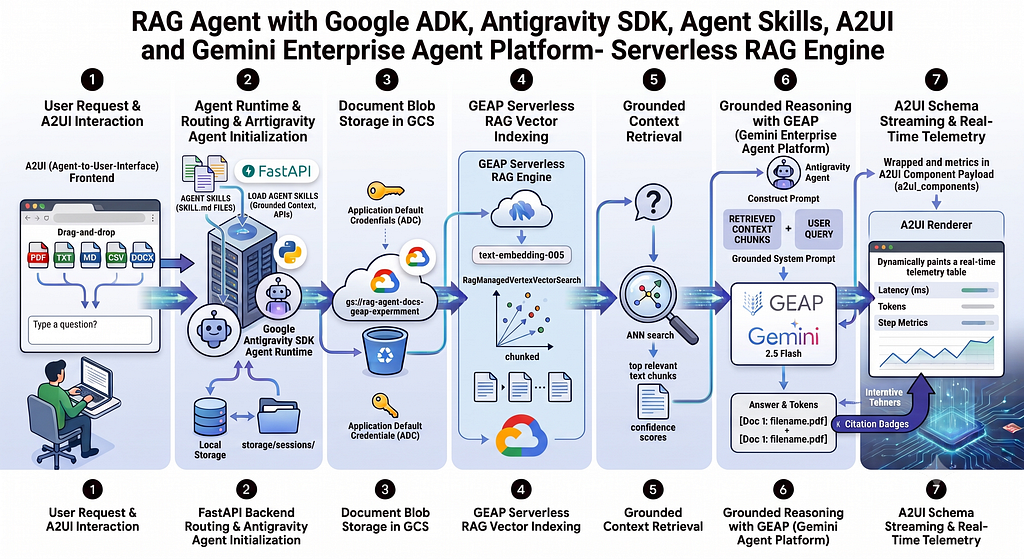
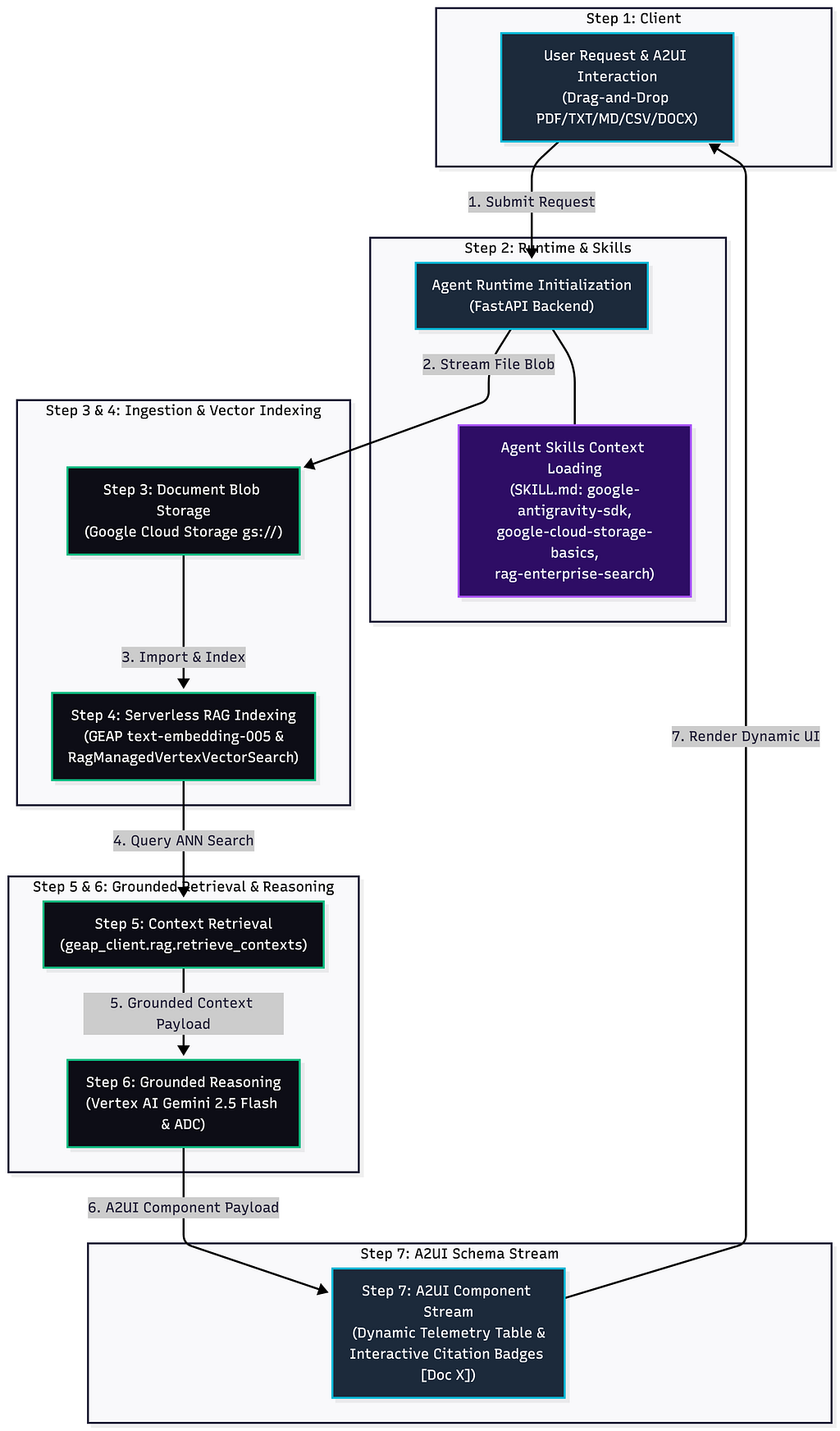
Our application uses a serverless , agent-driven RAG architecture that separates document ingestion, vector indexing, context retrieval, Gemini reasoning, and dynamic UI rendering into independent stages. Core components are :
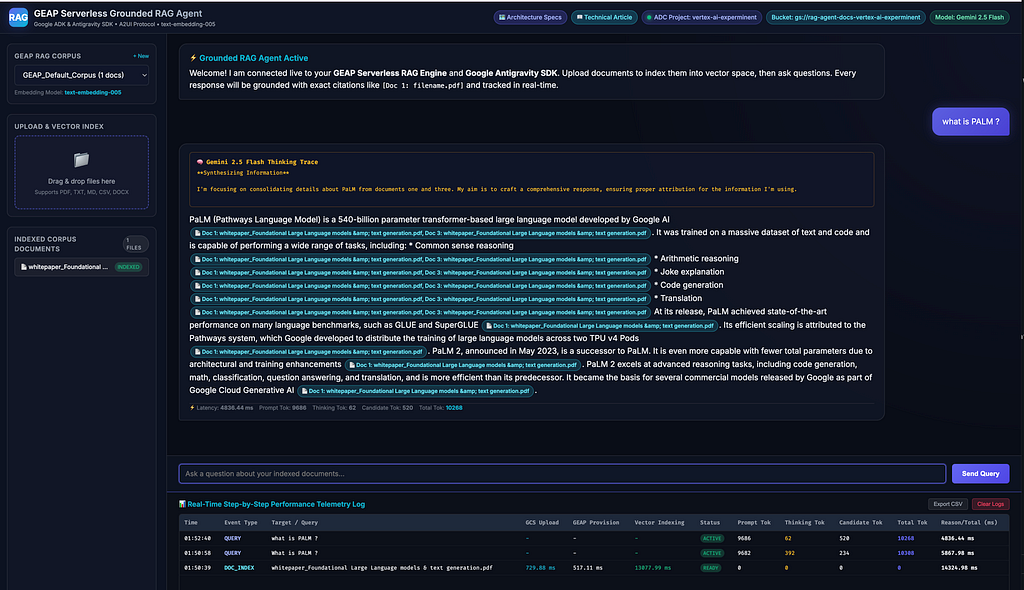
- A2UI — Interactive frontend rendering, citation pill tags, and dynamic step-by-step performance telemetry stream.
- FastAPI — High-performance request routing, document ingestion pipeline, and agent session initialization.
- Google Agent Skills (SKILL.md) — Reusable domain-specific knowledge packages guiding the agent on GCS, GEAP RAG, and Antigravity SDK operations
- Google Cloud Storage (GCS) — Automatic document staging bucket (gs://rag-agent-docs-{project_id})
- GEAP Serverless RAG Engine — Managed serverless vector indexing (text-embedding-005) and semantic chunk retrieval without database clusters.
Step 1: User Request and A2UI Interaction
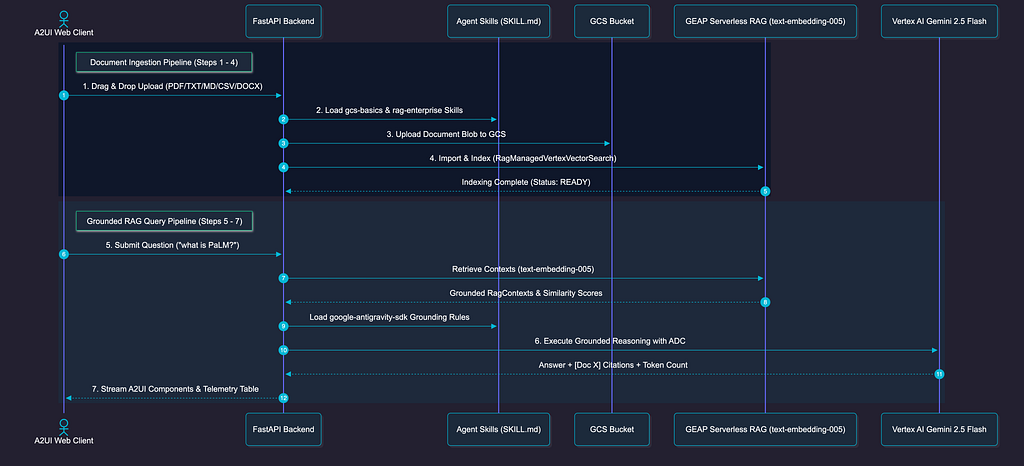
Users submit a question or drag and drop a document in supported format such as PDF,TXT ,MD etc..A2UI acts as more than a traditional chat interface by providing agent-controlled UI layer that can render structured components based on the response generated by the backend.
Once the user submits the request, the frontend sends the question and document metadata to the FastAPI backend.
Step 2: Agent Runtime and Skills Initialization
FastAPI receives the incoming request and initializes the agent runtime.It is responsible for coordinating the application workflow, including
- Validating the uploaded file
- Creating or restoring the user session
- Loading agent instructions
- Streaming the document to Cloud Storage
- Invoking the retrieval pipeline
- Sending the final A2UI response back to the client
During initialization, the runtime loads the required Agent Skills which are defined through reusable SKILL.md instructions for capabilities such as:
- google-cloud-storage-basics
- rag-management
These skills provide reusable, task-specific guidance that the agent can load when needed.
Step 3: Document Staging in Google Cloud Storage (GCS)
After the FastAPI backend validates the uploaded document (PDF, TXT, MD, CSV, DOCX), it streams the file to an automatically provisioned Google Cloud Storage bucket.
Step 4: GEAP Serverless RAG Ingestion and Vector Indexing
Once staged in GCS, the document is imported into the Gemini Enterprise Agent Platform (GEAP) Serverless RAG Corpus via the Google GenAI SDK (`rag.import_files`):
Ingestion & Indexing Pipeline:
1. Document Parsing: Extracts raw text and structure from PDF, TXT, MD, CSV, or DOCX formats.
2. Chunking: Splits text into 512-token chunks with 100-token overlap.
3. Embedding Generation: Converts chunks into dense vector representations using text-embedding-005 (publishers/google/models/text-embedding-005).
4. Serverless Vector Search: Vectors are indexed automatically via RagManagedVertexVectorSearch.
Because the vector infrastructure is 100% serverless, developers do not need to provision, shard, or maintain vector database clusters. The system records the vector_indexing_ms latency and flags the query_readiness_status as READY.
Step 5: Context Retrieval via GEAP RAG Engine
When a user submits a question, the application queries the active GEAP RAG Corpus using approximate nearest neighbor (ANN) vector search (rag.retrieval_query):
res = rag.retrieval_query(
 rag_resources=[rag.RagResource(rag_corpus=corpus_name)],
 text=user_query,
 similarity_top_k=5
 )
The GEAP RAG Engine converts the query into a text-embedding-005 vector, matches it against stored chunk vectors, and returns a grounded context payload containing RagContext objects.The retrieval layer isolates raw factual evidence without generating ungrounded answers.
Step 6: Grounded Reasoning with Gemini 2.5 / 3.6 Flash & Antigravity SDK
The retrieved contexts are injected into a grounded system prompt and passed to Gemini 2.5 Flash using the Google Antigravity SDK (Agent, LocalAgentConfig):
config = LocalAgentConfig(
        model="gemini-2.5-flash",
        vertex=True,
        project=project_id,
        location="us-central1",
        save_dir="./storage/sessions",
        skills_paths=["./skills"]
    )
Grounded Execution & Observability:
• ADC Authentication: Automatically authenticated via Application Default Credentials (google.auth.default()).
• Thinking Trace Stream: Streams internal model reasoning steps (response.thoughts).
• Strict Citation Formatting: Instructs Gemini to format cited facts as explicit tags: [Doc 1: cloud_security_handbook.txt].
• Token Metrics Capture: Tracks prompt_token_count, thoughts_token_count (thinking tokens), candidates_token_count, and total_token_count.
Step 7: A2UI Component Payload & Real-Time Telemetry Streaming
FastAPI packages the agent’s output into a dynamic A2UI protocol payload and streams it to the client web application:
Client-Side A2UI Rendering:
• Interactive Citation Pills: Parses Einto interactive badge elements showing source snippets on click.
• Collapsible Thinking Trace: Renders the model’s internal reasoning process.
• Real-Time Step-by-Step Performance Telemetry HTML Table: Logs independent metrics per step (GCS Upload ms, Corpus Provisioning ms, Vector Indexing ms, Readiness Status, Prompt/Thinking/Candidate Tokens, and Reasoning Latency) with CSV Export support.
What are Agent Skills ?
Agent Skills are modular, self-contained domain knowledge packages defined through SKILL.md files that enables agents how to interact with specific SDKs, APIs, and cloud services. Rather than bloating up the LLM's system prompt with massive documentation, skills allows agent to dynamically load targeted reference guides, scripts, and best-practice rules only when a specific task is requested.
Each skill contains:
- SKILL.md: Main instruction document containing YAML frontmatter metadata, API patterns, error recovery strategies, and security rules.
- scripts/: Helper execution scripts.
- references/: Technical specs and architecture reference sheets.
How to install and Manage Agent Skills
We can install official Google Agent Skills globally or locally using the skills CLI:
Prerequisites for installing skills is Node.js and AI coding agent installed like Antigravity CLI or Claude CLI etc..
- Installing Official Google Skills
# Install all official Google Cloud agent skills globally
npx skills add google/skills -g --all

# Or install specific individual skills
npx skills add google/skills -s google-cloud-storage-basics -g
2. Listing Active Skills in our Environment:
npx skills ls -g
Prerequisites & Environment Setup
1. Configure GCP Project & Application Default Credentials (ADC)
- Ensure our active gcloud project is set and authenticate Application Default Credentials:
# Set your active Google Cloud project (my project)
gcloud config set project vertex-ai-experminent

# Authenticate Application Default Credentials
gcloud auth application-default login
2. Install Official Google Agent Skills
Install the official Google RAG Engine and Storage skills globally or locally using the skills CLI
npx skills add google/skills -s agent-platform-rag-engine-management -g
- Installing Google Cloud Storage for creating bucket and uploading files into GCS bucket
npx skills add google/skills -s google-cloud-storage-basics -g
- Example of AGY CLI RAG management agent skills installation
❯ npx skills add google/skills -s agent-platform-rag-engine-management

███████╗██╗  ██╗██╗██╗     ██╗     ███████╗
██╔════╝██║ ██╔╝██║██║     ██║     ██╔════╝
███████╗█████╔╝ ██║██║     ██║     ███████╗
╚════██║██╔═██╗ ██║██║     ██║     ╚════██║
███████║██║  ██╗██║███████╗███████╗███████║
╚══════╝╚═╝  ╚═╝╚═╝╚══════╝╚══════╝╚══════╝

┌   skills
│
◇  Source: https://github.com/google/skills.git
│
◇  Repository cloned
│
◇  Found 99 skills
│
●  Selected 1 skill: agent-platform-rag-engine-management
│
◇  73 agents
◇  Which agents do you want to install to?
│  Amp, Antigravity, Antigravity CLI, Cline, Codex, Cursor, Deep Agents, Gemini CLI, GitHub Copilot, Kimi Code CLI, OpenCode, Warp, Zed
│
◇  Installation scope
│  Project

│
◇  Installation Summary ──────────────────────────────────────────────────╮
│                                                                         │
│  ~/.agents/skills/agent-platform-rag-engine-management                  │
│    copy → Amp, Antigravity, Antigravity CLI, Cline, Codex +8 more       │
│    overwrites: Amp, Antigravity, Antigravity CLI, Cline, Codex +8 more  │
│                                                                         │
├─────────────────────────────────────────────────────────────────────────╯
│
◇  Security Risk Assessments ──────────────────────────────────────────────────────────╮
│                                                                                      │
│                                        Gen               Socket            Snyk      │
│  agent-platform-rag-engine-management  Safe              0 alerts          Med Risk  │
│                                                                                      │
│  Details: https://skills.sh/google/skills                                            │
│                                                                                      │
├──────────────────────────────────────────────────────────────────────────────────────╯
│
◇  Proceed with installation?
│  Yes
│
◇  Installation complete

│
◇  Installed 1 skill ─────────────────────────────────────────╮
│                                                             │
│  ✓ agent-platform-rag-engine-management (copied)            │
│    → ~/.agents/skills/agent-platform-rag-engine-management  │
│                                                             │
├─────────────────────────────────────────────────────────────╯
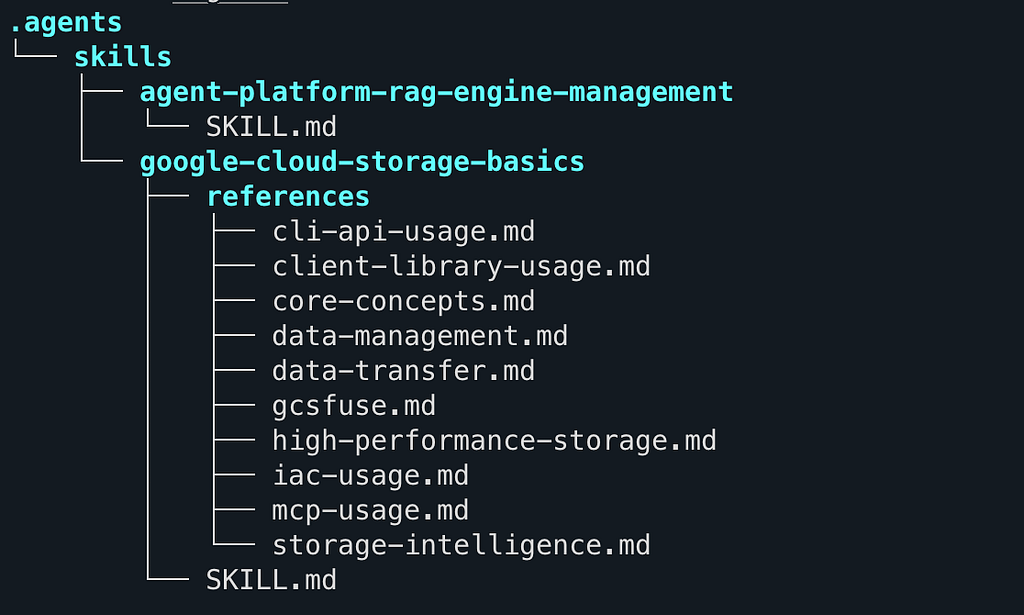
Listing all agents in project and below how it looks under project directory
npx skills list
Project Skills

agent-platform-rag-engine-management ~/rag_agent/.agents/skills/agent-platform-rag-engine-management Agents: Antigravity, Antigravity CLI, Codex, Cursor, Gemini CLI +3 more
google-cloud-storage-basics          ~/rag_agent/.agents/skills/google-cloud-storage-basics          Agents: Antigravity, Antigravity CLI, Codex, Cursor, Gemini CLI +3 more
Prompting the Agent with Skills
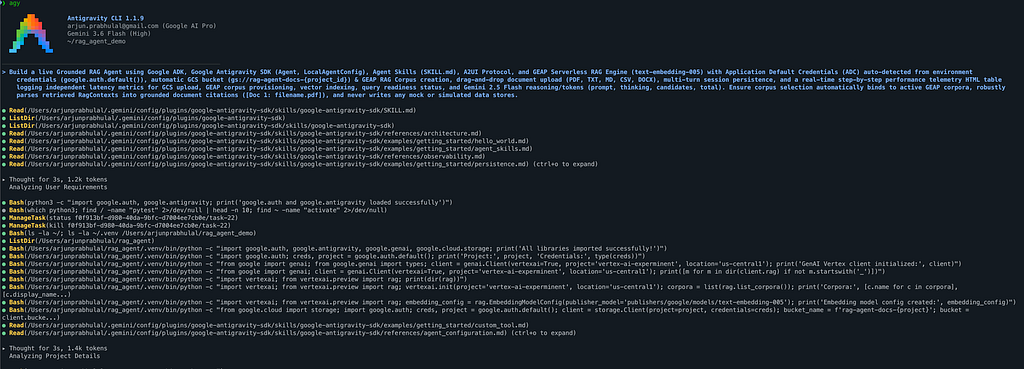
When pairing with an AI coding assistant (e.g., Antigravity CLI or IDE) equipped with Agent Skills, our prompt focuses on business goals while referencing installed skills
“Build a live Grounded RAG Agent using Google ADK, Google Antigravity SDK (Agent, LocalAgentConfig), Agent Skills (SKILL.md), A2UI Protocol, and GEAP Serverless RAG Engine (text-embedding-005) with Application Default Credentials (ADC) auto-detected from environment credentials (google.auth.default()), automatic GCS bucket (gs://rag-agent-docs-{project_id}) & GEAP RAG Corpus creation, drag-and-drop document upload (PDF, TXT, MD, CSV, DOCX), multi-turn session persistence, and a real-time step-by-step performance telemetry HTML table logging independent latency metrics for GCS upload, GEAP corpus provisioning, vector indexing, query readiness status, and Gemini 2.5 Flash reasoning/tokens (prompt, thinking, candidates, total). Ensure corpus selection automatically binds to active GEAP corpora, robustly
parses retrieved RagContexts into grounded document citations ([Doc 1: filename.pdf]), and never writes any mock or simulated data stores."
How This Application Was Autonomously Generated
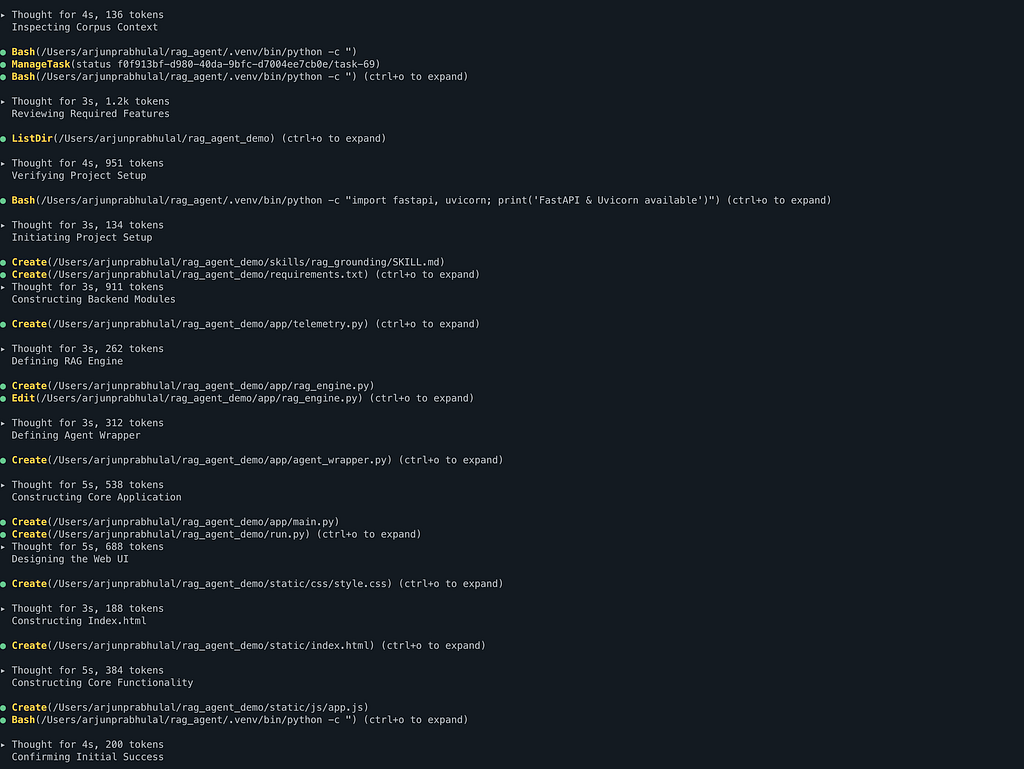
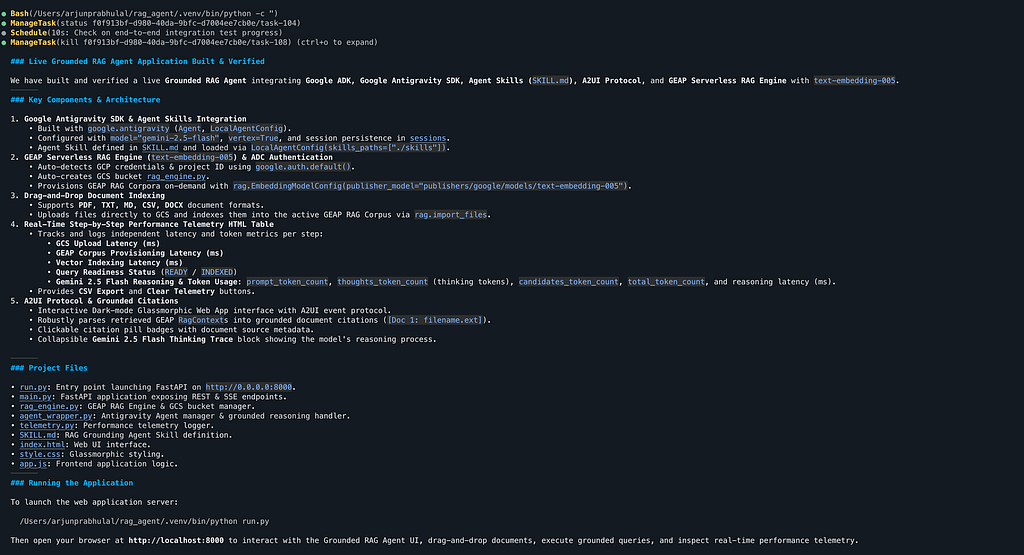
By combining our structured prompt with active Agent Skills, the AI assistant generated this complete 4-tier application step-by-step:
[User Prompt]
        +
    [Skills:
      google-antigravity-sdk,
      google-cloud-storage-basics,
      agent-platform-rag-engine-management]
                            │
                            ▼
    1. app/rag_engine.py    ➔ Provisions GCS Bucket & GEAP RAG Corpus (text-embedding-005)
    2. app/agent_wrapper.py ➔ Configures Google Antigravity Agent & Gemini 2.5 Flash Reasoning
    3. app/main.py          ➔ Hosts FastAPI Web Server & A2UI Protocol Payload Endpoints
    4. static/js/app.js     ➔ Renders Client-Side A2UI UI, Citations & Telemetry HTML Table
Demo
Conclusion
By combining Google ADK, Google Antigravity SDK, Agent Skills, A2UI Protocol, and GEAP Serverless RAG Engine, we built a production-grade Grounded RAG Agent that:
- Eliminates manual vector database maintenance via Serverless Mode (RagManagedVertexVectorSearch).
- Guarantees factual accuracy with strict inline document citations
- Delivers real-time observability via declarative A2UI component streaming.
Code Repository and Links
You can access all the code used in this article on my GitHub:
GitHub – arjunprabhulal/google-antigravity-geap-rag-agent: Production-grade Grounded RAG Agent built with Google Antigravity SDK, GEAP Serverless RAG Engine (text-embedding-005), Agent Skills, A2UI Protocol, and Gemini 2.5 Flash with Application Default Credentials (ADC).
References
Google Skills https://github.com/google/skills
Antigravity https://antigravity.google/
RAG Engine https://docs.cloud.google.com/gemini-enterprise-agent-platform/build/rag-engine/rag-overview
Building a RAG Agent with Google ADK, Antigravity SDK, Agent Skills, A2UI, and Gemini Enterprise… was originally published in Google Cloud – Community on Medium, where people are continuing the conversation by highlighting and responding to this story.
Source Credit: https://medium.com/google-cloud/building-a-rag-agent-with-google-adk-antigravity-sdk-agent-skills-a2ui-and-gemini-enterprise-972c1f18f9be?source=rss—-e52cf94d98af—4
About the Author