Coauthored by Wei Hsia
In our previous post, we built a real-time observability pipeline by streaming agent telemetry from the Agent Development Kit (ADK) to BigQuery Continuous Queries, visualizing live sentiment drops on a Grafana dashboard.
But a dashboard only tells you when things break. It doesn’t fix them. In production, multi-agent systems need to adapt on the fly (updating guardrails mid-flight without waiting on a container build or a full code redeploy).
In this blog, we’ll close the loop. We’ll begin by showing you how to handle live policy friction using dynamic RAG updates, altering agent behavior directly from the database layer. Then, we’ll shift from real-time hotfixes to systemic post-mortems, using BigQuery ML’s native AI.AGG function to distill thousands of conversation logs into structured summaries using standard SQL.
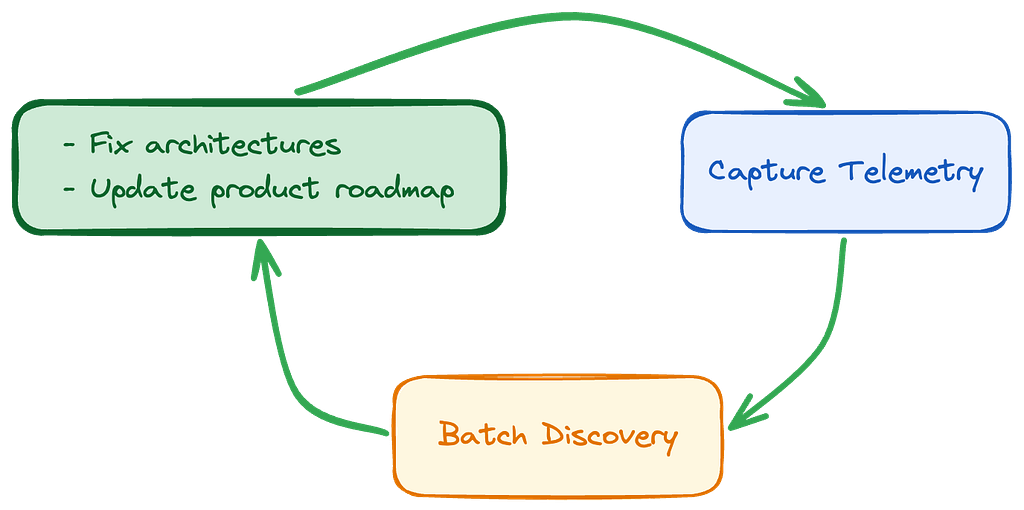
Dual feedback loop architecture
An adaptive agent fleet relies on two separate operational speeds: real-time intervention to stop active failures, and batch log discovery to understand hidden user intents. By using BigQuery to unify both workloads, you move from passive observability to a cycle of continuous improvement.
Part 1: Hot-patching agent context with dynamic RAG
Let’s walk through a live failure scenario from our Vegas Concierge demo. Picture a guest heading straight from a day of conference sessions to an evening concert across town. Realizing they’re still carrying their work laptop, they open their hotel’s concierge app and ask:
I have a laptop with me, I can’t walk all the way back to my hotel, the concert will be over!
Because our Supervisor Agent routes stadium questions to the Stadium Agent, that agent queries its vector database (stadium_logistics) and returns the default policy:
Laptops and large bags are strictly prohibited, and there are no secure lockers available.
Our Continuous Query pipeline flags the user’s rising frustration in Grafana. But a red line on a dashboard doesn’t help the person standing outside the gate.
Instead of patching Python code, spinning up Cloud Build, and waiting on a rolling restart, we can update the agent’s behavior directly in the vector store.
Optimizing vector search for production SLAs
We query BigQuery VECTOR_SEARCH directly for our RAG lookup because it unifies embeddings and analytics with zero extra infrastructure management.
While BigQuery is great for prototyping and analytical RAG, high-concurrency user chat often restricts sub-100ms SLAs. For ultra low latency production environments, consider offloading vector lookups to Cloud SQL pgvector or Agent Platform Vector Search, while keeping BigQuery as your core observability and post-mortem engine.
Updating the vector store mid-flight
When on-call engineers see the laptop policy causing friction, they coordinate with event staff to open a secure bag-check station outside Gate 4. To get the word out, the team runs a context update script against BigQuery.
In the companion demo repository, you can trigger this database hot-patch directly using the helper script in the scripts/ folder:
./scripts/update_policy.py allow
This script handles three steps:
- Updates the text guideline: “Laptops are not prohibited inside the stadium, but guests can check them securely at the newly opened bag-check located at Gate 4.”
- Generates a new 768-dimensional embedding using the text-embedding-005 model
- Overwrites the vector embedding field in the stadium_logistics table
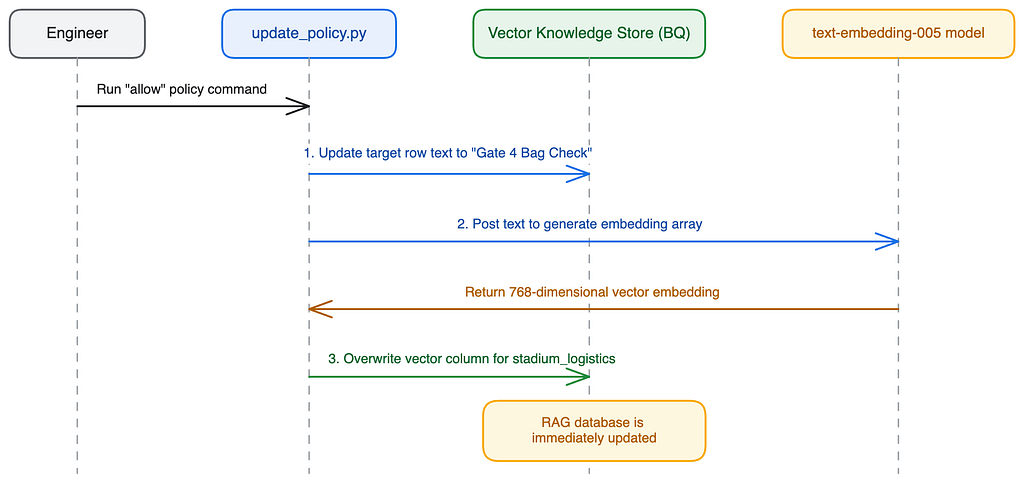
At the database level, it’s just a standard SQL UPDATE:
UPDATE `your_project.next_navigator.stadium_logistics`
SET
  details = 'Laptops are prohibited inside, but guests can check them securely at the newly opened bag-check located at Gate 4.',
  vector_content = 'Policy: Laptop, Tablet & Bag Policy. Details: Laptops are prohibited inside, but guests can check them securely at the newly opened bag-check located at Gate 4. Category: Device & Bag Policy',
  embedding = ML.GENERATE_EMBEDDING(
    MODEL `your_project.next_navigator.text_embedding_005`,
    'Policy: Laptop, Tablet & Bag Policy. Details: Laptops are prohibited inside, but guests can check them securely at the newly opened bag-check located at Gate 4. Category: Device & Bag Policy'
  ).text_embedding
WHERE id = 's_004';
Zero-redeploy adaptation
The millisecond that SQL update commits, the next user who asks about laptops gets a new response:
Laptops aren’t allowed inside the stadium bowl, but you can safely check yours at the new bag-check station directly outside Gate 4.
Your application code didn’t change, and no containers restarted. By treating guardrails and policy constraints as dynamic data rather than hardcoded prompts, you change the response behavior mid-flight. This turns what used to be a risky, multi-step deployment into a quick database transaction.
Part 2: Systemic post-mortems in BigQuery
Hotfixes keep you afloat during an incident, but long-term reliability requires looking across thousands of conversations to identify patterns. The same telemetry we streamed for real-time alerts can feed post-event analysis.
Quantitative trend analysis
Before jumping into summaries, let’s look at what users asked about. This isn’t huge scale yet, but the smaller size will more easily demo how these concepts work.
# Unnest real-time entities into tabular format for analysis

entity_sql = """
SELECT
  JSON_VALUE(entity, '$.name') as entity_name,
  COUNT(1) as occurrence_count
FROM `next_navigator.sentiment_analysis_results`,
UNNEST(JSON_QUERY_ARRAY(entities)) AS entity
GROUP BY entity_name
ORDER BY occurrence_count DESC
LIMIT 10;
"""

df_entities = bq_client.query(entity_sql).to_dataframe()
sns.barplot(x="occurrence_count", y="entity_name", data=df_entities, palette="viridis")
The chart clearly shows spikes around “Laptop”, “Bag Check”, and “Lockers”, confirming that opening Gate 4 bag storage likely addresses many of the attendee anxieties.
Qualitative synthesis via BigQuery ML’s AI.AGG
Summarizing millions of log rows using an LLM usually requires writing custom batching loops, managing concurrent API calls, handling rate-limiting backoffs, and recursively stitching chunked summaries together. It’s doable…but it’s definitely not fun.
BigQuery handles this in a single SQL function, AI.AGG. You can test this semantic aggregation query interactively against sample conversation traces by running python3 batch-analytics/run_analytics_demo.py in the demo repository.
-- Summarize conversation logs into executive takeaways
SELECT
  AI.AGG(
    text_content,
    'Summarize overall customer concerns and pain points from these logs into 3 concise, professional bullet points.'
  ) AS overall_experience_summary
FROM `next_navigator.sentiment_analysis_results`;
Behind the scenes, Gemini digests the rows and returns a clean summary:
- Security Friction: attendees felt anxious about strict bag and laptop rules with no clear storage options.
- Navigational Anxiety: guests struggled to locate physical gates and check-in lines, needing clearer spatial instructions.
- Immediate Resolution Value: opening Gate 4 bag check shifted sentiment immediately from frustration to relief.
Closing the loop: From passive charts to adaptive systems
At the beginning of this two-part series, we raised a core issue with traditional monitoring: AI success is a semantic property. Standard monitoring tools only care primarily about infrastructure metrics. They’ll happily log an HTTP 200 OK even while your agent is confidently hallucinating or frustrating a user.
To help solve this, we treated agent telemetry like a unified data pipeline:
- Spot friction in real-time (Part 1): we paired the ADK plugin with BigQuery Continuous Queries to analyze conversational semantics on the fly and surface rising user frustration in Grafana before chat sessions ended
- Hot-patching mid-flight (Part 2a): we pushed updates directly to the vector database to alter agent responses in production instantly
- Mining the post-mortem (Part 2b): we used BigQuery ML’s native AI.AGG to synthesize millions of rows into actionable architectural insights and roadmap priorities.
By centralizing observability, real-time remediation, and systemic post-mortems in the data warehouse, you can turn static LLM apps into resilient and self-correcting systems.
Want to build this feedback loop yourself? Run through our example on GitHub to get started today!
How to Build an Adaptive Feedback Loop for AI Agents in BigQuery was originally published in Google Cloud – Community on Medium, where people are continuing the conversation by highlighting and responding to this story.
Source Credit: https://medium.com/google-cloud/how-to-build-an-adaptive-feedback-loop-for-ai-agents-in-bigquery-89bf68cb8772?source=rss—-e52cf94d98af—4
About the Author