Most developers using Claude Code barely scratch the surface of what the CLI can do.
Here are 37 cheat codes to level up your terminal workflow in under 20 minutes, covering:
1️⃣ Verbosity Control (Tricks 1–6) — Stop conversational fluff & demand code solutions
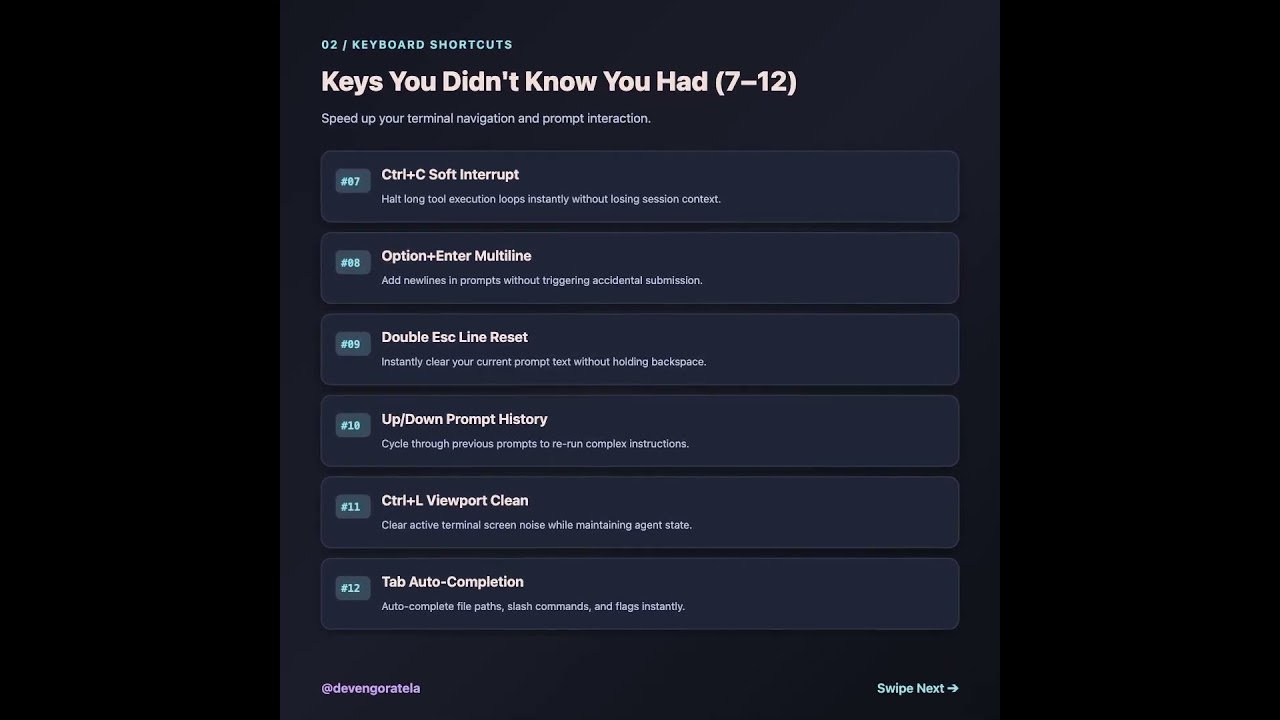
2️⃣ Hidden Keyboard Shortcuts (Tricks 7–12) — Interrupt loops & edit multiline prompts
3️⃣ Session Recovery (Tricks 13–18) — Resume sessions & roll back broken code
4️⃣ Token Bill Fixes (Tricks 19–24) — Proactive compacting & cost optimization
5️⃣ Persistent Memory (Tricks 25–30) — CLAUDE.md rules & dynamic pattern learning
6️⃣ Advanced Automation (Tricks 31–37) — Custom slash commands & pre-commit hooks
Swipe through the slides for the complete 37-trick breakdown! ➡️
Which of these cheat codes are you adding to your daily developer setup? Let me know in the comments below! 👇
♻️ Repost to help developers in your network level up their AI workflow.
➕ Follow Deven Goratela (https://www.linkedin.com/in/devengoratela/) for daily practical guides on AI engineering, prompt systems, and developer tools.
#ClaudeCode #AIEngineering #DeveloperTools #Terminal #SoftwareEngineering
Video Source
About the Author