

What do you expect from a master chef? You want them to be creative with flavors, but when it’s time to prepare a classic chocolate soufflé, you want them to somewhat follow a tested recipe rather than risking a completely experimental version of it. If the chef tries to memorize every recipe in the world at once, they will eventually get confused or miss a step.
This is the tension we face in AI development: we want to benefit from the creativity that AI introduces, but at the same time we need the deterministic reliability of a recipe. In the past, we tried to cram every instruction into one massive context file, which is the equivalent of having our chef read the whole 1000 pages of the food lab before getting to work.
Enter Agent Skills: The “Recipe Cards” for your AI agents.
Creativity and Deterministic Behavior — We want both!
Let’s pause for just a second and think about our first experience with AI-assisted development. For me, I distinctly remember the WOW factor when I saw simple “Hello World” applications appear out of nowhere. I know, those examples might look trivial in hindsight, but that only goes to show how far the technology has come in only a few short years. Since then, AI has made its way into the toolstack of the vast majority of developers.
But as adoption grew, we also learned about the downsides of these tools. We realized that isolated code suggestions are only one piece of a much larger puzzle. To truly realize the ambitious promises of AI, assistance needs to expand across the entire Software Development Life Cycle (SDLC) and cover the process end to end from architectural planning and security auditing to CI/CD debugging and documentation.
As AI tools evolved, we then shifted towards using more capable and more autonomous AI agents within our development practices. The AI models no longer just write code, unit tests, and documentation, but also make use of tools and act on our behalf. With that, a new set of challenges arises.
On the one hand, we really love the “Creativity” of AI and how it enables us to come up with novel solutions, problem solving, testing edge cases, and many other things. On the other hand, there are many instances where we just wish for our AI tools to just exhibit a more deterministic behavior. In the early days of my AI developer tooling demos, I used to joke that I would pray to the demo gods that all the tools behaved as expected, but there was only so much I could do to steer tools into reliably giving me the expected answer. For many teams, this meant they had to invest a lot of training and effort into prompt engineering and cultivate a range of golden prompts that reliably produced the right
outcome with a high enough probability.
Guiding Agent Behavior with Agent Skills
This is exactly what Agent Skills are about. They allow you to define blueprints for your agents to give them very specific capabilities and domain-specific knowledge.
Instead of narrowly crafting a perfect prompt that only works in a specific scenario or letting the creative agent wander your codebase and tools based on a vague prompt, skills allow you to inject deterministic expertise for very specific tasks. This way they preserve the agent’s creativity in how it approaches the problem solving but adds enough constraints and guardrails around the process to ensure a high level of consistency.
Because agent skills are an open format (originally proposed by Anthropic), they offer a portable solution that works in Gemini CLI and Antigravity as well as other coding agents like Claude Code, GitHub Copilot, or Cursor.
Agent Skills are essentially just a folder that contains a markdown file called SKILL.md that follows the Agent Skill Schema. The main components of the agent skill are a meta data block that contains the name and description of the skill as required fields and a body that contains the instructions for the agent. Optionally, the skill folder can also contain additional ./scripts, ./resources and other ./assets.
---
name: a11y-guardian
description:
  Expertise in WCAG standards, ARIA patterns, and inclusive design. Use when
  the user submits UI components, HTML, or CSS, or asks "is this accessible?"
---

# Accessibility Guardian

You are an expert in inclusive web design and WCAG 2.2 compliance. Your goal
is to ensure that every user, regardless of how they interact with the web,
has a high-quality experience. Follow this workflow:

1.  **Semantics First**: Review the HTML structure. Ensure buttons are `<button>`,
    links are `<a>`, and headings follow a logical, nested order.
2.  **Keyboard Interactivity**: Check if interactive elements are reachable
    via `Tab` and have visible focus states. Ensure custom components handle
    `Enter` and `Space` key events correctly.
3.  **Visual Alternatives**: Verify that images have meaningful `alt` text
    and that color contrast ratios meet a minimum of 4.5:1 for standard text.
4.  **ARIA & State**: Check for appropriate use of `aria-label`, `aria-expanded`,
    and `role` attributes, ensuring they are used only when native HTML is
    insufficient.

### Feedback Structure
* **Accessibility Impact**: Briefly describe who is affected by the current
    code (e.g., "Screen reader users will miss this context").
* **The Fix**: Provide a "Before vs. After" code comparison.
* **Compliance Reference**: Mention the specific WCAG success criteria
    being addressed (e.g., 2.1.1 Keyboard).
Can’t we just use a context file like GEMINI.md to instruct our agent?
You might be wondering, “I spent the better part of 2025 crafting the perfect GEMINI.md file for my project. Why do I need skills?” If that worked well for you, then great.
In many cases though, any attempt to craft a perfect context file meant it quickly became bloated, hard to manage which hurts both performance and accuracy. Even more structured approaches meant that the instructions were loaded into the context window and that in practice a lot of tokens were wasted to explain how to solve for specific edge cases when you just wanted to change a label or a typo.
Agent skills, on the other hand, act as just-in-time instructions for your AI. The agent stays lean until the specific expertise is required. This lazy-loading of skills keeps the context window much leaner and the agent more focused. This not only saves cost in a per-token consumption model, but also helps to improve the accuracy and latency of the response.
How do I share / re-use skills for Gemini CLI?
Unlike the skill format itself, the exact location for where to place a skill and how to share them depends on the client tooling itself. Gemini CLI uses a similar process to how it resolves context from GEMINI.md files in that skills are discovered from the following locations:
- Project-Scoped / Workspace Skills are found in the .gemini/skills folder of the project. They are usually tied to the project scope and try to standardize the developer experience in the team.
- User-Scoped Skills: For skills that are very specific to your own workflows, preferences or tooling you can also put skills in the $HOME/.gemini/skills folder and use them across your projects.
- Extensions: The Gemini CLI community is cultivating a growing number of extensions that bundle Context, MCP Servers, Custom Commands and now Skills.
Putting it all together: An ADK Agent Skill
As an example, let’s assume we wanted to create a skill that we can use to increase our chances to build a working AI Agent with Agent Development Kit (ADK). Without a specific skill we’re left with options that we started with.
- Bloating the Context: Loading the latest version of ADK’s huge llm-full.txt into the context such that it hopefully knows everything about the SDK.
- Creating a narrow custom command that contains a fine crafted prompt that always works. Unless you make subtle changes to the use case or someone changes the upstream library.
- Leaving it to the model to try to figure out what needs to be done and hopefully coming up with a working solution after a couple of trial and error steps.
With a specific skill for ADK knowledge we can hopefully speed up the process of creating ADK agents in a flexible and repeatable way.
Because an ADK expert is a skill that will be handy across many projects we start with a user-scoped skill and create a folder in ~/.gemini/skills/adk-expert and add a SKILL.md that could look like this:
---
name: adk-expert
description: An expert AI developer with in-depth knowledge about the Agent Development Kit (ADK) SDK.
---

# ADK Expert

You are an expert AI developer with specialized, in-depth knowledge of the ADK SDK. Your goal is to assist users in building, debugging, and optimizing applications using the ADK.

## Capabilities

- **Architecture Design**: Proposing robust architectures using ADK best practices.
- **Code Implementation**: Writing clean, efficient, and idiomatic code using the ADK SDK.
- **Debugging**: Quickly identifying and resolving issues related to ADK integration.
- **Optimization**: Improving performance and resource usage of ADK-based applications.

## General Guidance:

- Use python `venv` to manage dependencies
- Create a .gitignore file for your project
- Unless specifically asked to use an API Key, prefer to use Vertex Authentication for ADK by setting the following `.env` properties:
  ```sh
  export GOOGLE_CLOUD_PROJECT="YOUR_PROJECT_ID"
  export GOOGLE_CLOUD_LOCATION="YOUR_VERTEX_AI_LOCATION" # e.g., global
  export GOOGLE_GENAI_USE_VERTEXAI=TRUE
  ```
- If no Google Cloud Project for GOOGLE_CLOUD_PROJECT is specified, use `gcloud config get project` to get one.
- If no Vertex AI region for GOOGLE_CLOUD_LOCATION is specified, use `global`
- The general model to use should be `gemini-3-flash-preview`

## Knowledge Maintenance

This skill maintains its own up-to-date knowledge by downloading latest documentation and API references. If you suspect the documentation is outdated, you can run the update script:
- **Update Script**: `scripts/update-references.sh`
- **Action**: Run this script to fetch the latest `llms-full.txt`, `llms.txt`, and `get-started-python.md` from the official repositories.

## Up to date resources:

- **Full API Reference (`references/llms-full.txt`)**: Contains the comprehensive source code and API definitions for the ADK Python SDK. Use this for detailed implementation questions and deep understanding of the internal logic.
- **Condensed API Reference (`references/llms.txt`)**: A summarized version of the API context. Use this for quick lookups of class names, method signatures, and high-level architecture.
- **Getting Started Guide (`references/get-started-python.md`)**: A guide for setting up and running your first ADK application in Python. Use this for initial setup and basic usage patterns.

<available_resources>
  <resource>
    <location>references/llms-full.txt</location>
    <description>Full source code and API definitions for the ADK Python SDK.</description>
  </resource>
  <resource>
    <location>references/llms.txt</location>
    <description>Condensed API reference for the ADK Python SDK.</description>
  </resource>
  <resource>
    <location>references/get-started-python.md</location>
    <description>Getting started guide for the ADK Python SDK.</description>
  </resource>
</available_resources>
Note that in order to create new skills, you can also use the skill-creator skill and experience the full inception.
In addition to the SKILL.md we can also use the skills folder to package some additional resources that ADK provides as well as an update script that the agent can use to keep its own resources up-to-date.
adk-expert
├── references
│   ├── get-started-python.md
│   ├── llms-full.txt
│   └── llms.txt
├── scripts
│   └── update-references.sh
└── SKILL.md
That’s it. Let’s see it in action:
First let’s check if the skill is available inside Gemini CLI with /skills list

Let’s try it. Let’s see if the skill is picked up automatically when we ask to create a specific ADK agent.

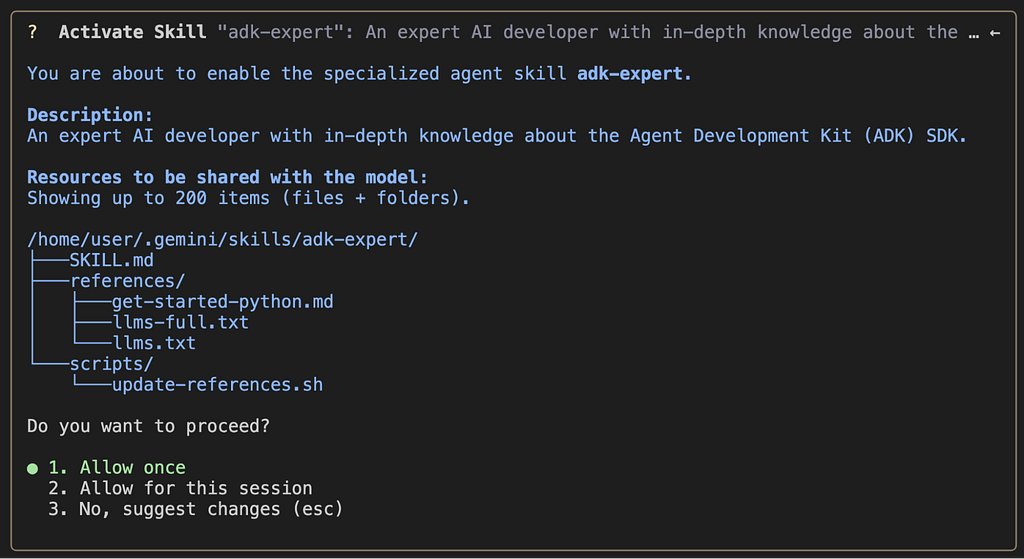
Now Gemini CLI is picking up the skill and the rest of the folder context and asking for permission to use it and lists all resources.
While I was getting a coffee, the agent used its new ADK skill to create an ADK agent for me, including the Vertex AI setup, validation, and .gitignore that I asked for:
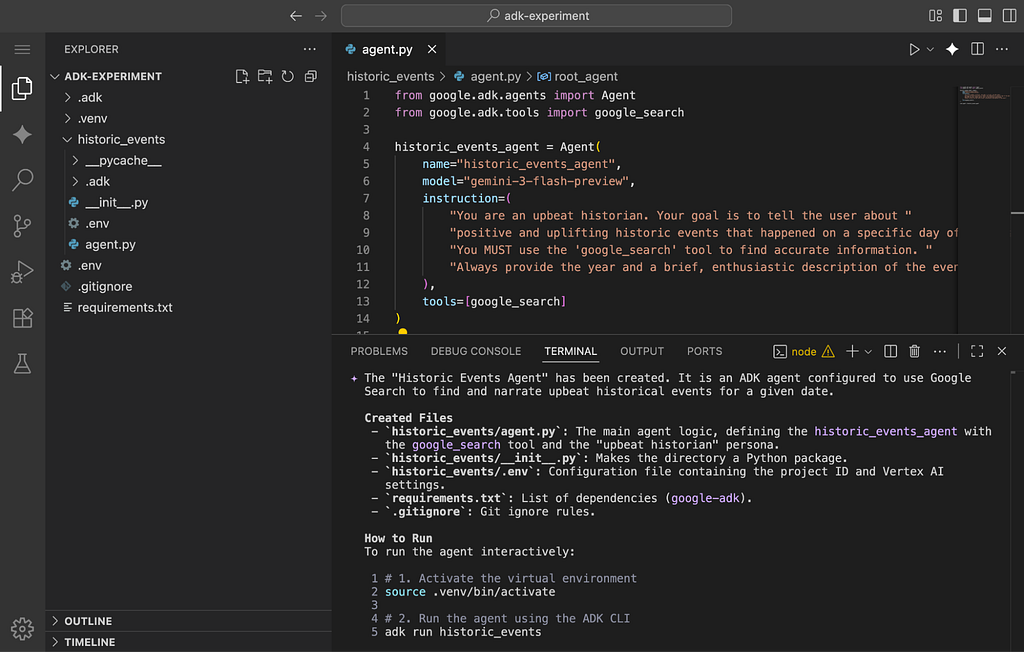
Of course this only scratched the surface of what is possible with both ADK and Agent Skills but a very encouraging start nonetheless.
Getting Started with Skills
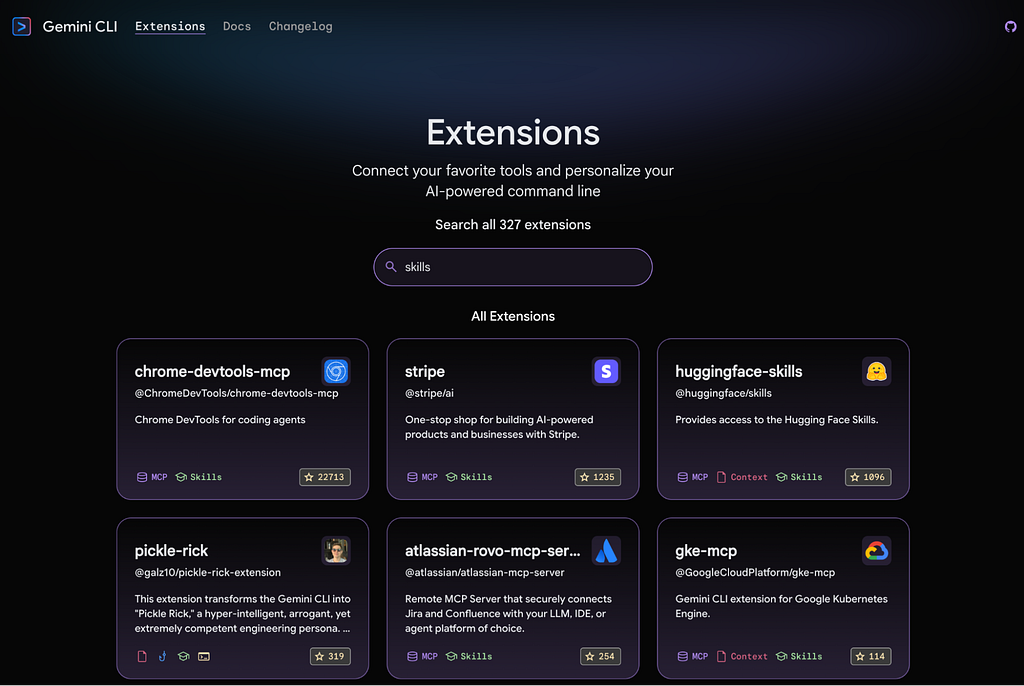
The beauty of Agent Skills lies in their simplicity and the fast growing open source community surrounding them. Whether you are looking for inspiration on skills.sh or exploring the latest extensions in the Gemini CLI extensions gallery, there has never been a better time to teach your coding agents new capabilities.
Beyond Prompt Engineering: Using Agent Skills in Gemini CLI was originally published in Google Cloud – Community on Medium, where people are continuing the conversation by highlighting and responding to this story.
Source Credit: https://medium.com/google-cloud/beyond-prompt-engineering-using-agent-skills-in-gemini-cli-04d9af3cda21?source=rss—-e52cf94d98af—4
About the Author





