
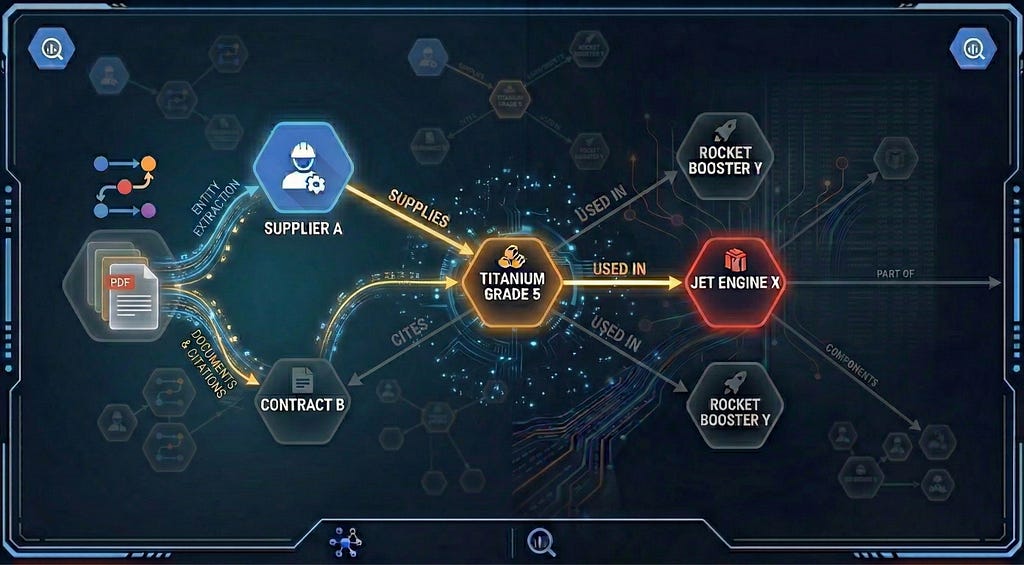
The Untapped Value of Dark Data
Valuable knowledge is often buried in “dark data” — unstructured files that are easy to store but hard to analyze. Semantic Search allows us to find documents based on meaning (e.g., “find documents that mention Titanium”) — it’s great at finding the dots, but it doesn’t connect them.
Semantic search will struggle to answer, “which products are delayed if Titanium Grade 5 is halted?” if the answer is scattered across multiple documents. It can find the concepts, but not the path between them.
Enter Knowledge Graphs
To bridge that gap, you need a map of the relationship between your materials and your inventory: Jet Engine -> manufactured_with -> Titanium Grade 5.
A knowledge graph transforms messy unstructured text into a structured web of information. By defining Nodes (entities) and Edges (relationships), you can create a reliable map of your data.
Graphs can tell you exactly how entities are related. They allow you to traverse data points instantly — hopping from Supplier to Material to Product — reducing hallucinations and cutting costs by retrieving only the precise context needed.
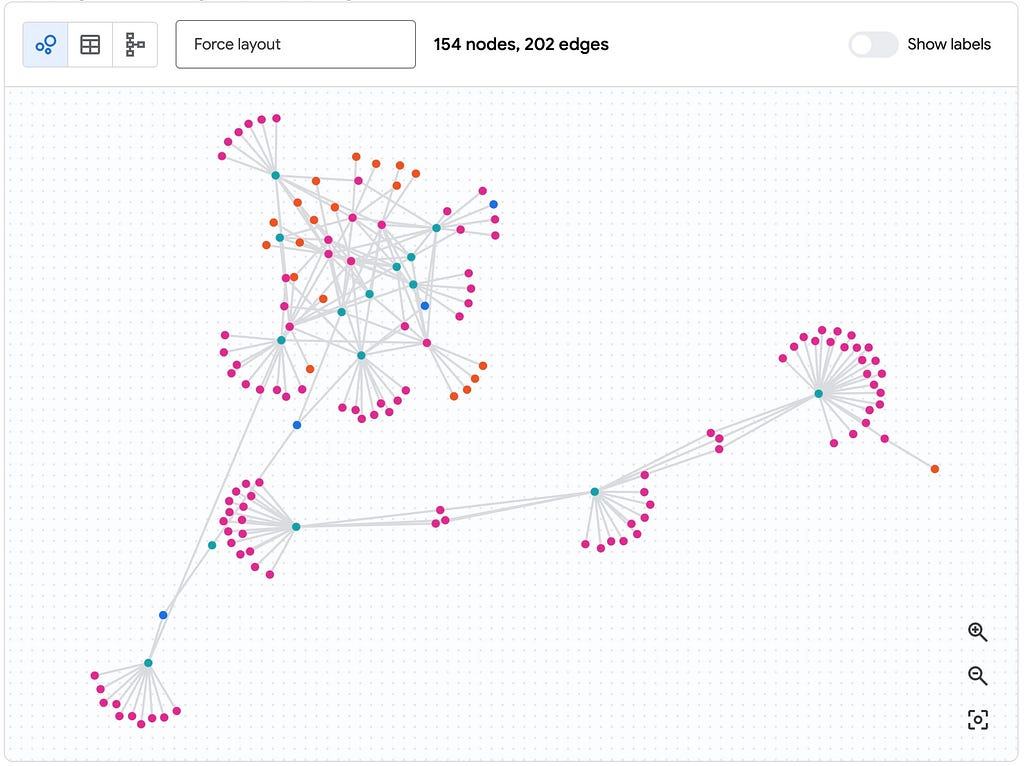
BigQuery Graph is in private preview (sign up to check it out)!
Historically, building a knowledge graph required specialized, standalone databases. BigQuery Graph changes this by allowing you to:
- Query at Scale: Analyze relationships across billions of nodes and tens of billions of edges natively within your data warehouse.
- Use Familiar Tools: BigQuery supports Graph Query Language (GQL), an ISO-standard extension that lets you use graph pattern matching alongside standard SQL.
- Unify Your Data: Your graph lives right next to your existing structured tables, allowing you to join relationship-heavy graph data with your standard business metrics in a single query.
- Visualize Insights: Explore your graph’s structure and relationships directly within the BigQuery Console.
In this three-part series, I’ll walk through how to unlock unstructured data and build a scalable Knowledge Graph natively in BigQuery.
Part 1 (this post): From Dark Data to Knowledge Graphs
Part 2: Tutorial: Build a BigQuery Graph from unstructured data
Part 3: Query and visualize your Graph
The challenge: Extracting meaning from unstructured data
You could jump straight into extracting the entities and relationships, but it helps to have the source text — both for vector search embeddings and to provide grounding (citations). In practice, traditional text extraction often falls over thanks to:
- Context Loss: It’s handy to know that the text “temperatures above 100°C are required” belongs to the header “Cleaning Instructions” and not “Serving Instructions”.
- Structural Collapse: Tables, lists and pages with multiple columns get flattened and turn into garbled text.
- Can’t handle visuals: Vital info in diagrams, images, and schematics are totally lost.
Ok, well we can just use Gemini … right?
You could feed the entire PDF directly into Gemini. Its multimodal capabilities allow it to “read” documents just like you (a human), with a massive context window (1M+ tokens). For simple use cases, it probably is good enough.
But at scale and in production, it might not be the silver bullet it seems — you’d need to carefully craft and test prompts to get consistent JSON outputs. There’s always the risk of hallucination, and it doesn’t natively give you bounding boxes — the exact coordinates of where text is located (which is helpful if you need to jump to the exact spot in the document where your text is located).
The Solution: A Hybrid AI Architecture
A hybrid approach combines the deterministic precision of a dedicated parser with the reasoning power of an LLM.
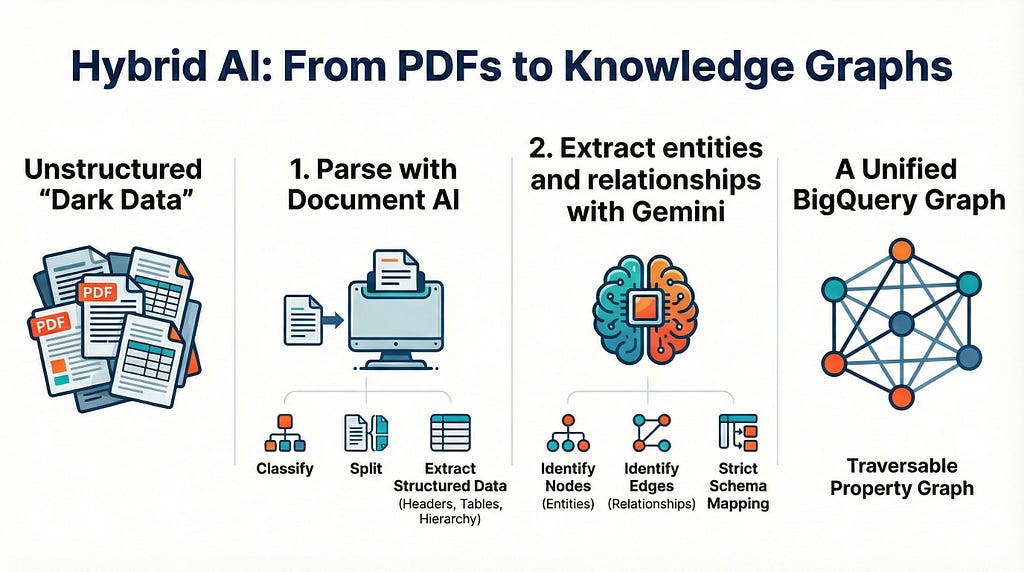
1: Parse with Document AI
Document AI is Google’s suite of pre-trained models designed specifically to classify, split, and extract structured data from documents. It offers specialized parsers, including the Layout Parser, which goes beyond simple OCR to understand the document hierarchy (perfect for unstructured, noisy PDFs):
- Ancestral Heading support: Identifies headers, subheaders, and the child text that belongs to them.
- Layout Understanding: Lists, tables, and pages with multiple columns are preserved. Sounds obvious, but these data structures are often lost in simple OCR.
- Logical Chunking: Instead of splitting documents by arbitrary token counts, it creates ‘context-aware’ chunks (e.g., “Section 4.1”), which makes RAG searches much more reliable.
2: Extract entities and relationships with Gemini
Once the document is parsed into clean chunks, we pass them to Gemini and ask it to do its thing:
- Entity Recognition: Identifying core ‘Nodes’ (e.g., labeling ‘Model X-100’ as a Product and ‘E-402’ as an Error_Code).
- Relationship Extraction: Defining how these nodes interact (e.g., Model X-100 -> HAS_FAULT -> E-402).
- Schema Mapping: Enforcing a strict output format for direct integration into your graph’s edge tables.
This gives us the best of both worlds: reliably extracted source text (great for grounding and embeddings) alongside reasoning-based relationships.
The BigQuery Advantage: A Unified Graph Engine
Historically, building a Knowledge Graph required complex external pipelines to move data between storage, OCR engines, and vector databases. Now, the entire architecture — from ingestion to reasoning to graph traversal — lives natively in BigQuery.
You can orchestrate the entire “Hybrid Approach” directly using just SQL:
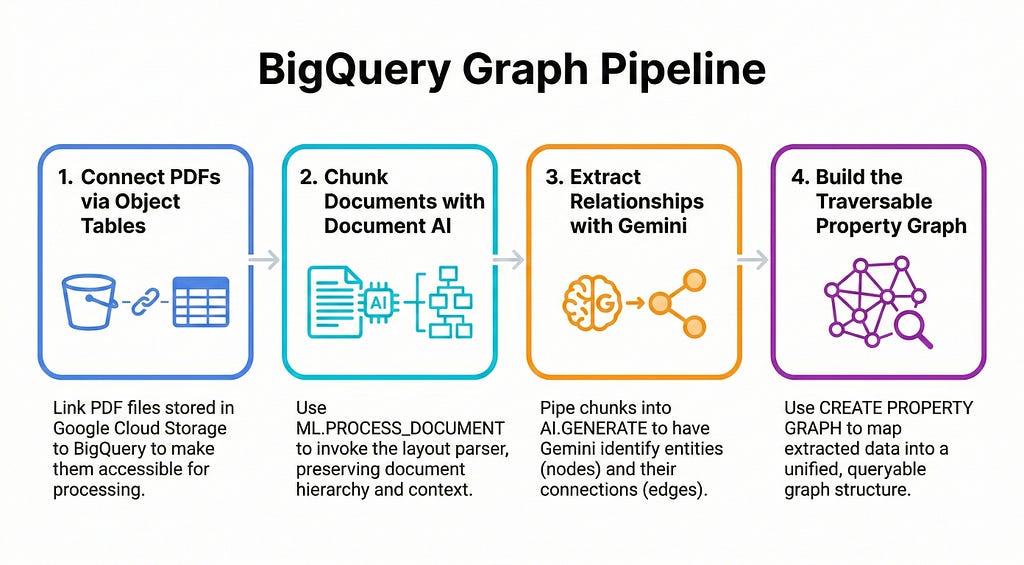
- Use ML.PROCESS_DOCUMENT to invoke the Document AI layout parser on our object tables, instantly chunking our PDFs.
- Pipe those chunks into AI.GENERATE, prompting Gemini to extract the specific nodes and edges we need.
- CREATE PROPERTY GRAPH maps those outputs into a traversable BigQuery graph.
Beyond BigQuery’s new Graph capabilities, it provides a governed, unified environment where your unstructured PDFs live right next to your structured sales and inventory data. BigQuery has a suite of MCP tools that let Agents query your data and you can generate embeddings and easily run semantic search with just a few lines of SQL.
What’s Next?
In Part 2, we’ll walk through the code that takes us from unstructured documents to a scalable knowledge graph entirely within BigQuery.
In the meantime, check out these docs to learn more:
- Document AI Overview
- BigQuery AI Functions
- BigQuery meets ADK and MCP
BigQuery Graph Series | Part 1: From “Dark Data” to Knowledge Graphs was originally published in Google Cloud – Community on Medium, where people are continuing the conversation by highlighting and responding to this story.
Source Credit: https://medium.com/google-cloud/bigquery-graph-series-part-1-from-dark-data-to-knowledge-graphs-5a37f052d043?source=rss—-e52cf94d98af—4
About the Author





