The Jira ticket had been sitting in the “Backlog” column for six months, staring at me like a unexploded ordnance.
“Task: Upgrade Airflow 1.10 to 2.10.”
It sounds innocent enough. But anyone who has managed a production data platform knows the reality. We had 400+ DAGs. Some were written by engineers who left three years ago. Some used deprecated operators that hadn’t existed in the documentation since 2021. Others relied on custom plugins that would almost certainly break the moment we touched the Python environment.
The “traditional” approach is a war of attrition: Manually open a DAG, run it against the new version, watch the stack trace explode, fix the import, rinse, repeat. For 400 files/folders.
We realized we couldn’t just throw bodies at this problem — it was a recipe for burnout and human error. We needed a robot. Not just a simple find-and-replace script (regex is useless against logic changes), but an intelligent agent that understands how our DAGs work and how the Airflow API has changed.
So, we built one. Using Google Cloud’s Agent Development Kit (ADK), Gemini, and Vertex AI Search, we created an autonomous migration agent.
Here is how we automated the impossible, and how you can build this architecture yourself.
The “Why”: Moving Beyond Simple Scripts
Why build an AI agent for this? Why not just ask ChatGPT to rewrite them one by one?
- Context is King: A generic LLM knows about Airflow, but it doesn’t know your specific edge cases or the exact migration path from version X to Y for obscure operators.
- Scale: Copy-pasting 400 DAGs into a chat window isn’t a strategy; it’s a cry for help.
- Hallucination Control: By using Retrieval-Augmented Generation (RAG) grounded in a custom-built knowledge base, we stop the AI from inventing parameters that don’t exist.
Our agent reduced a projected 3-month migration timeline into a matter of days, freeing our engineers to build features rather than babysit broken pipelines.
The Architecture: A Two-Agent System
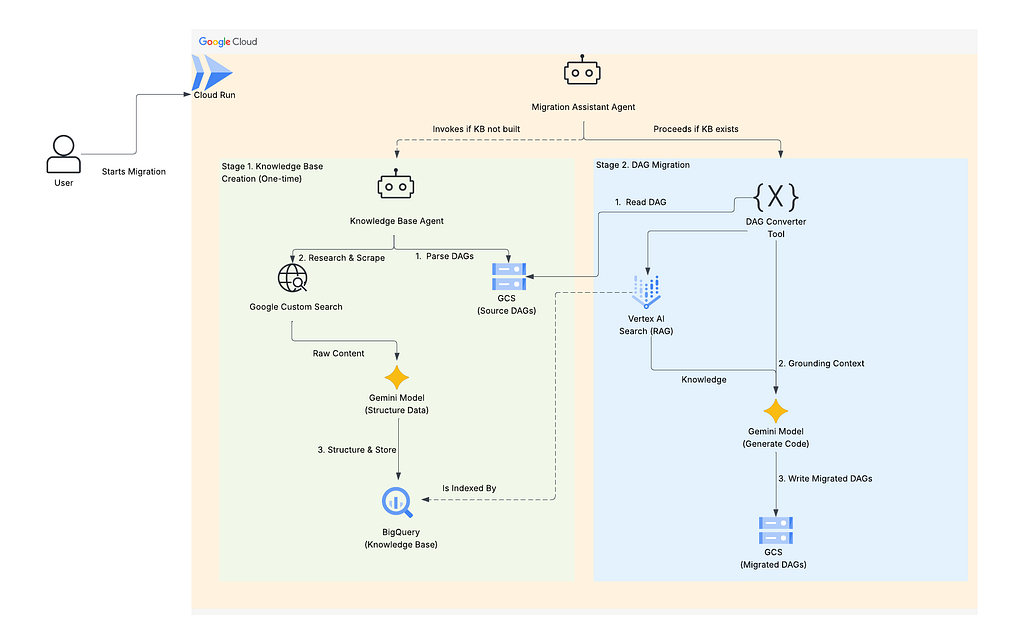
We designed the solution as a “Two-Phase” operation. You don’t want the agent researching the same operator 50 times. You want it to learn once, and execute many times.
- Phase 1: The Researcher (Knowledge Base Agent): Scans your code, identifies unique operators, Googles the migration docs, and builds a structured brain in BigQuery.
- Phase 2: The Engineer (Migration Agent): Reads your DAG, looks up the rules in the “brain” (via Vertex AI Search), and writes the new code.
The Tech Stack
- Orchestration: Google Cloud Agent Development Kit (ADK)
- Brain: Vertex AI Search (RAG) & BigQuery
- Compute: Cloud Run (Serverless)
- LLM: Gemini Pro
- Research: Google Custom Search API
Phase 1: Building the Knowledge Base
The first step is teaching the agent what it needs to know. We can’t just feed it the entire Airflow documentation. We need to feed it only what matters to our specific DAGs.
Step 1: Parsing the Source (Safely)
We need to know which operators we are actually using. We built a dag_parser.py that utilizes Python’s ast (Abstract Syntax Tree) module.
Why AST? because importing the DAGs to inspect them might trigger code execution or fail due to missing dependencies. AST allows us to inspect the code structure statically.
https://medium.com/media/9723345152e4caf04a0d493ca26b32e2/href
What’s happening here:
We walk through the code tree. Every time we see a function call (like BigQueryOperator(…)), we grab the name. We collect a unique list of every operator used across all DAGs.
Step 2: The AI Researcher
Once we have the list (e.g., KubernetesPodOperator, DataflowPythonOperator), the Knowledge Base Agent kicks in.
It iterates through the list and uses the Google Custom Search API to find migration guides and changelogs specific to the target version (e.g., “ KubernetesPodOperator changes for Airflow 2.10”).
It then uses Gemini to structure this messy HTML into a clean JSON format and loads it into a BigQuery table (migration_corpus).
Step 3: Grounding with Vertex AI Search
Storing data in BigQuery is great, but Gemini needs to access it semantically. We point Vertex AI Search at our BigQuery table. This creates a vector index, allowing the LLM to perform RAG.
Now, when we ask, “How do I fix this DAG?”, the model doesn’t guess — it retrieves the exact row from BigQuery containing the migration rules for the operators in that DAG.
Phase 2: The Automated Migration
Now that the “brain” is built, the heavy lifting begins. We spin up the dag_converter tool.
The Migration Workflow
- Input: The agent reads a DAG file from the Source GCS Bucket.
- Context: It retrieves the relevant migration rules from Vertex AI Search based on the operators found in the file.
- Generation: It sends the old code + the migration rules + a strict system prompt to Gemini.
- Output: It writes the modernized code to the Destination GCS Bucket.
Here is a simplified view of the converter logic:
https://medium.com/media/52555c72b9e5ab36e5be7dee88d63b45/href
The “Aha!” Moment:
The magic happens in the phase 1 of the design. We aren’t hardcoding rules. If Airflow releases version 4.0 tomorrow, we just re-run Phase 1 (Research) to update the Knowledge Base, and the Phase 2 agent immediately knows how to handle the new version.
Operational Guide: Running the Agent
We deployed this agent on Cloud Run. This provides a secure endpoint and allows us to interact with it via a chat interface (or API).
Scenario: The Interactive Migration
- User: “I need to migrate my DAGs to 2.10.0.”
- Agent: “Checking Knowledge Base… It looks like I haven’t researched your operators yet. Shall I build the knowledge base?”
- User: “No” (Wait, actually, I need to say “No” to the check, implying it doesn’t exist yet, so the agent starts building).
- Agent triggers knowledge_builder.py. It parses GCS, scrapes the web, and loads BigQuery.
- Agent: “Knowledge base ready. 45 unique operators analyzed. Ready to migrate?”
- User: “Yes.”
- Agent triggers dag_converter.py. It loops through GCS, migrates code, and saves to the destination bucket.
Conclusion
Data engineering isn’t about writing boilerplate code; it’s about managing data flows. By treating the migration process as a data problem — parsing, researching, indexing, and generating — we turned a high-risk manual slog into a repeatable, automated pipeline.
This architecture (Parser -> Researcher -> RAG -> Coder) is applicable far beyond Airflow. You can use it for Terraform upgrades, Python version bumps, or even legacy SQL-to-BigQuery migrations.
Next Steps:
Don’t let your backlog rot. Start by setting up a simple Vertex AI Search data store with your target documentation and see how much better your LLM prompts perform.
Have you experimented with Agentic workflows for DevOps tasks? Let me know in the comments or reach out on LinkedIn.
Escaping Airflow Migration Chaos: Building an AI-Powered Autonomous Migration Agent was originally published in Google Cloud – Community on Medium, where people are continuing the conversation by highlighting and responding to this story.
Source Credit: https://medium.com/google-cloud/escaping-airflow-migration-chaos-building-an-ai-powered-autonomous-migration-agent-ea38ccbd9658?source=rss—-e52cf94d98af—4
About the Author