Bidirectional Streaming for Building Multi-Agent Runtime Systems with Google ADK and Live Streaming Models
We know REST APIs are effective for content delivery and standard create/read/update/post operations, but they are often not enough for designing complex multi-agent systems. We need more advanced communication models.
As we move toward building more sophisticated AI agents, the limitations of the traditional request-response model become clear. This model creates a rigid, turn-based interaction pattern that is not naturally suited for high-concurrency, low-latency environments. It becomes even more challenging when dealing with continuous data streams such as audio and video, especially when the input contains noise or requires real-time responsiveness.
Imagine building an AI agent that can talk, listen, and watch a live FIFA match with you. Instead of simply responding to isolated prompts, it acts as a real-time co-watcher — understanding the game, tracking events, and discussing match progress naturally as it happens.
For example, during a France vs. Brazil match, you could ask:
“Hey, do you think Kylian Mbappé will score a goal today?”
The agent could analyze live gameplay, player positioning, momentum, and past performance to give an intelligent response instantly.
This is where the future of AI systems is heading: beyond REST APIs and static request-response interactions, toward persistent, multimodal, real-time agents that can collaborate with humans naturally.
What is Bidirectional streaming?
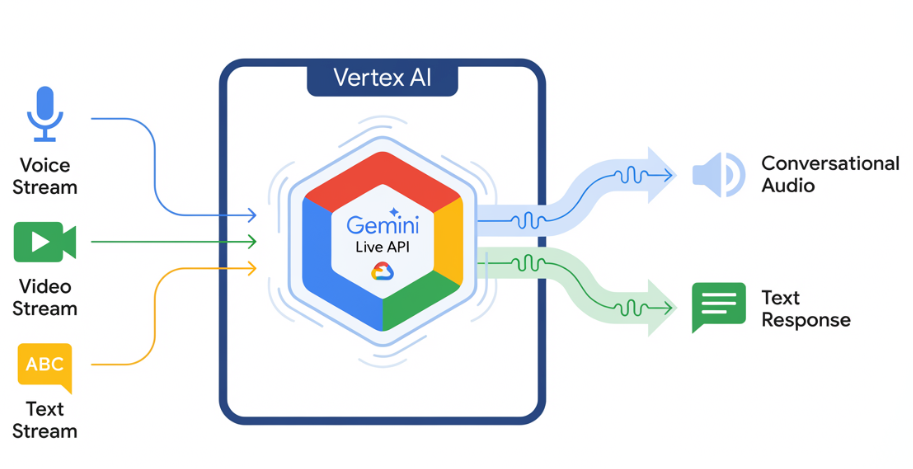
Bidirectional streaming in Agent Runtime enables persistent, real-time, two-way communication between the application and an AI agent. Instead of relying on the traditional request-response model — where a user sends a message and waits for a reply — bidirectional streaming keeps an open connection so both the application and the agent can continuously send and receive data at the same time.
This communication model is essential for modern interactive AI systems that require low latency, continuous context awareness, and real-time responses.
Building with LiveRequest + ADK
Install the latest Google ADK and access any live streaming models from here. Gemini 3.1 Flash Live is the latest model released on May 26. Older Models only work for voice streaming; we need voice and video both for this use case.
You can define tools for agents, such as real-time screen or video capture for highlights or images, and extend them based on your needs.
import asyncio
import cv2
import numpy as np
import os
import sys
from typing import Optional
import yt_dlp

from google.adk.agents import Agent
from google.adk.agents.live_request_queue import LiveRequestQueue
from google.adk.agents.run_config import RunConfig
from google.adk.runners import InMemoryRunner
from google.genai import types as genai_types
## Configuration settings
YOUTUBE_URL = "<<replace with FIFA WC Video path>>"
MODEL_NAME = "Gemini-3.1-Flash-Live-Preview" #  cost of tokens you need to keep in check

USER_ID = "user_123"
SESSION_ID = "session_FIFA"

# Define main fuctions and tools

async def capture_and_stream_video(video_url: str, queue: LiveRequestQueue):
    """Captures frames from YouTube video and sends them to the agent."""
    ydl_opts = {
        'format': 'best',
        'quiet': True,
        'no_warnings': True,
    }

    print(f"Extracting video stream from {video_url}...")
    with yt_dlp.YoutubeDL(ydl_opts) as ydl:
        info = ydl.extract_info(video_url, download=False)
        url = info['url']

    cap = cv2.VideoCapture(url)
    if not cap.isOpened():
        print("Error: Could not open video stream.")
        queue.close()
        return

    print("Started streaming video frames...")
    try:
        while cap.isOpened():
            ret, frame = cap.read()
            if not ret:
                break

            _, buffer = cv2.imencode('.jpg', frame, [int(cv2.IMWRITE_JPEG_QUALITY), 80])
            frame_bytes = buffer.tobytes()

            queue.send_realtime(genai_types.Blob(
                data=frame_bytes,
                mime_type='image/jpeg'
            ))

            await asyncio.sleep(2)
    except Exception as e:
        print(f"Video streaming error: {e}")
    finally:
        cap.release()
        print("Video stream closed.")
        queue.close()  # Signal to shut down when video ends


async def handle_user_input(queue: LiveRequestQueue):
    """Reads user questions from the console and sends them to the agent."""
    print("You can now ask questions about the video (type 'exit' to quit):")
    loop = asyncio.get_event_loop()
    while True:
        user_text = await loop.run_in_executor(None, sys.stdin.readline)
        user_text = user_text.strip()

        if user_text.lower() == 'exit':
            queue.close()
            break

        if user_text:
            queue.send_content(genai_types.Content(
                parts=[genai_types.Part(text=user_text)]
            ))


async def process_agent_responses(runner: InMemoryRunner, queue: LiveRequestQueue, run_config: RunConfig):
    """Listens to the agent's responses and prints them."""
    print("Agent is ready and watching...")
    try:
        async for event in runner.run_live(
            user_id=USER_ID,
            session_id=SESSION_ID,
            live_request_queue=queue,
            run_config=run_config
        ):
            if event.content and event.content.parts:
                text_content = "".join(part.text for part in event.content.parts if part.text)
                if text_content:
                    print(f"\nAgent: {text_content}", flush=True)

            if event.input_transcription:
                print(f"\n[User Transcription]: {event.input_transcription.text}")
            if event.output_transcription:
                print(f"\n[Model Transcription]: {event.output_transcription.text}")

    except Exception as e:
        print(f"\nError processing agent responses: {e}")
Calling Main Function
async def main():

    fifa_agent = Agent(
        name="FIFA_Assistant",
        model=MODEL_NAME,
        instruction=(
            "You are a live sports commentator watching a FIFA match. "
            "Each message may contain a video frame (image) from the live stream "
            "or a text question from the user. "
            "When you receive an image, silently update your understanding of the match state. "
            "When you receive a text question, answer it concisely based on what you have seen "
            "in the frames so far — including score, player positions, actions, and events."
        ),
        tools=[] #you can use tools like screen capture or record main events etc.
    )


    runner = InMemoryRunner(agent=fifa_agent)

    await runner.session_service.create_session(
        app_name=runner.app_name,
        user_id=USER_ID,
        session_id=SESSION_ID,
    )


    stop_event = asyncio.Event()
    queue = LiveRequestQueue()


    run_config = RunConfig(response_modalities=["TEXT"])

    async def shutdown_watcher():
        await stop_event.wait()
        queue.close()  # Close the queue only once, from one place

    print("Starting FIFA Watcher …")
    try:
        await asyncio.gather(
            capture_and_stream_video(YOUTUBE_URL, queue, stop_event),
            handle_user_input(queue, stop_event),
            process_agent_responses(runner, queue, run_config, stop_event),
            shutdown_watcher(),
        )
    except Exception as e:
        print(f"[ERROR] Main loop: {e}")
    finally:
        print("Shutdown complete.")


if __name__ == "__main__":
    asyncio.run(main())
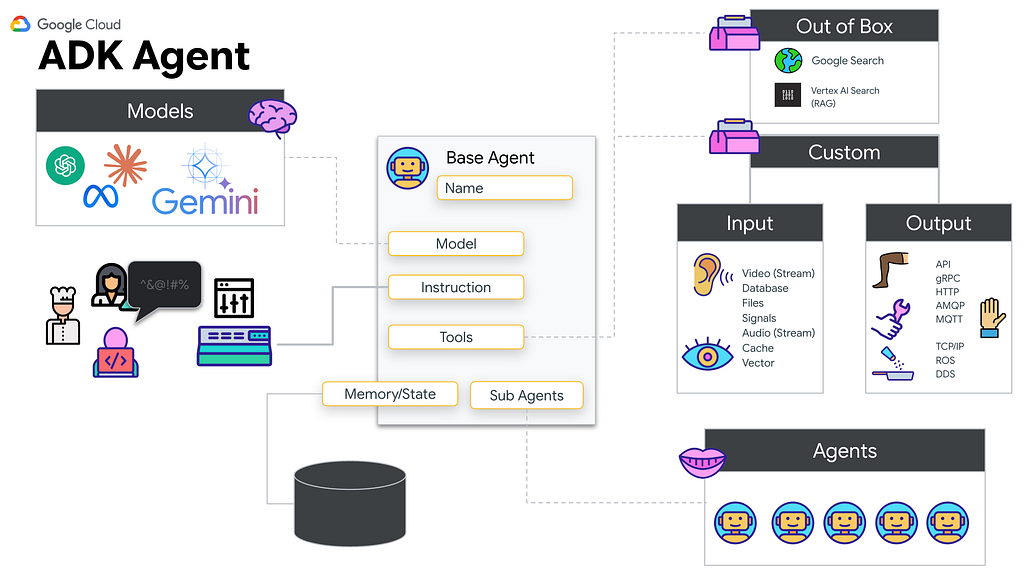
High-level Architecture
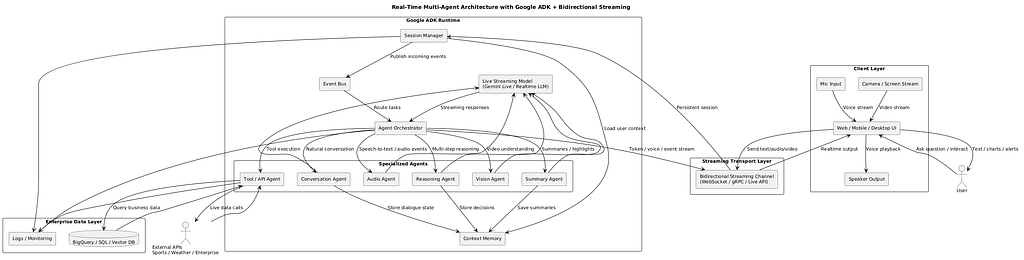
Moving Beyond Traditional Request-Response Architectures
Most AI applications today use a turn-based interaction pattern:
- User sends input
- Agent processes the request
- Agent returns response
- Connection closes or waits for the next turn
While effective for chatbots or standard APIs, this model is not ideal for live experiences such as:
- Voice assistants
- Real-time transcription
- Video understanding
- Continuous monitoring systems
- Live customer support copilots
- Interactive robotics
- Smart devices with sensor feeds
Bidirectional streaming solves this by maintaining a persistent session where communication happens continuously in both directions.
How Bidirectional Streaming Works
With bidirectional streaming:
Your application can continuously send data streams such as:
- Audio input from the microphone
- Video frames from the camera
- Sensor signals
- Text messages
- User events
- The agent can simultaneously stream back:
- Partial responses
- Spoken output
- Live recommendations
- Decisions or actions
- Transcriptions
- Alerts
This creates a fluid, human-like interaction model with near real-time responsiveness.
Bidirectional Streaming in Google Agent Runtime
Google Agent Runtime supports bidirectional streaming for advanced interactive agent applications.
It enables:
- Persistent duplex communication channels
- Multimodal live interactions
- Low-latency streaming with Gemini models
- Real-time tool calling and orchestration
- Continuous session memory
This capability works across multiple frameworks and architectures.
Framework Support
Bidirectional streaming is supported for:
- Native Google Agent Runtime implementations
- Agent Development Kit (ADK)
- Google GenAI SDK
- Custom frameworks through registered streaming methods
- Multimodal live APIs, including Gemini Live integrations
This gives developers the flexibility to build agents using their preferred stack.
Read here for more details
Gemini Live API Integration
Developers can use bidirectional streaming to connect directly with Gemini Live API, enabling:
- Real-time voice conversations
- Streaming multimodal reasoning
- Low-latency live interactions
- Dynamic tool execution during conversation
This is especially powerful for next-generation voice assistants and interactive AI systems.
Making Your Agent “Bidi-Capable”
To make an agent fully bidirectional:
1. Enable Streaming Transport
Use WebSockets, gRPC streaming, or supported runtime transport.
2. Register Bidirectional Methods
Define methods that can receive and emit streamed data simultaneously.
3. Maintain Session State
Track memory, conversation context, and partial outputs.
4. Support Incremental Responses
Return tokens, audio chunks, or actions progressively.
5. Optimize for Real-Time Performance
Use lightweight tools, async execution, and efficient pipelines.
Example Real-World Scenario in HealthCare
AI Medical Assistant
A clinician speaks continuously during a patient visit.
The agent:
- Listens live
- Transcribes conversation in real time
- Suggests diagnoses
- Pulls patient history
- Generates SOAP notes
- Alerts for missing clinical documentation
All while the conversation is still happening.
This is only practical through bidirectional streaming.
Why It Matters
The future of AI is not static chat windows — it is live, continuous, multimodal intelligence that interacts naturally with humans and systems in real time.
Bidirectional streaming is a foundational capability that enables:
- Voice-first AI
- Smart copilots
- Real-time enterprise automation
- Ambient assistants
- Autonomous decision systems
Conclusion
If traditional APIs were built for documents and forms, bidirectional streaming is built for conversations, video, sensors, and the real world.
It transforms AI from a reactive tool into an always-on collaborative partner.
References
https://developers.googleblog.com/beyond-request-response-architecting-real-time-bidirectional-streaming-multi-agent-system/
Bidirectional Streaming for Building Multi-Agent Runtime Systems with Google ADK and Live Streaming… was originally published in Google Cloud – Community on Medium, where people are continuing the conversation by highlighting and responding to this story.
Source Credit: https://medium.com/google-cloud/bidirectional-streaming-for-building-multi-agent-runtime-systems-with-google-adk-and-live-streaming-454ca9f5d12b?source=rss—-e52cf94d98af—4
About the Author