Smoothing Spiky LLM Traffic: Maximize Provisioned Throughput Utilization With a Queuing Architecture
Introduction
As organizations move Large Language Models (LLMs) from proof-of-concept into production, guaranteeing capacity and performance becomes a primary engineering focus. For enterprise workloads, Provisioned Throughput (PT) is an excellent solution, offering dedicated model capacity to ensure consistent performance for your application. However, architecting effectively around PT requires a deep understanding of the difference between macro-level traffic patterns and how API quotas operate under the hood.
The core architectural nuance lies in the mismatch between minutes and seconds. In some business applications, the overall volume of requests is highly predictable and stable at the minute or hour level. However, Provisioned Throughput capacity is measured and enforced at the second level (Requests Per Second). In the real world, there are situations in which traffic does not arrive perfectly distributed. A sudden burst of concurrent user activity or a scheduled internal system might trigger a high volume of requests in a single second, followed by several seconds or even minutes of relative silence.
When a micro-spike exceeds your per-second PT limit, the overflow requests do not immediately fail; instead, they are automatically directed to the standard pay-as-you-go shared resource pool. While this is a fantastic built-in safety net, relying heavily on a shared resource pool during unexpected traffic spikes naturally increases the likelihood of encountering 429 Too Many Requests errors.
For workloads that process massive volumes of data entirely offline, traditional batch processing solves this easily. But for applications that require a near real-time response — where a user interacting with a web app or internal tool expects an answer in seconds or minutes — offline processing is not the right fit. We need a way to handle these mid-sized, spiky request volumes promptly while maximizing our dedicated PT and minimizing our reliance on the shared overflow pool.
The solution is to introduce a lightweight, serverless queuing layer that acts as a “shock absorber.” Rather than having the application hit the LLM API directly during a traffic burst, this architecture instantly captures the requests and smoothly drips them into the Gemini API at the exact rate defined by your Provisioned Throughput. In the following sections, we will explore how to build this scalable, near real-time traffic smoother using FastAPI, Google Cloud Tasks, and Google Cloud Storage.
This architecture isn not for real-time, live-typing chatbots. It’s designed for heavy, asynchronous tasks (like video analysis or agentic reasoning) where a 10 to 60-second wait is acceptable. The primary goal is simply to prevent job failures during sudden traffic spikes, ensuring every request processes reliably without overwhelming your PT quota.
Architectural Design and Component Breakdown
To solve the minute-to-second traffic mismatch, we must fundamentally decouple request ingestion from request execution.
If a web application forces the user to wait with an open HTTP connection while the LLM generates a response, a traffic spike will overwhelm both the API quotas and the application server’s connection limits. Instead, we use an asynchronous, event-driven architecture that accepts requests instantly, queues them, and processes them in the background at a strictly controlled rate.
The Core Components
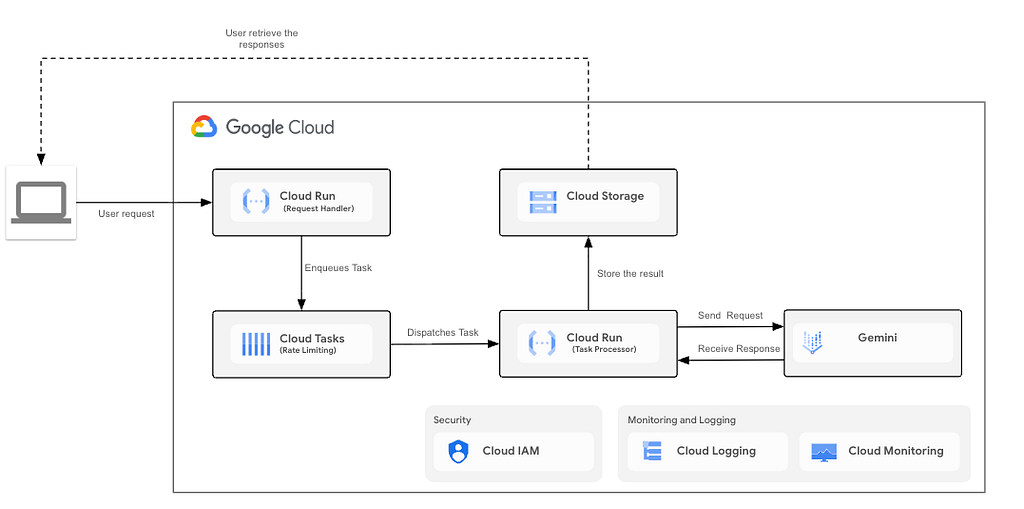
This architecture relies on four primary Google Cloud components working in tandem:
- The Ingestion API (Cloud Run): A lightweight, serverless frontend endpoint. Its only job is to receive the incoming user request, package it, and hand it off to the queue as fast as possible.
- The “Shock Absorber” (Google Cloud Tasks): The heart of the rate-limiting strategy. Cloud Tasks acts as a fully managed, highly configurable queue. It holds the pending requests and is explicitly configured to dispatch them at a rate that mathematically matches your Provisioned Throughput (e.g., exactly 10 requests per second).
- The Background Worker (Cloud Run): A secondary serverless endpoint (often hosted within the same service as the Ingestion API) that is entirely hidden from the public internet. It is invoked exclusively by Cloud Tasks to execute the actual prompt against the Gemini API.
- The State & Storage Layer (Cloud Storage): A durable storage bucket where the final LLM responses are saved asynchronously.
How the System Works: The Request Lifecycle
When a traffic spike occurs — for instance, 100 requests arriving in a single second, the system processes them through a smooth, multi-step pipeline:
- Step 1: Instant Ingestion: The client application sends a prompt to the Ingestion API. Because this endpoint does not wait for the LLM to process the prompt, it executes in milliseconds. It immediately packages the request ID and the prompt, forwards it to Cloud Tasks, and returns an instant “Queued” receipt to the user. This ensures the user’s application remains responsive, even during massive traffic bursts.
- Step 2: Queuing and Rate Enforcement: All 100 requests land in Google Cloud Tasks simultaneously. However, because Cloud Tasks is configured with strict max-dispatches-per-second and max-concurrent-dispatches limits, it acts as a traffic cop. It holds the bulk of the requests securely in the queue and begins releasing them to the Background Worker at a steady, controlled drip, perfectly aligning with your dedicated PT capacity.
- Step 3: Execution and LLM Interaction: As Cloud Tasks releases each request, it triggers the Background Worker. The Worker makes the actual API call to Gemini. Because Cloud Tasks is enforcing the rate limit upstream, the Worker is guaranteed never to exceed the Provisioned Throughput limits. This keeps your application safely within its dedicated capacity and minimizes any spillover into the shared pay-as-you-go pool.
- Step 4: Storage and Retrieval: Once Gemini generates the response, the Background Worker saves the final JSON output directly into Google Cloud Storage, indexed by the original Request ID. If a transient error occurs (such as a brief network timeout), Cloud Tasks automatically catches the failure and retries the worker, ensuring zero dropped requests.
Production tip: While GCS is excellent for storing the final heavy payloads, polling a storage bucket creates a laggy UX and drives up I/O costs. For production systems, architects should track job state using a fast, transient NoSQL database (like Firestore or Memorystore/Redis), and push the final result to the client using Webhooks or Server-Sent Events (SSE) the millisecond the worker finishes.
The Architectural Advantage
By implementing this pattern, the architecture transforms a volatile, spiky workload into a perfectly flat, predictable stream of execution. The Ingestion API handles the burst, Cloud Tasks flattens the curve, the Worker maximizes the Provisioned Throughput, and Cloud Storage safely holds the results for near real-time retrieval by the client.
Implementing the Queuing Layer
To bring this architecture to life, we can use FastAPI to build both the ingestion endpoint and the background worker. To keep the deployment simple and easy to maintain, both of these endpoints are hosted together inside a single Google Cloud Run service.
The Ingestion Endpoint: Capturing the Spike
The frontend API (/ask) has one critical job: receive the user’s prompt, get it into a queue, and respond to the user as fast as possible without waiting for Gemini.
Before looking at the code, it is important to understand exactly what this queue is and how it dictates the flow of traffic. We use Google Cloud Tasks as our managed buffer. The true magic of this architecture happens when we create this queue via the Google Cloud CLI, because this is where we strictly enforce our rate limits to match our Provisioned Throughput (PT) capacity:
gcloud tasks queues create gemini-request-queue \
  --location=us-central1 \
  --max-dispatches-per-second=15 \
  --max-attempts=3
By setting –max-dispatches-per-second=15, we mathematically guarantee that Cloud Tasks will never dispatch more than 15 requests per second. Whether the application receives 10 requests or 1,000 requests in a single second, the queue acts as an unyielding traffic cop.
Here is the core implementation of that ingestion flow:
from fastapi import FastAPI, Request
from google.cloud import tasks_v2
import os
import json

app = FastAPI()

# Environment variables
PROJECT_ID = os.environ.get("PROJECT_ID")
QUEUE = os.environ.get("QUEUE_NAME")
LOCATION = os.environ.get("LOCATION", "us-central1")

@app.post("/ask")
async def trigger_analysis(request: Request, request_id: str, question: str):
    """
    Frontend endpoint. Instantly delegates the workload to Cloud Tasks.
    """
    client = tasks_v2.CloudTasksClient()
    parent = client.queue_path(PROJECT_ID, LOCATION, QUEUE)
    service_url = str(request.base_url).rstrip("/")
    if service_url.startswith("http://"):
        service_url = service_url.replace("http://", "https://")

    # 1. Package the user's request
    task_payload = {
        "request_id": request_id,
        "question": question
    }

    # 2. Define the Cloud Task routing (pointing back to our worker)
    task = {
        "http_request": {
            "http_method": tasks_v2.HttpMethod.POST,
            "url": f"{service_url}/process-worker",
            "headers": {"Content-type": "application/json"},
            "body": json.dumps(task_payload).encode(),
        }
    }

    # 3. Drop the task into the managed queue
    client.create_task(request={"parent": parent, "task": task})

    # 4. Instantly free up the HTTP connection
    return {
        "status": "queued",
        "request_id": request_id,
        "message": "Request queued successfully."
    }
If you look at the task dictionary in the code above, you will notice the url parameter is constructed using the SERVICE_URL environment variable. This introduces a highly efficient "loopback" pattern. Because both the frontend API and the background worker live in the exact same FastAPI application, the SERVICE_URL is simply the public address of your deployed Cloud Run service.
Essentially, the ingestion endpoint is dropping a payload into the queue with a strict instruction: “Hold onto this data, and when the rate limit allows, send it right back to my own /process-worker route."
By handling requests this way, when a micro-spike of 100 requests hits this endpoint, FastAPI loops through them in milliseconds, securely handing the payloads over to Google’s infrastructure. Returning a 202 Accepted style response ("status": "queued") prevents the client application from timing out or holding open hundreds of expensive HTTP connections.
The Background Worker: Execution and Storage
The second half of our FastAPI application is the /process-worker endpoint. This is the route that Cloud Tasks will call in the background at the exact rate we defined earlier.
Because Cloud Tasks is acting as our upstream traffic cop, this endpoint doesn’t need any complex concurrency controls, mutex locks, or internal rate-limiting logic. We can write a standard, straightforward Gemini API call:
from google import genai

@app.post("/process-worker")
async def process_worker(request: Request):
    """
    Background worker endpoint strictly controlled by Cloud Tasks.
    """
    data = await request.json()
    request_id = data["request_id"]
    question = data["question"]

    # 1. Initialize Gemini Client
    client = genai.Client()

    # 2. Execute the prompt against your Provisioned Throughput capacity
    response = client.models.generate_content(
        model='gemini-2.5-flash',
        contents=question
    )

    # 3. Save the result to Google Cloud Storage
    result_data = json.dumps({"request_id": request_id, "answer": response.text})
    save_result_to_gcs(BUCKET_NAME, request_id, result_data)

    return {"status": "success"}
CI/CD Friendly Deployment
Historically, loopback architectures suffered from a “chicken-and-egg” deployment problem: the code needed to know its own production URL to queue the background task, but you didn’t know the URL until after you deployed the infrastructure. This often required clumsy double-deployments or hardcoded environment variables.
However, because our FastAPI application dynamically reads its own host URL at runtime (request.base_url), this architecture is entirely self-resolving and CI/CD friendly.
You can deploy the entire infrastructure in a single, clean step without any manual URL injection. Whether you deploy via the terminal or an automated GitHub Actions pipeline, the command is simple:
gcloud run deploy gemini-queue-api \
  --source . \
  --region us-central1 \
  --allow-unauthenticated \
  --set-env-vars="PROJECT_ID=your-project-id,BUCKET_NAME=your-bucket,QUEUE_NAME=gemini-request-queue"
A Crucial Note on Security (IAM):
By default, Cloud Run executes your code using the Compute Engine Default Service Account. In order for your ingestion endpoint to successfully place tasks into the queue, you must ensure that this built-in robot account has the Cloud Tasks Enqueuer role (roles/cloudtasks.enqueuer) applied at the project or queue level. Without this, Google's IAM security layer will instantly reject the queue requests with a Permission Denied error!
Deployment Note 1: Securing the Endpoints (Avoiding Public Access):
For the sake of this tutorial, we deployed the service using
-- allow-unauthenticated
which exposes both the frontend and the worker to the public internet. In a production environment, this is a major security and billing risk.
To secure this architecture, you must lock down both routes.
- First, the /ask endpoint should be protected by an API Gateway, Firebase Auth, or standard bearer tokens so only legitimate users can enqueue jobs.
- Second , the /process-worker endpoint must be configured to validate OIDC (OpenID Connect) tokens. When Cloud Tasks dispatches a job, it can attach a Google-signed OIDC token.
By configuring your FastAPI app to require and verify this token, you guarantee that only your trusted queue is allowed to trigger the LLM, preventing attackers from bypassing your rate limits and hitting the worker directly.
Deployment Note 2: Enterprise Networking Consideration (Load Balancers & VPCs):
While using request.base_url is a clean, CI/CD-friendly trick for standard Cloud Run deployments, it can be fragile in complex enterprise environments. If your Cloud Run service sits behind a Global Cloud Load Balancer (GCLB), an API Gateway (like Apigee), or a custom domain, request.base_url will resolve to the public-facing gateway URL.
If your security posture restricts Cloud Run ingress to internal-only, Cloud Tasks will fail to route the job back through that public URL. For strict enterprise networks, it is safer to dynamically fetch the native, internal Cloud Run URL at application startup by querying the local Google Cloud Instance Metadata Server (http://metadata.google.internal/), or by injecting the URL cleanly via Infrastructure as Code (like Terraform) during the pipeline execution.
Conclusion: Scaling GenAI with Confidence
Moving Large Language Models from the sandbox to a production environment requires more than just good prompting — it requires resilient infrastructure. By acknowledging the reality of traffic micro-spikes and the strict per-second boundaries of Provisioned Throughput, we can design systems that work with our quotas rather than against them.
This lightweight, serverless architecture acts as the perfect shock absorber for near real-time workloads. By offloading rate-limiting logic to Google Cloud Tasks and utilizing a simple loopback pattern in Cloud Run, we eliminate the need for complex, error-prone concurrency management in our application code.
The result is a highly scalable system that maximizes the ROI of your dedicated Provisioned Throughput, minimizes risky overflow into shared resource pools, and completely prevents dropped requests. By decoupling request ingestion from LLM execution, you empower your application to handle sudden bursts of traffic gracefully, ensuring a seamless, near real-time experience for your users at any scale.
Ready to build this yourself?
You can grab the complete FastAPI application, deployment scripts, and a Python test script to simulate your own traffic spikes over at the LLM Traffic Smoother GitHub Repository.
Smoothing Spiky LLM Traffic: Maximize Provisioned Throughput Utilization With a Queuing… was originally published in Google Cloud – Community on Medium, where people are continuing the conversation by highlighting and responding to this story.
Source Credit: https://medium.com/google-cloud/smoothing-spiky-llm-traffic-maximize-provisioned-throughput-utilization-with-a-queuing-176753d96818?source=rss—-e52cf94d98af—4
About the Author