In 2026, I expected to finally put my Claude Code subscription to good use by vibe-coding a text-based RPG I’ve always wanted to create. Instead, half the year has gone by, and Claude has helped me make something far more personal — my entire wedding plan. With a million different things to plan, it’s impossible for an entire team of planners to do it right, let alone a sole AI agent, so I tried asking ChatGPT for help, too.
Having used both these tools, along with Gemini, to previously build a quick packing app, I knew that I wanted to go past mere in-chat IDEs. The planners would still be React-based, but I needed way more than just a checklist and a sticky bar that calculated expenses this time around. The only thing I was going to make sure both tools got from me was all the information I had, but organizing it all into a presentable and digestible form for my friends and family to understand was all up to them.
I asked Claude, Gemini, and ChatGPT to design a website wireframe, and only one looked like it came from a real designer
Which model is the best UX designer?
Claude was brilliant, but flawed
Even a detailed first prompt couldn’t deliver what I wanted
A standard “can you help me plan my wedding with a React-based app?” wasn’t going to cut it, and I wasn’t going to try to do it, either. Instead, I went with a detailed prompt about what I wanted, and Claude immediately got to work.
Here’s a Pastebin link for the detailed prompt I gave to both Claude and ChatGPT.
Right off the bat, Claude gave me more detail than I was myself ready for. Not only did it give me full control over every single event in the entire wedding proceedings, but it even created separate tabs for vendors such as caterers, decorators, the makeup artists, transport, and invitations. Despite this level of granularity, there were a few glaring mistakes I didn’t quite expect.
For starters, my prompt had explicitly asked Claude to make sure I could change the color scheme and themes of each tab/event, but it only gave me that option for one single event. That aside, the overall font and size were simply not festive, coming off as soulless. Instead of letting me decide how much each vendor, event, and outfit would cost, or at least set my budget for each of those, Claude simply slapped an arbitrary number on each, leading to a planner that calculated all the wrong expenses. Lastly, for a planner with 16 tabs lined up from left to right, Claude forgot to give me a “next slide” button. It was clear that it needed a lot more tweaking, but my test dictated that I only follow up once with an “improvements required” prompt.
After I asked for improvements regarding my complaints, Claude decided to stick with the font size and colors, which remained just as off-putting as it was in the first draft. Even though I wanted more control over my final budget for each event, it just ended up giving me a manual input box to put in the final budget. Sliders would have worked perfectly here, instead of a UI element that makes me leave my mouse and get to the keyboard. The second draft for Claude was somehow worse than the first one, meaning ChatGPT’s GPT-5.5 model could very easily win some points here over Anthropic’s Sonnet 4.6 model.
I tried Gemini Scheduled Actions, and they took over the prompts I retype
ChatGPT did a lot less, but got it right
It wasn’t until I tweaked prompts that I got some real help
With ChatGPT, Claude had already set a bit of a standard. OpenAI’s tool, however, could very well surpass it, considering just how simple things were at the moment, despite the granular level of detail involved. The process was going to be the same — the same prompt, and just one follow-up prompt as criticism and a list of things to improve for a second go.
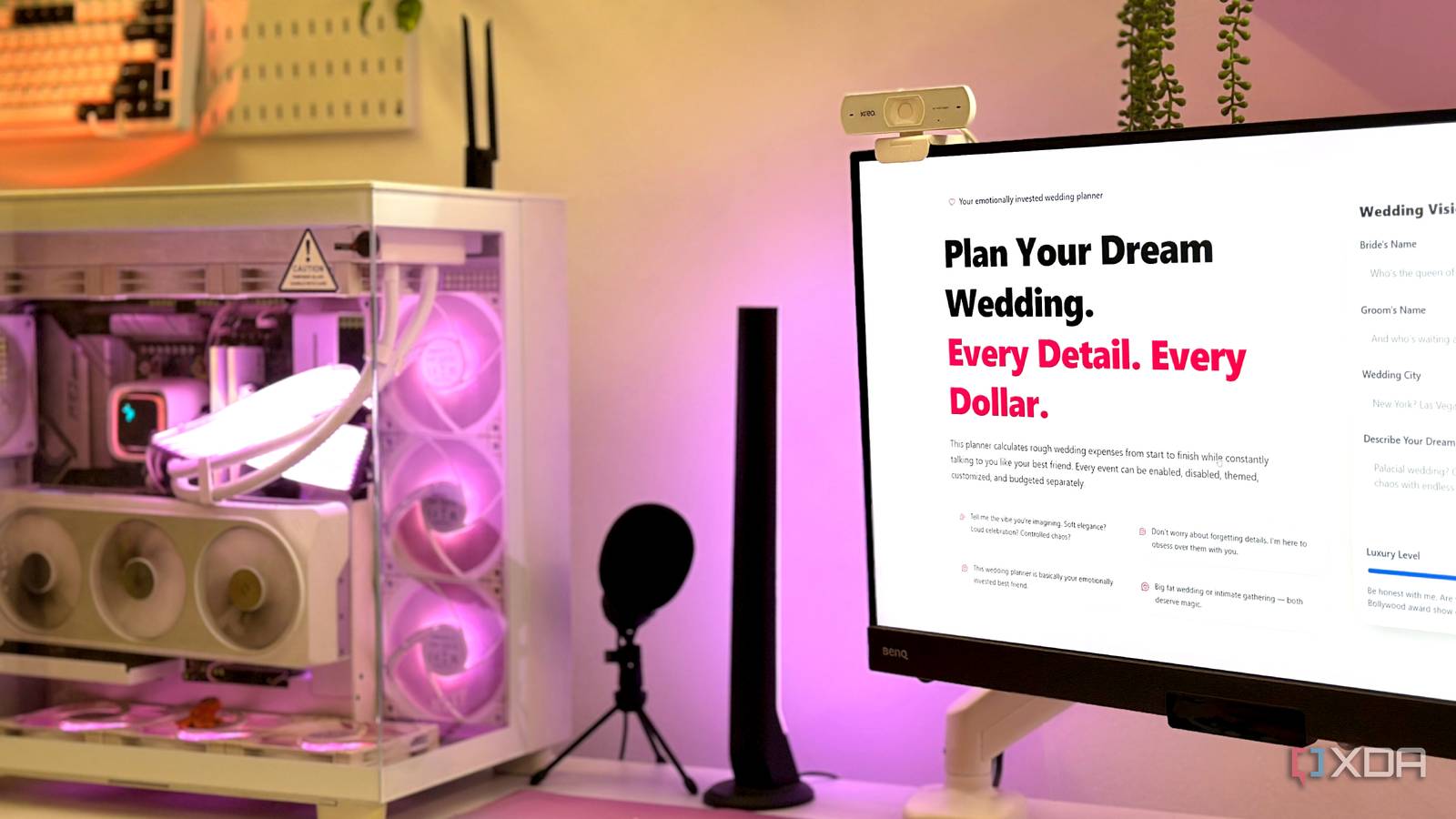
The result was nothing short of remarkable. In five minutes, I immediately had a visually pleasing app to show to friends and family, which showed the breakdown of each event involved in the process. In fact, compared to Claude, it even got more things right in the first go, with each event’s dashboard changing themes as per what I selected, while Claude only did it for one ceremony out of five. ChatGPT also gave me budget sliders for each vendor instead of slapping a random number on it, letting me change each vendor’s budget as I got on a call with them and discussed deliverables. Disappointingly, while Claude let me manage each and everything that went into an event like a reception party, ChatGPT only asked me the number of guests involved.
The downside for this first draft, however, was that it wasn’t even half as granular as Claude was. Claude had given me different tabs for each event as well as each vendor, along with a few extra tabs for miscellaneous expenses. Regardless, I went ahead and asked it for improvements in round 2, which is all that it would get. This is where I finally got a budget slider for every single vendor, from the music and decor to the flower arrangements and dessert tables. With the first round of improvements done, ChatGPT had proven to be the objectively better planner. Of course, there was more coming.
Claude and ChatGPT cover so much ground together that I forget I’m subscribed to Perplexity
Claude and ChatGPT now cover so much of my daily AI workflow that Perplexity has become the tool I open when I need sources fast.
ChatGPT couldn’t help me plan the seating arrangement, either
Arguably the most taxing part of wedding planning
My next step was to check even further and see if ChatGPT had my back in the seating arrangement. This is usually the part that requires hours of working together with Styrofoam, thumb tacks, and a label maker, but I figured I needed more than just a checkbox-and-slider-based planner. In for a penny, and whatnot. Despite ChatGPT’s fantastic visual planner in the first phase, its seating arrangement environment fell apart immediately. The prompt I gave for the wedding seating planner was —
Let’s expand this further by giving me an interactive seating planner. Let me add families and then input guest names, whether they’re the bride’s guests or the groom’s, and their dietary preference. Allow me club them family-wise through expandable family cards, and drag/assign them to tables for each event. Make sure the theme for each event is the same as the one in the planner. The bride’s guests and the groom’s guests must be easy to distinguish. Each event will have its own seating plan. Build it into a Canva/Figma-style interactive planner. Let me export the final layout as a PDF as well. Make it a beautiful and interactive wedding planner that is warm, emotional, fun, and efficient as well.
As expected, ChatGPT returned a gorgeous visual seating planner with cleanly-segmented family cards. Each event got its own tab, and I didn’t have to re-add guests for a new event, which was great. I also asked it to remember these families so I could use its help in building a hotel room booking list. Sadly, the drag-and-drop feature didn’t work, nor did it allow me to export as PDF. Despite multiple rounds of tweaks and improvements, the drag-and-drop planning feature simply didn’t work. This was a remarkable attempt, but one that failed at any real-world usability.
I didn’t realize ChatGPT was serving ads until I dug into how it actually works
You probably won’t notice it happening
Claude’s seating arrangement was perfect
It did what ChatGPT failed to do ten times over
Claude, on the other hand, took the exact same prompt and ran with it. While my prompts and ChatGPT’s responses were making me second-guess its abilities and whether I should first go to a DBMS and then help GPT-5.5 with the families, seating arrangements, table sizes, and more, Claude simply did everything on its own. It had the same Add Family → Add Guest layout as ChatGPT, but each family could neatly be dragged on to a table or a row of chairs. Even the tables could be expanded as per the guest, with an ‘Add Table’ feature right next to the ‘Add Guests’ tab, which was as useful as it was thoughtful.
After an hour spending time with Claude’s seating arrangement, it was clear that I was going to be able to use it as a final draft on the day of the wedding and not run into any trouble at all. At the same time, any changes would be easy to make for either me or my partner, considering just how visually intuitive the entire system was.
In fact, Claude’s seating planner was so good that it wiped the floor with GPT-5.5’s version, no matter how visually impressive the latter was. However, in the aesthetics department, Claude’s seating planner wasn’t too far behind, either.

- OS
-
Windows, macOS
- Individual pricing
-
Free plan available; $17/month Pro plan
- Group pricing
-
$100/month per person for the Max plan
Claude is an AI assistant and LLM developed by Anthropic.
I cancelled my ChatGPT, Perplexity, and Gemini subscriptions for Claude — and I should have sooner
Wish I did this sooner.
Claude’s intuitiveness makes it the winner
ChatGPT failed to understand what I needed despite multiple prompts.
Planning a wedding is a huge hassle for everyone involved, no matter how excited you might be about the job. AI tools can really help you make the job easier, especially if you’re ready to do the initial labor of creating the right kind of database and instruction set. That being said, Claude clearly saved me hours, if not days, of work by letting me arrange each family and guest the way I wanted.
ChatGPT came pretty close, but towards the second half of the process, it simply failed to understand exactly what I needed despite multiple prompts. On the other hand, its Anthropic rival required just two attempts to completely take over all planning duties for the wedding. Don’t mind the budget in the images, either — you’re all invited!
About the Author