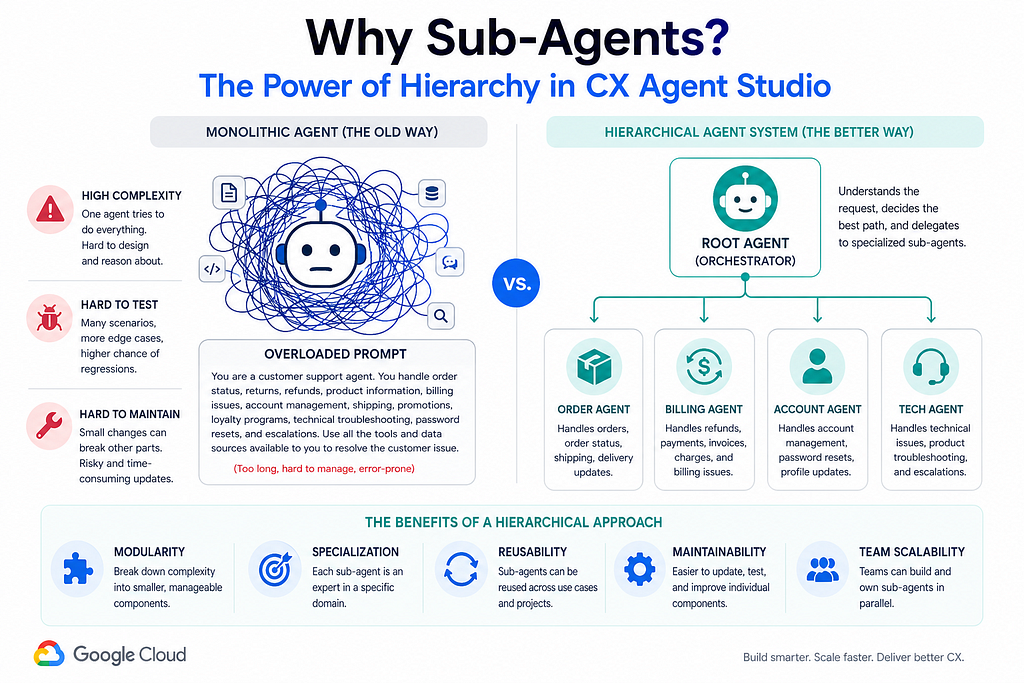
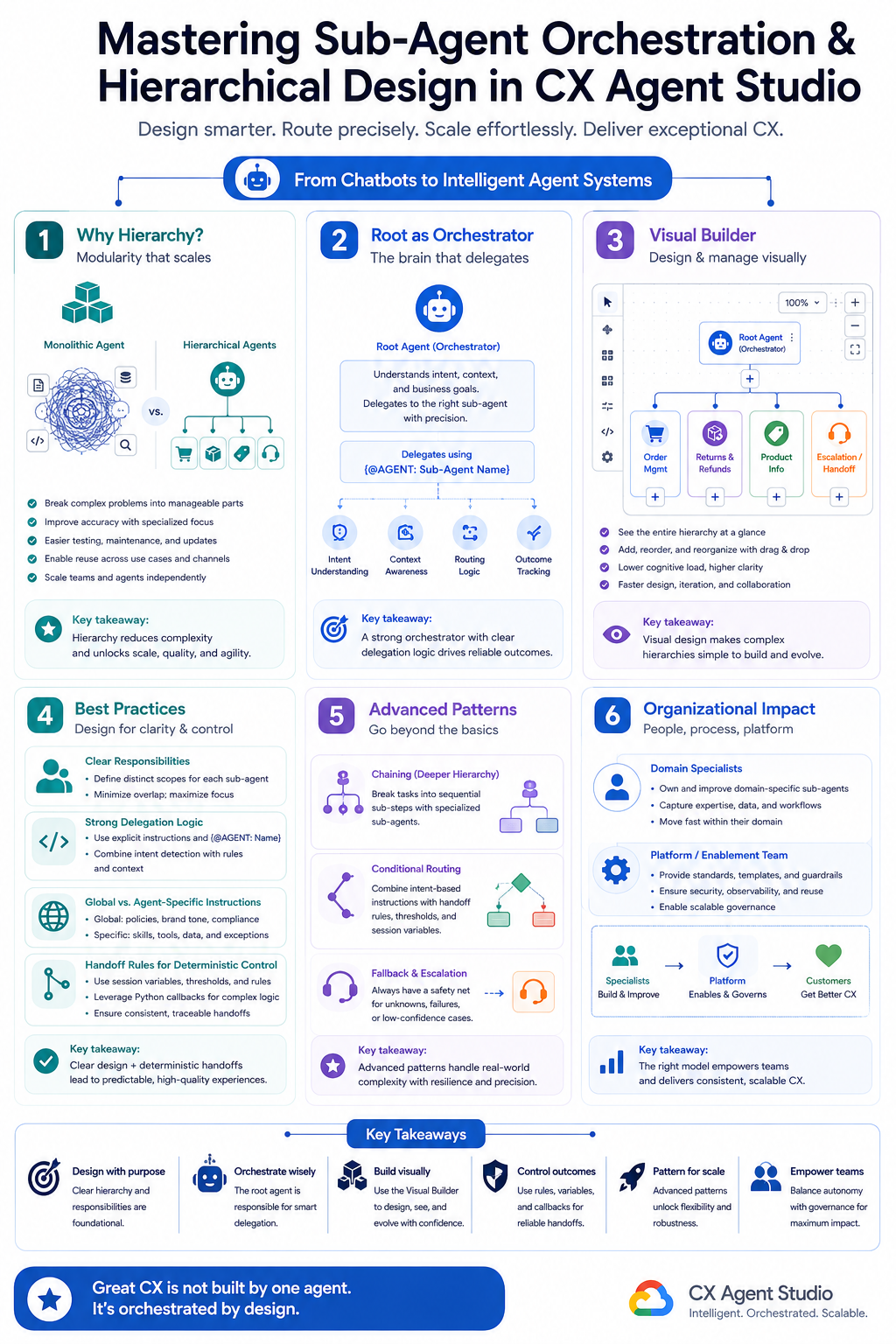
CX Agent Studio represents a fundamental shift from the monolithic flow-based paradigm of traditional Dialogflow CX to a true multi-agent system built on hierarchical orchestration. Instead of one giant agent trying to do everything, we now design systems where a root agent (the orchestrator) intelligently delegates to specialized sub-agents.
This is where complexity stops being a liability and becomes a manageable, modular asset.
Why Sub-Agents? The Case for Hierarchy
Monolithic agents eventually collapse under their own weight. As capabilities grow, prompts become bloated, testing becomes impossible, and every small change risks breaking unrelated flows.
Sub-agents solve this through:
– Modularity— Each agent owns a clear domain.
– Specialization — Narrow, deep expertise beats shallow generalists.
– Reusability — The same Returns sub-agent can serve multiple root agents or channels.
– Maintainability & Testing — You can evolve, test, and version one specialist without touching the rest of the system.
– Team Scalability — Different domain experts can own different sub-agents.
This mirrors how real organizations work: you don’t ask one person to be the entire support, sales, and logistics team.
Designing Hierarchies: Root as Orchestrator
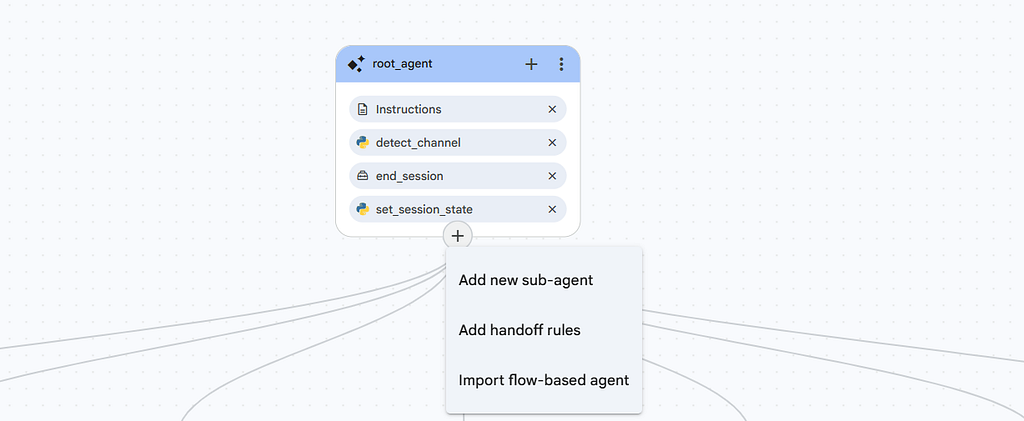
In CX Agent Studio, every agent application has one root agent (also called the steering agent) and zero or more sub-agents (child agents). The root agent is the primary entry point. Its job is not to answer everything — it’s to understand intent and delegate effectively.
Typical hierarchy for a retail support agent:
- Root Agent (Steering)
— Order Management Sub-Agent
— Returns & Refunds Sub-Agent
— Product Information Sub-Agent
— Escalation / Human Handoff Sub-Agent
— (Optional) Proactive/Notification Sub-Agent

The root agent’s description and instructions are critical. They tell the model which sub-agents exist and when to use them.
Visual Builder for Orchestration
One of the most delightful aspects of CX Agent Studio is the visual canvas. You can:
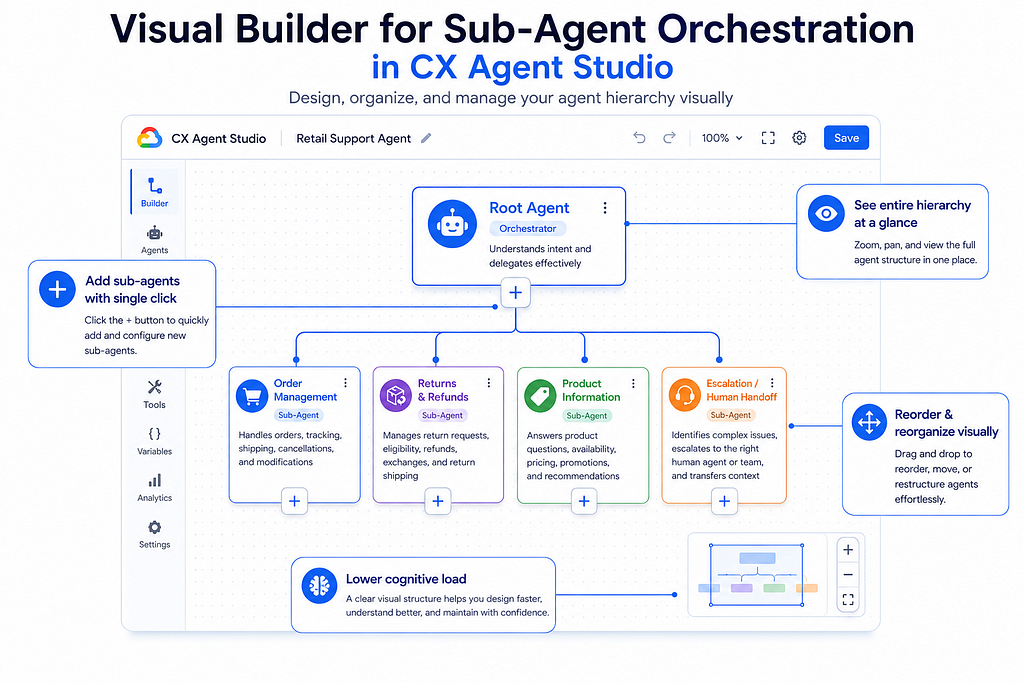
– See the entire hierarchy at a glance
– Add sub-agents with a single click on the `+` under any agent node
– Visually understand the delegation structure
– Reorder and reorganize without digging through pages of flows
This visual-first approach dramatically improves cognitive load compared to traditional intent/flow builders.
Best Practices for Effective Orchestration
1. Clear Responsibilities & Minimal Overlap
Every sub-agent should have a crisp, non-overlapping mandate. If two sub-agents could reasonably handle the same query, the root agent will get confused.
2. Strong Delegation Logic in the Root
Write explicit instructions in the root agent:
You are the root orchestrator for customer support.
Available specialized sub-agents:
- {@AGENT: Order Management Agent} - Handles order status, modifications, tracking
- {@AGENT: Returns Agent} - Handles returns, refunds, and exchanges
- {@AGENT: Product Info Agent} - Answers questions about products, specs, availability
Analyze the user's intent. Delegate to the most appropriate sub-agent using the exact syntax {@AGENT: Agent Name}.
If the query doesn't clearly match any sub-agent, handle it yourself or ask clarifying questions.
3. Global vs Agent-Specific Instructions
Use global instructions for brand voice, core principles, and shared context. Use agent-specific instructions for deep domain logic and tool usage.
4. Leverage Handoff Rules for Deterministic Control
While instructions are powerful, they are probabilistic. For critical routing decisions, use Handoff Rules (available under each agent node).

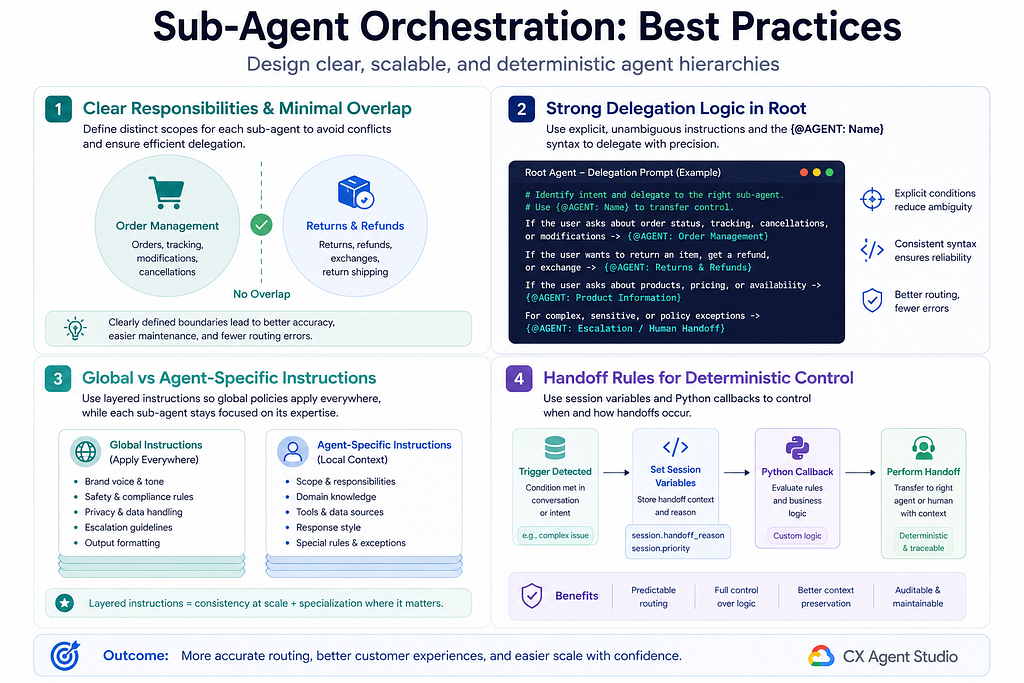
Handoff rules let you define deterministic conditions based on session variables (text, number, boolean) or Python callbacks. Perfect for:
– Routing authenticated vs unauthenticated users
– High-stakes actions (financial, PII)
– Retry logic and backward handoffs from sub-agent to root
Advanced Patterns
- Chaining: Sub-agents can themselves delegate to other sub-agents (creating deeper hierarchies when needed).
– Conditional Routing: Combine strong root instructions + handoff rules.
– Fallback & Escalation Agents: Create dedicated sub-agents for out-of-scope queries or human escalation. This keeps the root clean.
– Specialized Context: Each sub-agent can have its own tools, variables, and model overrides.
Nuances & Challenges (The Real Talk)
No architecture is free. Be aware of these realities:
- Latency from Multiple Hops: Every delegation adds an LLM call. Keep hierarchies reasonably shallow for latency-sensitive flows.
– Context Passing: Use session variables and global variables deliberately. Don’t assume full conversation history automatically flows perfectly between every level.
– Debugging Complexity: Rich tracing and the built-in simulator become essential. Learn to read delegation traces.
– Agent Sprawl: It’s easy to create too many tiny sub-agents. Start with 3–5 strong specialists. Only add more when clear value emerges.

Real-World Examples
Retail Support Agent (most common starting point)
Root handles greeting, small talk, and high-level routing. Sub-agents own orders, returns, product catalog, and escalation. This pattern dramatically improves containment rates while keeping each agent focused.
Real Estate Inquiry Handler
– Root: Understands intent and qualifies the lead
– Sub-agents: Property Search, Viewing Scheduler, Mortgage/Financing Info, Neighborhood Insights, and Follow-up Nurture
The visual hierarchy makes it obvious who owns what.
Evaluation Implications
CX Agent Studio’s evaluation capabilities shine here. You should:
– Test individual sub-agents in relative isolation (invoke them directly when possible)
– Run end-to-end scenario evaluations through the root agent
– Use the built-in evaluation framework with scenario tests and AI-assisted analysis
– Measure both functional correctness and delegation quality (did the right agent get invoked?)
Good evaluation strategy catches routing issues before they reach production.
Organizational Implications
This architecture changes how teams work.
Instead of one person (or small team) owning an entire monolithic agent, you can now have:
– Domain specialists owning individual sub-agents
– Orchestration/platform team owning the root agent, shared tools, variables, and handoff rules
– Clearer ownership boundaries and faster iteration cycles
This is how mature conversational AI teams will organize in 2026 and beyond.
Final Thoughts
Sub-agent orchestration in CX Agent Studio isn’t just a feature — it’s the core paradigm for building production-grade conversational experiences at scale.
The visual builder lowers the barrier, the instruction system + handoff rules give you both flexibility and control, and the evaluation tooling helps you maintain quality as complexity grows.
Master this pattern, and you move from building chatbots to architecting intelligent agent systems.
Written from the perspective of a Developerin Conversational AI who has moved from building 5+ production Dialogflow CX agents to architecting the next generation of systems in CX Agent Studio.*
Mastering Sub-Agent Orchestration and Hierarchical Design in CX Agent Studio was originally published in Google Cloud – Community on Medium, where people are continuing the conversation by highlighting and responding to this story.
Source Credit: https://medium.com/google-cloud/mastering-sub-agent-orchestration-and-hierarchical-design-in-cx-agent-studio-143796163877?source=rss—-e52cf94d98af—4
About the Author