Welcome to Part 4 of Lakehouse Demystified blog series — a practical guide to lakehouse on Google Cloud. My goal is to share an opinionated architectural perspective rooted in practical experience, providing depth and implementation-ready clarity through reference architectures, best practices, and minimum viable code. This series is created for lakehouse practitioners and future-state builders — the architects and engineers striving to master the “art of the possible” on Google Cloud while cutting through the noise of information overload.
The focus of my previous blog post was lakehouse engines and covered Managed Service for Apache Spark — serverless interactive sessions that power Spark notebooks. This blog post features the lakehouse metastore component — a managed service called Lakehouse runtime catalog with two catalog flavors — Iceberg and Hive. It includes complementary minimum viable code samples.
When I sat down to write this, I had one specific reader in mind: someone who already knows the lakehouse paradigm and Apache Spark inside and out, but needs to get up and running on Google Cloud as fast as possible. I’ve spent too many hours scouring convoluted, cross-product documentation myself, and I completely empathize. Further, even if you have managed to find the docs and understand the content, it’s another matter entirely to stitch all the pieces together and stand up a functional prototype quickly. That’s why this post is dense by design. Not only will this single page give you the comprehensive context you need, but I have also provided a minimum viable functional sample as a hands-on lab to simplify your learning journey. So grab a coffee — this is your complete crash course.
1. [Recap] Lakehouse reference architecture
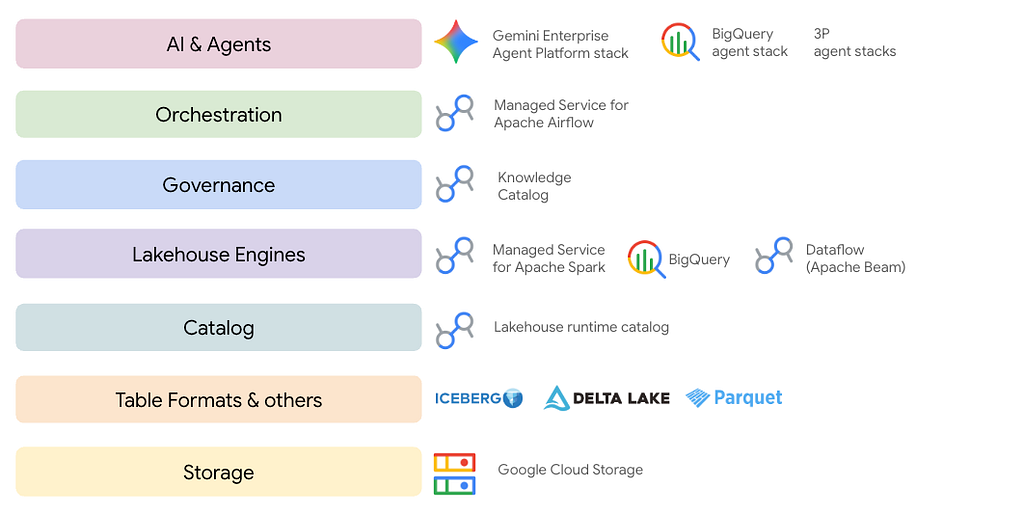
In blog 2 of the series, I covered lakehouse reference architecture on Google Cloud. A core component is the lakehouse metastore/catalog.

Lets explore what the Lakehouse runtime catalog offering on Google Cloud is — starting with what exactly the catalog construct is.
2. Levelset: What is a lakehouse catalog?
A Lakehouse catalog is the centralized metadata layer and single source of truth for data and AI assets. It enables seamless data discovery, governance, and sharing across platforms without the need to copy or move underlying files.
Key functions and trends:
- Centralized metadata: Keeps storage and compute in sync by maintaining a single record of schemas, locations, and file states.
- Unified governance: Enforces row- and column-level access controls and tracks data lineage for strict security and compliance.
- Engine interoperability: Allows diverse compute engines (like Spark or Trino) to query the same data concurrently using open table formats.
- Data federation: Enables direct querying of external databases (such as MySQL or Snowflake) without requiring costly data migrations.
Popular catalogs are — Hive metastore (HMS), Apache Polaris, Google Cloud’s Lakehouse runtime catalog (formerly BigLake metastore), AWS’s Glue, Databricks’ Unity catalog, Nessie and Gravitino to name a few.
In terms of how you use the the catalog in — say Apache Spark code — its as simple as:
1. Create a catalog ahead of time — one time activity, covered in subsequent sections
2. Create a database/namespace within the catalog — also one time activity, covered in subsequent sections
3. Read data, transform to ensure it has structure and persist the data by registering the schema into the catalog database as a table. Below is just one of many ways to create & persist to Iceberg tables.
customer_df.write.format("iceberg").mode("overwrite").saveAsTable("froyo_ns.s_customer_master")
4. To work with the data in the table, you just have to read off of the table as shown below
spark.sql("select * from froyo_ns.s_customer_master limit 2").show(truncate=False)
3. About the Lakehouse runtime catalog service
(straight off of the documentation)
Google Cloud’s Lakehouse runtime catalog is a fully managed, serverless product that acts as the definitive source of truth for your lakehouse data architecture.
Core Capabilities
- Seamless interoperability: Enables disparate compute engines — like BigQuery, Apache Spark, and Apache Flink — to share metadata and tables without the need to duplicate underlying files.
- Enhanced security: Eliminates the need for direct lakehouse storage bucket access by utilizing storage access delegation (credential vending) to securely manage permissions.
- Integrated governance: Connects seamlessly with Knowledge Catalog to provide centralized data lineage, quality tracking, and comprehensive governance.
Catalog flavors
There are two catalog flavors at the time of authoring this blog — for Iceberg (GA) and Hive (private preview).
Resource hierarchy
The resource hierarchy is as follows:
- Lakehouse runtime catalog: The top-level regional service resource in Google Cloud that hosts your metadata. The region is dependent on the Google Cloud Storage bucket that serves as lakehouse storage.
- Catalog: An instance of a metastore resource in the catalog (e.g. froyo_catalog). A logical container within the runtime catalog service. In the Project/Catalog/Namespace/Table (P.C.N.T) naming structure, this represents the specific catalog instance you are querying.
- Namespace: A logical grouping of tables within a catalog (e.g. froyo_ns). For users familiar with BigQuery, a namespace is functionally similar to a dataset.
- Table: The specific entity pointing to data in Cloud Storage (e.g. s_customer_master). The table metadata contains the schema, partitioning information, and a pointer to the current table state through an Apache Iceberg metadata.json file.
Subsequent sections cover various features and considerations.
4. Practitioner lens — basics of using the catalog for Apache Iceberg
Basic questions you might have are-
1. What Google APIs do I need to enable?
2. What are modes to access the catalog?
3. Which identity to assume to work with the catalog?
4. How do I authenticate to the catalog?
5. What about authorization?
6. How do I create this catalog?
7. What are the spark session configurations for the catalog?
8. How do I get to the catalog UI?
9. Can I query a table I created from Apache Spark in BigQuery with BigQuery SQL?
10. What is the mapping of a catalog to a Lakehouse storage bucket?
11. Is the catalog global or regional?
12. Are Apache Iceberg tables interoperable for read and write between Apache Spark and BigQuery?
13. What Lakehouse engines are supported with Lakehouse runtime catalog?
14. Is there Terraform IaaC support?
If you are Google Cloud savvy, you might wonder –
15. Do entries get created automatically in Knowledge Catalog when you create an Iceberg table? What about table alters — do they get synced?
16. Is data lineage captured? What does it look like?
Lets get these out of the way.
4.1. Google APIs
The Lakehouse API needs to be enabled — biglake.googleapis.com . The following is thegcloud command to enable the API:
gcloud services enable biglake.googleapis.com
4.2. Access mode
The Lakehouse runtime catalog can be accessed via Client libraries, Google Cloud CLI & REST
4.3. Identity to assume to work with the catalog
Lakehouse runtime catalog supports End User Credentials, and Service Accounts.
For development purposes, you can use any of the below:
- User credentials for client libraries or third-party tools
- User credentials for REST requests from the command line
- Service account impersonation
In higher environments:
For batch pipelines, use user managed service accounts with requisite permissions for the Lakehouse runtime catalog, and for interactive environments, end user credentials.
4.4. Authenticating to the catalog
There are multiple options as shown below.

Authentication options and commands are covered [here](https://docs.cloud.google.com/lakehouse/docs/authentication#access-control).
With credential vending more, you dont have to give access to the storage bucket to your users. You give it to the catalog service account, your users get access only to Iceberg tables. Credential vending is covered in the complementary hands-on lab, as is end user credentials based authentication.
4.5. What about authorization?
4.5.1. IAM roles
There are three out of the box IAM roles.

4.5.2. Access Control Lists
IAM roles can be applied with ACLs at project, catalog, namespace, table levels.
Here is an example:
We want to give a user called Biscuit read access to the Lakehouse Iceberg table p_rdm_revenue_by_month in the froyo_ns Iceberg namespace within the Lakehouse runtime catalog for Iceberg – froyo_iceberg_lakehouse_catalog_30466744069 . Here is how you go about it…
- Create a policy file (lrci-policy-json) with the user or group (replace 'user:' with 'group:' for group access)
{
  "bindings": [
    {
      "role": "roles/biglake.viewer",
      "members": [
        "user:biscuit@akhanolkar.altostrat.com",
      ]
    },
  ],
  "etag": "ACAB",
  "version": 1
}
2. Apply the policy
gcloud alpha biglake iceberg tables set-iam-policy p_rdm_revenue_by_month lrci-policy.json --catalog="froyo_iceberg_lakehouse_catalog_30466744069" --namespace="froyo_ns"
3. With this, Biscuit will only be able to access this one table and query it and does not have access to any other catalogs, namespaces or tables.
4.6. Creating an Iceberg catalog
To create a catalog with end user credentials (default) for authentication:
gcloud biglake iceberg catalogs create \
    CATALOG_NAME \
    --project YOUR_PROJECT_ID \
    --catalog-type 'gcs-bucket' \
    --credential-mode end-user
To create a catalog with credential vending for authentication:
gcloud biglake iceberg catalogs create \
    CATALOG_NAME \
    --project YOUR_PROJECT_ID \
    --catalog-type 'gcs-bucket' \
    --credential-mode vended-credentials
The above is covered in the lab.
4.7. Spark session configurations to access the catalog
The configurations vary based on authentication mode.
4.7.1. End User Credentials for authentication
The below is a sample for Managed Spark serverless interactive sessions.
from google.cloud.dataproc_spark_connect import DataprocSparkSession
from google.cloud.dataproc_v1 import Session
from pyspark.sql import functions as F

# Create the Dataproc Serverless session.
s8s_spark_session = Session()

# Serverless runtime at authoring was 3.0 with Iceberg 1.10
s8s_spark_session.runtime_config.properties[f"spark.sql.defaultCatalog"] = ICEBERG_CATALOG_NAME
s8s_spark_session.runtime_config.properties[f"spark.sql.catalog.{ICEBERG_CATALOG_NAME}"] = "org.apache.iceberg.spark.SparkCatalog"
s8s_spark_session.runtime_config.properties[f"spark.sql.catalog.{ICEBERG_CATALOG_NAME}.type"] = "rest"
s8s_spark_session.runtime_config.properties[f"spark.sql.catalog.{ICEBERG_CATALOG_NAME}.uri"] = f"https://biglake.googleapis.com/iceberg/{REST_API_VERSION}/restcatalog"
s8s_spark_session.runtime_config.properties[f"spark.sql.catalog.{ICEBERG_CATALOG_NAME}.warehouse"] = f"gs://{ICEBERG_LAKEHOUSE_BUCKET_NAME}"
s8s_spark_session.runtime_config.properties[f"spark.sql.catalog.{ICEBERG_CATALOG_NAME}.io-impl"] = "org.apache.iceberg.gcp.gcs.GCSFileIO"
s8s_spark_session.runtime_config.properties[f"spark.sql.catalog.{ICEBERG_CATALOG_NAME}.header.x-goog-user-project"] = PROJECT_ID
s8s_spark_session.runtime_config.properties[f"spark.sql.catalog.{ICEBERG_CATALOG_NAME}.rest.auth.type"] = "org.apache.iceberg.gcp.auth.GoogleAuthManager"
s8s_spark_session.runtime_config.properties[f"spark.sql.extensions"] = "org.apache.iceberg.spark.extensions.IcebergSparkSessionExtensions"
s8s_spark_session.runtime_config.properties[f"spark.sql.catalog.{ICEBERG_CATALOG_NAME}.rest-metrics-reporting-enabled"] = "false"

spark = (DataprocSparkSession.builder
    .appName(APP_NAME)
    .dataprocSessionConfig(s8s_spark_session)
    .getOrCreate())
The following is an example of configurations for Managed Spark serverless batches.
gcloud dataproc batches submit pyspark gs://prod-code-bucket/scripts/curate_sales_data.py \
    --batch="curate-sales-batch-$(date +%Y%m%d-%H%M%S)" \
    --project="$PROJECT_ID" \
    --region="$LOCATION" \
    --version="3.0" \
    --subnet="projects/$PROJECT_ID/regions/$LOCATION/subnetworks/froyo-lab-snet" \
    --service-account="froyo-lab-sa@$PROJECT_ID.iam.gserviceaccount.com" \
    --properties="spark.sql.catalog.lakehouse=org.apache.iceberg.spark.SparkCatalog,spark.sql.catalog.lakehouse.type=rest,spark.sql.catalog.lakehouse.uri=https://biglake.googleapis.com/iceberg/v1/restcatalog,spark.sql.catalog.lakehouse.warehouse=gs://froyo-lakehouse-bucket/iceberg_data,spark.sql.catalog.lakehouse.io-impl=org.apache.iceberg.gcp.gcs.GCSFileIO,spark.sql.catalog.lakehouse.rest.auth.type=org.apache.iceberg.gcp.auth.GoogleAuthManager,spark.sql.extensions=org.apache.iceberg.spark.extensions.IcebergSparkSessionExtensions" \
    -- gs://froyo-lakehouse-bucket/bronze/b_sales_raw.parquet gs://froyo-lakehouse-bucket/silver/s_sales_curated
4.7.2. Credential vending for authentication
The below is a sample for Managed Spark Serverless Interactive Sessions.
from google.cloud.dataproc_spark_connect import DataprocSparkSession
from google.cloud.dataproc_v1 import Session
from pyspark.sql import functions as F

# Create the Dataproc Serverless session.
s8s_spark_session = Session()

# Serverless runtime at authoring was 3.0 with Iceberg 1.10
s8s_spark_session.runtime_config.properties["spark.sql.defaultCatalog"] = ICEBERG_CATALOG_NAME
s8s_spark_session.runtime_config.properties[f"spark.sql.catalog.{ICEBERG_CATALOG_NAME}"] = "org.apache.iceberg.spark.SparkCatalog"
s8s_spark_session.runtime_config.properties[f"spark.sql.catalog.{ICEBERG_CATALOG_NAME}.type"] = "rest"
s8s_spark_session.runtime_config.properties[f"spark.sql.catalog.{ICEBERG_CATALOG_NAME}.uri"] = f"https://biglake.googleapis.com/iceberg/{REST_API_VERSION}/restcatalog"
s8s_spark_session.runtime_config.properties[f"spark.sql.catalog.{ICEBERG_CATALOG_NAME}.warehouse"] = f"gs://{ICEBERG_LAKEHOUSE_BUCKET_NAME}"
s8s_spark_session.runtime_config.properties[f"spark.sql.catalog.{ICEBERG_CATALOG_NAME}.io-impl"] = "org.apache.iceberg.gcp.gcs.GCSFileIO"
s8s_spark_session.runtime_config.properties[f"spark.sql.catalog.{ICEBERG_CATALOG_NAME}.header.x-goog-user-project"] = PROJECT_ID
s8s_spark_session.runtime_config.properties[f"spark.sql.catalog.{ICEBERG_CATALOG_NAME}.rest.auth.type"] = "org.apache.iceberg.gcp.auth.GoogleAuthManager"
s8s_spark_session.runtime_config.properties["spark.sql.extensions"] = "org.apache.iceberg.spark.extensions.IcebergSparkSessionExtensions"
s8s_spark_session.runtime_config.properties[f"spark.sql.catalog.{ICEBERG_CATALOG_NAME}.rest-metrics-reporting-enabled"] = "false"
s8s_spark_session.runtime_config.properties[f"spark.sql.catalog.{ICEBERG_CATALOG_NAME}.header.X-Iceberg-Access-Delegation"] = "vended-credentials"
s8s_spark_session.runtime_config.properties[f"spark.sql.catalog.{ICEBERG_CATALOG_NAME}.gcs.oauth2.refresh-credentials-endpoint"] = "https://oauth2.googleapis.com/token"


spark = (DataprocSparkSession.builder
    .appName(APP_NAME)
    .dataprocSessionConfig(s8s_spark_session)
    .getOrCreate())
4.8. Lakehouse runtime catalog UI
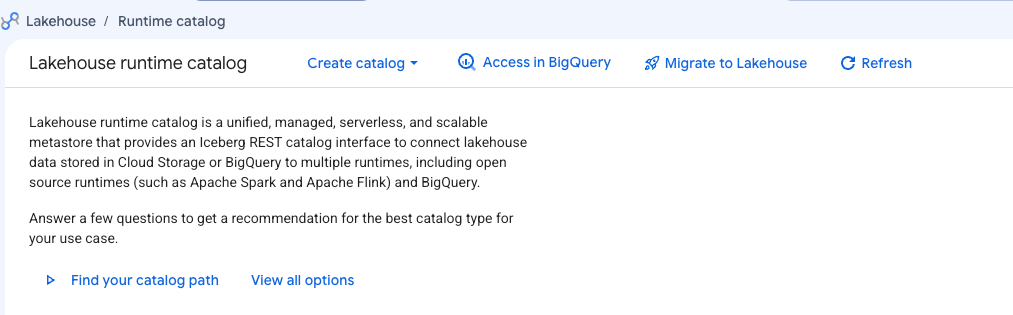
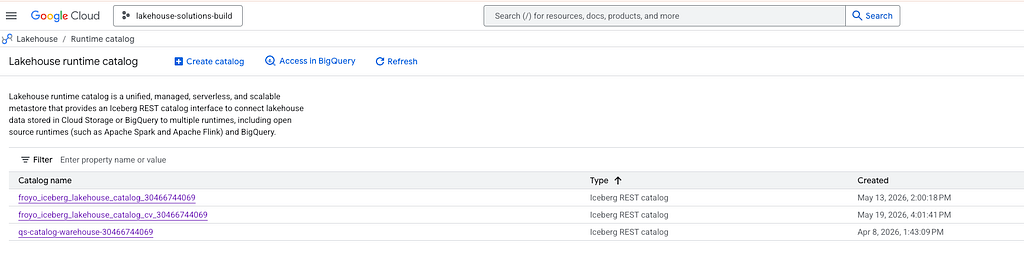
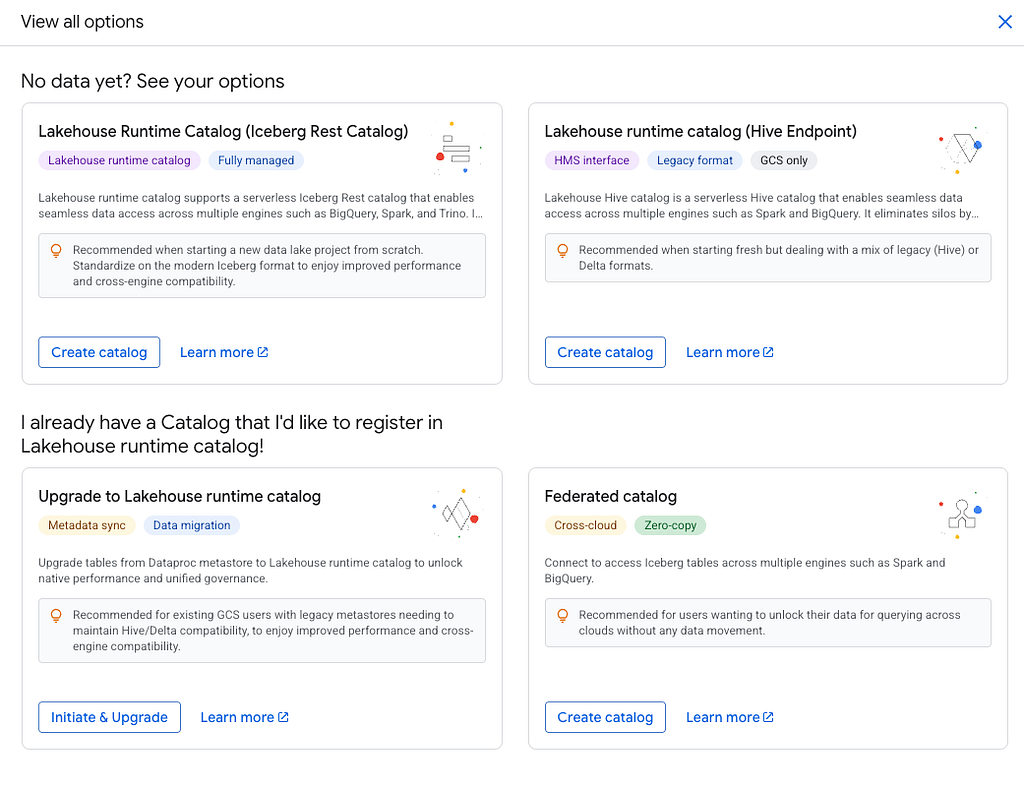
Lakehouse runtime catalog has a UI. Search for ‘Lakehouse’ in the Cloud Console, and you should see the UI as shown below.
4.9. Querying an Iceberg table authored by Spark, and registered in Lakehouse runtime catalog in BigQuery with BigQuery SQL
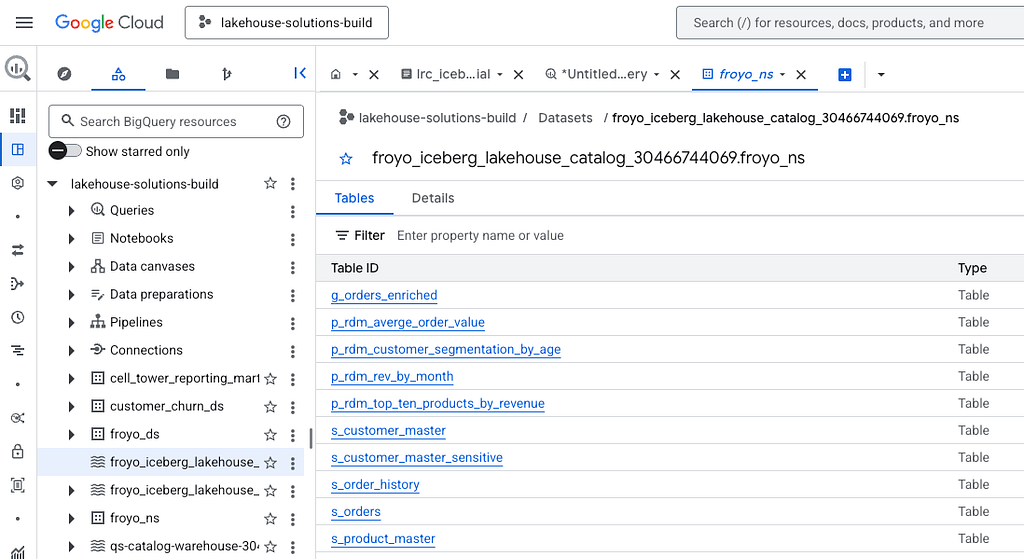
This is possible with the P.C.N.T syntax for the fully qualified table name in the BigQuery SQL query. P stands for GCP project ID, C for catalog ID, N for namespace, T for table name.
Here is the BigQuery UI with my Iceberg table listing. Note that this table was created via Spark.
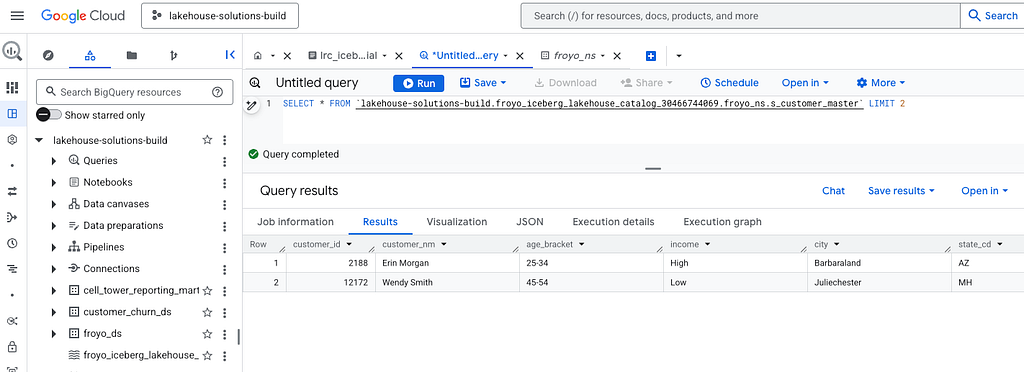
Here is the query:
SELECT * FROM
`lakehouse-solutions-build.froyo_iceberg_lakehouse_catalog_30466744069.froyo_ns.s_customer_master`
LIMIT 2
4.10. Mapping of a catalog to a lakehouse storage bucket
It is currently 1:1 — a catalog maps to exactly one lakehouse storage bucket. This is a limitation that will be removed in the near future.
4.11. Catalog location affiliation
The catalog inherits the region from the lakehouse bucket it maps to.
4.12. BigQuery and Apache Spark interoperability for Apache Iceberg tables
This feature will be released shortly and is nuanced. If you need early access, reach out to your Google Cloud account team.
4.13. Lakehouse engines supported
The lakehouse engines supported are Apache Spark, Apache Flink and Trino. Bigquery interoperability support is shipping soon.
4.14. Terraform support
Terraform support is available and more details are available here.
4.15. Automated Knowledge Catalog entries
If you are new to Google Cloud, Knowledge Catalog is a Gemini-powered data catalog that provides universal business context and governance for your entire data estate.
Entries get created automatically in Knowledge Catalog when a table is registered in the Lakehouse runtime catalog. There is periodic synchronization for alters and drops of tables.

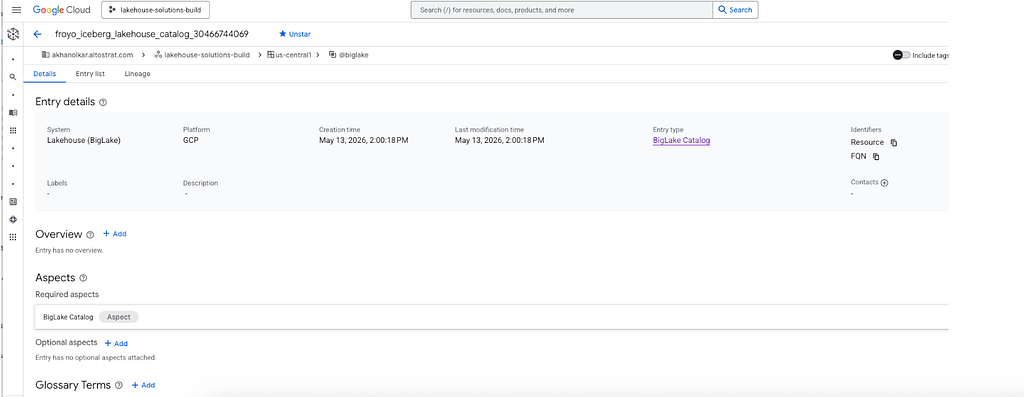
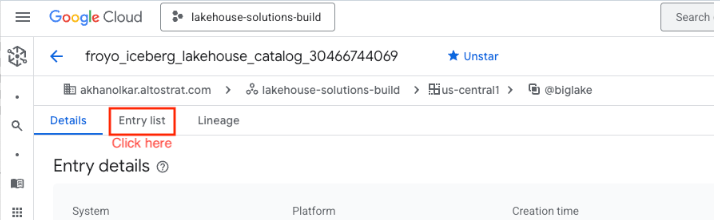
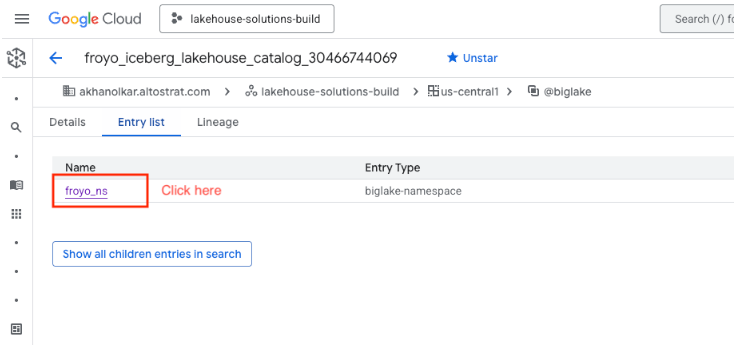

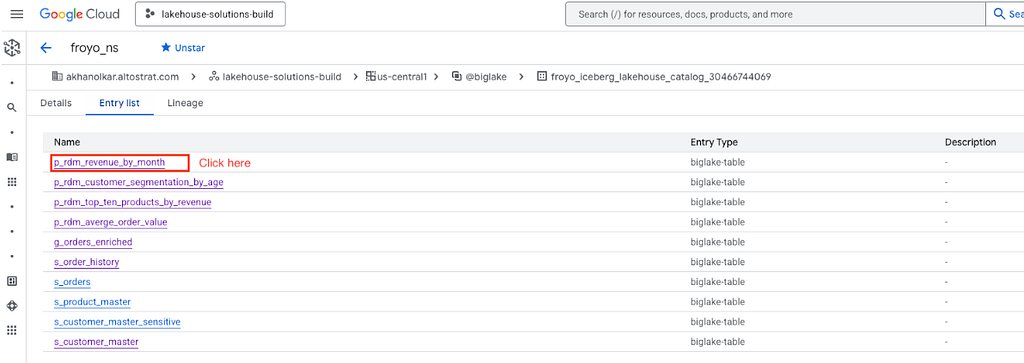

All of this is covered in the complementary hands-on lab.
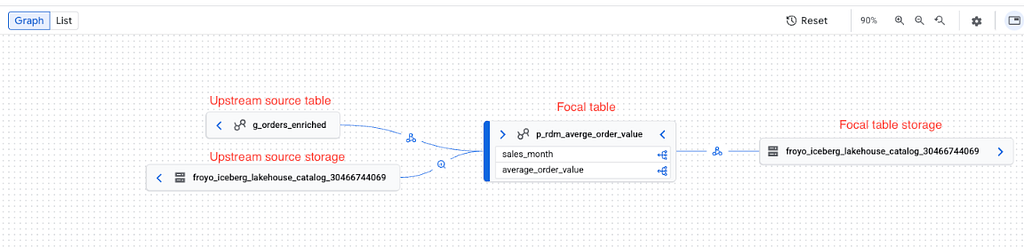
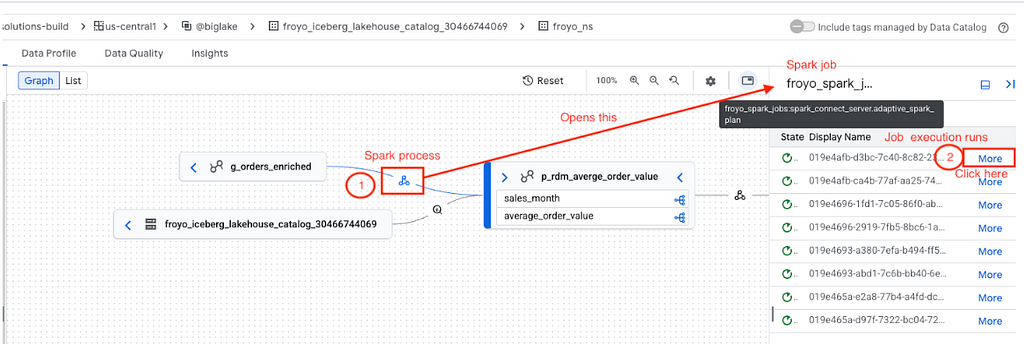
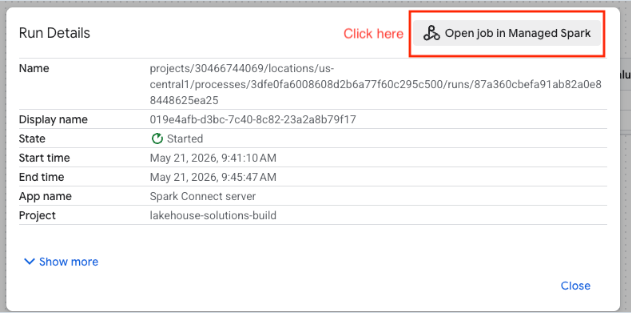
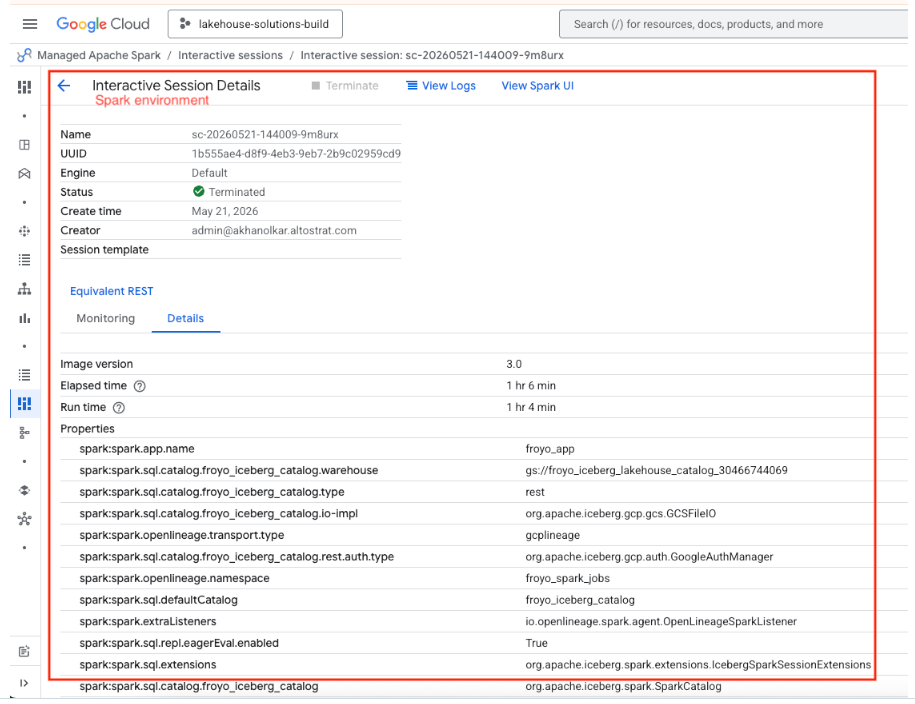
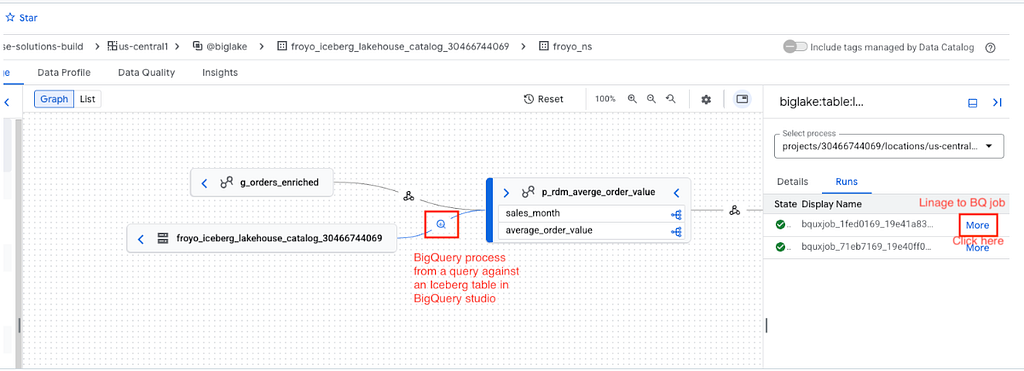
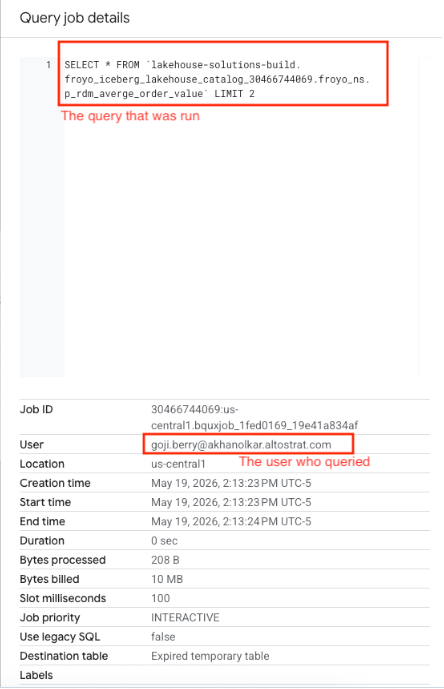
4.16. Automated data lineage capture of Iceberg tables in the Lakehouse runtime catalog
If the data lineage API is enabled in the GCP project, lineage is automatically captured. Here are samples from the complementary hands-on lab.

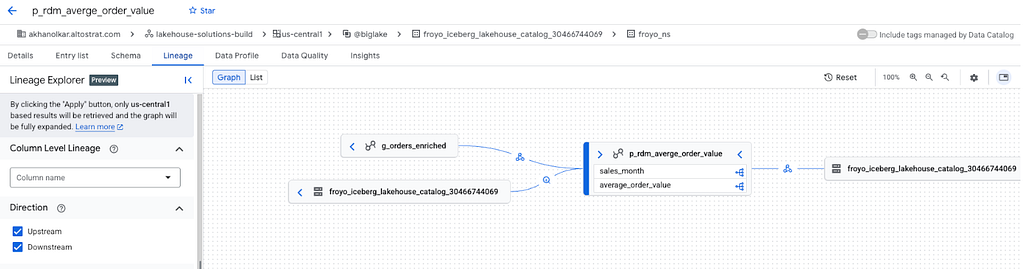

Now that we have squared away the basics, let’s look a little deeper, understand what else is there to the service — Lakehouse runtime catalog.
5. Anatomy of a query against a Lakehouse table from Spark
Now that we know what the Lakehouse runtime catalog is, how to create an Iceberg catalog and Spark configurations to access the catalog, lets understand what happens behind the scenes of a query submission to an Iceberg table registered in the Lakehouse runtime catalog (REST endpoint) from a lakehouse engine — Apache Spark.
- Metadata request: The lakehouse engine/Spark requests table metadata from the catalog to identify the table and its metadata location.
- Authorization: The catalog validates the request against configured Identity and Access Management (IAM) and fine-grained security policies/ACLs.
- Metadata response: The catalog returns the metadata to the lakehouse engine/Spark. If credential vending is enabled on the Iceberg catalog, the catalog also returns a short-lived token for secure storage access for the data associated with the Iceberg table in the Cloud Storage bucket.
- Data retrieval: The lakehouse engine/Spark uses the metadata as a map for the data files in Cloud Storage and optional token as a key for access and reads the data.
- Presentation: The lakehouse engine/Spark processes the data read and presents the results.
6. Lakehouse Iceberg runtime catalog management
For data engineers to start using the catalog, it should be created ahead of time. Lets review the catalog management activities, features, integration and dependencies.
Let’s look at what’s involved with managing catalogs.
6.1. IAM permissions needed
To manage the Lakehouse Iceberg Runtime Iceberg catalogs including catalog creation, two roles are needed — roles/biglake.admin and roles/storage.admin
6.2. Create a catalog
Already covered in previous section
6.3. Configure credential vending for the Iceberg catalog
Already covered in section 4.6
6.4. Get catalog details
The UI aspect is already covered in section 4.8. Getting catalog details via spark is covered in the hands-on lab.
6.5. Update the catalog
This is possible from the UI and with the gcloud command.
6.6. Import tables
You can import tables from external Apache Iceberg REST catalogs directly into your Lakehouse tables using Dataflow’s job builder UI.
6.7. Migrate from other catalogs
Covered further on
6.8 Delete a catalog
Drop all the tables, drop namespace and then delete catalog by unregistering a catalog metadata management endpoint from the Lakehouse runtime catalog.
6.9. Auditing
You can inspect Cloud Audit Logs for verifiable records of administrative and data access activities.
6.10. Knowledge Catalog entry automation
The Knowledge Catalog API need to be enabled.
6.11. Knowledge Catalog lineage capture automation
The Knowledge Catalog Lineage API need to be enabled.
7. Lakehouse Iceberg table management
There are no nuances to managing Iceberg tables in Lakehouse runtime catalog from Apache Spark. The complementary hands-on lab referenced further on, covers not just working with the catalog service, but also an Apache Iceberg primer.
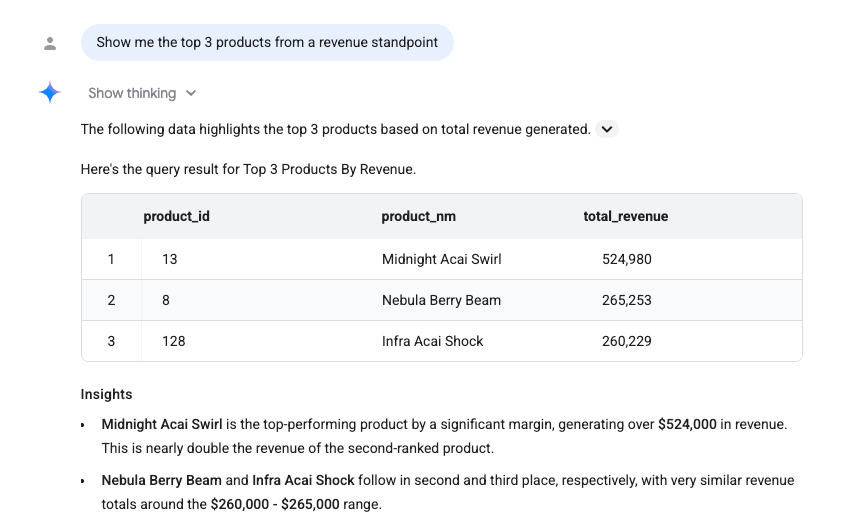
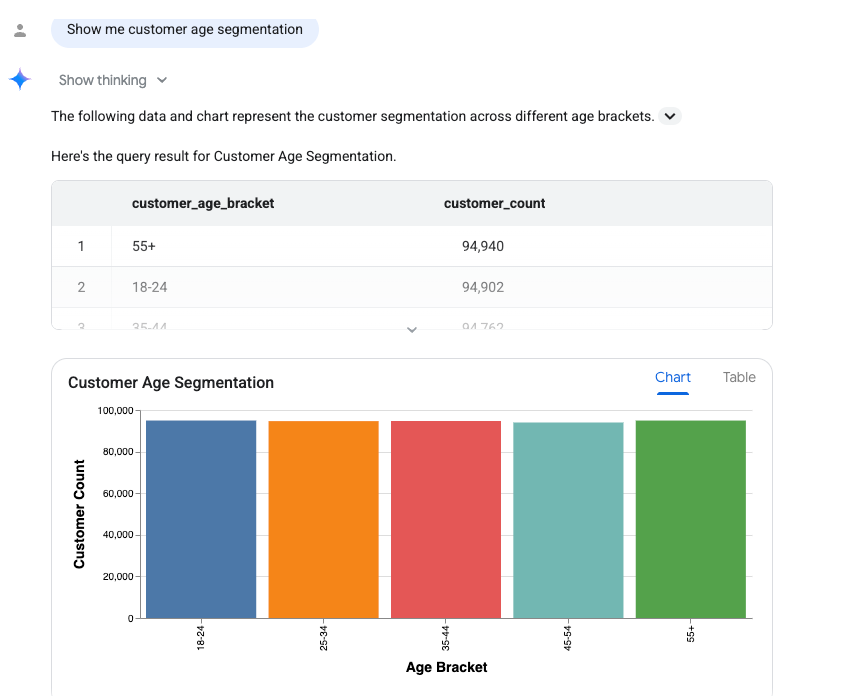
8. Conversational analytics with Iceberg tables in Lakehouse runtime catalog
I would be remiss if I don’t cover chatting with data. You can go to a table and click on the ‘chat’ icon and start asking questions. You can create an agent and publish it too.


9. Quotas
Tables registered in the Lakehouse runtime catalog are subject to the same quotas as standard/native tables in BigQuery.
10. Limitations / nuances
The below list of limitations of Iceberg tables in the Lakehouse runtime catalog is as of the authoring of this blog post in May 2026. Check the product documentation for the latest.
- At the time of authoring, the mapping of Iceberg catalog to lakehouse storage bucket was 1:1, with this limitation to be lifted in the future.
- Table renaming is not supported.
- Clustering is not supported.
- Apache Iceberg views is not supported
- Nested namespaces (sub-namespaces) are not supported.
- Row and column level security is currently not supported but is on the roadmap
- Data masking is currently not supported but is on the roadmap
11. Pricing
The pricing for Lakehouse runtime catalog can be found here for the ‘metastore’ aspect.
12. Availability & Disaster Recovery
There are two aspects to be considered when you plan for availability — the data and the metastore.
12.1. Data replication
For high availability, the underlying Lakehouse storage bucket should be configured highly available with a multi-region configuration at a minimum to protect against regional outages. For this, there is option to go with Google Cloud paired region for your primary region, or custom paired region to your primary for data and metadata replication in the Lakehouse storage bucket. This replication will happen seamlessly and is managed by the Google Cloud Storage service.
12.2. Metastore replication
The Lakehouse runtime catalog automatically selects primary and secondary regions for catalog metadata based on the Lakehouse storage bucket region configuration. The primary region processes all table commit metadata and behind the scenes replicates it to the secondary region.
12.3. Disaster recovery
Disaster recovery (DR) is not automatic. You can/have to switch/failover from primary to secondary — this includes during operational readiness DR testing as well as in the event of a regional failure.
There are two failovers modes: soft failover and hard failover.
a) Soft failover: Ensures data consistency. In this mode, the DR region begins to accept writes only after all data synchronizes from the (primary) region where there is an outage. This mode of soft failover is ideal for disaster recovery testing or any other planned events.
b) Hard failover: Prioritizes service availability over data consistency. In this mode, the DR region accepts write traffic, regardless of the primary region’s state, or the data synchronization (from primary to DR lakehouse bucket) state.
13. Observability
13.1. Logging
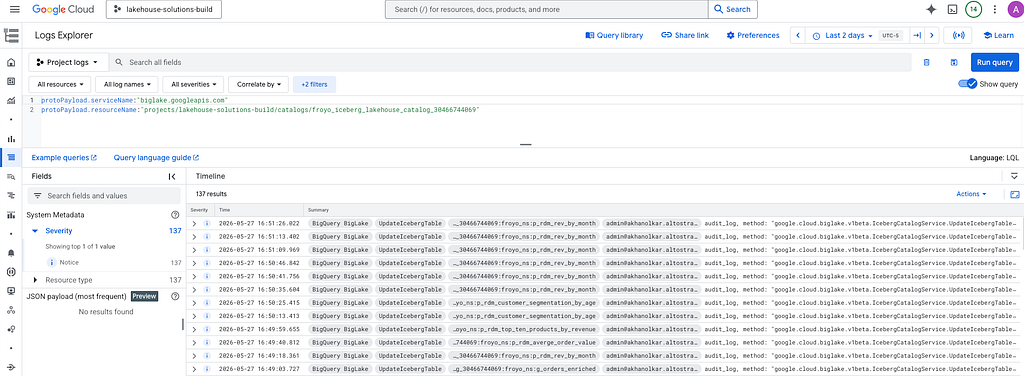
You can search for logs in Cloud Logging with these base filters and then adjust the time range. Be sure to update with your project and catalog name.
protoPayload.serviceName:"biglake.googleapis.com"
protoPayload.resourceName:"projects/YOUR_PRO/catalogs/froyo_iceberg_lakehouse_catalog_30466744069"
13.2. Monitoring
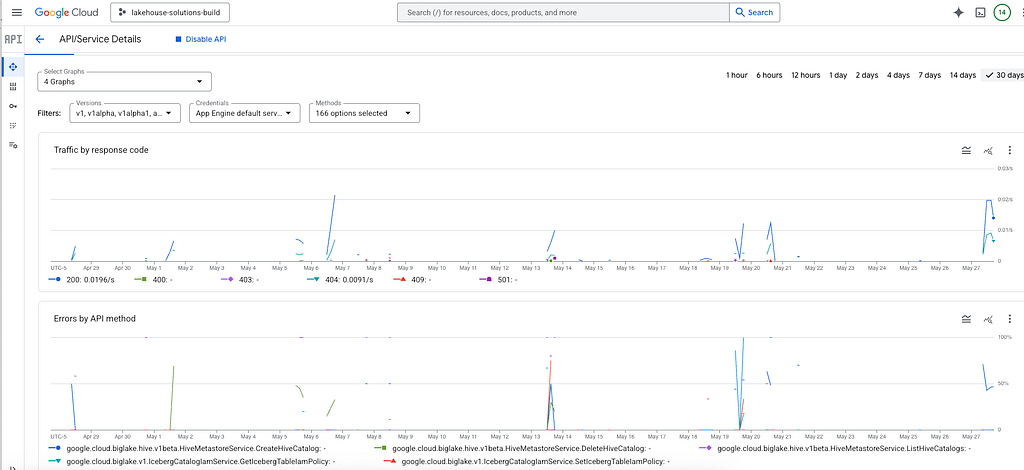
Monitoring metrics are not published. API level metrics are available by visiting the link below:
https://console.cloud.google.com/apis/api/biglake.googleapis.com/metrics?project=YOUR_PROJECT_ID
14. Active lakehouse
Active lakehouse on Google Cloud is essentially a closed-loop architecture seamlessly connecting AlloyDB, Spanner with BigQuery and Lakehouse.
We need to serve Lakehouse analytics to applications in near real-time while ensuring those analytics run on the freshest data from our operational databases. To achieve this, we offer the following features on Google Cloud:
- Replication: Continuously sync operational data from Spanner and AlloyDB into Iceberg tables through Datastream Changed Data Capture configuration.
- Reverse ETL: Serve Iceberg analytics at low latency in AlloyDB and Spanner through reverse ETL processes.
- Federation: Query data across operational and analytical systems instantly, with zero data movement.
15. Cross cloud lakehouse
Google Cloud announced new high-performance cross-cloud data solutions at NEXT 26 to overcome the egress costs and performance bottlenecks typically associated with accessing data across multiple clouds. This allows enterprises to seamlessly apply Google’s AI capabilities to their AWS and Azure data. The following are the key features:
AI-Native Cross-Cloud Lakehouse (Preview):
New interconnect and caching features allow BigQuery and Managed Spark to access AWS Iceberg (S3) data with the same price-performance as cloud-native platforms. This enables users to run Gemini-powered AI functions directly on their AWS data.
Interoperable Open Ecosystem:
A new Lakehouse catalog federation (Preview) integrates with AWS Glue, Databricks, SAP, and Snowflake. This allows for simple, centralized data discovery and bi-directional access across various clouds and partner engines without moving the data.
Centralized Security:
Advanced Lakehouse Governance (Preview) ensures that all security protocols and access permissions are immediately and uniformly enforced across this new cross-cloud environment.
More in the blog post and product documentation.
16. Lakehouse interoperable Iceberg tables
This topic is an honorary mention of a compelling feature to be available soon.
With the Lakehouse runtime catalog for Iceberg, Iceberg tables are interoperable from BigQuery and OSS engines like Spark, Flink, and Trino. This means DDL and DML can be run in BigQuery or a supported OSS engine and there is strong consistency for reads.
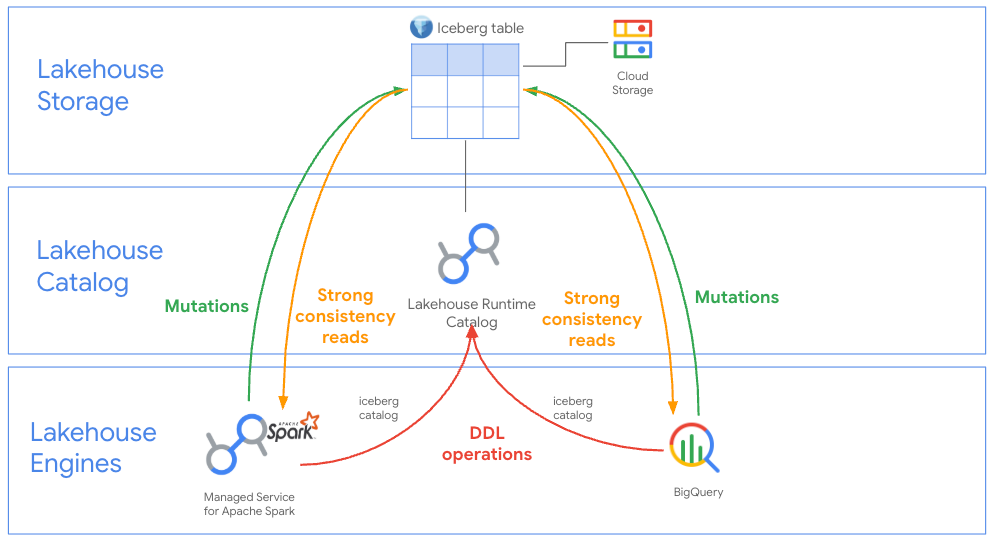
For high concurrency streaming workloads, advanced BigQuery optimizations can be configured for Iceberg tables, and a number of compelling BigQuery centric innovations and features are unlocked such as — for high-throughput upserts, BigQuery’s robust and mature Vortex engine, and continuous queries become available. With advanced BigQuery optimizations for Iceberg, multi-statement transactions and Changed Data Capture (CDC) are also unlocked. When you pivot to using advanced BigQuery optimizations, OSS engine reads and writes to the Iceberg table have to be via the BigQuery Spark Connector to the Iceberg table for strong consistency (almost like it were a native BigQuery table in Colossus file system instead of a Lakehouse table). However, the Iceberg data is still available in Cloud Storage with a small delay.
17. Migrations into Lakehouse runtime catalog for Iceberg
Data Analytics Migration Service offers tooling to migrate from external supported catalogs into Lakehouse runtime catalog for Iceberg. This is covered in depth, including calling out limitations, in the documentation.
18. Parquet conversions into Apache Iceberg tables in Lakehouse runtime catalog
There is tooling / solutions available to convert from plain old parquet to Iceberg for those wanting to expedite modernization.
19. Hive catalog (private preview)
The Hive catalog is in private preview. To try this feature, please reach out to your account team for allow-listing your Google Cloud project. I have included a hands-on lab for the Hive catalog — you can review this lab if you cant get allow-listed for it. The experience is somewhat seamless relative to Lakehouse runtime Iceberg catalog.
To get started:
- Create a Hive warehouse bucket
gsutil mb -p {PROJECT_ID} -l {LOCATION} gs://{LAKEHOUSE_BUCKET_NAME}
2. Create the Hive catalog
gcloud alpha biglake hive catalogs create {HIVE_CATALOG_NAME} --location-uri=gs://{LAKEHOUSE_BUCKET_NAME} --primary-location={LOCATION} --description=" hive catalog" --project={PROJECT_ID}
3. Create a Spark session with Hive catalog configuration
from google.cloud.dataproc_spark_connect import DataprocSparkSession
from google.cloud.dataproc_v1 import Session


import os
os.environ['DATAPROC_SPARK_CONNECT_DEFAULT_DATASOURCE'] = ""

session = Session()
session.runtime_config.properties = {
 "spark.hive.metastore.blms.project.id": PROJECT_ID,
 "spark.hive.metastore.blms.catalog.default": HIVE_CATALOG_NAME,
 "spark.hive.metastore.warehouse.dir": LAKEHOUSE_BUCKET_NAME,
 "spark.hive.metastore.client.factory.class": "com.google.cloud.bigquery.metastore.client.BigLakeMetastoreClientFactory",
 "spark.sql.catalogImplementation": "hive",
}


spark = DataprocSparkSession.builder.dataprocSessionConfig(session).getOrCreate()

print("Spark session created successfully")
4. Create a Hive database
spark.sql(f"CREATE DATABASE IF NOT EXISTS froyo_db;")
5. Create table
# Write to bronze layer / raw layer
customer_stage_df.write \
    .format("parquet") \
    .mode("overwrite") \
    .partitionBy("region_id") \
    .option("path", f"gs://{LAKEHOUSE_BUCKET_NAME}/froyo-raw/bronze/customer_master") \
    .saveAsTable("froyo_db.b_customer_master")
The hands on lab covers the above with a very basic sample.
20. Try it out with the complementary hands-on lab
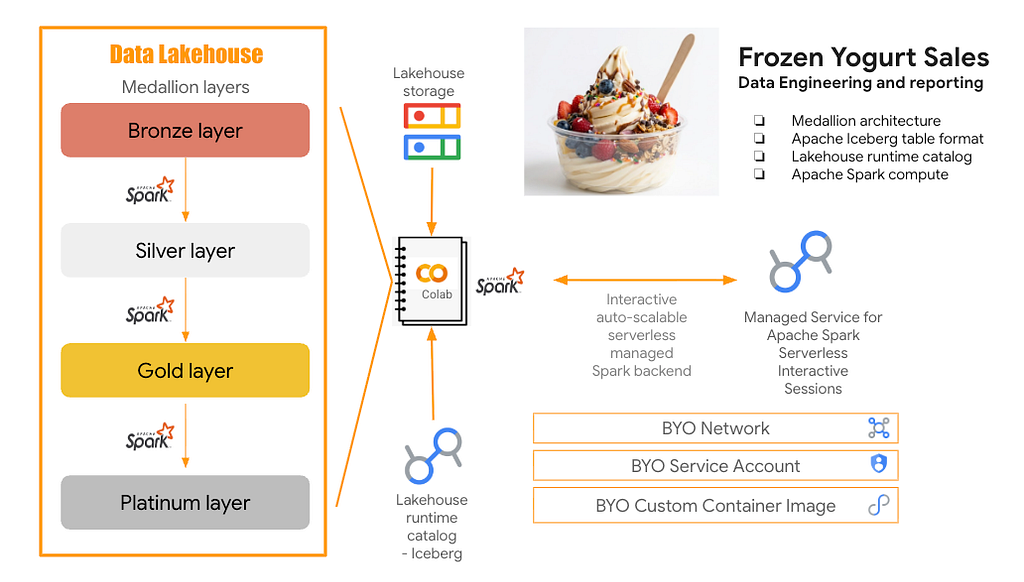
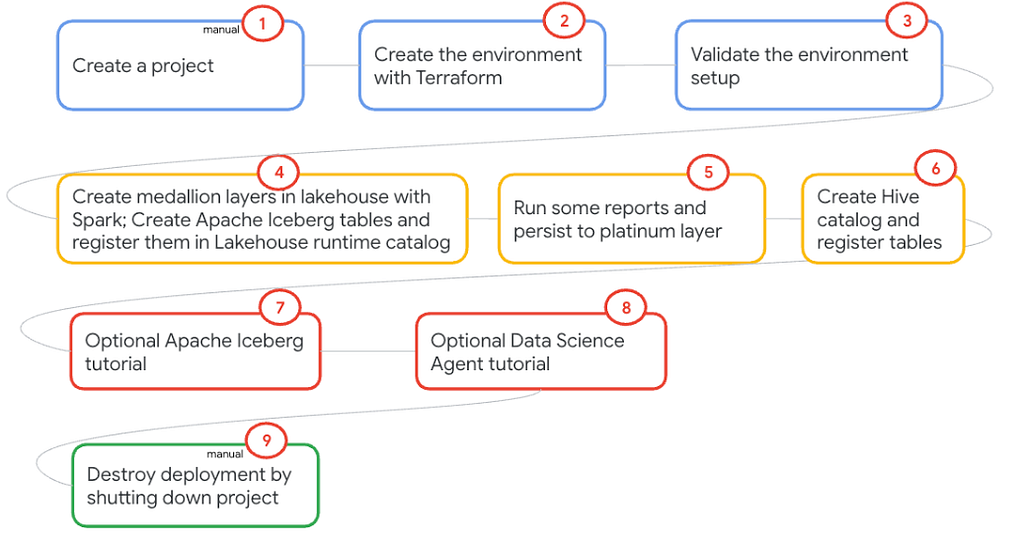
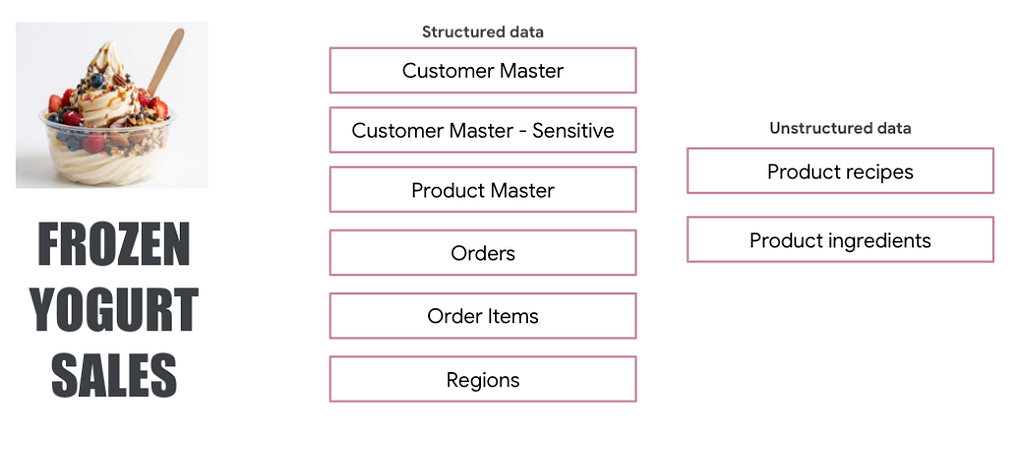
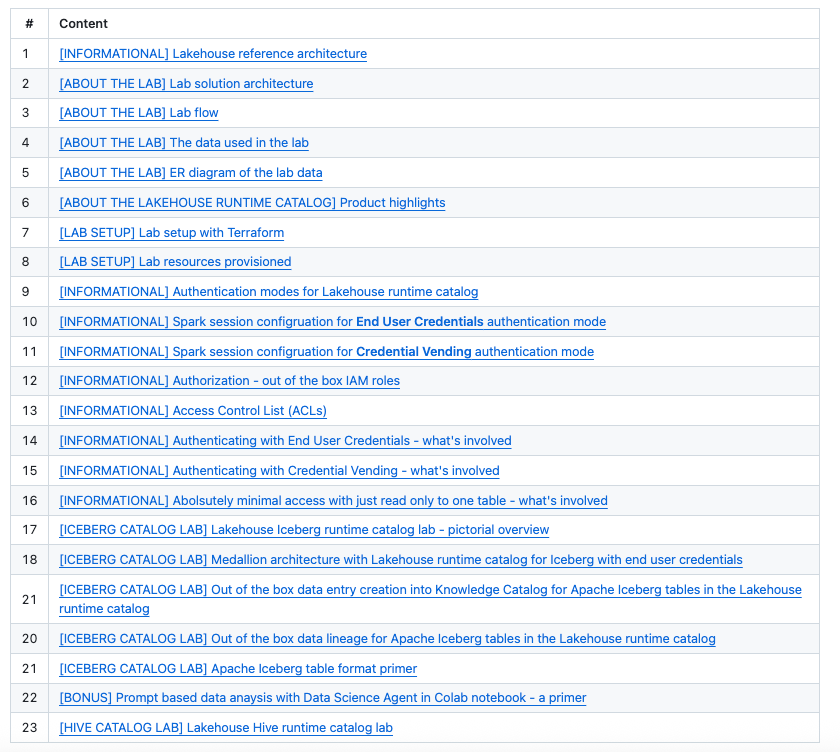
I have a minimum viable complementary hands-on lab if you are interested in kicking the tires. Optionally, you can read the lab content like a book. It’s pretty basic — builds a medallion layer — frozen yogurt retail sales data. It’s rich in visuals with many screenshots to help digest even if you can’t try out the lab. It includes Iceberg catalog as well as Hive catalog. Hive catalog is in preview. Reach out to your account team to be allow-listed to try it out.
What’s next
The next blog post will be about lakehouse pipeline orchestration with Apache Airflow. I will cover the Data Agent Kit for authoring DAGs as well as Managed Service for Apache Airflow (formerly called Cloud Composer).
Lakehouse Demystified blog series-
Part 1: Introduction to Lakehouse on Google Cloud
Part 2: Just enough about Managed service for Apache Spark — serverless batches
Part 3: Just enough about Managed service for Apache Spark — serverless interactive sessions for Spark notebooks
Part 4: Just enough about Lakehouse runtime catalog for Apache Iceberg and Hive (this blog)
Part 5: Just enough about Managed service for Apache Airflow for lakehouse pipeline orchestration
Part 6: Just enough about performance optimization with Managed service for Apache Spark
Part 7: Just enough about machine learning, generative AI and agents on the lakehouse on Google Cloud
Part 8: Just enough about Apache Iceberg table interoperability between Apache Spark and BigQuery
Part 9: Just enough about Managed Service for Apache Spark clusters
And more to come..
Lakehouse Demystified — Part 4: Just enough about Lakehouse runtime catalog was originally published in Google Cloud – Community on Medium, where people are continuing the conversation by highlighting and responding to this story.
Source Credit: https://medium.com/google-cloud/lakehouse-demystified-part-4-just-enough-about-lakehouse-runtime-catalog-ea489cb1d19d?source=rss—-e52cf94d98af—4
About the Author