
💡 Before You Read
This article uses native GKE features to apply the llm-d agentic-serving guide. While the upstream guide details a cohesive agentic deployment stack, and GKE documentation covers raw infrastructure primitives (GPUs, tolerations, RoCE/TCPX), this piece bridges the two. It provides a simplified overview — not a rigid blueprint — covering “The Memory Tax,” multi-turn memory tiering, and GKE-ready deployment manifests.
LLM agents are fundamentally transforming how we build software, but they are also introducing a brutal new challenge for infrastructure teams: The Memory Tax.
In a traditional single-turn LLM request, a user sends a prompt, the model generates a response, and the Key-Value (KV) cache is immediately discarded. But agentic workflows don’t work that way. Agents are multi-turn conversationalists; they think, call external APIs, wait for database loops, or pause for human-in-the-loop approval.
While the agent is waiting on an external tool or human input, its massive context window (the KV Cache) remains parked directly in the ultra-expensive High Bandwidth Memory (HBM/VRAM) of your GPU or TPU. If an agent spends 30 seconds waiting on a third-party API call, that accelerator memory is effectively held hostage — idly draining your compute budget and starving other requests.
To solve this, a modern stack has emerged natively on Kubernetes, with highly optimized implementations available on Google Kubernetes Engine (GKE). This stack leverages vLLM for local memory management, combined with llm-d (a CNCF Sandbox project) for distributed inference orchestration.
Here is how this architecture eliminates the memory tax through Prefill/Decode Disaggregation and Stateful KV Cache Routing.
Key Terminology
Before deep-diving into the request lifecycle, we are introducing a few core concepts to ensure a clear understanding of the architecture:
- Disaggregated Inference: An architectural pattern that separates the two phases of LLM generation (Prefill and Decode) onto distinct, specialized hardware nodes rather than running both on a single GPU.
- GKE Inference Gateway: A native Google Kubernetes Engine routing layer supporting both internal (gke-l7-rilb) and external (gke-l7-gxlb) GatewayClasses (including multi-cluster topologies). It manages incoming inference traffic by utilizing the Envoy External Processing (envoy.filters.http.ext_proc) filter to safely delegate stateful routing intelligence without heavy data-plane overhead.
- KV Cache (Key-Value Cache): A critical optimization in LLM inference where the mathematical representations (keys and values) of previous tokens are stored in memory. This prevents the model from recalculating the entire conversational context every time it generates a single new token.
- llm-d Endpoint Picker (EPP): The routing intelligence component of the llm-d orchestrator. It inspects incoming requests and calculates "affinity," ensuring traffic is sent to the specific Pod holding the warm cache for that session.
- Memory Tax: The operational friction and financial cost incurred when expensive accelerator memory (GPU VRAM / TPU HBM) is held hostage by idle agent workflows waiting on external APIs or database queries.
- Prefill: The compute-heavy initial phase of reading a prompt and generating the first token (and the initial KV cache).
- Decode: The memory-heavy, sequential phase of generating subsequent tokens one by one.
- Tiered KV Cache Offloading: The mechanism (handled locally by engines like vLLM) of evicting paused or idle KV caches from high-cost GPU VRAM down to cheaper host machine RAM, swapping it back only when the agent resumes generation.
The Architecture: End-to-End Request Lifecycle
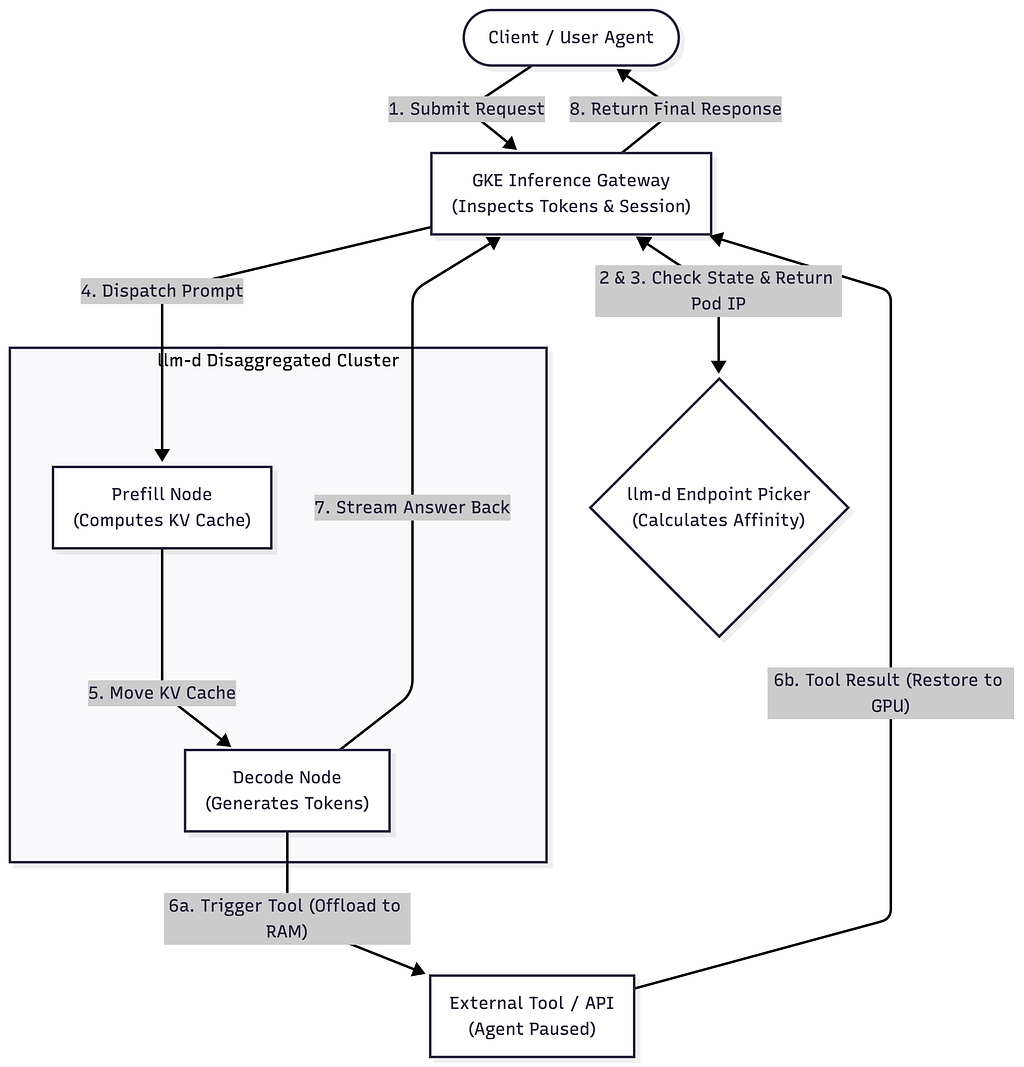
The diagram below represents the unified workflow of a multi-turn agent request flowing through a disaggregated GKE cluster optimized by llm-d.
Deconstructing the Workflow
1. Ingress & Intelligent Routing (Steps 1–3)
When a Client or User Agent initiates a request, it hits the GKE Inference Gateway. Instead of blindly round-robining the traffic to any available worker, the Gateway intercepts the incoming request and consults the llm-d Endpoint Picker (EPP) via an ext-proc gRPC call.
The EPP inspects the prompt’s session context and token footprint. It checks which node in the cluster already holds the “warm” prefix or historical context for this specific agent session, calculating precise cache affinity to return the exact Pod IP best equipped to handle the request.
2. Disaggregated Execution: Prefill to Decode (Steps 4–5)
Traditional inference engines run Prefill (the compute-heavy process of reading the prompt) and Decode (the memory-heavy process of generating tokens sequentially) on the same GPU. This causes “prefill stalls,” where a massive incoming prompt locks up the GPU and pauses token generation for dozens of other users.
To prevent this, the cluster is physically split into specialized resource pools:
- Prefill Nodes: High-compute machines (like NVIDIA H100s or Google TPUs) that ingest the prompt and rapidly construct the initial KV cache tensor.
- Decode Nodes: High-memory, highly-scalable nodes optimized for sequential token generation.
Once the Prefill node finishes processing the prompt, the raw KV cache state is efficiently streamed over the network directly to the designated Decode node.
3. The Multi-Turn Tool Loop & Eviction (Steps 6a–6b)
This is where we explicitly dodge the “Memory Tax.”
As the Decode Node generates tokens, the model decides it needs to execute an action (e.g., querying a database or hitting an external API). The Decode Node triggers the External Tool and enters a paused state. Instead of letting the agent’s KV cache sit idly in the GPU’s VRAM during this network wait, vLLM tiers the memory. It proactively offloads the agent’s KV cache tensors out of expensive VRAM and down into the host machine’s cheaper CPU RAM. The GPU is immediately freed up to process tokens for other active requests.
When the external tool completes its execution, it sends the tool result back through the Inference Gateway. The Gateway talks to the EPP, identifies the correct Decode node where the session resides, and routes the tool output there. vLLM instantly swaps the cached context back from CPU RAM to the GPU VRAM, resuming generation seamlessly.
4. Stream and Response (Steps 7–8)
Once the model successfully completes its task, the Decode Node streams the final output tokens back through the GKE Inference Gateway, which safely flushes the response back to the client and clears the session state.
A Real-World Example: The Travel Agent AI
To see how this architecture translates to a real-world scenario, imagine a user interacting with an AI travel agent on your platform.
User Prompt: “What is the weather in Paris right now? If it is sunny, look up flights for tomorrow.”
Here is exactly what happens under the hood:
- The Gateway & Endpoint Picker (Routing): The user hits “Send.” The prompt arrives at the GKE Inference Gateway. The gateway asks the EPP, “Have we seen this user recently?” Because this is a brand new conversation, the EPP assigns the request to the best available compute node.
- The Prefill Node (Heavy Reading): The prompt is sent to a Prefill Node (a massive, compute-heavy GPU like an H100). The GPU’s only job is to read those 18 words, understand the context, and mathematically compress them into a KV Cache (the agent’s memory).
- Moving to the Decode Node (Generating Text): Instead of keeping that memory on the expensive Prefill GPU, the architecture instantly streams the KV Cache over the network to a Decode Node (a different, memory-optimized GPU). The Decode Node begins generating the response one word at a time: “Let me check the weather in Paris…”
- The Tool Call & The Pause (The “Memory Tax” Moment): To actually check the weather, the LLM triggers an external API call to a weather service. The agent must now pause and wait for the weather API to reply.
- CPU Offloading (Saving the GPU): In a traditional setup, the agent’s memory would sit on the Decode GPU doing nothing while waiting for the network, blocking other users. Instead, vLLM kicks in. It instantly grabs the user’s KV Cache and moves it out of the ultra-expensive GPU VRAM and drops it into cheap, standard CPU RAM. The Decode GPU immediately pivots to answer a different customer’s question.
- Swapping Back In: Three seconds later, the weather API replies: “Sunny, 25°C.” The result flows back through the GKE Gateway. The EPP knows exactly which Decode Node was handling this conversation. It routes the weather data there, and vLLM instantly pulls the user’s memory from the CPU RAM back up into the GPU.
- The Final Response: The Decode Node resumes exactly where it left off, generating the rest of the text: “…It is currently sunny and 25°C! I am now looking up available flights for tomorrow.” (If the agent needs to search a flight database, it will trigger another tool call, offload to CPU RAM again, and repeat the cycle until the final answer is complete).
Beyond the First Prompt: The Conversation Loop & Prefix Caching
When a user replies to the travel agent, the new request conceptually contains the entire history of the conversation (Prompt 1 + Response 1 + Prompt 2). If you were running a naive, stateless infrastructure, the model would be forced to run a massive, computationally expensive Prefill on the entire growing chat history every single time the user typed a new message.
Because the llm-d Endpoint Picker remembers exactly which server handled the first turn of the conversation, it routes the user's second message back to that exact same machine. Here is how it processes the ongoing chat without overloading the hardware:
- Cache Hit: vLLM instantly recognizes the beginning of the prompt (Prompt 1 + Response 1) as a “prefix” it has already computed. It skips the Prefill phase entirely for those historical words.
- Delta Prefill: The Prefill phase only executes on the brand new words the user just typed. It digests these new words in one shot and appends their mathematical state to the existing KV Cache.
- Decode: The model drops immediately into the Decode phase to generate the next reply.
As a conversation goes on for 50 turns, the KV Cache grows linearly. However, the compute required for the Prefill phase stays incredibly small, because the model is only ever prefilling the newest user message. This exact mechanism is why offloading idle caches to CPU RAM during tool calls is so critical. It is vastly cheaper to move the massive, pre-computed memory block to RAM and back than it is to throw it away and force the GPU to re-prefill a 50-turn conversation from scratch.
Advanced GKE Configurations for Disaggregated Serving
GKE does not magically separate these phases for you. As the infrastructure engineer, you must provision two distinct GKE Node Pools with different hardware profiles and utilize specific Kubernetes manifests to ensure high-performance execution, network availability, and memory stability.
Below are advanced baseline manifests to help you get started. Keep in mind that these configurations must be rigorously load-tested and tuned depending on your specific model sizes, context window requirements, and agentic use cases.
1. Prefill Worker Manifest (Compute-Heavy)
Prefill nodes process massive prompt tensors. On GKE, these are typically high-end accelerator nodes (e.g., A3 VMs with NVIDIA H100s or Google TPUs) utilizing multi-network interfaces for ultrafast KV cache streaming.
apiVersion: apps/v1
kind: Deployment
metadata:
  name: llmd-vllm-prefill-worker
  namespace: agentic-serving
spec:
  replicas: 2
  selector:
    matchLabels:
      app.kubernetes.io/name: vllm-prefill
      llm-d.io/role: prefill
  template:
    metadata:
      labels:
        app.kubernetes.io/name: vllm-prefill
        llm-d.io/role: prefill
      annotations:
        # Mandatory for streaming large KV Cache tensors over GPUDirect TCPX/RoCE high-bandwidth networks
        networking.gke.io/interfaces: |
          [
            {"interfaceName":"eth0","network":"default"},
            {"interfaceName":"eth1","network":"gke-accelerator-net-0"},
            {"interfaceName":"eth2","network":"gke-accelerator-net-1"}
          ]
    spec:
      # 1. Tolerations: Mandatory because GKE automatically taints all GPU/TPU nodes
      tolerations:
      - key: "nvidia.com/gpu"
        operator: "Exists"
        effect: "NoSchedule"
      - key: "cloud.google.com/gke-accelerator"
        operator: "Exists"
        effect: "NoSchedule"
      # 2. Node & Accelerator Affinity: Explicit hardware & node pool targeting
      affinity:
        nodeAffinity:
          requiredDuringSchedulingIgnoredDuringExecution:
            nodeSelectorTerms:
            - matchExpressions:
              - key: cloud.google.com/gke-nodepool
                operator: In
                values: ["gpu-prefill-pool"]
              - key: cloud.google.com/gke-accelerator
                operator: In
                values: ["nvidia-h100-80gb"] # Or tpu-v5p-slice
      containers:
      - name: vllm-prefill
        image: vllm/vllm-openai:latest
        command: ["python3", "-m", "vllm.entrypoints.openai.api_server"]
        args:
          - "--model=meta-llama/Llama-3.1-70B-Instruct"
          - "--gpu-memory-utilization=0.95"
          - "--kv-transfer-config={'kv_role':'kv_producer','kv_connector':'PyNcclConnector'}"
        resources:
          limits:
            nvidia.com/gpu: "4" # GKE Device Plugin requires explicit integer device limits
            memory: "256Gi"
            cpu: "32"
          requests:
            nvidia.com/gpu: "4"
            memory: "256Gi"
            cpu: "32"
        volumeMounts:
        - name: dshm
          mountPath: /dev/shm
      # 3. Shared Memory: Required by vLLM for high-speed PagedAttention IPC
      volumes:
      - name: dshm
        emptyDir:
          medium: Memory
          sizeLimit: "64Gi"
2. Decode Worker Manifest (Memory & Scale Optimized)
Decode workers process sequential token generation and perform frequent Tiered KV Cache Offloading (swapping between GPU VRAM and host CPU RAM during external tool calls).
apiVersion: apps/v1
kind: Deployment
metadata:
  name: llmd-vllm-decode-worker
  namespace: agentic-serving
spec:
  replicas: 6
  selector:
    matchLabels:
      app.kubernetes.io/name: vllm-decode
      llm-d.io/role: decode
  template:
    metadata:
      labels:
        app.kubernetes.io/name: vllm-decode
        llm-d.io/role: decode
      annotations:
        # Mandatory: Attaches the Decode pod to secondary RoCE/TCPX networks so it can receive KV cache streams from Prefill pods at wire speed
        networking.gke.io/interfaces: |
          [
            {"interfaceName":"eth0","network":"default"},
            {"interfaceName":"eth1","network":"gke-accelerator-net-0"},
            {"interfaceName":"eth2","network":"gke-accelerator-net-1"}
          ]
    spec:
      tolerations:
      - key: "nvidia.com/gpu"
        operator: "Exists"
        effect: "NoSchedule"
      - key: "cloud.google.com/gke-accelerator"
        operator: "Exists"
        effect: "NoSchedule"

      affinity:
        nodeAffinity:
          requiredDuringSchedulingIgnoredDuringExecution:
            nodeSelectorTerms:
            - matchExpressions:
              - key: cloud.google.com/gke-nodepool
                operator: In
                values: ["gpu-decode-pool"]
              - key: cloud.google.com/gke-accelerator
                operator: In
                values: ["nvidia-h100-80gb", "nvidia-a100-80gb"] # Multi-network capable accelerator tiers

        # Prevent multiple decode workers from packing onto the same underlying host if scaling out
        podAntiAffinity:
          preferredDuringSchedulingIgnoredDuringExecution:
          - weight: 100
            podAffinityTerm:
              labelSelector:
                matchExpressions:
                - key: llm-d.io/role
                  operator: In
                  values: ["decode"]
              topologyKey: "kubernetes.io/hostname"

      containers:
      - name: vllm-decode
        image: vllm/vllm-openai:latest
        command: ["python3", "-m", "vllm.entrypoints.openai.api_server"]
        args:
          - "--model=meta-llama/Llama-3.1-70B-Instruct"
          - "--gpu-memory-utilization=0.90"
          - "--swap-space=64" # Crucial: Allocates 64GB of CPU RAM for Tiered KV Cache Offloading during tool calls
          - "--kv-transfer-config={'kv_role':'kv_consumer','kv_connector':'PyNcclConnector'}"
        resources:
          limits:
            nvidia.com/gpu: "1"
            memory: "128Gi"
            cpu: "16"
          requests:
            nvidia.com/gpu: "1"
            memory: "128Gi"
            cpu: "16"
        volumeMounts:
        - name: dshm
          mountPath: /dev/shm

      volumes:
      - name: dshm
        emptyDir:
          medium: Memory
          sizeLimit: "32Gi"
Why These Enhancements Matter
- Mandatory GPU Tolerations (tolerations): GKE automatically applies the [nvidia.com/gpu:NoSchedule] (and/or [cloud.google.com/gke-accelerator:NoSchedule]) taint to every accelerator node pool to prevent standard CPU workloads from scheduling onto expensive GPUs. If a manifest specifies nodeAffinity without matching tolerations, the pod will remain stuck in Pending indefinitely.
- Explicit Accelerator Targeting ([cloud.google.com/gke-accelerator]): Targeting both the node pool ([cloud.google.com/gke-nodepool]) and the specific GPU architecture label ([cloud.google.com/gke-accelerator]: nvidia-h100-80gb) ensures that prefill workloads never accidentally land on lower-bandwidth GPUs (e.g., L4s or T4s) during cluster scaling.
- Multi-Network Annotations (networking.gke.io/interfaces): When streaming massive KV cache tensors over the network between Prefill and Decode workers, standard 10Gbps/50Gbps VPC networking can become a major bottleneck. Annotating the pod to attach to GKE's secondary high-bandwidth GPU networks (gke-accelerator-net-* via GPUDirect RoCE/TCPX) ensures wire-speed memory transfers across nodes.
- Shared Memory Size Limit (/dev/shm): vLLM relies heavily on PyTorch tensor IPC and PagedAttention memory mapping in /dev/shm. By default, Kubernetes allocates a tiny 64MB tmpfs volume for /dev/shm, causing vLLM to crash with Bus error (core dumped) under heavy load. Mounting an emptyDir backed by Memory (sizeLimit: "64Gi") is mandatory for high-throughput serving.
- Explicit CPU Host RAM Allocation for Swapping (–swap-space): For Decode workers to successfully offload idle KV caches during 30-second external tool calls, vLLM must be explicitly configured with adequate –swap-space=64 (in gigabytes) and corresponding container memory requests (128Gi+) so the host OS doesn't OOM-kill the pod when VRAM blocks are moved to system RAM.
From Theory to Production: Draft Guideline in 6 Steps
To deploy this disaggregated serving architecture on a GKE cluster, follow the six core implementation steps documented in the upstream llm-d Agentic Serving Guide:
- Install Gateway API CRDs: Apply the official Kubernetes SIG Custom Resource Definitions (InferencePool, InferenceModel) documented under Prerequisites to register Envoy ext_proc sidecar hooks.
- Provision Dedicated GKE Node Pools: Provision distinct GPU node pools (cloud.google.com/gke-nodepool) matching the Supported Hardware Backends with secondary high-bandwidth RoCE/TCPX network interfaces enabled.
- Deploy the llm-d Router: Install the intelligent Endpoint Picker Protocol (EPP) router using the Router Helm Values (agentic-serving-gpu.values.yaml) to enable prefix-cache and token-load scoring.
- Deploy Disaggregated vLLM Workers: Apply the Model Server Kustomize Overlays launching Prefill pods (kv_producer) and Decode pods (kv_consumer) with –swap-space configured for host CPU RAM tool-loop offloading.
- Verify the Gateway & EPP Router: Retrieve the Gateway Service endpoint and execute synthetic request verification as outlined under Verification.
- Connect Agent Harness & Benchmark: Point your OpenAI-compatible agent workflow (–base-url http://<GKE_GATEWAY_IP>/v1) to the cluster and validate multi-turn tool pauses using the Agentic Benchmarking Workload Templates.
Why This Architecture Wins
1. Maximized Hardware ROI: By offloading idle agent contexts to system RAM during tool calls, your expensive GPUs spend 100% of their time calculating matrices rather than waiting on third-party network APIs.
2. Zero Prefill Stalls: Disaggregating the prefill and decode layers ensures that a sudden spike in long agent prompt submissions won’t degrade the time-to-first-token (TTFT) or generation throughput of ongoing sessions.
3. Linear Scalability on GKE: GKE handles the horizontal autoscaling of your Prefill and Decode node pools independently based on their unique bottlenecks (Compute vs. Memory), keeping infrastructure costs tightly aligned with actual traffic characteristics.
References & Further Reading
Google Cloud / GKE Public Documentation:
- Schedule GPUs on GKE (Explicitly details mandatory nvidia.com/gpu:NoSchedule tolerations and accelerator node labels).
- Maximizing GPU bandwidth with GPUDirect TCPX on GKE (Details networking.gke.io/interfaces annotations).
- Set up multi-network support for Pods
- About GKE Inference Gateway
- Configure GKE Service Extensions (ext_proc)
- Google Cloud Docs: Multi-Network Support for Pods
- Google Cloud Docs: Configure Automated Networking for Accelerators
- Google Cloud Docs: Maximizing GPU Bandwidth & GPUDirect/RoCE on GKE
- Google Cloud Docs: Accelerator-Optimized Machines (A3 VMs)
llm-d & Endpoint Picker Protocol (EPP):
- GitHub: llm-d/guides/agentic-serving
- GitHub: Endpoint Picker Protocol (EPP Spec)
vLLM & PagedAttention:
- vLLM Documentation
- vLLM Docs: PagedAttention Design
- vLLM Deployment & Kubernetes FAQ (Explains /dev/shm emptyDir memory mounts).
A Deep Dive into High-Efficiency Agentic Serving on GKE with vLLM and llm-d was originally published in Google Cloud – Community on Medium, where people are continuing the conversation by highlighting and responding to this story.
Source Credit: https://medium.com/google-cloud/a-deep-dive-into-high-efficiency-agentic-serving-on-gke-with-vllm-and-llm-d-298379d93106?source=rss—-e52cf94d98af—4
About the Author