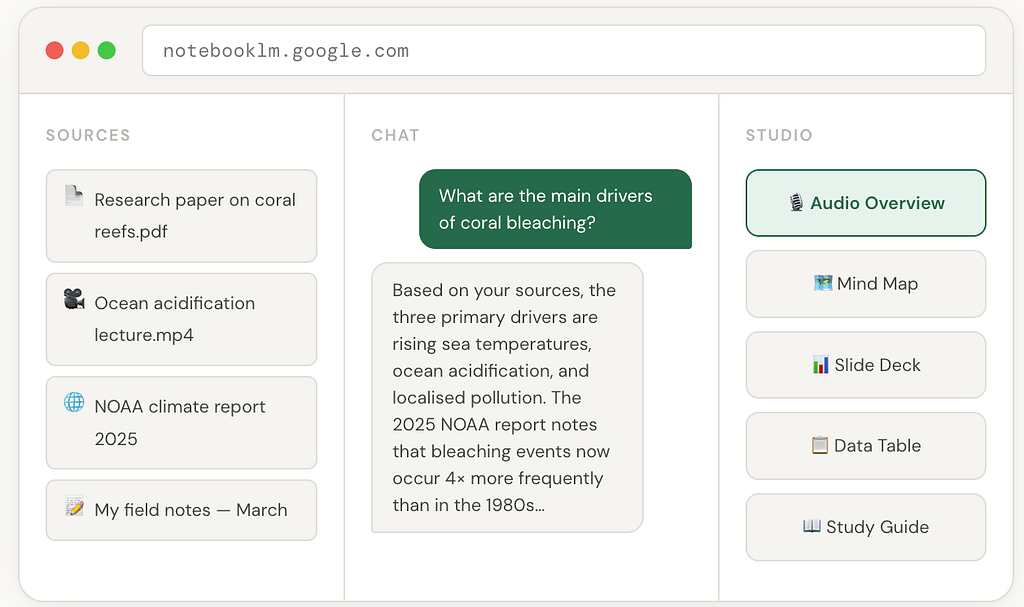
It turns your PDFs, videos, and notes into a podcast, a slide deck, a mind map, and a research assistant, all at once. Here’s everything it can do, and why it matters.
Most AI tools treat your documents as an afterthought. You paste in some text, ask a question, and hope the model doesn’t hallucinate something from its training data instead of your actual source. It happens constantly, and it’s maddening.
NotebookLM is built on a completely different philosophy. It only knows what you give it. Upload five research papers, a YouTube transcript, and a Google Doc and NotebookLM’s entire world becomes those five things. Every answer it gives is grounded in your sources, cited with direct links back to the passage it pulled from. No wandering off into the internet. No confabulating facts it doesn’t have.
It sounds like a simple constraint, but in practice it changes everything.
“What if an AI could read everything on a topic for you — and then have a conversation about it?”
Where it came from
NotebookLM started life in May 2023 as Project Tailwind, an experimental tool from Google Labs. The concept was straightforward: give an AI model access to your personal documents and let it help you think through them. It was described at the time as “an AI-powered notebook.”
In 2024 Google rebranded it as NotebookLM and opened it more broadly to researchers, students, and enterprise users. The team behind it includes author Steven Johnson, whose books on innovation and complexity perhaps explain the tool’s unusually thoughtful design philosophy.
What made it viral, though, wasn’t the interface or the citations. It was one feature nobody expected.
The Audio Overview that broke the internet
In late 2024 Google quietly shipped a feature called Audio Overview. You upload your sources, click a button, and within a few minutes NotebookLM generates a podcast. Not a robotic text-to-speech readout — an actual two-host discussion, with the AI hosts banter, finishing each other’s sentences, saying things like “wait, that’s fascinating” and asking follow-up questions as if they’re genuinely curious.
People lost their minds. Writers uploaded their manuscripts and listened to two AI hosts debate their chapter structure. Academics uploaded 40-page papers and got a 12-minute podcast summarising the key findings. Students uploaded their lecture notes and studied on their commute.
By the numbers
In the three months after Audio Overviews launched, users generated over 350 years’ worth of content, measured in total listening time. It became one of the most-shared AI demos of 2024.
Then in December 2024 Google made it interactive. You can now join the conversation. Tap a button mid-podcast and ask the hosts a question. They pause, address you directly, and fold your question back into the discussion. It is genuinely uncanny.
What NotebookLM can actually do in 2026
The tool has grown dramatically since that viral moment. Here’s the full picture of what it can do today:
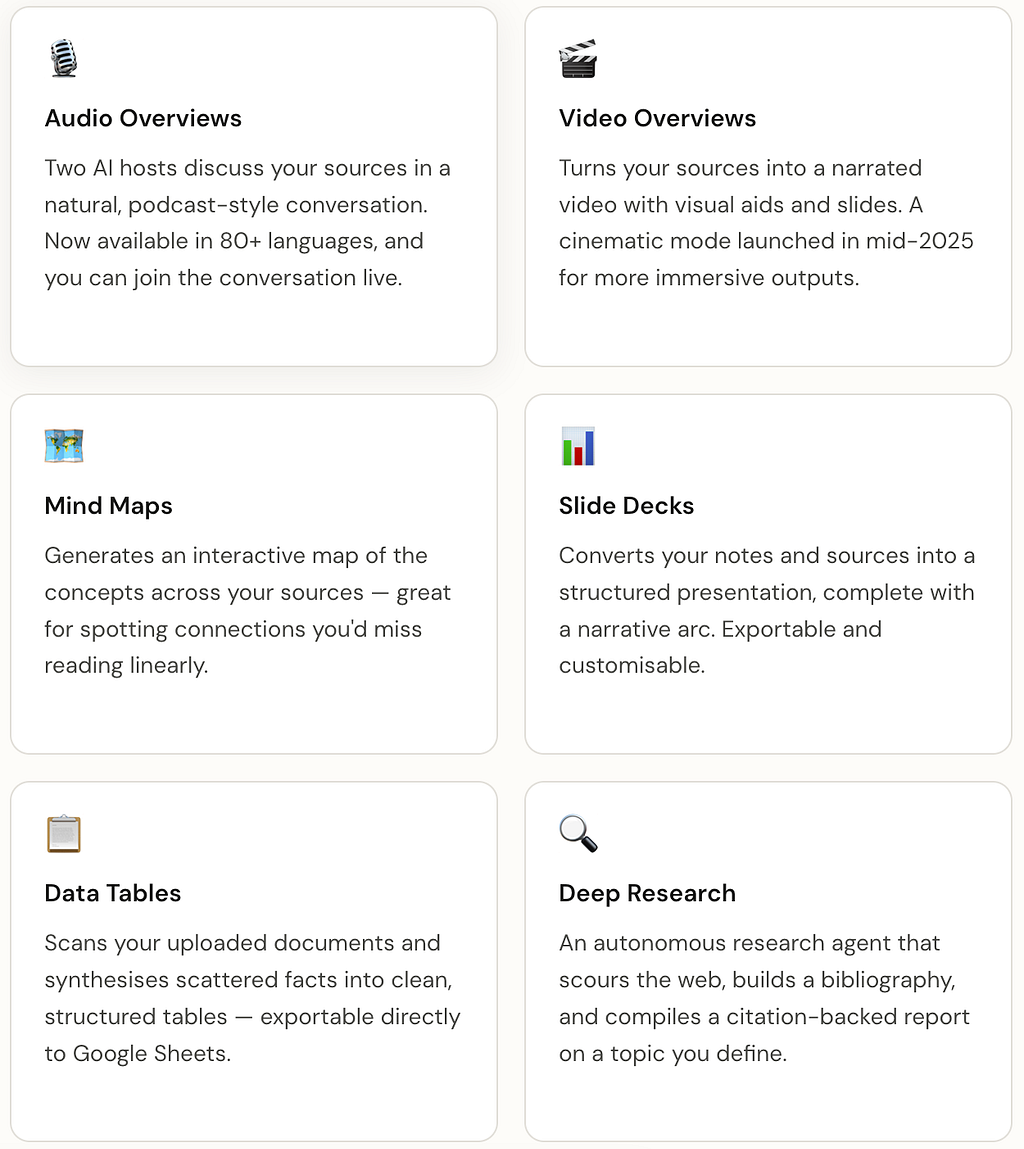
And underlying all of this, since early 2026, the engine is Gemini 3. That means significantly better reasoning across complex texts, stronger multimodal understanding (it can now read charts and images inside your PDFs, not just the text), and meaningfully fewer hallucinations.
The source types it accepts
One thing that surprises people is how broadly NotebookLM defines “source.” It isn’t just PDFs. You can feed it:
Supported sources
PDFs (including charts and images inside them) · Google Docs · Google Slides · web URLs · YouTube video links · audio files (MP3, WAV) · plain text and Markdown · and now web discovery, it can find related sources from the web and pull them in automatically.
The multimodal PDF support, added in 2025, is particularly useful for scientists and researchers. Upload a paper with figures, graphs, and tables and NotebookLM will reason about those visuals, not just the surrounding text. Ask it “what does Figure 3 show in the context of the Methods section?” and it will answer coherently.
Who is actually using it
NotebookLM’s user base is fascinatingly broad. The same tool is being used by PhD students synthesising literature reviews, journalists building source libraries for long-form investigations, lawyers organising case documents, and secondary school teachers turning their curriculum materials into study guides for students.
One of the more creative use cases: Spotify used the Audio Overview feature to generate personalised podcast-style summaries for their 2024 Wrapped campaign, each user got a mini AI podcast discussing their own listening habits.
“The same tool used to write a doctoral thesis is also being used to recap your favourite albums of the year.”
Free vs. Plus — what’s the difference?
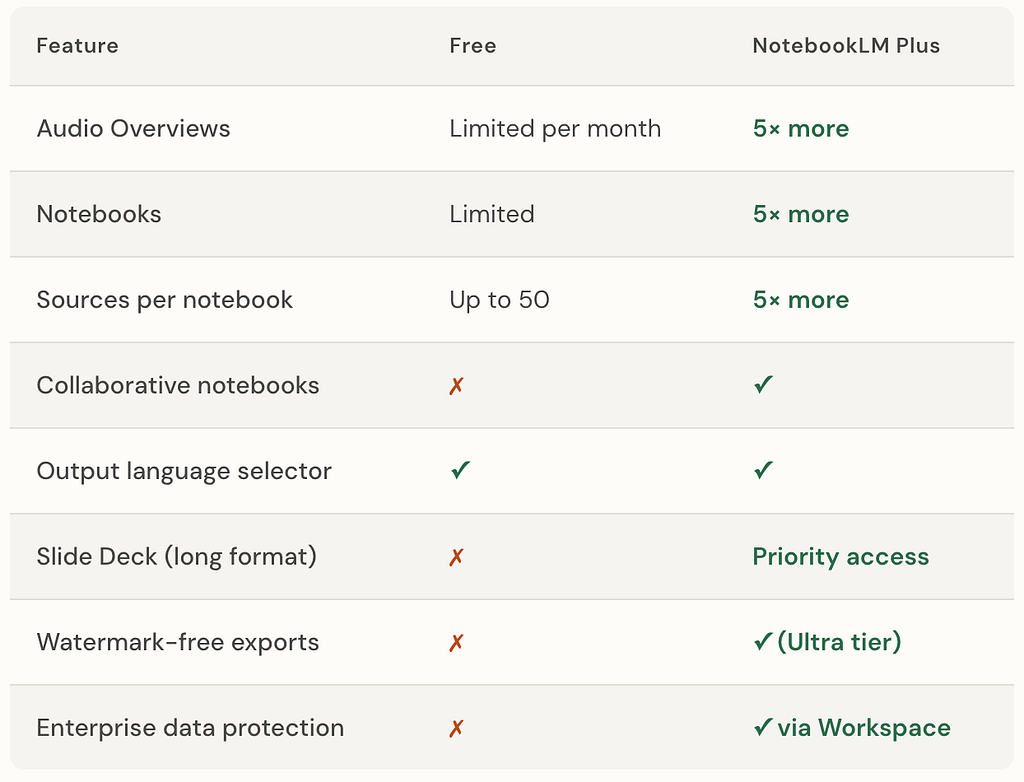
NotebookLM Plus is included in the Google One AI Premium plan and is also available for organisations through Google Workspace. For teams doing serious research work, the collaborative notebooks and higher source limits make the upgrade straightforward to justify.
What makes it different from just using ChatGPT
The most common question: why not just paste my documents into a general-purpose AI?
Three reasons. First, grounding. NotebookLM will not answer from anything outside your sources. Every claim comes with a citation, and clicking the citation takes you to the exact passage. General AI models blend your documents with their training data in ways that are hard to audit.
Second, scale. You can upload 50 or more sources and have a single conversation that ranges across all of them simultaneously. No general-purpose chat interface handles that cleanly.
Third, output formats. Nobody else is generating interactive podcasts, video summaries, and exportable slide decks from your source material in one place. The Studio panel is genuinely its own thing.
One honest limitation
Audio Overviews are currently only available in English for the spoken audio, even though you can upload sources in 35+ languages and chat in your preferred language. This is the feature users outside the English-speaking world most want fixed and it’s reasonable to expect it will be.
How to get started in five minutes
Go to notebooklm.google.com and sign in with a Google account. Create a new notebook. Upload two or three documents on a topic you're working on — PDFs, URLs, a YouTube link, whatever you have. Wait a few seconds for NotebookLM to process them.
Then do two things before you do anything else. Open the Chat panel and ask a question that cuts across all your sources ; something like “what do these sources agree on, and where do they contradict each other?” Then go to the Studio panel and generate an Audio Overview. Listen to the first two minutes.
That’s the moment most people become converts. The feeling of hearing your own research discussed back to you, coherently, engagingly, accurately is unlike anything else in the current AI landscape.
The bigger picture
NotebookLM represents something genuinely new in the AI tool space: a product that is more opinionated about what it won’t do than what it will. It won’t browse the web unprompted (unless you use Deep Research deliberately). It won’t answer from its training data. It won’t give you a response it can’t source.
In an era of AI systems that confidently make things up, that constraint is a feature, not a limitation. It’s a tool built for people who care about where the information comes from and in research, journalism, law, and academia, that’s everyone who matters.
The Audio Overviews went viral because they’re impressive. But NotebookLM is worth using because it’s trustworthy. In 2026, that’s the rarer achievement.
NotebookLM is the AI research tool I wish had existed in university was originally published in Google Cloud – Community on Medium, where people are continuing the conversation by highlighting and responding to this story.
Source Credit: https://medium.com/google-cloud/notebooklm-is-the-ai-research-tool-i-wish-had-existed-in-university-6e9e9b32ad92?source=rss—-e52cf94d98af—4
About the Author