A practical introduction to managed agents on the Gemini API
At Google I/O 2026 (May 20, 2026), Google announced managed agents on the Gemini API.
What is a managed agent?
Managed agents on the Gemini API give you a configurable agent harness. A single API call provisions a Linux sandbox where the agent reasons, executes code, manages files, and browses the web autonomously. Unlike a standard LLM call that returns text, you are getting a persistent compute environment where the agent acts, produces files, and can be resumed across multiple turns.
The default agent is called Antigravity Agent: a general-purpose managed agent powered by Gemini 3.5 Flash, using the same harness as the Antigravity IDE. It comes with built-in tools for code execution (Bash, Python, Node.js), web search, and URL fetching. Filesystem tools are enabled automatically when you attach an environment. You can use it as-is or extend it with your own instructions, skills, and data to build a custom agent.
This article accompanies a codelab I built in collaboration with Mete Atamel, Developer Advocate at Google. It is a gentle, hands-on introduction to managed agents using a practical example: a daily tech digest agent that fetches headlines, writes editorial summaries, and generates a PDF.
This article is an overview. The codelab walks through every step in full detail with concept explanation.
A powerful new solution
What used to take weeks now takes a couple of config files.
Take the tech digest use case as a concrete example. Before managed agents, building this yourself meant choosing a web scraping library, installing and learning it, writing a scraping script, writing a summarization layer, writing a PDF renderer, containerizing the whole pipeline, and running it somewhere. Multiple scripts, multiple decisions, significant implementation work, before you had produced a single digest.
With managed agents, you describe what you want done. The agent decides which packages to install, how to fetch the pages, how to structure the output, and how to produce the PDF. It writes and runs the code itself inside the sandbox. Google handles the runtime, the tools, the filesystem, and the web access. You write config, not implementation.
The pattern holds regardless of the use case. Any task that involves browsing the web, writing and running code, managing files, or producing an artifact can now be built in a fraction of the time. That is the shift managed agents represent, and the possibilities are practically endless.
How managed agents compare to building it yourself
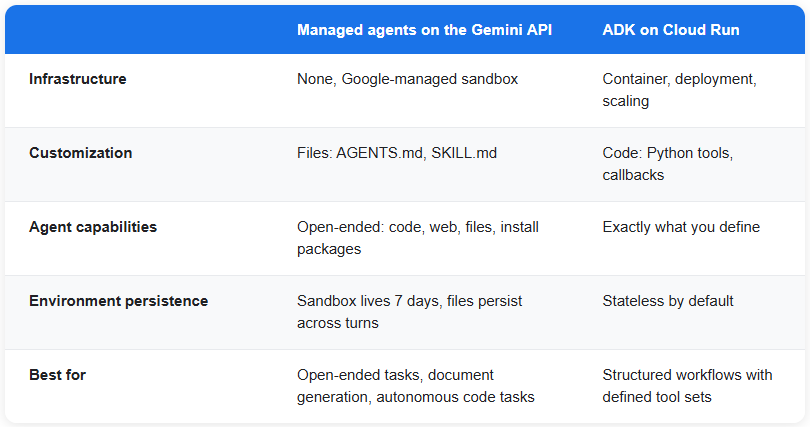
With frameworks like ADK or LangGraph, you still make all the implementation decisions: you define tools as Python functions, decide which libraries to use, write the glue code, build a container, and deploy it. You control the agent precisely, which is valuable for structured workflows where you know exactly what the agent needs to do.
Managed agents are a different trade-off. You give up some of that precise control, and in return the agent takes on the implementation decisions. It figures out which packages to install, writes the code, runs it, checks the output, and corrects course if something fails. You describe the goal; the agent handles the how.
This is not always the right choice. For well-defined workflows with a fixed set of tools, ADK gives you more predictability. But for tasks that involve open-ended research, multi-step code execution, or producing file artifacts, managed agents significantly reduce the amount of work you have to do.
What you learn
The tech digest is the running example, but it is not the point. The codelab teaches the core mechanics of managed agents: how they are created, configured, and extended.
By the end, you will know how to:
1. Make your first agent call and stream the response event by event
2. Customize the agent using AGENTS.md and skills mounted into the sandbox filesystem
3. Work with environments: the persistent Linux sandbox that retains files and state across turns
4. Build multi-turn conversations: resume the same sandbox with `environment_id` and `previous_interaction_id`
5. Save your configuration as a named agent and invoke it by ID in future runs
The core idea: one API call, a full agent loop
Here is the complete first call:
from google import genai

client = genai.Client()

stream = client.interactions.create(
    agent="antigravity-preview-05-2026",
    input="Fetch the Hacker News front page and list the top 5 stories.",
    stream=True,
    environment="remote",
)
environment=”remote” provisions a fresh Ubuntu sandbox with Python 3.12, Node.js 22, git, pip, and curl pre-installed. The Antigravity agent runs inside it, with three built-in tools available: code_execution (run Bash, Python, Node.js), google_search, and url_context (fetch and read web pages). Filesystem tools (`read_file`, `write_file`, `list_files`) are enabled automatically when you pass the `environment` parameter.
No container to build. No deployment to run. The sandbox is managed by Google.
Customizing the agent with AGENTS.md and skills
The real power comes in the Customize step. Instead of passing a long system prompt string, you mount configuration files directly into the sandbox filesystem at startup
stream = client.interactions.create(
    agent="antigravity-preview-05-2026",
    input="",
    stream=True,
    environment={
        "type": "remote",
        "sources": [
            {
                "type": "inline",
                "target": ".agents/AGENTS.md",
                "content": AGENTS_MD,
            },
            {
                "type": "inline",
                "target": ".agents/skills/digest-pdf/SKILL.md",
                "content": SKILL_MD,
            },
            {
                "type": "inline",
                "target": ".agents/skills/digest-pdf/scripts/generate_pdf.py",
                "content": GENERATE_PDF_PY,
            },
        ],
    },
)
AGENTS.md defines the editorial voice and the full workflow: which sources to fetch, how many stories per source, how to write the summaries, where to save the PDF. Once it is loaded, `input` can be empty: the agent reads AGENTS.md at startup and proceeds autonomously.
SKILL.md is a step-by-step playbook the agent follows to generate the PDF. `generate_pdf.py` is the pre-built renderer it runs inside the sandbox.
Watching the agent work: live streaming
Because PDF generation can take a minute, the codelab streams the response so you can watch the agent work in real time. This is the agent actually reasoning and acting inside the sandbox, not a model returning text:
agent started]
  [tool] read_file (/.agents/skills/digest-pdf/SKILL.md)
  [tool] list_files (/.agents/skills/digest-pdf/scripts)
  [tool] read_file (/.agents/skills/digest-pdf/scripts/generate_pdf.py)
  [tool] run_code
  [tool] write_file (/workspace/summaries.json)
  [tool] run_code
I have successfully generated today's tech digest and saved it to /workspace/digest.pdf.
Done. environment_id=4129ffd75574e308748e9425d7ec828f
The event stream includes `step.start`, `step.delta`, and `interaction.completed` events. The codelab includes a pre-built `run_stream()` helper that handles the event loop, prints progress with filenames, and returns `(environment_id, interaction_id)` for use in subsequent steps.
Multi-turn: refining the digest without re-fetching
The sandbox persists for 7 days after it goes idle. `environment_id` is your handle back to it. Pass it to a second call along with `previous_interaction_id` and the agent resumes on the same filesystem, with the same files and conversation history:
stream = client.interactions.create(
    agent="antigravity-preview-05-2026",
    input="Add a one-line 'Why it matters' note under each story.",
    environment=environment_id,
    previous_interaction_id=interaction_id,
    stream=True,
)
The agent picks up where it left off. It reads `summaries.json`, adds the notes, and regenerates the PDF. No re-scraping. No re-running the full workflow.
Saving as a named agent
Once you are happy with the configuration, save it as a named agent:
agent = client.agents.create(
    id="my-digest",
    base_agent="antigravity-preview-05-2026",
    base_environment={
        "type": "remote",
        "sources": [...],
    },
)
Future calls become simple:
stream = client.interactions.create(
    agent="my-digest",
    input="",
    stream=True,
    environment="remote",
)
The config is baked in on Google’s side. No need to re-upload AGENTS.md or the skill files on every call.
Try the hands-on codelab
For a hands-on deep dive into each of these concepts with detailed explanation, follow the codelab: Build a Managed Tech Digest Agent with the Gemini API
You will need a Gemini API key from aistudio.google.com. The codelab runs entirely in Cloud Shell, so there is nothing to install locally.
Managed agents are generally available. The shift they represent is already real. We are only at the beginning of what that unlocks.
Build a Managed Tech Digest Agent with the Gemini API was originally published in Google Cloud – Community on Medium, where people are continuing the conversation by highlighting and responding to this story.
Source Credit: https://medium.com/google-cloud/build-a-managed-tech-digest-agent-with-the-gemini-api-e560240b3fee?source=rss—-e52cf94d98af—4
About the Author