If you’ve built AI agents, you know they can go off-script. See here for an amusing example.
Prompt engineering and system instructions just aren’t enough. Long conversations make models forget rules, and stuffing prompts with “dos and don’ts” degrades performance and spikes token costs.
System instructions are a suggestion; callbacks are a contract.
Standard safety filters catch basic stuff like PII (Personally Identifiable Information) or toxic language, but they don’t understand business logic. They can’t distinguish between, for example, a user asking for raw stock data (allowed) versus a user asking for investment advice (blocked).
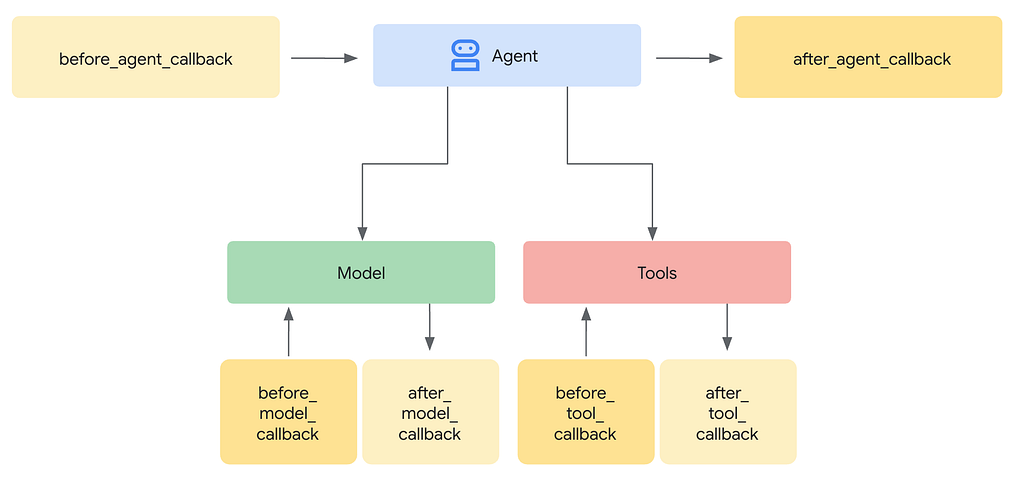
To build reliable agents, you need hard execution boundaries. Google’s Agent Development Kit (ADK) solves this with Agent Callbacks. Think of them as middleware for your agent’s execution pipeline.
Why Callbacks Matter
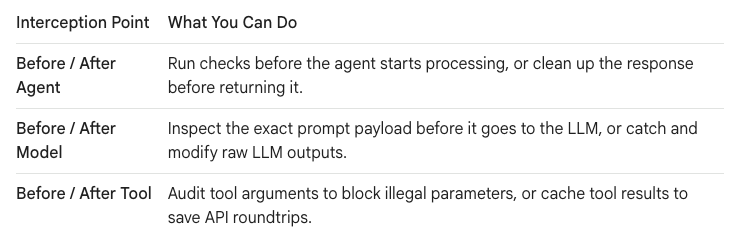
Instead of hoping your LLM behaves, callbacks let you run standard Python code at critical stages of the execution cycle.
The Goal: Our Stock Quote App
Let’s look at a concrete example. We are building a stock assistant agent called pro_advisor. Its job is to pull financial data and analyze stock tickers for users. You can find the code for it at https://github.com/miguegutGoogle/adk-financial-advisor.
Because financial tech is highly regulated, we can’t just let the LLM say whatever it wants. We need to enforce four specific guardrails on our application:
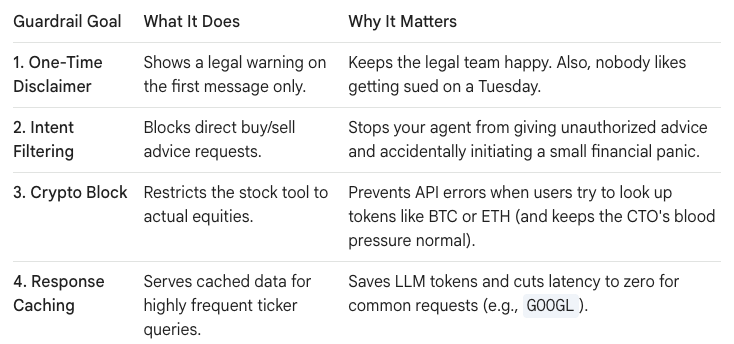
To see how these four guardrails fit together in practice, here is a map of where each one hooks into our agent:
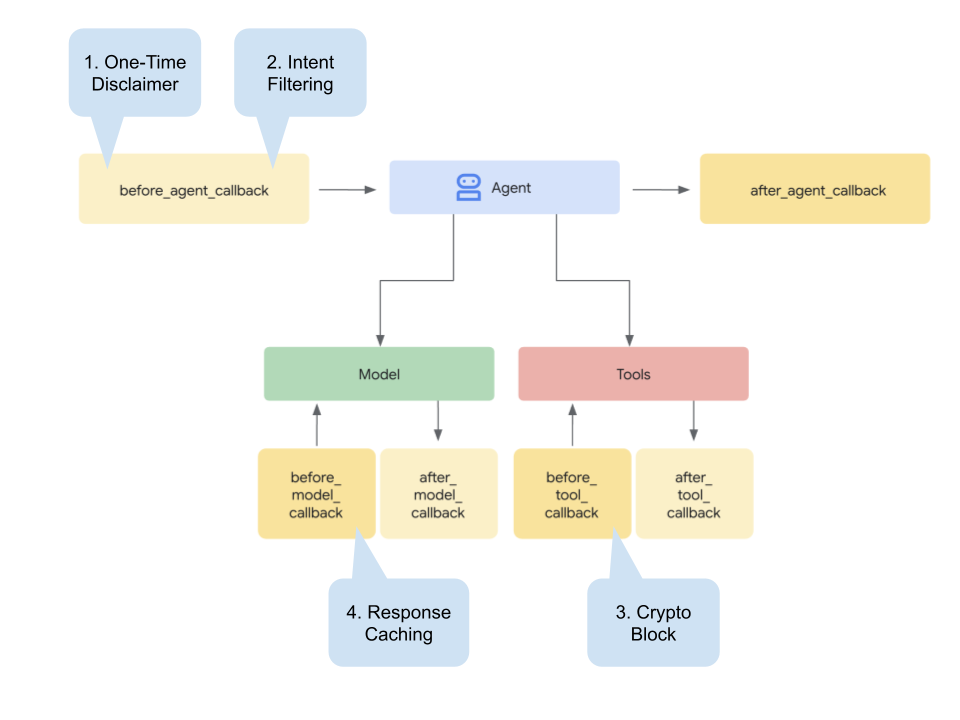
The Code
Here is how you write these guardrails in Python.
1. One-time Disclaimer
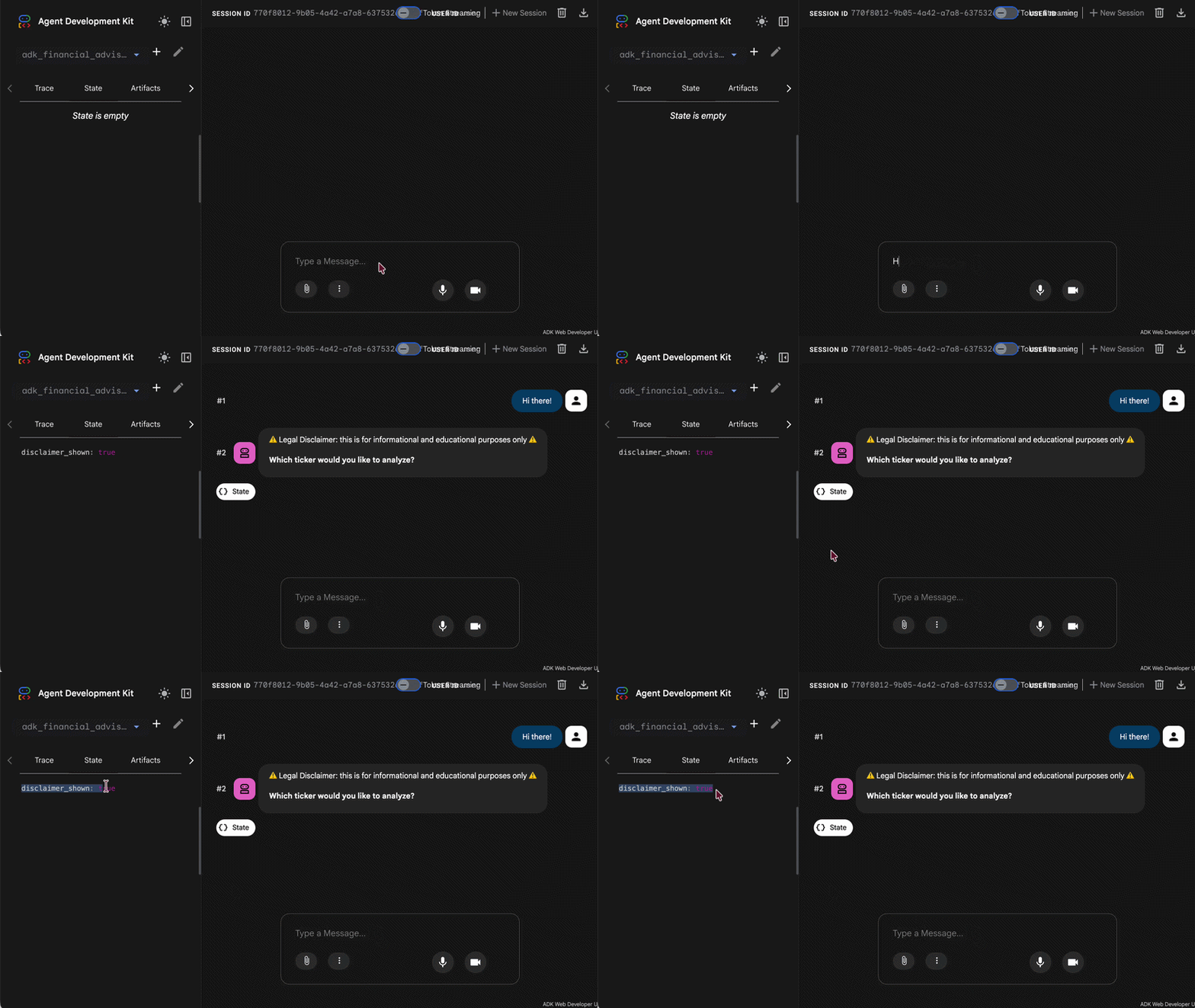
To protect your business and establish user trust, you often need to show a legal disclaimer when a session begins. Instead of cluttering your system prompt (which risks the model repeating it or forgetting it completely) we can handle this with a callback. It runs exactly once at the very start of a user’s session.
def enforce_disclaimer(callback_context: CallbackContext) -> Optional[types.Content]:
  # Check if we already showed the disclaimer in this session
  if not callback_context.state.get("disclaimer_shown"):
    callback_context.state["disclaimer_shown"] = True
    return types.Content(
      role="model",
      parts=[types.Part(text="⚠️ Legal Disclaimer: This bot does not provide financial advice.")],
    )
  return None
- Session State: We use callback_context.state as a lightweight, persistent key-value store unique to each user session.
- Interception Mechanics: If the disclaimer_shown flag is not found, the callback returns a types.Content object. This immediately halts the agent’s turn and sends the disclaimer directly to the user.
- Subsequent Turns: Once set to True, future messages bypass this check.
2. Intent Filtering
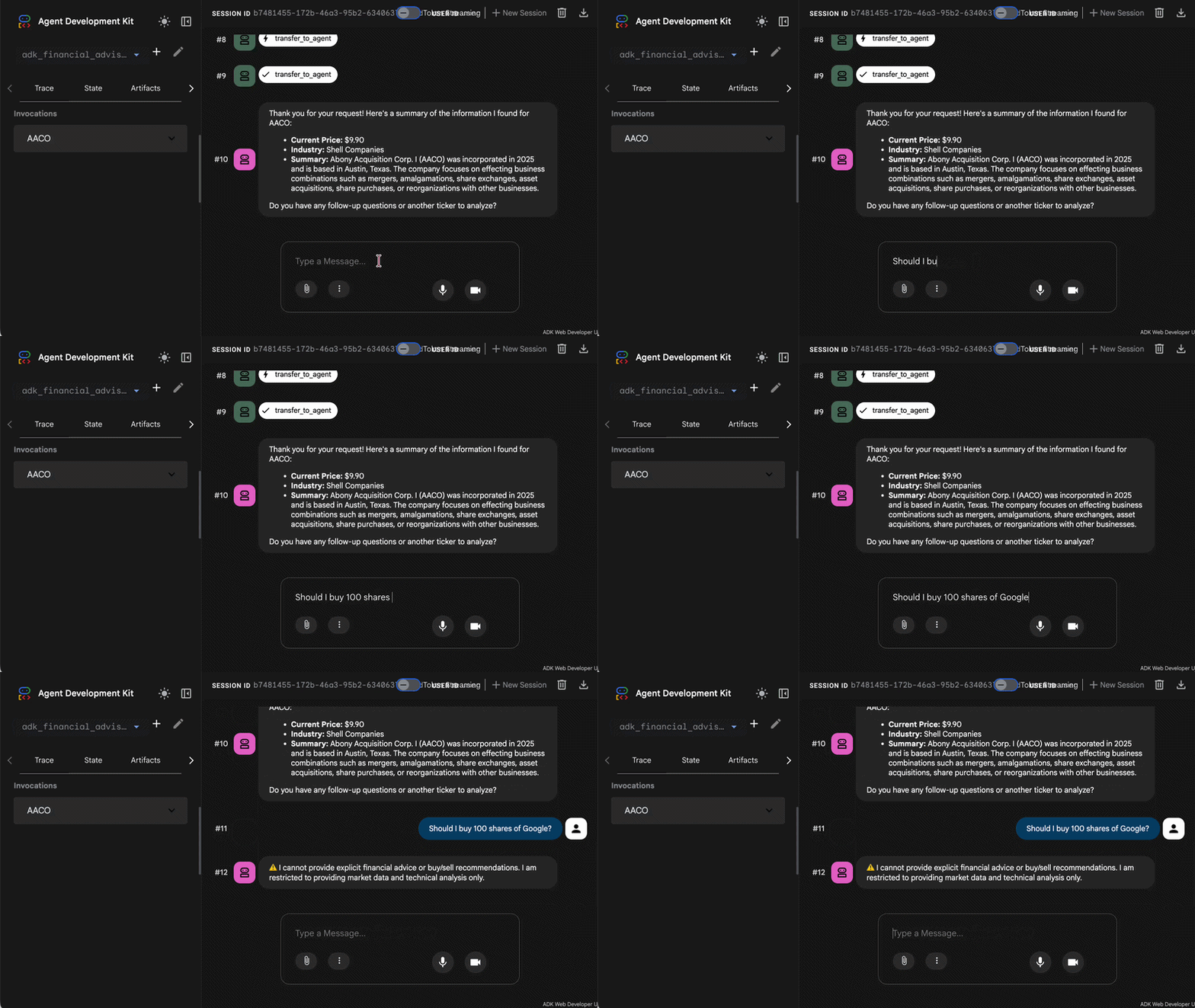
AI agents are notoriously easy to distract. This intent filter acts as a digital bouncer, intercepting off-topic queries before they ever reach your core agent. In this case, we want to prevent the agent from giving financial advice.
async def intercept_financial_advice(callback_context: CallbackContext) -> Optional[types.Content]:
    # 1. Extract the latest user message
    user_text = ""
    if callback_context.user_content and callback_context.user_content.parts:
        user_text = callback_context.user_content.parts[0].text

    if not user_text:
        return None

    # 2. Use the intent_client to analyze the user's prompt
    prompt = f"""
    Analyze the following user input: "{user_text}"

    Determine if the user is asking for explicit financial advice (e.g., "should I buy", "is it a good investment", "give me a recommendation").

    Respond with ONLY the word 'BLOCKED' if it is financial advice.
    Respond with ONLY the word 'ALLOWED' if they are just asking for data or analysis of a ticker.
    """

    try:
        # Use the global intent_client here instead of callback_context.client
        response = await intent_client.aio.models.generate_content(
            model="gemini-2.5-flash",
            contents=prompt
        )

        decision = response.text.strip().upper()

        # 3. If the intent is blocked, return a Content object to stop the agent execution
        if "BLOCKED" in decision:
            print(f"[INTENT BLOCKED] User asked for advice: {user_text}")
            return types.Content(
                role="model",
                parts=[types.Part(text="⚠️ I cannot provide explicit financial advice or buy/sell recommendations. I am restricted to providing market data and technical analysis only.")]
            )
    except Exception as e:
        print(f"Error in intent analysis: {e}")
        # Optionally allow the request to proceed if the check fails
        return None

    return None
- Pre-Processing Check: This callback runs before the agent is invoked. It uses a fast, specialized classification prompt to determine if the query is related to financial advice.
- Bypassing the Agent: If the query is off-topic, it returns a friendly redirect message. By returning a string, ADK stops execution early, saving you API costs.
- Standard Execution: If the query is advice-related, the function returns None, signaling to ADK that it is safe to proceed to the agent.
3. Crypto Block
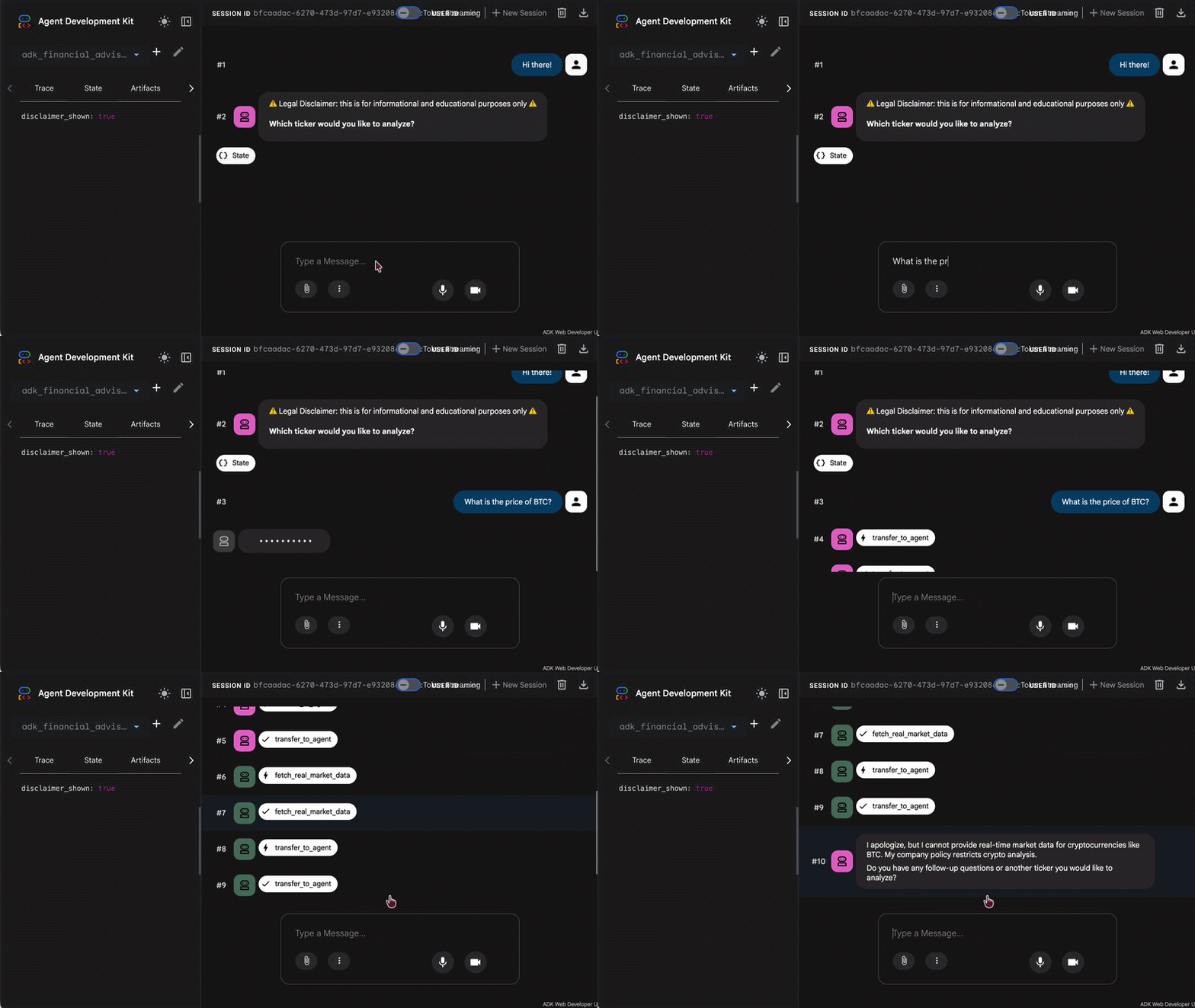
Even when a query is broadly about finance, your agent might have strict operational boundaries. For example, if your app is only licensed for traditional stock trading, you must prevent the agent from executing tools that fetch cryptocurrency data. This callback acts as a targeted guardrail on specific tools.
Never rely on prompts to block tools. Intercept at the callback layer.
def block_crypto_tool(tool, args: dict[str, Any], tool_context: ToolContext) -> Optional[dict]:
    ticker = args.get("ticker", "").upper()
    if ticker in ["BTC", "ETH", "DOGE"]:
        print(f"[TOOL BLOCKED] Cannot analyze crypto: {ticker}")
        return
- Tool-Level Interception: Instead of intercepting the user’s message, this callback monitors tool execution.
- Ticker Inspection: It extracts the requested asset ticker and matches it against a list of known cryptocurrencies (like BTC, ETH, or DOGE).
- Safe Failures: If a match is found, it raises an exception or returns an error message directly, forcing the tool to fail safely without executing dangerous external API calls.
4. Response Caching
In high-traffic financial applications, users often query the same popular stocks (like AAPL or GOOG) repeatedly within a short window. Fetching live data every single second is slow and expensive. This caching callback checks for recently retrieved prices before executing a live tool call.
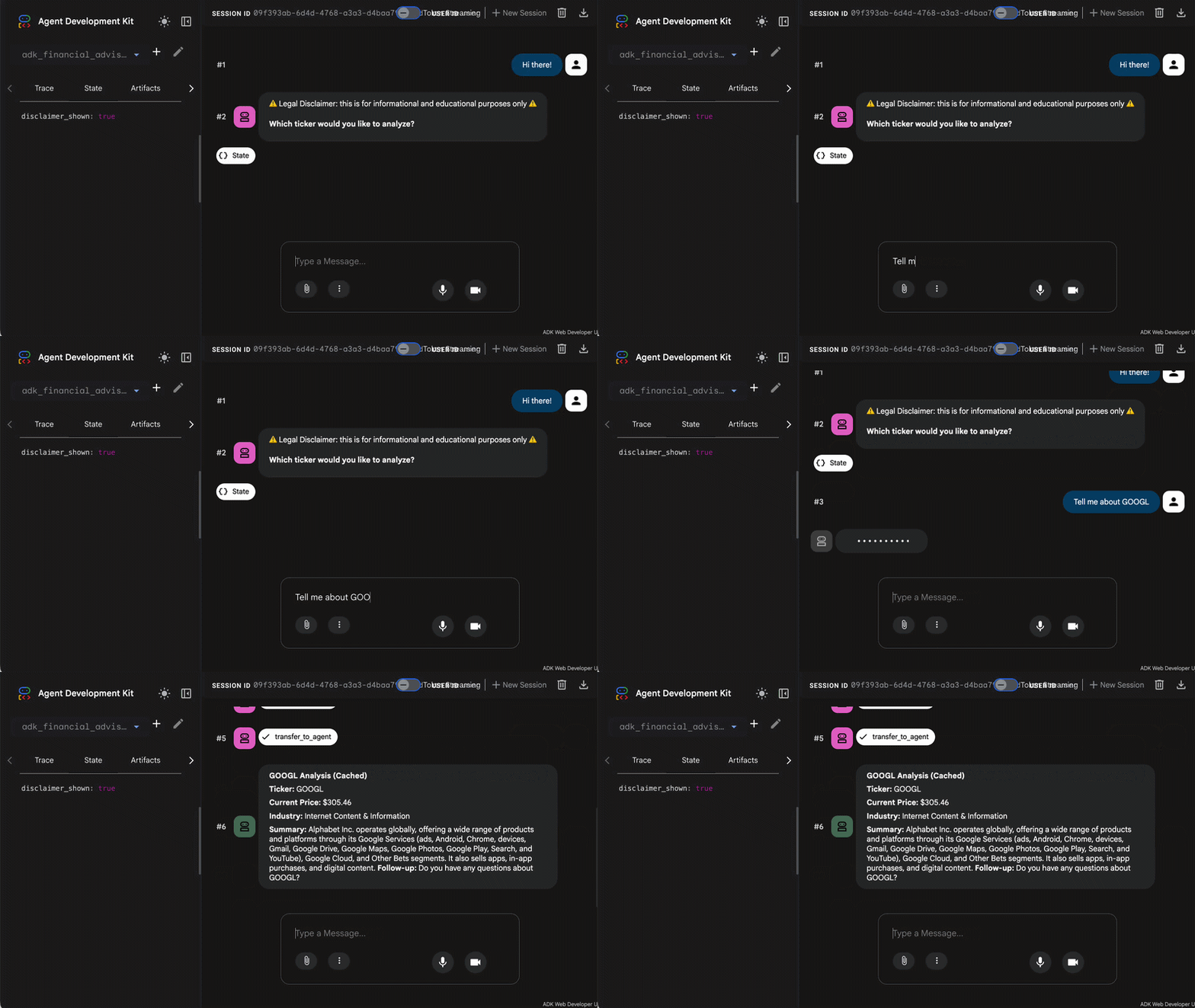
async def cache_googl_analysis(callback_context: CallbackContext, llm_request: LlmRequest) -> Optional[LlmResponse]:
    current_query = callback_context.user_content
    text = current_query.parts[0].text.upper() if current_query and current_query.parts else ""

    if "GOOGL" in text:
        print("[Cache Hit] Serving static GOOGL report...")
        return LlmResponse(
            content=types.Content(
                role="model",
                parts=[types.Part(text="**GOOGL Analysis (Cached)**\n\n**Ticker:** GOOGL\n\n**Current Price:** $305.46\n\n**Industry:** Internet Content & Information\n\n**Summary:** Alphabet Inc. operates globally, offering a wide range of products and platforms through its Google Services (ads, Android, Chrome, devices, Gmail, Google Drive, Google Maps, Google Photos, Google Play, Search, and YouTube), Google Cloud, and Other Bets segments. It also sells apps, in-app purchases, and digital content.\n**Follow-up:** Do you have any questions about GOOGL?")]
            )
        )
    return None
- Performance Optimization: This callback runs immediately before a tool executes to see if a valid result is already stored in our cache dictionary.
- Cache Hits: If the ticker exists in the cache and hasn’t expired, the callback returns the cached data instantly, bypassing the slow network request entirely.
- Cache Misses: If the data isn’t cached, the tool runs normally, and a companion after_tool_call callback stores the fresh result in the cache for next time.
Wiring Callbacks into Your Agent
Now that we have designed our specialized guardrails and optimization callbacks, we need to register them. You wire them into your agent when it’s created.
data_analyst = LlmAgent(
    name="data_analyst",
    model="gemini-2.5-flash",
    description="Analyzes real market data for tickers.",
    instruction="""
    Use the fetch_real_market_data tool to pull live data.
    Do NOT summarize the findings to the user directly.
    Once you have the data, use the transfer_to_agent tool to transfer control back to 'pro_advisor'.
    """,
    tools=[fetch_real_market_data],
    before_model_callback=cache_googl_analysis,
    before_tool_callback=block_crypto_tool
)

pro_advisor = LlmAgent(
    name="pro_advisor",
    model="gemini-2.5-flash",
    instruction="""
    Coordinate with your analyst to help the user with financial questions.
    Step 1. Ask the user for a stock ticker they want to analyze.
    Step 2. run the data_analyst sub-agent to fetch the data.
    Step 3. When data_analyst transfers control back to you, summarize its findings for the user.
    Step 4. (CRITICAL): Always ask the user if they have follow-up questions or another ticker to analyze.
    """,
    sub_agents=[data_analyst],
    before_agent_callback=[enforce_disclaimer, intercept_financial_advice]
)
Conclusion
Let’s be honest: relying on system prompts to secure your agent is basically like writing production code and just adding a comment that says:
// Please do not crash!
If a user asks nicely enough, a soft prompt is eventually going to bend.
Callbacks don’t replace prompts. They make them reliable.
By shifting your guardrails into robust middleware, you take back control. Stop hoping your models behave, and start engineering them so they have no other choice!
Keeping AI Agents in Check: Guardrails and Callbacks in ADK was originally published in Google Cloud – Community on Medium, where people are continuing the conversation by highlighting and responding to this story.
Source Credit: https://medium.com/google-cloud/keeping-ai-agents-in-check-guardrails-and-callbacks-in-adk-78e4f560a3fc?source=rss—-e52cf94d98af—4
About the Author