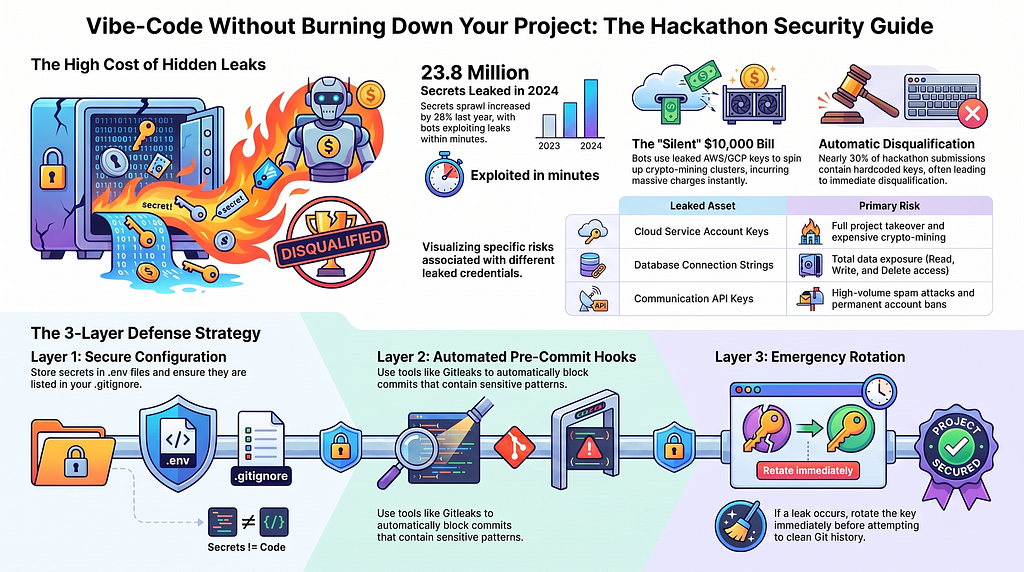
TL;DR — Every year, millions of secrets are leaked to public repos. Automated bots exploit them within minutes. This guide gives you the tools, code patterns, and checklists to ship fast and ship safe.
Want to skip straight to a secure setup?
I’ve built hackathon-safe-starter, a ready-to-use GitHub template with every guardrail in this guide pre-configured and tested. Clone it, run two commands, and start coding with three layers of automated secret detection already in place:
- Pre-commit hook — Gitleaks scans every git commit and blocks secrets before they enter your history
- GitHub Action — CI/CD pipeline scans every push and pull request automatically
- Smart .gitignore — Prevents .env, *.pem, service account keys from ever being tracked
It also includes secure code samples for Gemini API, Firebase, Google Cloud Storage, and Groq/OpenAI, plus fake secret test files so you can see the guardrails catch a leak in real time.
git clone https://github.com/rominirani/hackathon-safe-starter.git my-project
cd my-project
pip install pre-commit && pre-commit install
# Done. You're protected. Start building! 🛡️
Read the full guide below to understand why each layer matters or jump straight to the hands-on walkthrough in the repo.
Why This Guide Exists
Let’s talk about numbers first. According to GitGuardian’s State of Secrets Sprawl 2025 report, 23.8 million new hardcoded secrets were leaked on public GitHub repositories in 2024, a 25% increase over the previous year. These numbers are likely to only increase in each successive report.
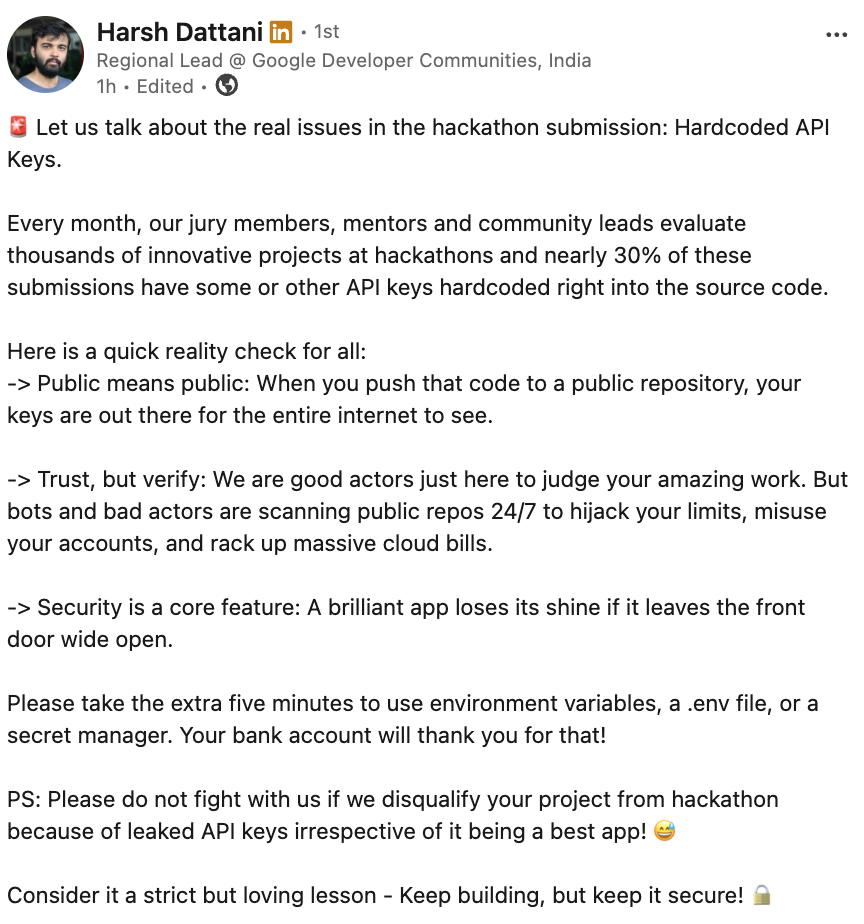
A recent post from Harsh Dattani, who leads the Developer Ecosystems Team in India, does indicate that not paying attention to security might even cost you a chance at the Hackathon.
In the age of “vibe coding”, where we rapidly prompt LLMs to stitch together boilerplate, frontends, and backend connections, it’s incredibly easy to blindly accept generated code, commit it, and leave the front door wide open. AI coding assistants are continously improving and it is less likely that they would frequently generate code with hardcoded placeholder keys that look harmless but become live attack vectors the moment you paste in your real credentials and push. Chances are high that in your hurry to get the entries across the finish line, you end up taking certain shortcuts and hardcode keys and credentials. And worse, you submit that along with your source code, pushed most likely in a public Github repository, as your final entry.
The attacks mentioned are not hypothetical. Automated bots crawl GitHub 24/7. They can detect and exploit a leaked AWS key within minutes of a commit. The most likely aftereffect … spinning up crypto-mining clusters on your account that can run up tens of thousands of dollars in charges overnight. And unlike ransomware, crypto-mining attacks are designed to be silent, they won’t announce themselves until you check your billing dashboard.
This guide is an attempt to be your comprehensive blueprint to ensure your team builds safely, avoids massive surprise cloud bills, and doesn’t get disqualified right before the finish line.
Part 1: What Gets Leaked — The Threat Map
Before your next commit, audit your codebase for every category below. First-time coders frequently focus only on “API keys” but miss entire classes of sensitive data.
1. Cloud Provider Credentials & Service Accounts
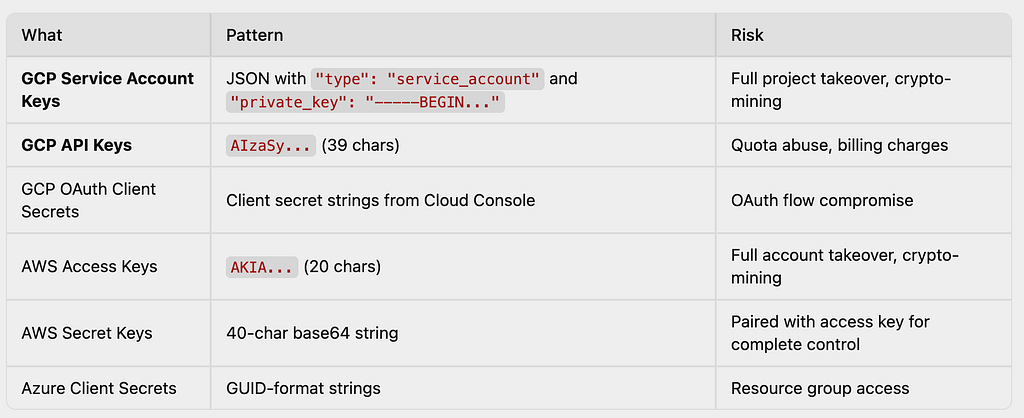
Automated bots harvest these 24/7 from GitHub and immediately spin up massive, expensive crypto-mining clusters in your name. A single leaked GCP Service Account Key or AWS root key can generate thousands of $$$ in charges within hours.
2. Database Connection Strings
Raw connection URIs with embedded plaintext passwords grant the entire internet read, write, and delete permissions to your database.
# These patterns should NEVER appear in source code:
mongodb+srv://admin:MySecretPass123@cluster0.abc123.mongodb.net
postgresql://postgres:HackathonAdmin2026@db.supabase.co:5432/main
redis://default:sUp3rS3cr3t@redis-12345.c1.us-east-1-2.ec2.cloud.redislabs.com:6379
mysql://root:password@localhost:3306/hackathon_db
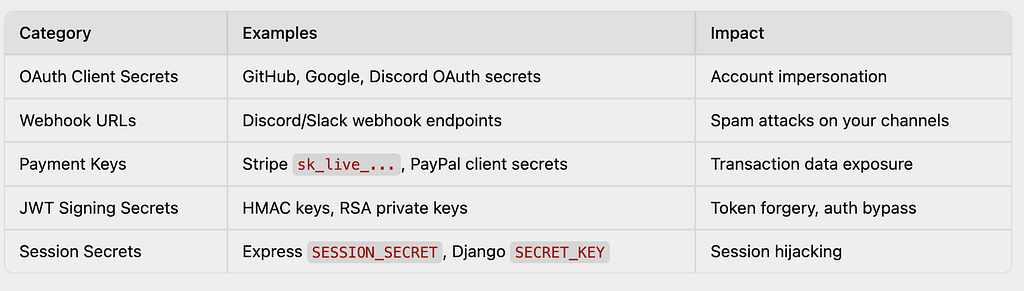
3. OAuth Secrets, Tokens & Webhook URLs
4. Communication & Messaging Service Credentials
Twilio SIDs, SendGrid API keys, Mailgun tokens, Firebase Cloud Messaging keys … these leaked communication credentials let attackers send high-volume spam under your identity, potentially getting your accounts permanently banned.
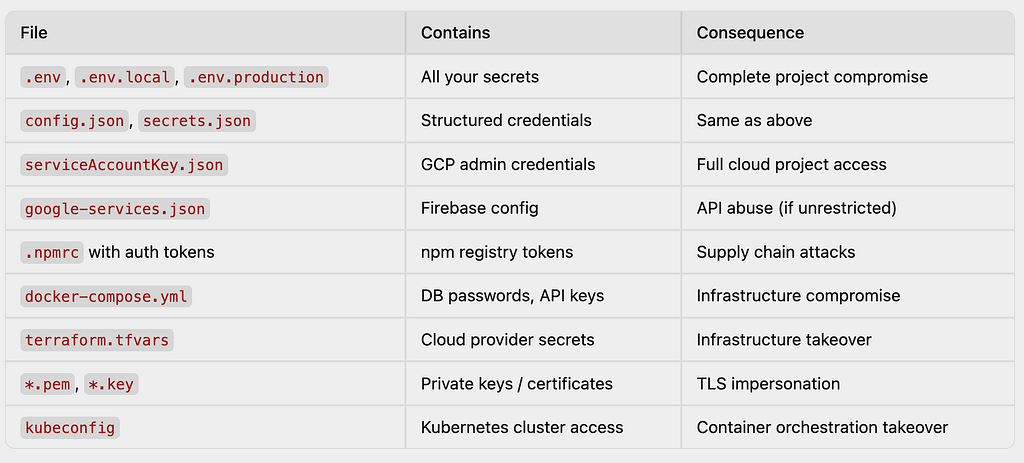
5. The Forgotten Config Files
These files are committed by accident more often than any hardcoded string:
6. The Git History Trap
Deleting a secret from your file and making a new commit does NOT remove it. The secret is still fully visible in your Git commit history. Unless the history is explicitly purged, attackers can trivially recover it.
This is one of the most common mistakes. You realize a key was hardcoded, you delete it, you commit the fix and you think you’re safe. You are not. Every previous commit is a permanent snapshot. We cover how to properly purge history later in the article.
Part 2: Code Blueprints — 13 Framework Examples (Before & After)
Don’t leave configuration to chance. Here are some ways to safely manage secrets across popular frameworks.
1. Gemini / Google GenAI SDK (Python)
❌ Vulnerable:
from google import genai
client = genai.Client(api_key="AIzaSyA1B2C3D4E5F6G7H8I9J0K_LeakedKey")
✅ Secure:
import os
from google import genai
client = genai.Client(api_key=os.environ.get("GEMINI_API_KEY"))
📝 Add to .env:
GEMINI_API_KEY=your_gemini_api_key_here
2. Vector Databases (Pinecone / AI Apps)
❌ Vulnerable:
from pinecone import Pinecone
pc = Pinecone(
     api_key="pcsk_7a8b9c_secret_production_key",
     host="https://my-index-12345.svc.us-east-1-aws.pinecone.io"
)
✅ Secure:
import os
from pinecone import Pinecone

pc = Pinecone(
    api_key=os.environ.get("PINECONE_API_KEY"),
    host=os.environ.get("PINECONE_HOST")
)
📝 Add to .env:
PINECONE_API_KEY=your_pinecone_api_key_here
PINECONE_HOST=https://your-index.svc.region.pinecone.io
3. Frontend Framework Keys (Vite / React)
❌ Vulnerable (firebase.js):
export const firebaseConfig = {
  apiKey: "AIzaSyAsDfGhJkL123456_FakeFirebaseKey",
  authDomain: "hackathon-app.firebaseapp.com",
  projectId: "hackathon-app-123"
};
✅ Secure:
export const firebaseConfig = {
  apiKey: import.meta.env.VITE_FIREBASE_API_KEY,
  authDomain: import.meta.env.VITE_FIREBASE_AUTH_DOMAIN,
  projectId: import.meta.env.VITE_FIREBASE_PROJECT_ID
};
📝 Add to .env:
VITE_FIREBASE_API_KEY=your_firebase_api_key_here
VITE_FIREBASE_AUTH_DOMAIN=your-app.firebaseapp.com
VITE_FIREBASE_PROJECT_ID=your-project-id
Firebase API keys are designed to be public identifiers, not authorization secrets. They route requests to your project — the real security comes from Firebase Security Rules and App Check. However, you should still:
- Restrict your API key in the Google Cloud Console (HTTP referrer restrictions, API restrictions)
- Never use allow read, write: if true; in production Security Rules
- Enable App Check to block unauthorized clients
Even though the key is “public,” an unrestricted key can be abused for quota theft or to access other Google APIs enabled on your project.
4. LLM API Providers (Gemini / Groq / OpenAI)
❌ Vulnerable:
from google import genai

client = genai.Client(api_key="AIzaSyA1B2C3D4E5F6G7H8I9J0K_LeakedKey")
response = client.models.generate_content(model="gemini-2.5-flash", contents="Hello!")
✅ Secure:
import os
from google import genai

client = genai.Client(api_key=os.environ.get("GEMINI_API_KEY"))
response = client.models.generate_content(model="gemini-2.5-flash", contents="Hello!")
📝 Add to .env:
GEMINI_API_KEY=your_gemini_api_key_here
5. Cloud Object Storage (Google Cloud Storage / AWS S3)
❌ Vulnerable:
from google.cloud import storage

# DANGER: Loading a service account key file that gets committed to Git
client = storage.Client.from_service_account_json("service-account-key.json")
bucket = client.bucket("my-hackathon-bucket")
✅ Secure (environment variables):
import os
from google.cloud import storage

# Point to the key file via environment variable (file itself is in .gitignore)
os.environ["GOOGLE_APPLICATION_CREDENTIALS"] = os.environ.get("GCP_SA_KEY_PATH", "")
client = storage.Client()
bucket = client.bucket(os.environ.get("GCS_BUCKET_NAME"))
✅✅ Best Practice (Application Default Credentials — zero keys in code):
from google.cloud import storage

# The SDK automatically picks up credentials from:
# 1. Attached service account (on Compute Engine, Cloud Run, Cloud Functions)
# 2. GOOGLE_APPLICATION_CREDENTIALS environment variable
# 3. gcloud auth application-default login (local dev)
# No keys needed in code at all.
client = storage.Client()
Add to .env:
# Google Cloud
GOOGLE_APPLICATION_CREDENTIALS=/path/to/your/service-account-key.json
GCS_BUCKET_NAME=your-bucket-name

# AWS (if applicable)
AWS_ACCESS_KEY_ID=your_access_key
AWS_SECRET_ACCESS_KEY=your_secret_key
Prefer Application Default Credentials (ADC) over service account key files entirely. If you’re running on a Compute Engine VM, Cloud Run service, or Cloud Function, attach a service account directly. The SDK picks up temporary credentials automatically — no key files to leak.
6. Chat Webhooks (Discord / Slack Bots)
❌ Vulnerable:
const DISCORD_WEBHOOK = "https://discord.com/api/webhooks/123456789/AbCdEfGhIjKlMnOpQrStUvWxYz";
await axios.post(DISCORD_WEBHOOK, { content: "New User Registered!" });
✅ Secure:
const DISCORD_WEBHOOK = process.env.DISCORD_WEBHOOK_URL;
7. Communication Gateways (Twilio SMS)
❌ Vulnerable:
from twilio.rest import Client

account_sid = 'ACXXXXXXXXXXXXXXXXXXXXXXXXXXXXXXXX'
auth_token = 'your_raw_auth_token_value_here'
client = Client(account_sid, auth_token)
✅ Secure:
import os
from twilio.rest import Client

account_sid = os.environ.get('TWILIO_ACCOUNT_SID')
auth_token = os.environ.get('TWILIO_AUTH_TOKEN')
client = Client(account_sid, auth_token)
8. Database ORM Frameworks (Prisma Schema)
❌ Vulnerable (schema.prisma):
datasource db {
  provider = "postgresql"
  url      = "postgresql://postgres:HackathonAdminPassword2026@db.supabase.co:5432/main"
}
✅ Secure:
datasource db {
  provider = "postgresql"
  url      = env("DATABASE_URL")
}
📝 Add to .env:
DATABASE_URL=postgresql://user:password@localhost:5432/my_db
9. Maps & Geocoding SDKs (Google Maps)
❌ Vulnerable:
<script src="https://maps.googleapis.com/maps/api/js?key=AIzaSyB4_X_yZ12345&callback=initMap" async defer></script>
✅ Secure (server-side injection at build time):
For Vite, load the key in JavaScript rather than hardcoding it in HTML:
// maps-loader.js
const script = document.createElement('script');
script.src = `https://maps.googleapis.com/maps/api/js?key=${import.meta.env.VITE_MAPS_API_KEY}&callback=initMap`;
script.async = true;
script.defer = true;
document.head.appendChild(script);
For Next.js, use server-side rendering:
// pages/map.js
export async function getServerSideProps() {
  return { props: { mapsKey: process.env.GOOGLE_MAPS_API_KEY } };
}

export default function MapPage({ mapsKey }) {
  return <script src={`https://maps.googleapis.com/maps/api/js?key=${mapsKey}&callback=initMap`} async defer />;
}
Always restrict Maps API keys in the Google Cloud Console. Set HTTP referrer restrictions to your domain(s) so the key is useless if scraped from your page source.
10. Development Bypass Routes (Backdoors)
❌ Vulnerable:
app.post('/api/login', (req, res) => {
    if (req.body.username === "judge_tester" && req.body.password === "SuperSecretBypass!!!") {
        return res.json({ token: "mock_jwt_token_admin" });
    }
});
✅ Secure:
app.post('/api/login', (req, res) => {
    // Test bypass only exists in development mode
    if (process.env.NODE_ENV === 'development' &&
        req.body.username === process.env.TEST_USER &&
        req.body.password === process.env.TEST_PASS) {
        return res.json({ token: generateTestToken() });
    }
    // ... real authentication logic
});
Even with environment variables, shipping backdoors is risky. If NODE_ENV is accidentally left as development in production, the bypass is live. Consider removing test login routes entirely before submission, or use a dedicated feature flag service.
11. Django / Flask Secret Keys (Python)
❌ Vulnerable (settings.py):
SECRET_KEY = 'django-insecure-super-secret-key-that-should-not-be-here'
✅ Secure:
import os

SECRET_KEY = os.environ.get('DJANGO_SECRET_KEY')
if not SECRET_KEY:
    raise ValueError("DJANGO_SECRET_KEY environment variable is not set!")
12. Payment Integrations (Stripe)
❌ Vulnerable:
const stripe = require('stripe')('sk_live_51H1234567890abcdefghijklmnopqrs');
✅ Secure:
const stripe = require('stripe')(process.env.STRIPE_SECRET_KEY);
Stripe live keys (sk_live_…) provide full access to your payment processing. A leaked key can expose customer payment data and transaction history. Use test keys (sk_test_…) during development, and even those should be in environment variables.
13. Docker Compose Secrets
❌ Vulnerable (docker-compose.yml):
services:
  db:
    image: postgres:16
    environment:
      POSTGRES_PASSWORD: MyHackathonPassword123
      POSTGRES_USER: admin
  app:
    environment:
      DATABASE_URL: postgresql://admin:MyHackathonPassword123@db:5432/hackathon
      API_KEY: AIzaSy_LeakedAgain
✅ Secure:
services:
  db:
    image: postgres:16
    env_file:
      - .env
    environment:
      POSTGRES_PASSWORD: ${POSTGRES_PASSWORD}
      POSTGRES_USER: ${POSTGRES_USER}
  app:
    env_file:
      - .env
    environment:
      DATABASE_URL: ${DATABASE_URL}
      API_KEY: ${API_KEY}
Part 3: Automated Defense — Tools That Catch Secrets Before They Ship
Humans make mistakes. Tools don’t get tired at 3 AM during a hackathon. Set up these automated defenses.
Layer 1: Pre-Commit Hooks (Catches secrets before they enter Git)
This is your first and most important line of defense. Install gitleaks as a pre-commit hook:
Step 1: Install the pre-commit framework
# macOS
brew install pre-commit

# pip
pip install pre-commit
Step 2: Create .pre-commit-config.yaml in your repo root
repos:
  - repo: https://github.com/gitleaks/gitleaks
    rev: v8.30.1  # Check GitHub for latest version
    hooks:
      - id: gitleaks
Step 3: Install the hook
pre-commit install
Now every git commit will automatically scan for secrets and block the commit if any are found.
Hackathon shortcut: If you don’t want to set up pre-commit, you can run Gitleaks manually before pushing:
# Install
brew install gitleaks

# Scan your project directory
gitleaks dir . --verbose
Note: The detect and protect subcommands are deprecated since v8.19.0. Use gitleaks dir (for directories) or gitleaks git (for git repos) instead.
Layer 2: GitHub Push Protection (Catches secrets at the remote)
GitHub automatically scans every push to public repositories and blocks commits containing recognized secret patterns (API keys, Stripe keys, etc.). This is enabled by default on public repos.
For private repos: Go to Settings → Code security → Secret scanning and enable both Secret scanning and Push protection.
Layer 3: CI/CD Pipeline Scanning (Final safety net)
Add Gitleaks to your GitHub Actions workflow:
# .github/workflows/security-scan.yml
name: Security Scan — Gitleaks
on:
  push:
  pull_request:
  workflow_dispatch:

permissions: {}  # Start with zero permissions (principle of least privilege)

jobs:
  gitleaks:
    name: Gitleaks Secret Scanner
    runs-on: ubuntu-latest
    permissions:
      contents: read          # Required for actions/checkout
      pull-requests: write    # Required for PR comments on findings
    steps:
      - uses: actions/checkout@v6
        with:
          fetch-depth: 0  # CRITICAL: Scan full commit history, not just latest commit
      - uses: gitleaks/gitleaks-action@v3
        env:
          GITHUB_TOKEN: ${{ secrets.GITHUB_TOKEN }}
          # GITLEAKS_LICENSE: ${{ secrets.GITLEAKS_LICENSE }}  # Only needed for org repos
gitleaks-action@v2 is deprecated. Use @v3 which runs on Node 24. Also ensure fetch-depth: 0 — without it, only the latest commit is scanned (shallow clone).
Defense Layers Summary

Want a ready-to-use template?
Clone the hackathon-safe-starter repo — it has all these guardrails pre-configured and tested, with hands-on exercises to verify they work.
GitHub – rominirani/hackathon-safe-starter: 🛡️ Hackathon security template with pre-configured Gitleaks, pre-commit hooks, GitHub Actions, and secure code patterns for Gemini, Firebase, GCP, and more.
Part 4: The AI Guardrail — System Prompt for Vibe Coding
If you rely on AI coding assistants (Antigravity, Claude, Claude, ChatGPT, Gemini, GitHub Copilot) to write your application code, you can block raw secrets at the source. Paste this into your AI assistant’s system rules or your initial chat prompt:
You are an expert, security-conscious Lead Developer. We are building a
rapid prototype / hackathon project, but infrastructure security is a
non-negotiable core feature.

STRICT GUARDRAILS for all code generation:

1. NEVER hardcode API keys, passwords, private tokens, connection strings,
   webhook URLs, or any environment secrets directly into the code.

2. When a credential is required, ALWAYS use the standard environment
   variable pattern for the language/framework:
   - Node.js: process.env.VARIABLE_NAME
   - Python: os.environ.get("VARIABLE_NAME")
   - Vite/React: import.meta.env.VITE_VARIABLE_NAME
   - Go: os.Getenv("VARIABLE_NAME")
   - Prisma: env("VARIABLE_NAME")

3. Every time you generate code that requires a secret, explicitly list the
   key-value pairs I need to add to my local .env file.

4. Provide a .env.example file with placeholder names (never real values).

5. If I accidentally paste code containing what appears to be a live API
   key, FLAG IT IMMEDIATELY and remind me to rotate the credential.

6. When generating Docker or docker-compose files, use env_file or
   variable substitution — never inline secrets.

7. When generating .gitignore, always include: .env, .env.local,
   .env.production, *.pem, *.key, serviceAccountKey.json, and
   any other credential files relevant to the project.
Part 5: Emergency Response — When You Leak a Secret
It’s 2 AM. You just realized you pushed a commit with your live keys 6 hours ago. Here’s the emergency protocol:
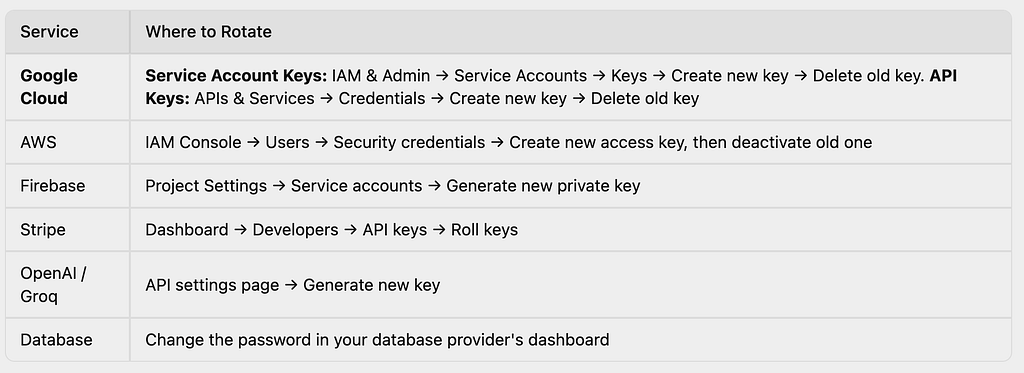
Step 1: ROTATE IMMEDIATELY (Do this FIRST)
Do not skip this step. Do not “clean up the code first.” Assume the secret has already been harvested.
Step 2: Check for Unauthorized Usage
- Google Cloud: Check Cloud Audit Logs for unexpected API calls. Check Billing reports for unusual charges.
- AWS: Check CloudTrail for unexpected API calls. Check the Billing dashboard for unusual charges.
- Azure: Check Activity Log and Cost Management.
- Stripe: Check the Events log for unauthorized transactions.
Step 3: Remove from Git History
Simply deleting the line and making a new commit is not enough. Use git filter-repo (the modern, Git-recommended replacement for the deprecated git filter-branch):
# Install
pip install git-filter-repo

# Clone a fresh mirror copy (required by git filter-repo)
git clone --mirror https://github.com/your-org/your-repo.git
cd your-repo.git

# Option A: Remove an entire file from history
git filter-repo --path .env --invert-paths

# Option B: Replace a specific secret string
# Create replacements.txt with format: literal:OLD_SECRET==>***REDACTED***
echo 'literal:AKIAIOSFODNN7EXAMPLE==>***REDACTED***' > /tmp/replacements.txt
git filter-repo --replace-text /tmp/replacements.txt

# Force push the cleaned history
git push origin --force --all
git push origin --force --tags
After force-pushing, every team member must re-clone the repository. If anyone pushes from their old local copy, the secret will be re-introduced into the history.
Part 6: Protect Your Wallet — Cloud Billing Safeguards
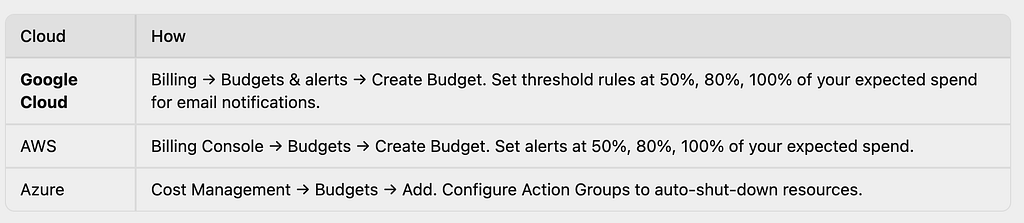
Leaked keys are the #1 cause of surprise cloud bills at hackathons. Even if you’re using free-tier credits, set these up immediately.
Set Budget Alerts on Day Zero
Hackathon Cost Hygiene
- Use the smallest instance sizes (e2-micro on GCP, t3.micro on AWS) unless you specifically need more.
- Set calendar reminders to delete resources after the hackathon.
- Tag all resources with project=hackathon-name so you can identify orphaned resources.
- Disable unused APIs in your cloud console.
- Never use root/owner credentials — create a limited IAM user or service account with only the permissions you need.
Restrict Your API Keys
Even keys that are designed to be client-facing (like Firebase or Google Maps keys) should be restricted:
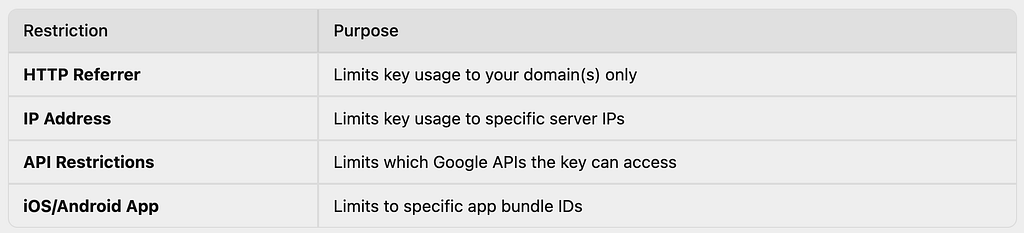
Configure these in the Google Cloud Console → APIs & Services → Credentials.
Part 7: The Bulletproof Submission Checklist
Before your team clicks “Submit,” take five minutes to walk through this loop. Print this out. Tape it to your monitor.
Pre-Submission Audit
- .gitignore exists and contains: .env, .env.local, .env.production, *.pem, *.key, serviceAccountKey.json, config.json (if it has secrets)
- .env.example is included in the repo with descriptive placeholder names (see template below)
- No secrets in docker-compose.yml — uses env_file or ${VARIABLE} substitution
- No secrets in CI/CD config — all secrets are in GitHub Secrets / environment variables
- No test backdoors with hardcoded credentials remain in the code
- Run the comprehensive grep scan (see below)
- Run Gitleaks (gitleaks detect –source . –verbose)
- API keys are restricted in cloud console (referrer, IP, API scope)
- Budget alerts are set on all cloud accounts
- README includes setup instructions that reference the .env.example
.env.example Template
Ship this in your repo root so judges and reviewers can set up your project:
# ==========================================
# PROJECT CONFIGURATION TEMPLATE
# ==========================================
# Copy this file to .env and fill in your values.
# DO NOT commit the .env file.
# ==========================================

# --- Server ---
PORT=8080
NODE_ENV=development

# --- Database ---
DATABASE_URL=

# --- AI / LLM ---
GEMINI_API_KEY=
OPENAI_API_KEY=
GROQ_API_KEY=

# --- Vector Database ---
PINECONE_API_KEY=
PINECONE_HOST=

# --- Cloud Storage ---
AWS_ACCESS_KEY_ID=
AWS_SECRET_ACCESS_KEY=
AWS_REGION=us-east-1

# --- Authentication ---
JWT_SECRET=
GOOGLE_OAUTH_CLIENT_ID=
GOOGLE_OAUTH_CLIENT_SECRET=

# --- Communication ---
TWILIO_ACCOUNT_SID=
TWILIO_AUTH_TOKEN=
DISCORD_WEBHOOK_URL=

# --- Payments ---
STRIPE_SECRET_KEY=
STRIPE_PUBLISHABLE_KEY=

# --- Firebase (client-side, restrict in Cloud Console) ---
VITE_FIREBASE_API_KEY=
VITE_FIREBASE_AUTH_DOMAIN=
VITE_FIREBASE_PROJECT_ID=
Leave values blank (not with fake-looking values like AIzaSyYourKeyHere that could be mistaken for real keys). Use descriptive variable names so it's obvious what each one is for.
Comprehensive Pre-Push Grep Scan
Run this in your terminal from the project root. It searches for common secret patterns across your codebase, ignoring common false-positive directories:
# Quick scan — looks for common secret patterns
git grep -inE \
  'sk_live|sk_test|AKIA[0-9A-Z]{16}|AIzaSy|ghp_|gho_|glpat-|xoxb-|xoxp-|hooks\.slack\.com|discord\.com/api/webhooks|mongodb\+srv://|postgresql://[^ ]*:[^ ]*@|-----BEGIN (RSA |EC )?PRIVATE KEY|pcsk_|gsk_' \
  -- ':!node_modules' ':!.git' ':!*.lock' ':!package-lock.json'
# Broader scan — catches environment variable assignments with values
git grep -inE \
  '(api[_-]?key|secret|password|token|credential|auth[_-]?token)\s*[:=]\s*["\x27][A-Za-z0-9_\-/.+]{8,}' \
  -- ':!node_modules' ':!.git' ':!*.lock' ':!*.md'
The original blog’s git grep -i "key|secret|password|token|sk_" is too broad and will produce hundreds of false positives (variable names, comments, documentation). The patterns above target actual secret values, not just keywords.
Part 8: Quick-Reference Cheat Sheet
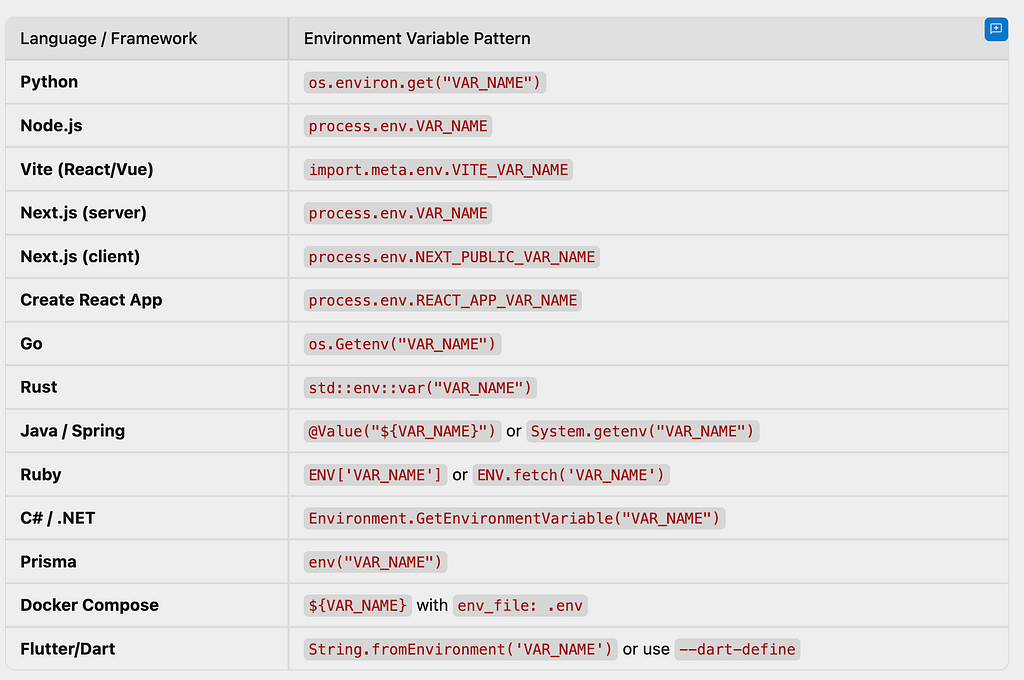
Part 9: The Minimal .gitignore Every Hackathon Project Needs
# === Secrets & Config ===
.env
.env.*
!.env.example
*.pem
*.key
*.p12
*.pfx
serviceAccountKey.json
google-services.json
GoogleService-Info.plist
credentials.json
secrets.json
config.local.json

# === Dependencies ===
node_modules/
vendor/
__pycache__/
*.pyc
.venv/
venv/

# === Build Outputs ===
dist/
build/
.next/
out/

# === IDE ===
.vscode/
.idea/
*.swp
*.swo
.DS_Store
Thumbs.db

# === Terraform ===
*.tfvars
.terraform/
terraform.tfstate*
Final Words
The five minutes you spend separating your logic from your secrets will save you from:
- Surprise cloud bills that can reach thousands of dollars
- Hackathon disqualification for security violations
- The stress of rotating every credential at 3 AM
- The embarrassment of explaining to your team why the Cloud bill is $12,000
The tools exist. The patterns are simple. The checklists are right here. Use them.
Keep building. Keep shipping. Keep it secure.
The Hackathon Security Guide: How to Vibe-Code Without Burning Down Your Project was originally published in Google Cloud – Community on Medium, where people are continuing the conversation by highlighting and responding to this story.
Source Credit: https://medium.com/google-cloud/the-hackathon-security-guide-how-to-vibe-code-without-burning-down-your-project-0653cf6a82b9?source=rss—-e52cf94d98af—4
About the Author