This guide provides a comprehensive, step-by-step blueprint and architectural best practices for configuring Gemini Enterprise Agent Platform (GEAP) online prediction endpoints to be securely reachable over private networks, including Virtual Private Clouds (VPCs) and on-premises environments.
Pls note that I had originally written this article in my notes before Vertex AI became GEAP and thus, you’ll find me use Vertex AI in lieu of GEAP throughout.
1. Overview of Private Endpoints in GEAP (pka Vertex AI)
To design a secure, low-latency machine learning architecture, it is critical to understand how Google Cloud isolates and connects Vertex AI resources.
The Tenant Project Architecture
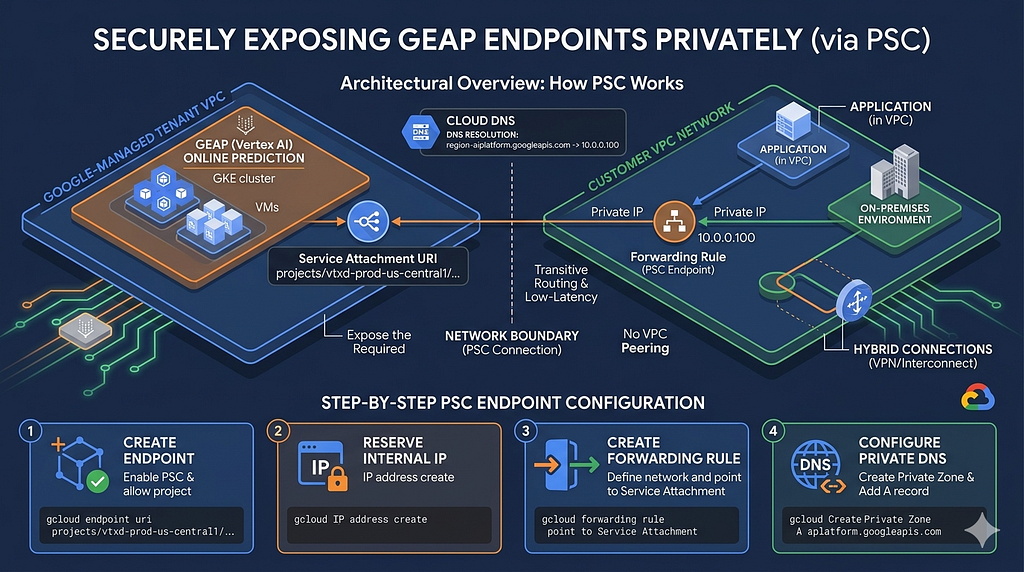
Vertex AI online prediction runs in a Google-managed tenant project. When you deploy a model to an endpoint, the actual compute resources (Google Kubernetes Engine clusters or Virtual Machines) are provisioned inside this tenant project. Because customers do not have direct access to the tenant project, network connectivity must be explicitly established between the customer’s VPC and the tenant VPC.
Recommended Pattern: Private Service Connect (PSC) for GEAP Endpoints
Private Service Connect (PSC) is the modern, recommended pattern for secure, private connectivity to GEAP. It completely eliminates the complexities of VPC peering, IP address block allocation, and transitive routing.
Architecture: How PSC Works
Instead of peering networks, PSC uses a forwarding rule inside your VPC that points to a Service Attachment exposed by the GEAP online prediction service. This forwarding rule instantiates a single, local private IP address inside your subnet.
To your network, the GEAP endpoint looks like a local resource (e.g., a local VM interface).
Step-by-Step PSC Endpoint Configuration
Step 1: Create the Private Endpoint in Vertex AI
When creating the endpoint, you must enable PSC and specify the consumer project IDs that are allowed to connect.
gcloud beta ai endpoints create \
— display-name=vertex-psc-endpoint \
— region=us-central1 \
— project=my-gcp-project-id \
— enable-private-service-connect \
— project-allowlist=my-gcp-project-id
Once created, describe the endpoint to retrieve the Service Attachment URI:
gcloud beta ai endpoints describe [ENDPOINT_ID] — region=us-central1
Look for the serviceAttachment field in the output (e.g., projects/vtxd-prod-us-central1/regions/us-central1/serviceAttachments/sa-xxxx)
Step 2: Reserve an Internal IP in Your VPC
Reserve a single IP address in a subnet of your choice:
gcloud compute addresses create psc-vertex-prediction-ip \
— subnet=my-subnet \
— addresses=10.0.0.100 \
— region=us-central1 \
— project=my-gcp-project-id
Step 3: Create the Forwarding Rule (PSC Endpoint)
Create a regional forwarding rule pointing to the Service Attachment URI retrieved in Step 1.
gcloud compute forwarding-rules create psc-geap-forwarding-rule \
— region=us-central1 \
— network=my-custom-vpc \
— address=psc-vertex-prediction-ip \
— target-service-attachment=projects/vtxd-prod-us-central1/regions/us-central1/serviceAttachments/sa-xxxx \
— project=my-gcp-project-id
Step 4: Configure Private DNS
Create a Private DNS Zone in Cloud DNS so that your application code can resolve the GEAP service domain to the local PSC IP address (10.0.0.100).
# 1. Create a Private DNS Zone for the regional endpoint
gcloud dns managed-zones create vertex-dns-zone \
— description=”Private zone for Vertex AI PSC” \
— dns-name=us-central1-aiplatform.googleapis.com. \
— networks=my-custom-vpc \
— visibility=private \
— project=my-gcp-project-id
# 2. Add an A record pointing to the PSC IP
gcloud dns record-sets create us-central1-aiplatform.googleapis.com. \
— rrdatas=10.0.0.100 \
— type=A \
— ttl=300 \
— zone=vertex-dns-zone \
— project=my-gcp-project-id
Key Architectural Clarification: PSC Endpoints vs. PSC Interfaces
It is vital to distinguish between the two PSC directions:
1. PSC Endpoints (Ingress / Consumer-to-Producer): Used to allow your applications (in VPC or on-premises) to call the GEAP online prediction service. You create a forwarding rule in your VPC.
2. PSC Interfaces (Egress / Producer-to-Consumer): Used when a Google-managed service (like GEAP Custom Training, Ray on Vertex AI, or GEAP Pipelines) needs to initiate connections outbound to reach databases, API endpoints, or secure web proxies inside your private network. This uses a Network Attachment resource.
References & further reading
- Vertex AI Networking Overview: https://cloud.google.com/vertex-ai/docs/general/netsec-overview
- Vertex AI Private Service Connect Endpoints: https://cloud.google.com/vertex-ai/docs/general/psc-endpoints
- VPC Network Peering with Vertex AI: https://cloud.google.com/vertex-ai/docs/general/vpc-peering
- Service Networking / Private Services Access: https://cloud.google.com/vpc/docs/configure-private-services-access
Exposing GEAP Endpoints Privately was originally published in Google Cloud – Community on Medium, where people are continuing the conversation by highlighting and responding to this story.
Source Credit: https://medium.com/google-cloud/exposing-geap-endpoints-privately-188002843481?source=rss—-e52cf94d98af—4
About the Author