
In this blog, I will share my experience running Gemma 4 (31B 4-bit quantized) locally, both with and without TurboQuant, to see if TurboQuant provides any gains in memory usage for an edge device like mine (MacbookBro 48GB). While results may vary depending on the specific task, I will report the performance benefits I achieved.
Hen Harrier, Ibaraki, Japan
TurboQuant
To speed up computation, a KV cache is used during LLM inference. However, as the cache grows, the required amount of scarce VRAM also increases. This is where TurboQuant optimizes the KV cache, allowing it to be stored using significantly less VRAM (offering theoretical gains of up to 6x).
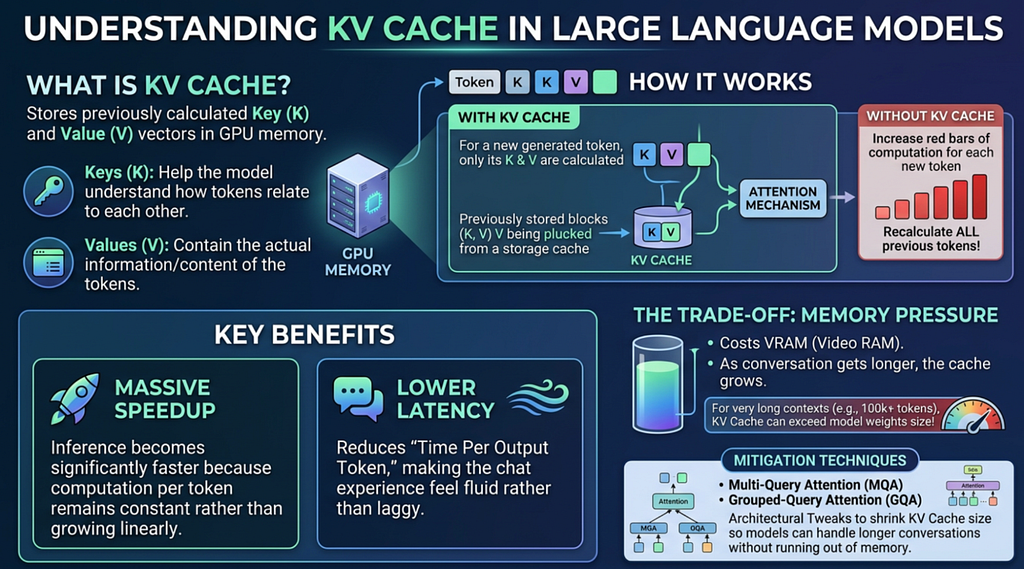
The Key breakthrough of TurboQuant is to help quantize the KV Cache by performing vector rotation through a process called Hadamard Transform . Simply put, these vectors can contain numerous extreme outliers, making them difficult to quantize while maintaining accuracy.
For example, consider the following vector:
K=[ 0.002 , 0.003 , 0.1 , 0.005 ]
A naive quantization of this vector might yield the following result:
[0.0, 0.0, 0.1, 0.0],
thereby losing potentially critical smaller values.
This is where the Hadamard Transform becomes invaluable. It rotates the vector in such a way that the values are evenly distributed, making the subsequent quantization highly effective.
For instance, applying the Hadamard Transform to the vector above produces the following rotated vector:
[ 0.055 0.047 -0.05 -0.048]
As you can see, the absolute values are now much more uniform, which makes quantization far more efficient because very little information is lost.
Since the original vector must eventually be recovered, the Hadamard Transform is ideal because it allows for a precise inverse transform to reconstruct the original data.
The following Python code demonstrates how this process can be achieved.
import numpy as np
from scipy.linalg import hadamard

# 1. Define the spiky vector
x = np.array([0.002, 0.003, 0.1, 0.005])
n = len(x)

# 2. Generate and normalize the Hadamard matrix
# Normalizing by 1/sqrt(N) makes it an orthogonal transformation
H = hadamard(n)
H_norm = H / np.sqrt(n)

# 3. Rotate (Forward Transform)
# This spreads the 0.1 "spike" across all dimensions
rotated_vector = np.dot(H_norm, x)

# 4. Reverse (Inverse Transform)
# Because H is its own inverse (when normalized), we apply it again
recovered_vector = np.dot(H_norm, rotated_vector)

# Output Results
print(f"Original Vector:  {x}")
print(f"Rotated (Spread): {rotated_vector}")
print(f"Recovered Vector: {recovered_vector}")

# Verification
assert np.allclose(x, recovered_vector), "Recovery failed!"
Transform Results


Original Vector:  [0.002 0.003 0.1   0.005]
Rotated (Spread): [ 0.055  0.047 -0.05  -0.048]
Recovered Vector: [0.002 0.003 0.1   0.005]
TurboQuant Quantization is performed by following key steps.
1. Vector Rotation
Normally, KV cache vectors have unevenly distributed values with extreme “outliers” that make compression difficult. TurboQuant fixes this by applying a mathematical rotation (a Hadamard Transform) that spreads the vector’s values evenly across all dimensions. This smooths out the spikes, transforming the data into a highly predictable, manageable distribution.
2. Convert to Polar Coordinates (PolarQuant)
Instead of keeping the data in standard coordinates, TurboQuant recursively pairs them up and converts them into polar coordinates (a radius and an angle). It repeats this pairing process over and over until the entire vector is distilled into just one single global radius and a collection of angle vectors.
3. Fixed Codebook Compression
Thanks to the smoothing effect in Step 1, the angles generated in Step 2 behave very predictably (clustering tightly around 45 degrees). Because of this predictability, TurboQuant doesn’t need to waste memory calculating scaling factors. Instead, it maps these angles to a fixed, pre-computed “codebook,” successfully compressing the data down to an incredibly tiny 2 to 3 bits per coordinate.
4. QJL Bias Correction
While the compression in Step 3 is highly efficient, it introduces a tiny systematic bias when the model calculates attention. To keep the math perfectly accurate, TurboQuant calculates the leftover residual error, processes it, and stores just the sign bit (+1 or -1). Costing only 1 extra bit per dimension, this clever mathematical error-checker completely eliminates bias without bloating the memory.
This entire process is illustrated in the figure below.
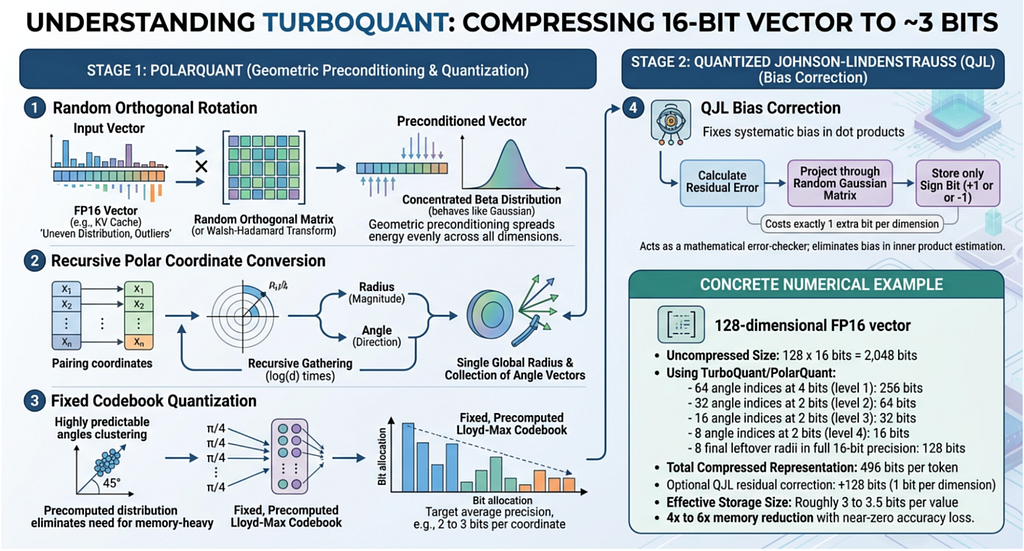
This Figure shows the 4 steps process of TurboQuant powered quantization
Using TurboQuant with Gemma 4
To evaluate the real-world efficiency of running Gemini 4 locally, I integrated TurboQuant into my custom Gemma 4 driver code. For reference I am running Genma 4 on my Macbook Pro with 48GB integrated memory. I ran both Gemma 4 without TurboQuant and without TurboQuant to see if there were any real world gains in terms of memory usage.
Test Setup
For the test data I used the text from the classic Novel, Kidnapped by Robert Louis Stevenson that I was able to get from project Gutenberg. I clipped the data to various length to see how the system behaves as the load increases.
TurboQuant Library: I used the TurboQuant library that is built for Apple Silicon. For this experiment I used TurboQuant V2 that performs 4-bit to 8-bit quantization, for this experiment I used 4-bit quantization with around 3.5x expected memory savings.
https://github.com/sharpner/turboquant-mlx
Test Results
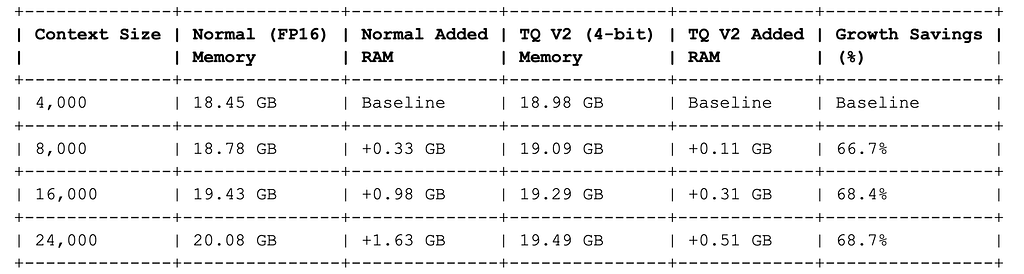
To gather reliable performance data, I designed a programmatic benchmarking method using MLX. By testing the setup across scaling prompt data sizes, I monitored how memory usage behaves under increasing loads. The results clearly highlight the scaling benefits of this approach, as detailed in the benchmark table below .
Table 1: Test results, comparison of FP16 vs TurboQuant V2 (4 bits)
Observations
- At lower contexts (4,000–8,000 tokens), TurboQuant has a slightly higher memory footprint due to a flat ~0.6 GB graph tracing overhead introduced by mixing custom Python classes with native C++ classes in the MLX execution graph.
- At 16,000 tokens , we hit the crossover point where the linear growth of the FP16 cache outpaces this overhead. TQ V2 active memory ( 19.29 GB ) drops below the Normal baseline ( 19.43 GB ).
- At 24,000 tokens , the absolute saving increases to 0.59 GB (2.9% savings) and scales up linearly from there.
Looking at the table it might seem the gains in memory savings are not as large as expected, however we need to consider the fact that there is a lot of overhead memory of running an LLM involved as well. For the context size of 4,000 you can see that both TurboQuant version and non TurboQuant version started around 18–19 GB of memory. This memory is the total memory used by Gemma 4 i.e memory needed to load the weights and the KV cache.
The TurboQuant version actually has a small memory overhead requirement over the FP16 version. However, as we start to increase the context size, we begin to see the characteristics of memory growth. The TurboQuant version shows a much slower memory increase with context size, reducing the memory footprint by almost 70%. Even with this overhead, TurboQuant starts to outperform at total system memory usage around 24K tokens.
After a few experiments I was able to get a consistent 3.2x memory savings with TurboQuant over FP16 KV Cache.
Considerations for this test
Gemma 4 Architecture
In this experiment, a 4-bit quantized Gemma 4 31B model was used. This version of Gemma 4 has 60 attention layers, which means it also has 60 total KV caches (one for each layer). However, of those 60 KV caches, 50 use a sliding window, meaning they only keep a fixed number of KV vectors. The other 10 layers use standard caching, so their cache can grow to the maximum limit. In this experiment, TurboCache was implemented only for those 10 layers because this provides the largest memory savings with minimal overhead. TurboCache adds processing overhead because you must quantize the vectors, and then dequantize them using an inverse Hadamard transform to recover the originals. For those 10 cache layers, the massive memory savings make applying TurboCache highly effective, whereas the processing overhead for the other 50 layers would make the minor memory savings cost-inefficient.
TurboCache 4-bit (V2) vs TurboCache 3.5-bit (V3)
In this experiment TurboCache 4-bit (V2) was used. However, 3.5-bit (V3) can compress the memory by up to 6x theoretically. I have not extensively tested the 3.5-bit version but in my preliminary experiments I found that V3 caches was not as performant as V2 caches because V3 caches have additional memory and processing overheads. So for edge systems like mine, V2 cache may make more sense. Let me know if you have had better luck with the V3 cache in your local machine.
Conclusion
I started this experiment not really understanding what to expect for my limited edge device, but I was pleasantly surprised to see that even for my less powerful device TurboQuant provided measurable benefits.
Most of the coding for this task was done using Antigravity 2.0 which helped me write code at lightning speed. All the code used for this experiment is attached below.
Gemma TurboQuant Driver Code
#!/usr/bin/env python3
import argparse
import os
import sys
import time
from typing import List, Dict, Any


# Suppress tokenizer parallelism warnings
os.environ["TOKENIZERS_PARALLELISM"] = "false"


# Ensure libraries are available
try:
   import mlx.core as mx
   import mlx_lm
   from mlx_lm.generate import GenerationResponse, make_sampler
   from mlx_lm.models.cache import RotatingKVCache, KVCache
except ImportError:
   print("Error: mlx-lm or mlx is not installed in the active environment.", file=sys.stderr)
   print("Please run: pip install mlx-lm", file=sys.stderr)
   sys.exit(1)


# Import turboquant-mlx library components
try:
   import turboquant.patch as tq_patch
   from turboquant.cache_v2 import TurboQuantKVCacheV2
   # Apply the SDPA monkey-patch to route to hardware-accelerated attention
   tq_patch.apply()
except ImportError:
   print("Error: turboquant-mlx library is not available in the workspace path.", file=sys.stderr)
   sys.exit(1)


try:
   from rich.console import Console
   from rich.panel import Panel
   from rich.text import Text
except ImportError:
   print("Error: rich library is not installed.", file=sys.stderr)
   print("Please run: pip install rich", file=sys.stderr)
   sys.exit(1)


class GemmaStreamFormatter:
   """
   Parses and formats streaming output from Gemma 4.
   Separates the thinking channel blocks from the final response text.
   """
   def __init__(self, console: Console):
       self.console = console
       self.buffer = ""
       self.is_thinking = False
       self.thought_tag_open = "<|channel>thought"
       self.thought_tag_close = "<channel|"
       self.full_response_raw = []


   def feed(self, text: str):
       self.full_response_raw.append(text)
       self.buffer += text


       while True:
           if not self.is_thinking:
               idx = self.buffer.find(self.thought_tag_open)
               if idx != -1:
                   before = self.buffer[:idx]
                   if before:
                       self.console.print(before, end="")

                   self.console.print("\n💭 Thinking Process:", style="dim")
                   self.is_thinking = True
                   self.buffer = self.buffer[idx + len(self.thought_tag_open):]
               else:
                   partial_len = 0
                   max_possible = min(len(self.buffer), len(self.thought_tag_open) - 1)
                   for i in range(max_possible, 0, -1):
                       suffix = self.buffer[-i:]
                       if self.thought_tag_open.startswith(suffix):
                           partial_len = i
                           break

                   if partial_len > 0:
                       to_print = self.buffer[:-partial_len]
                       self.buffer = self.buffer[-partial_len:]
                   else:
                       to_print = self.buffer
                       self.buffer = ""

                   if to_print:
                       self.console.print(to_print, end="")
                   break
           else:
               idx = self.buffer.find(self.thought_tag_close)
               if idx != -1:
                   thinking_content = self.buffer[:idx]
                   if thinking_content:
                       self.console.print(thinking_content, end="", style="dim italic")

                   self.console.print()
                   self.is_thinking = False
                   self.buffer = self.buffer[idx + len(self.thought_tag_close):]
               else:
                   partial_len = 0
                   max_possible = min(len(self.buffer), len(self.thought_tag_close) - 1)
                   for i in range(max_possible, 0, -1):
                       suffix = self.buffer[-i:]
                       if self.thought_tag_close.startswith(suffix):
                           partial_len = i
                           break

                   if partial_len > 0:
                       to_print = self.buffer[:-partial_len]
                       self.buffer = self.buffer[-partial_len:]
                   else:
                       to_print = self.buffer
                       self.buffer = ""

                   if to_print:
                       self.console.print(to_print, end="", style="dim italic")
                   break


   def finalize(self) -> str:
       if self.buffer:
           if self.is_thinking:
               self.console.print(self.buffer, end="", style="dim italic")
           else:
               self.console.print(self.buffer, end="")
       if self.is_thinking:
           self.console.print()
       self.buffer = ""
       self.is_thinking = False
       return "".join(self.full_response_raw)


def print_banner(console: Console, model_path: str, kv_bits: int, kv_group_size: int):
   banner = Text()
   banner.append("╔════════════════════════════════════════════════════════════╗\n", style="bold cyan")
   banner.append("║          Gemma 4 31B TurboQuant Driver (MLX)               ║\n", style="bold cyan")
   banner.append("╚════════════════════════════════════════════════════════════╝\n", style="bold cyan")
   banner.append(f"Model:      {model_path}\n", style="green")
   banner.append("Device:     Apple Silicon GPU (Metal Unified Memory)\n", style="green")
   banner.append(f"KV Cache:   TurboQuant {kv_bits}-bit (Group Size: {kv_group_size})\n", style="yellow")
   banner.append("Commands:   /exit (quit), /reset (clear history)\n", style="dim")

   try:
       import psutil
       ram = psutil.virtual_memory().total / (1024**3)
       banner.append(f"System RAM: {ram:.1f} GB\n", style="dim")
   except ImportError:
       pass

   console.print(Panel(banner, border_style="cyan"))


def run_generation(
   model: Any,
   tokenizer: Any,
   messages: List[Dict[str, str]],
   temp: float,
   max_tokens: int,
   no_think: bool,
   kv_bits: int,
   kv_group_size: int,
   console: Console
) -> str:
   prompt = tokenizer.apply_chat_template(
       messages,
       tokenize=False,
       add_generation_prompt=True,
       enable_thinking=not no_think
   )

   formatter = GemmaStreamFormatter(console)
   last_response = None
   sampler = make_sampler(temp=temp)

   # Pre-construct prompt cache using a heterogeneous layout
   # SWA layers remain unmodified, while global layers are selectively quantized
   prompt_cache = []
   for i, default_cache in enumerate(model.make_cache()):
       if default_cache is None:
           prompt_cache.append(None)
       elif isinstance(default_cache, RotatingKVCache):
           # Retain sliding-window caches exactly as-is to preserve local rolling mechanics
           prompt_cache.append(default_cache)
       elif isinstance(default_cache, KVCache):
           # Query the global attention module to retrieve the correct global head dimension
           attn_module = model.layers[i].self_attn
           h_dim = getattr(attn_module, "global_head_dim", attn_module.head_dim)

           # Instantiate hardware-accelerated TurboQuant cache for the global layers
           prompt_cache.append(
               TurboQuantKVCacheV2(
                   head_dim=h_dim,
                   bits=kv_bits,
                   group_size=kv_group_size,
                   use_rotation=True,
                   use_normalization=True
               )
           )
       else:
           prompt_cache.append(default_cache)

   # Run streaming generation
   for response in mlx_lm.stream_generate(
       model,
       tokenizer,
       prompt,
       sampler=sampler,
       max_tokens=max_tokens,
       prompt_cache=prompt_cache
   ):
       formatter.feed(response.text)
       last_response = response

   raw_output = formatter.finalize()

   if last_response:
       console.print("\n" + "─" * 60, style="dim")
       stats = (
           f"[bold green]Metrics:[/bold green] "
           f"Prompt: {last_response.prompt_tokens} tokens ({last_response.prompt_tps:.1f} tok/s) | "
           f"Generation: {last_response.generation_tokens} tokens ({last_response.generation_tps:.1f} tok/s) | "
           f"Peak Memory: {last_response.peak_memory:.1f} GB"
       )
       console.print(stats)
       console.print("─" * 60 + "\n", style="dim")

   return raw_output


def main():
   parser = argparse.ArgumentParser(description="Run Gemma 4 31B locally on macOS using MLX with TurboQuant KV Cache.")
   parser.add_argument(
       "-m", "--model",
       type=str,
       default="mlx-community/gemma-4-31b-it-4bit",
       help="Hugging Face repo or local path of the MLX model."
   )
   parser.add_argument(
       "-p", "--prompt",
       type=str,
       default=None,
       help="Single prompt to execute. If not provided, runs in interactive chat mode."
   )
   parser.add_argument(
       "-s", "--system-prompt",
       type=str,
       default="You are a helpful, respectful, and honest assistant.",
       help="System prompt to initialize the model context."
   )
   parser.add_argument(
       "--temp",
       type=float,
       default=0.7,
       help="Sampling temperature (default: 0.7)."
   )
   parser.add_argument(
       "-n", "--max-tokens",
       type=int,
       default=2048,
       help="Maximum number of tokens to generate."
   )
   parser.add_argument(
       "--no-think",
       action="store_true",
       help="Disable Gemma 4 analytical behaviors for faster text generation."
   )
   parser.add_argument(
       "--kv-bits",
       type=int,
       choices=[4, 8],
       default=4,
       help="Number of bits to use for TurboQuant KV Cache quantization (default: 4)."
   )
   parser.add_argument(
       "--kv-group-size",
       type=int,
       default=64,
       help="Group size for KV cache quantization (default: 64)."
   )
   args = parser.parse_args()


   console = Console()

   with console.status(f"[bold cyan]Loading model {args.model}...", spinner="dots"):
       try:
           start_time = time.time()
           model, tokenizer = mlx_lm.load(args.model)
           load_time = time.time() - start_time
           console.print(f"[bold green]✓ Model loaded successfully in {load_time:.1f}s.[/bold green]\n")
       except Exception as e:
           console.print(f"[bold red]Error loading model {args.model}: {e}[/bold red]", file=sys.stderr)
           sys.exit(1)

   messages = []
   if args.system_prompt:
       messages.append({"role": "system", "content": args.system_prompt})


   if args.prompt:
       messages.append({"role": "user", "content": args.prompt})
       console.print(f"[bold blue]Prompt:[/bold blue] {args.prompt}\n")
       run_generation(model, tokenizer, messages, args.temp, args.max_tokens, args.no_think, args.kv_bits, args.kv_group_size, console)
       return


   print_banner(console, args.model, args.kv_bits, args.kv_group_size)

   while True:
       try:
           user_input = console.input("[bold blue]user > [/bold blue]").strip()
       except (KeyboardInterrupt, EOFError):
           break

       if not user_input:
           continue

       if user_input.lower() == "/exit":
           break
       elif user_input.lower() == "/reset":
           messages = []
           if args.system_prompt:
               messages.append({"role": "system", "content": args.system_prompt})
           console.print("[bold green]Chat history reset.[/bold green]\n")
           continue

       messages.append({"role": "user", "content": user_input})

       console.print("[bold green]assistant > [/bold green]", end="")
       raw_output = run_generation(model, tokenizer, messages, args.temp, args.max_tokens, args.no_think, args.kv_bits, args.kv_group_size, console)
       messages.append({"role": "assistant", "content": raw_output})


if __name__ == "__main__":
   main()
Originally published at https://bufferof.com.
Running and Evaluating TurboQuant optimized Gemma 4 with Antigravity was originally published in Google Cloud – Community on Medium, where people are continuing the conversation by highlighting and responding to this story.
Source Credit: https://medium.com/google-cloud/running-and-evaluating-turboquant-optimized-gemma-4-with-antigravity-818524f8d3ff?source=rss—-e52cf94d98af—4
About the Author