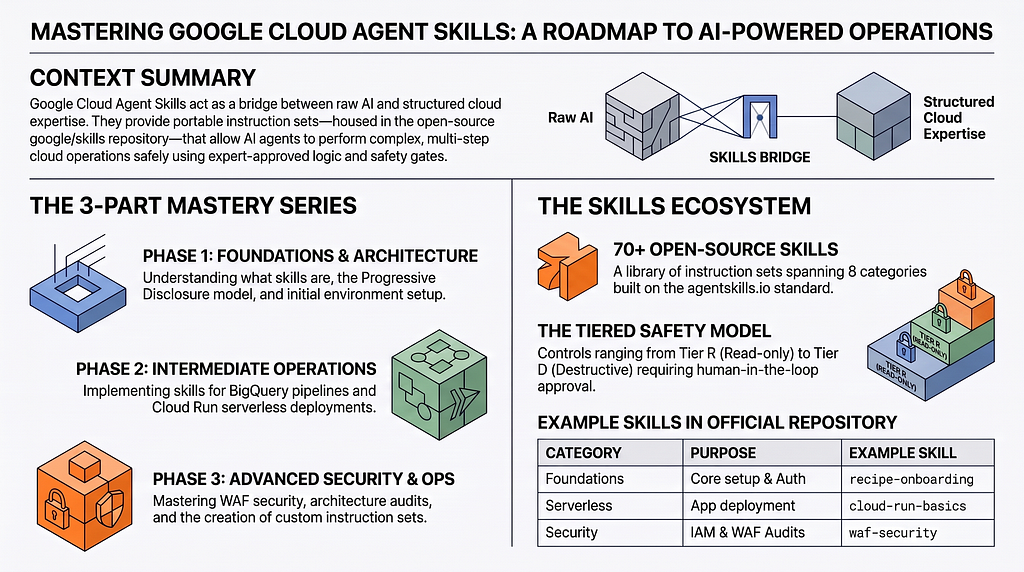
Welcome to the definitive guide on Google Cloud Agent Skills. As the landscape of software engineering evolves, AI coding agents are increasingly being given tasks to becoming autonomous and capable of executing complex, multi-step cloud operations.
The goal of this series is to take a look at the current set of official skills being made available by Google Cloud, right from the basics and applying it to a few use cases like performing security audits, deploy serverless applications, or optimize BigQuery pipelines.
At the end of this series, you should be able to assess their readiness and be able to leverage a few of these Agents Skills to get the job done accurately and securely.
The Series:
– Part 1 : What are Google Cloud Skills (this blog)
– Part 2 : Intermediate Skills in Action (BigQuery and Cloud Run)
– Part 3 : Advanced Ops (WAF Security, Architecture, Custom Skills)
– Part 4 : More Use Cases
What Are Google Cloud Skills?
Agent Skills act as the essential bridge between raw AI capabilities and structured cloud expertise. They are portable instruction sets that teach AI coding agents exactly how to work with specific technologies safely and efficiently.
Instead of an agent blindly guessing a gcloud command and breaking a production cluster, a skill provides:
- Verified Workflows: Step-by-step logic approved by experts.
- Safety Gates: Clear distinctions between read-only audits and mutating actions that require your explicit human-in-the-loop approval.
- Contextual Awareness: Instructions on what environmental variables, IAM permissions, and authentication states to check before beginning a task.
That is our understanding and expectations. At the end of the day, results will vary, depending on the quality of the Skills. Hence an important area like Cloud Operations , if using with Agent Skills, will have to be evaluated carefully.
The google/skills Repository
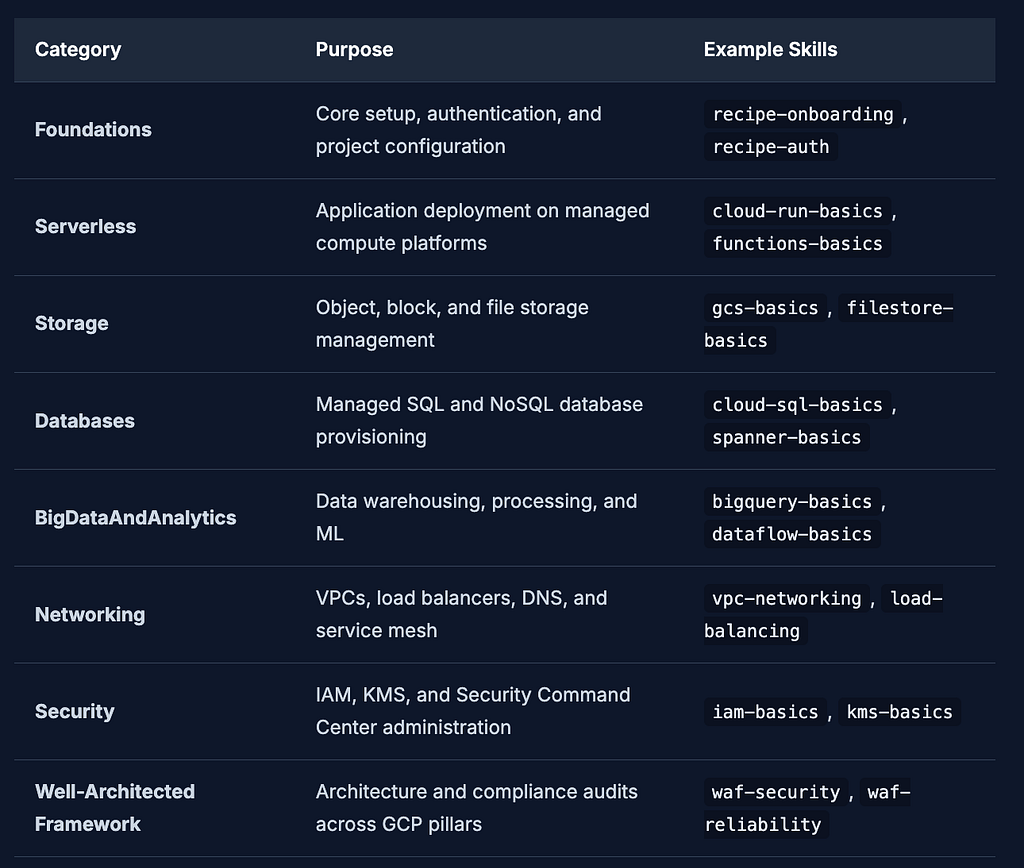
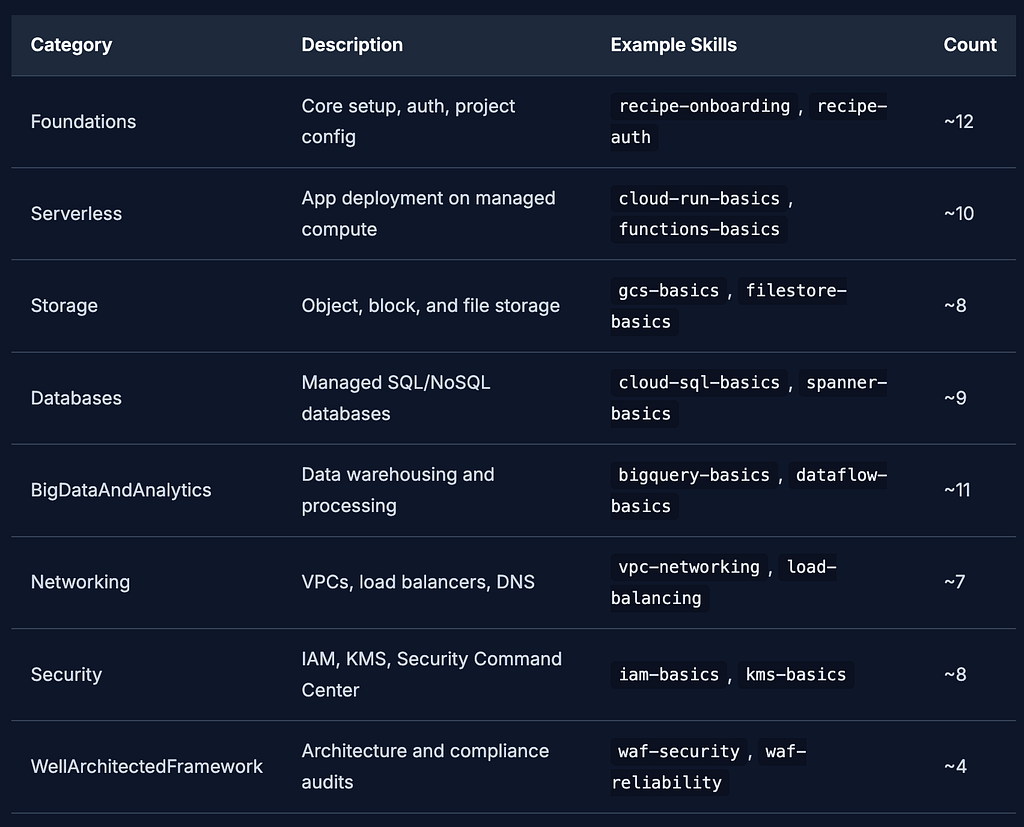
The official google/skills repository is an open-source collection of these instruction sets. Built on the open standard defined at agentskills.io, it currently houses (at the time of writing) nearly 70+ skills spanning 8 distinct categories:
How Skills Work: The Progressive Disclosure Model
If you were to load all 70 odd instructions/details that are present in these skills into an AI agent’s context window simultaneously, the agent would become confused, slow, and expensive to run. To solve this, when it comes to Skills, Agents will use a progressive disclosure model.
Enough has been written on this topic, so we will not iterate much on that here.
Getting Started
This section summarizes the foundational setup required to start using Google Skills. We will explore how to get your agent environment set up with these powerful instruction sets.
Prerequisites
Before we install anything, ensure you have the following installed on your machine:
- Node.js (v18+): Required for running the skills CLI.
- npm: Comes with Node.js.
- Google Cloud SDK (gcloud CLI): To authenticate and interact with Google Cloud. You should setup gcloud with a specific Google Cloud Project, so that all the experiments that you do with these Agent Skills will be executed across that project.
- An AI coding agent: E.g., Google Antigravity / Antigravity CLI or any other agent that supports the agentskills.io standard.
Installing Skills
Getting the skills onto your machine is straightforward. Ensure you have Node.js (v18+) and your AI coding agent installed. You could install specific skills that you need via the npx skills add google/skills command. But here are some ways to install the skills.
Option A: Install Only What This Tutorial Needs (Recommended)
For this tutorial, we use 9 specific skills across the steps and use cases. Installing only these keeps your environment focused and is a best practice, you should install what you need, not everything.
You can use the interactive CLI to install skills:
# Core setup skills
npx skills add google/skills --skill google-cloud-recipe-onboarding
npx skills add google/skills --skill google-cloud-recipe-auth

# Intermediate skills
npx skills add google/skills --skill bigquery-basics
npx skills add google/skills --skill cloud-run-basics

# Advanced skills
npx skills add google/skills --skill google-cloud-waf-security
npx skills add google/skills --skill google-cloud-solution-architecture

# Use Case skills
npx skills add google/skills --skill google-cloud-waf-cost-optimization
npx skills add google/skills --skill google-cloud-solution-build-deploy-agents
npx skills add google/skills --skill gemini-api
Starting with just these 9 skills is ideal for learning. You can always add more later as you explore.
For example, when I run the first command , I get the following interactive display:
$ npx skills add google/skills --skill google-cloud-recipe-onboarding

███████╗██╗  ██╗██╗██╗     ██╗     ███████╗
██╔════╝██║ ██╔╝██║██║     ██║     ██╔════╝
███████╗█████╔╝ ██║██║     ██║     ███████╗
╚════██║██╔═██╗ ██║██║     ██║     ╚════██║
███████║██║  ██╗██║███████╗███████╗███████║
╚══════╝╚═╝  ╚═╝╚═╝╚══════╝╚══════╝╚══════╝

┌   skills
│
◇  Source: https://github.com/google/skills.git
│
◇  Repository cloned
│
◇  Found 84 skills
│
●  Selected 1 skill: google-cloud-recipe-onboarding
│
◇  75 agents
◆  Which agents do you want to install to?
│
│  ── Universal (.agents/skills) ── always included ────────────
│    • Amp
│    • Antigravity
│    • Antigravity CLI
│    • Cline
│    • Codex
│    • Cursor
│    • Deep Agents
│    • Gemini CLI
│    • GitHub Copilot
│    • Kimi Code CLI
│    • OpenCode
│    • Warp
│    • Zed
│    …and 4 more
│
│  ── Additional agents ─────────────────────────────
│  Search:
│  ↑↓ move, space select, enter confirm
│
│ ❯ ○ AiderDesk (.aider-desk/skills)
│   ○ AstrBot (data/skills)
│   ○ Autohand Code CLI (.autohand/skills)
│   ○ Augment (.augment/skills)
│   ○ IBM Bob (.bob/skills)
│   ○ Claude Code (.claude/skills)
│   ○ OpenClaw (skills)
│   ○ CodeArts Agent (.codeartsdoer/skills)
│  ↓ 47 more
│
│  Selected: Amp, Antigravity, Antigravity CLI +10 more
It then asks you for Global or Project scope. It is advisable to go ahead with the current folder i.e. Project scope. This will create a .agents/skills folder and the skills will be placed in that.
Finally, you should see an overall report on the installation:
◇  Installation scope
│  Project

│
◇  Installation Summary ─────────────────────────────────────────────────────────────────╮
│                                                                                        │
│  ~/agy2-projects/google-skills-tutorial/.agents/skills/google-cloud-recipe-onboarding  │
│    copy → Amp, Antigravity, Antigravity CLI, Cline, Codex +8 more                      │
│                                                                                        │
├────────────────────────────────────────────────────────────────────────────────────────╯
│
◇  Security Risk Assessments ────────────────────────────────────────────────────╮
│                                                                                │
│                                  Gen               Socket            Snyk      │
│  google-cloud-recipe-onboarding  Safe              0 alerts          Low Risk  │
│                                                                                │
│  Details: https://skills.sh/google/skills                                      │
│                                                                                │
├────────────────────────────────────────────────────────────────────────────────╯
│
◇  Proceed with installation?
│  Yes
│
◇  Installation complete

│
◇  Installed 1 skill ────────────────────────────────────────────────────────────────────────╮
│                                                                                            │
│  ✓ google-cloud-recipe-onboarding (copied)                                                 │
│    → ~/agy2-projects/google-skills-tutorial/.agents/skills/google-cloud-recipe-onboarding  │
│                                                                                            │
├────────────────────────────────────────────────────────────────────────────────────────────╯

│
└  Done!  Review skills before use; they run with full agent permissions.
Here ~/agy2-projects/google-skills-tutorial/ is my folder in which I am running this tutorial. This could be something different on your machine.
Option B : Install Additional Skills (Later)
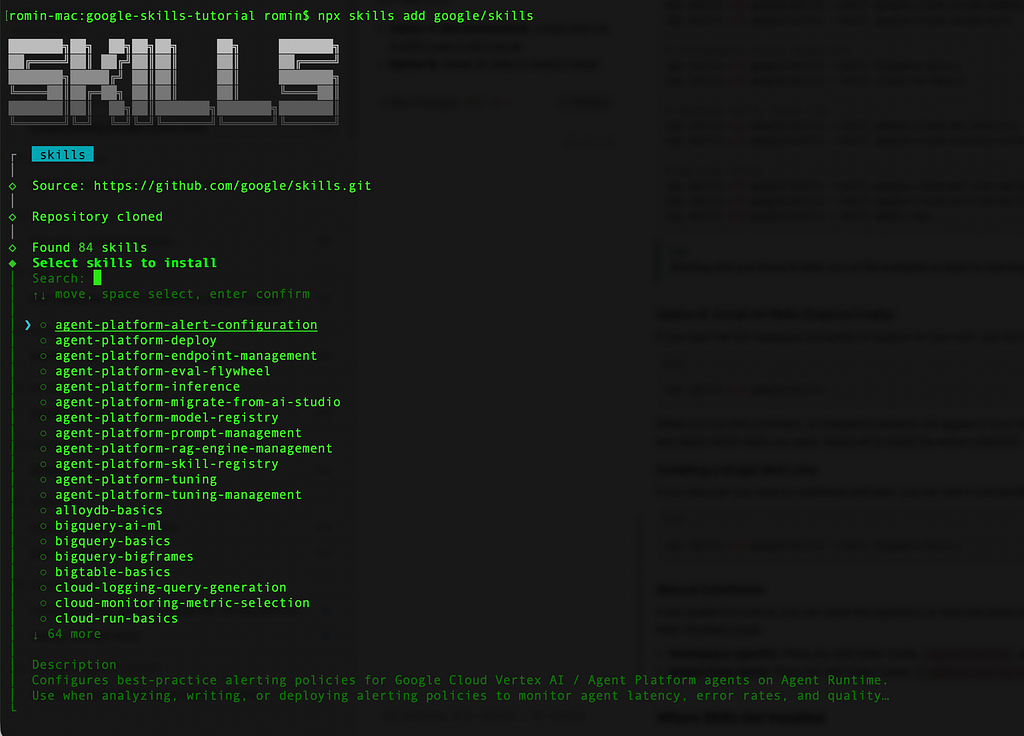
If you want the full catalogue and prefer to explore on your own, use the interactive installer: If you want the full catalogue and prefer to explore on your own, use the interactive installer:
npx skills add google/skills
When you run this command, an interactive selector will appear in your terminal. Choose the specific skills that you are interested to install and try out.
Option C : Installing a Single Skill Later (npx command based)
If you discover you need an additional skill later, you can add it individually at any time:
npx skills add google/skills --skill bigquery-basics
Manual Installation
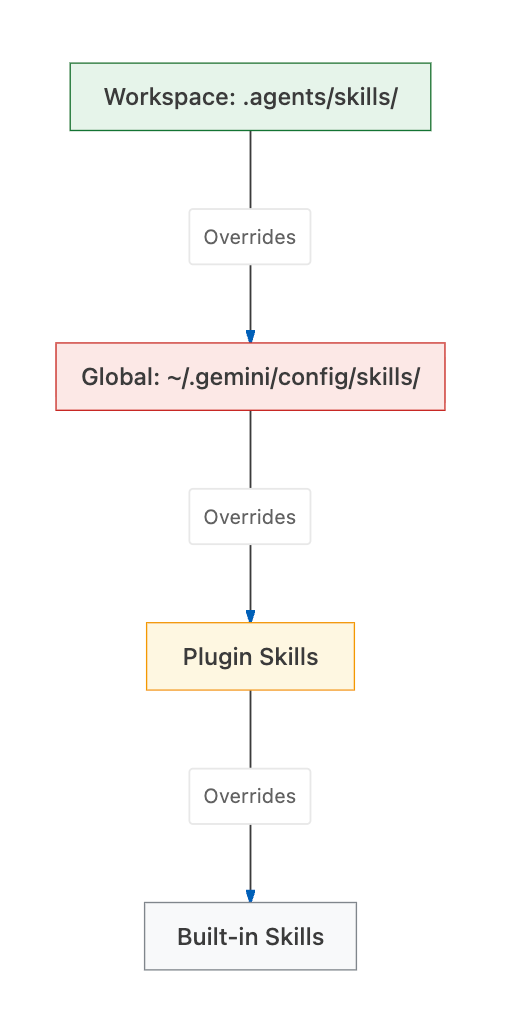
If you prefer full control, you can clone the repository or manually place skill folders in your environment. Skills can be installed in two locations depending on their intended scope:
- Workspace-specific: Place the skill folder inside .agents/skills/ at the root of your current project.
- Global (User level): Place the skill folder inside ~/.gemini/config/skills/ to make it available across all your projects.
Where Skills get installed
When your agent starts up, it looks for skills across several locations. It resolves them using a specific hierarchy. If a skill with the same name exists in multiple places, the one closest to the workspace takes precedence.
Verification
After installation, it is good practice to verify that everything is in order.
You can list all currently installed and active skills using:
npx skills list
You should see something similar to this:
$ npx skills list
Project Skills

bigquery-basics                           ~/agy2-projects/google-skills-tutorial/.agents/skills/bigquery-basics
  Agents: Antigravity, Antigravity CLI, Gemini CLI  Source: google/skills
cloud-run-basics                          ~/agy2-projects/google-skills-tutorial/.agents/skills/cloud-run-basics
  Agents: Antigravity, Antigravity CLI, Gemini CLI  Source: google/skills
gemini-api                                ~/agy2-projects/google-skills-tutorial/.agents/skills/gemini-api
  Agents: Antigravity, Antigravity CLI, Gemini CLI  Source: google/skills
google-cloud-recipe-auth                  ~/agy2-projects/google-skills-tutorial/.agents/skills/google-cloud-recipe-auth
  Agents: Antigravity, Antigravity CLI, Gemini CLI  Source: google/skills
google-cloud-recipe-onboarding            ~/agy2-projects/google-skills-tutorial/.agents/skills/google-cloud-recipe-onboarding
  Agents: Antigravity, Antigravity CLI, Gemini CLI  Source: google/skills
google-cloud-solution-architecture        ~/agy2-projects/google-skills-tutorial/.agents/skills/google-cloud-solution-architecture
  Agents: Antigravity, Antigravity CLI, Gemini CLI  Source: google/skills
google-cloud-solution-build-deploy-agents ~/agy2-projects/google-skills-tutorial/.agents/skills/google-cloud-solution-build-deploy-agents
  Agents: Antigravity, Antigravity CLI, Gemini CLI  Source: google/skills
google-cloud-waf-cost-optimization        ~/agy2-projects/google-skills-tutorial/.agents/skills/google-cloud-waf-cost-optimization
  Agents: Antigravity, Antigravity CLI, Gemini CLI  Source: google/skills
google-cloud-waf-security                 ~/agy2-projects/google-skills-tutorial/.agents/skills/google-cloud-waf-security
  Agents: Antigravity, Antigravity CLI, Gemini CLI  Source: google/skills
Alternatively, you can just peek into your directory structure to ensure the SKILL.md files are present:
ls -la .agents/skills/
If you are using Antigravity CLI, you can launch Antigravity CLI ( agy ) from the terminal. Give it the /skills command and you should see the skills listed in the workspace.
Workspace skills · Workspace config
  bigquery-basics: Manages datasets, tables, and jobs in BigQuery. Use when you need to interact with BigQuery, run SQL queries, manage BigQuery resour...
  cloud-run-basics: Manages Cloud Run services, jobs, and worker pools. Use when you need to deploy applications responding to HTTP requests (services)...
  gemini-api: Use when the user asks about using Gemini in an enterprise environment or explicitly mentions Vertex AI, Google Cloud, or Agent Platform....
  google-cloud-recipe-auth: Provides expert guidance on authenticating and authorizing to Google Cloud services and APIs, covering human users, service...
  google-cloud-recipe-onboarding: Guides a developer's first steps on Google Cloud, covering account creation, billing setup, project management, and d...
  google-cloud-solution-architecture: Interactively discovers requirements for a specific cloud workload and generates design recommendations and archi...
  google-cloud-solution-build-deploy-agents: Designs, builds, and deploys AI agents or multi-agent systems on Google Cloud. Provides an interactive wor...
  google-cloud-waf-cost-optimization: Generates cost optimization guidance for Google Cloud workloads based on the Google Cloud Well-Architected Framew...
  google-cloud-waf-security: Generates security-focused guidance for Google Cloud workloads based on the design principles and recommendations in the G...
Managing Skills
The CLI provides simple commands for managing your installed skills over time:
- Update skills: npx skills update
- Remove a skill: npx skills remove google-cloud-recipe-onboarding
- Find skills: npx skills find "cloud run"
Understanding Skill Anatomy
Once a skill is installed, what does it actually look like? In this step, we break down the structure of a skill following the agentskills.io standard.
The SKILL.md File
The heart of every skill is the SKILL.md file. This isn't just documentation, it is executable instruction code for AI coding agents. When an agent reads this file, it learns exactly how to perform tasks, what commands to run, and what safety checks to enforce.
Let’s look at the full contents of our sample-skill/SKILL.md and break down what each section does.
---
name: cloud-storage-lifecycle-manager
metadata:
  category: Storage
description: Use this skill when the user asks to manage, configure, or optimize Google Cloud Storage (GCS) bucket lifecycle policies and data retention rules.
---

> **Tutorial Note:** The frontmatter above is scanned by the agent on startup. The `description` acts as the trigger.

# Cloud Storage Lifecycle Manager

## Overview
This skill guides the agent in analyzing existing GCS buckets and applying XML or JSON lifecycle policies to transition objects to colder storage classes (Nearline, Coldline, Archive) or delete them to optimize costs.

> **Tutorial Note:** The overview sets the stage for the agent, clarifying its persona and objective.

## Prerequisites
Before executing any mutating commands, verify:
1. User is authenticated (`gcloud auth list`).
2. Current project is set to `PROJECT_ID` or the user-specified project.

## Workflow
1. **Assess:** List the target bucket's current policies using `gcloud storage buckets describe gs://<BUCKET_NAME> --format="json"`.
2. **Design:** Draft a lifecycle policy rule based on the user's requirements (e.g., transition to Coldline after 90 days).
3. **Confirm:** Present the proposed policy to the user for approval.
4. **Apply:** Apply the policy using `gcloud storage buckets update gs://<BUCKET_NAME> --lifecycle-file=<FILE.json>`.

> **Tutorial Note:** The workflow provides step-by-step instructions. Agents are highly capable of following numbered lists.

## Safety & Confirmation Tiers

- **Tier R (Read-only):** `gcloud storage ls`, `gcloud storage buckets describe`. You may run these without asking.
- **Tier M (Mutating):** Applying a new lifecycle policy. **MUST ASK FOR EXPLICIT CONFIRMATION.**
- **Tier D (Destructive):** Deleting objects or removing buckets. Refuse to do this unless explicitly mandated by the user.

> **Tutorial Note:** Safety tiers ensure the agent doesn't autonomously delete infrastructure.

## Workload Assessment Questions
If the user's request is vague, ask ONE of these questions at a time to clarify:
- "What is the name of the GCS bucket you want to apply the lifecycle rule to?"
- "After how many days should the objects transition to a colder storage class?"

## Validation
After applying the rule, verify success by running:
`gcloud storage buckets describe gs://<BUCKET_NAME> --format="value(lifecycle)"`
Ensure the output matches the applied rule.
YAML Frontmatter
Every SKILL.md begins with a YAML frontmatter block. This metadata is crucial for the agent's startup phase.
---
name: my-cloud-skill
metadata:
  category: Serverless
description: Use this skill when the user asks to deploy serverless applications.
---
- name: A unique identifier for the skill (usually matches the folder name).
- metadata.category: Groups skills logically.
- description: This is the activation trigger. The agent uses semantic matching against this description to decide when to activate the skill based on the user's prompt.
Markdown Body Sections
The markdown body dictates the agent’s behavior. While highly flexible, Google Cloud skills typically follow a common pattern:
- Overview / Quick Start: A brief explanation of the skill’s purpose.
- Prerequisites: Tools or API access required before execution.
- Workflow / Decision Trees: Step-by-step instructions the agent must follow.
- Safety & Confirmation Tiers: Guidelines on what needs user approval:
- Tier R (Read-only): Agent can run these without asking (e.g., gcloud compute instances list).
- Tier M (Mutating): Agent must ask before applying changes.
- Tier D (Destructive): Highly restrictive actions requiring extra confirmation (e.g., deleting buckets).
5. Workload Assessment Questions: Clarifying questions the agent should ask the user before beginning.
6. Validation Checklists: Steps to verify the task succeeded.
Optional Supporting Files
A skill folder isn’t limited to just SKILL.md. It can contain supporting directories:
- references/: Detailed documentation, IaC patterns (Terraform), IAM policies, or MCP integration configs that the agent can read for deep context.
- scripts/: Executable Bash/Python scripts for setup automation or verification.
- assets/: Templates for outputs, configuration files, or architecture diagrams.
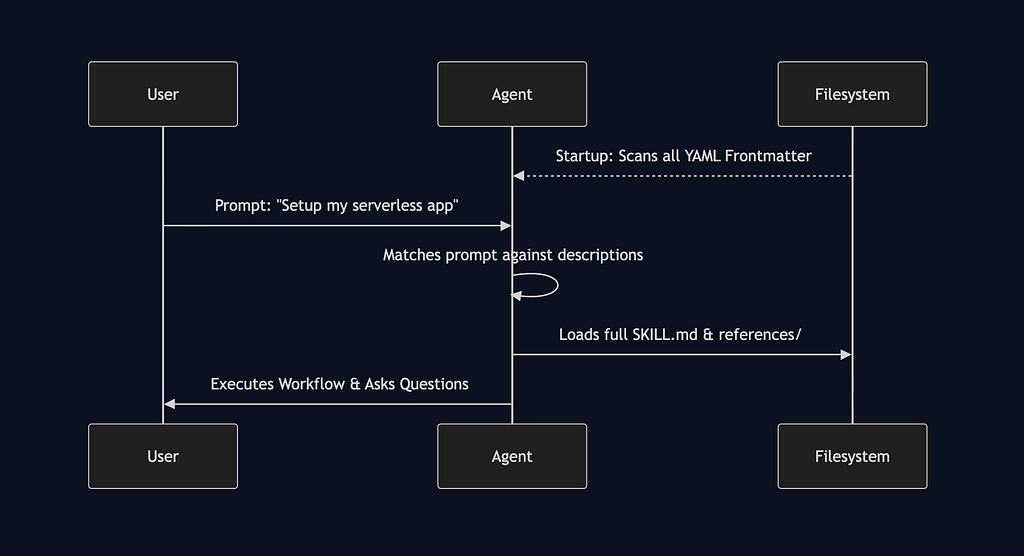
Skill Structure and Processing
The diagram below is a good way to visualize how the Agent at startup scans the Skills YAML frontmatter and then handles the loading of the skill accordingly.
Skill Categories Table
Google Cloud skills are broadly organized into 8 distinct categories, at the time of writing.
Your First Interaction
Now that you have skills installed and understand their anatomy, it’s time to see them in action.
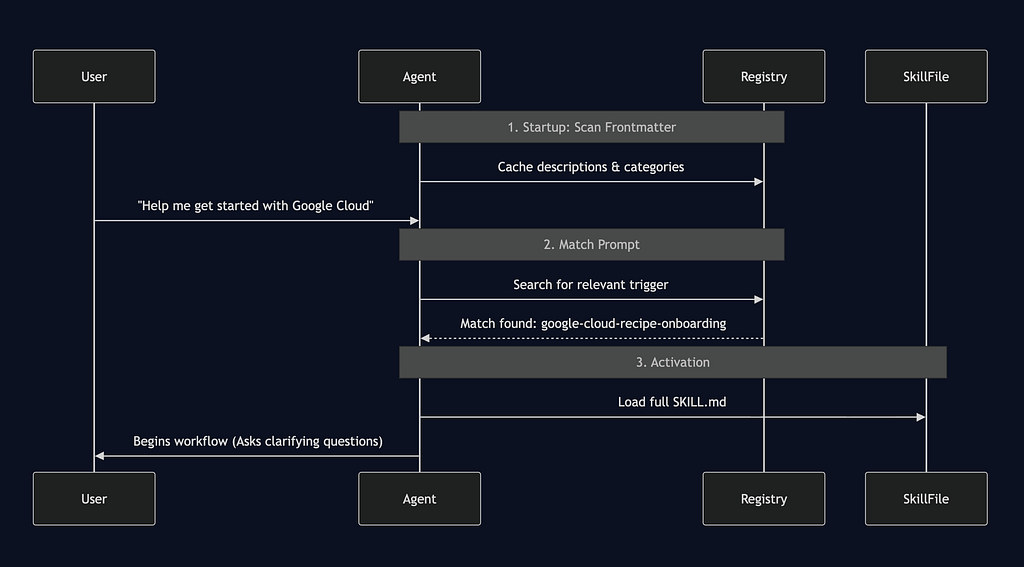
How Skill Activation Works
AI coding agents use a progressive disclosure model to manage skills efficiently:
- Startup: The agent rapidly scans only the YAML frontmatter of all installed skills. It builds an internal registry of description triggers.
- Prompting: When you type a prompt, the agent evaluates it against the registry.
- Activation: If a match is found, it loads the full SKILL.md into its context window and executes the defined workflow.
This prevents the agent’s context window from being overwhelmed with instructions for tools it doesn’t need for the current task.
Walkthrough: The Onboarding Skill
Let’s trace what happens when you trigger the google-cloud-recipe-onboarding skill.
User: “Help me get started with Google Cloud in my new project.”
- Agent Matches Prompt: The agent determines this matches the onboarding skill.
- Agent Reads SKILL.md: It loads the instructions.
- Agent Asks Questions: Following the “Single-question policy” often defined in skills, it asks: “What is your target Google Cloud Project ID?”
- User Answers: “Use MY_PROJECT_ID."
- Agent Audits: The agent runs Tier R (read-only) commands like gcloud config list to check current authentication and project setup.
- Agent Presents Confirmation Table: Before enabling billing or APIs, it presents a structured markdown table detailing what it plans to do.
- Agent Waits: It halts execution and waits for your explicit “Yes” before proceeding with mutating actions.
Key Concepts
- Safety Gates: Points in the workflow where the agent is explicitly instructed to stop and ask for permission.
- Consent Tables: A structured format agents use to explain What they will do, Command they will run, and the Impact.
- The Single-Question Policy: Best practice for skills dictating that agents should only ask the user one clarifying question at a time to prevent cognitive overload.
Example Prompts to Try
Ensure that you have launched your favourite Agent (Antigravity, Antigravity CLI or any other) from the folder in which the .agents/skills folder is present.
I suggest that you don’t run these prompts at the moment and just observe the kind of natural language prompts that you can use to work with Google Cloud Platform via these Google Agent Skills.
Category: Foundations
1. Trigger google-cloud-recipe-onboarding
Prompt: “I want to set up my first Google Cloud project from scratch.”
Explanation: The agent will guide you through project creation, billing linking, and initial IAM setup.
2. Trigger google-cloud-recipe-auth
Prompt: “How do I authenticate my local environment to Google Cloud?”
Explanation: The agent will walk you through gcloud auth login and Application Default Credentials (ADC).
Category: Serverless
3. Trigger cloud-run-basics
Prompt: “I have a Dockerfile here. Can you help me deploy a containerized app to Google Cloud?”
Explanation: The agent will ask for the service name and region, build the image, and run gcloud run deploy.
4. Trigger functions-basics
Prompt: “Help me deploy a Node.js function that triggers on Pub/Sub messages.”
Explanation: The agent will scaffold the function code and construct the deployment command with the correct trigger flags.
Category: Storage
5. Trigger cloud-storage-lifecycle-manager (Our custom skill!)
Prompt: “I need to automatically move objects in my GCS bucket to Archive storage after 1 year.”
Explanation: The agent will generate a JSON lifecycle policy and apply it after your confirmation.
Category: Databases
6. Trigger cloud-sql-basics
Prompt: “Spin up a PostgreSQL database on Cloud SQL and show me how to connect.”
Explanation: The agent will draft a gcloud sql instances create command and explain Cloud SQL Auth Proxy.
7. Trigger firestore-basics
Prompt: “Initialize a Firestore database in native mode for my web app.”
Explanation: The agent will set up the database and perhaps show you how to write basic security rules.
Category: Big Data & Analytics
8. Trigger bigquery-basics
Prompt: “Load this local CSV file into a new BigQuery table.”
Explanation: The agent will use the bq load command and verify the schema.
Category: Networking
9. Trigger vpc-networking
Prompt: “Create a custom VPC network with two subnets in us-central1 and us-east1.”
Explanation: The agent will map out the subnets, verify IP ranges, and execute the creation commands.
Category: Well Architected Framework
10. Trigger waf-security
Prompt: “Can you audit my current Google Cloud architecture to see if it is secure?”
Explanation: The agent will adopt an auditor persona, ask clarifying questions about your workloads, and check for public buckets, overly permissive IAM, etc.
The Series goes on
Stay tuned, as in Part 2, we will cover a couple of Skills in Action (BigQuery and Cloud Run).
Google Cloud Skills Tutorial: The Complete Guide to AI-Powered Cloud Operations was originally published in Google Cloud – Community on Medium, where people are continuing the conversation by highlighting and responding to this story.
Source Credit: https://medium.com/google-cloud/google-cloud-skills-tutorial-the-complete-guide-to-ai-powered-cloud-operations-7838fcc9541a?source=rss—-e52cf94d98af—4
About the Author