If you’re using Kubernetes, understanding the networking component can sometimes become complex. In this guide, we will look at some
This blog summarizes the ▶️ Kubernetes Networking 101 on GKE guide which cuts through the complexity, with very concise explanations of networking terms you need to know. This doesn’t just cover the basics; you will also see some concepts related to AI workloads as GKE positions itself as a platform for running AI workloads.
Networking Fundamentals & Standard Cluster Architecture
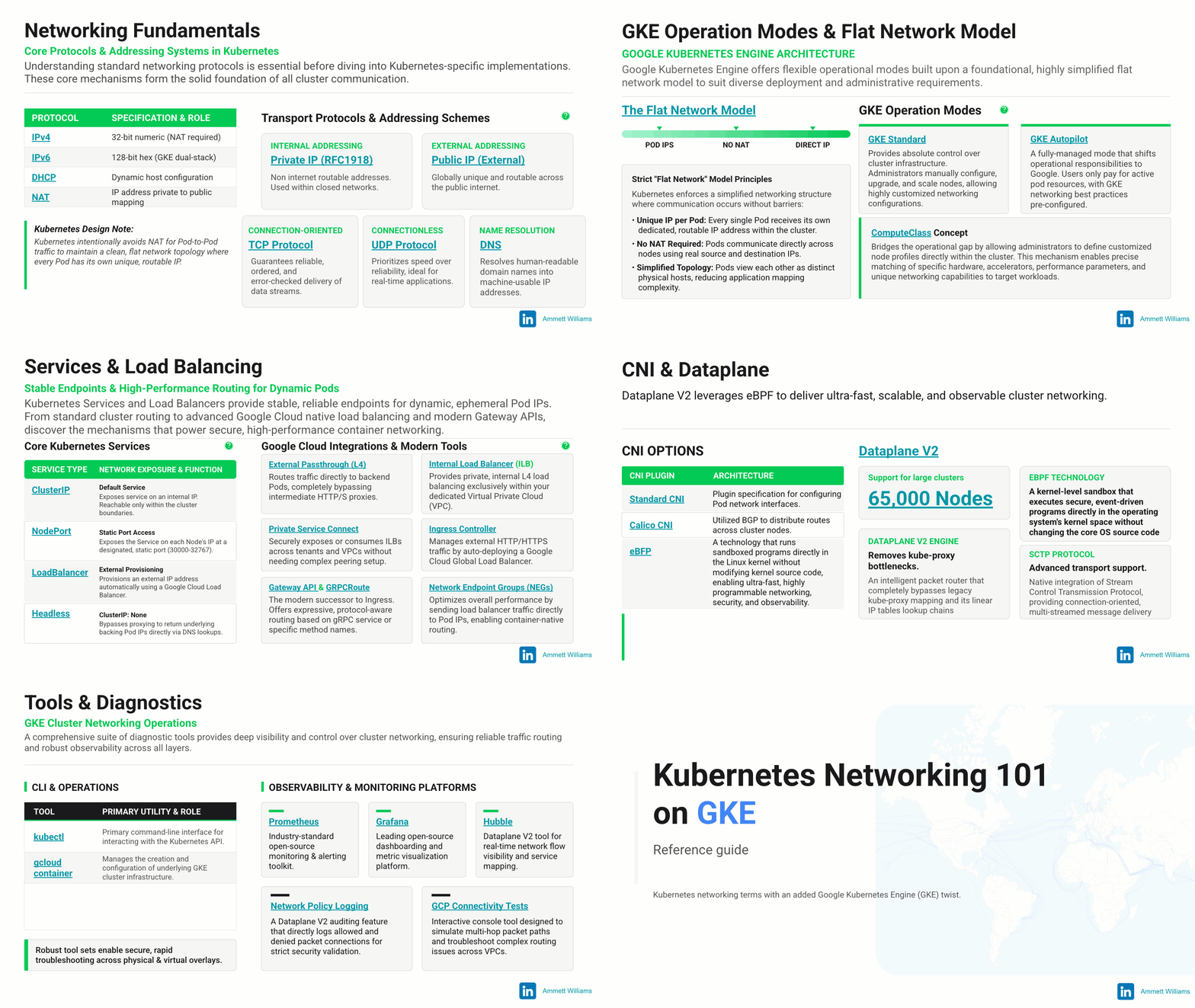
- Networking Fundamentals: Devices automatically receive their IP assignments via DHCP. Data transmission is governed by transport protocols like TCP and UDP, while DNS translates domain names and NAT map IP addresses.
- Concept of IP Addressing: IPv4 addresses are 32-bit, IPv6 are 128-bit, Internal IP’s cannot be used on the internet, while External IP’s are internet routable. It is beneficial to know IP address planning is important and GKE supports dual stack (IPv4/IPv6) clusters.
- Control Plane Primitives: The Control Plane serves as the engine’s brain. The API Server serves as the stateless front door for REST commands, etcd acts as the immutable key-value data store, the Scheduler calculates workload binding, and Controller Managers execute background state-reconciliation loops. Cloud infrastructure interfaces are offloaded to the Cloud Controller Manager.
- Worker Node Subsystems: Workload execution on Worker Nodes is managed via the host Kubelet daemon and the local Container Runtime interface (containerd).
- The Flat Network Model: Every individual Pod acts as an autonomous host with its own unique, routable IP address. Pods communicate directly across nodes without intermediate Network Address Translation (NAT) interventions.
- Operation Modes: GKE Standard preserves manual configuration rights over machine shapes and kernel adjustments. GKE Autopilot provisions infrastructure automatically based on end user configuration. Custom hardware profiles are defined through a ComputeClass. Traditional kube-proxy iptables configurations are completely replaced by the in-kernel anetd routing agent in modern Dataplane V2 deployments.
Cluster Networking Model & IP Addressing
- The 3 Pillars: Traffic isolation is structured into Pod Networking (intra-cluster container fabrics), Service Networking (stable microservice endpoints), and Cluster Networking (external hybrid connections).
- VPC-Native Routing: Pods receive IP addresses natively from the VPC’s secondary IP ranges (the Pod CIDR) via Alias IPs. This removes intermediate overlay routing table updates, improving cross-node throughput compared to a legacy Routes-based Cluster. Outbound traffic source translations are controlled by the IP Masquerade Agent.
- Auto IPAM: Prevents IP address starvation. Auto IPAM automates Pod IP provisioning by dynamically carving up and assigning smaller /24 CIDR blocks to individual nodes as they scale out.
- Multi-Subnet Clusters: Allows cluster node pools to dynamically span Multi-Subnet Clusters in the same region, bypassing the maximum host boundaries of individual subnets.
- Persistent Pod IPs: Anchors specific Persistent Pod IPs to StatefulSet pods across restarts, using data-plane reaction modes to handle migration based on health status. Service virtual IPs are managed within the software-defined Service CIDR.
Services & Load Balancing
- ClusterIP: An internal-only software-defined Virtual IP (VIP) via ClusterIP used exclusively for east-west traffic within the cluster.
- NodePort: Opens a static NodePort allocation (default 30000–32767) across every node IP for basic external access.
- Network Endpoint Groups (NEGs): Implements container-native load balancing. Standalone NEGs allow Google Cloud Load Balancers to route packets directly to the destination Pod IP, bypassing node-level iptables forwarding loops and dropping latency.
- Private Service Connect (PSC): Exposes and consumes Internal Load Balancers (ILBs) via PSC across independent VPC networks or tenants without utilizing VPC Peering.
- Gateway API: Replaces standard Ingress with role-based routing primitives including Gateway, HTTPRoute, and GRPCRoute for protocol-aware L7 dispatching via the Gateway API. Standard traffic can also utilize External Passthrough (L4) options.
- Headless Service: A headless service (ClusterIP: None) returns direct backing Pod IPs via DNS instead of a single virtual IP.
Network Security & Policies
- Network Policy: Controls L3/L4 ingress and egress communication blocks between Pod groups using standard Network Policies.
- Dataplane V2 Enforcement: Processes firewall policies inside the Linux kernel using eBPF, entirely removing iptables rule chain evaluation overhead up to 65,000 nodes via GKE’s managed Dataplane V2.
- Network Policy Logging: Streams eBPF data plane connection logs for allowed and denied packets natively via Network Policy Logging features.
- Isolation Primitives: Authorized Networks restrict Kubernetes API server access to white-listed IP ranges. A Private Cluster configuration fully isolates node pools from public internet routing. A Shared VPC allows clusters in Service Projects to use infrastructure managed in a central Host Project. Virtual infrastructure is further isolated using automated Tags, while Workload Identity secure container mappings provide secure GCP resource authorization without static secrets.
DNS & Service Discovery & CNI & Dataplane
- NodeLocal DNSCache: Runs a lightweight caching daemonset on every node to intercept standard kube-dns / CoreDNS queries locally via NodeLocal DNSCache, avoiding constant round-trip calls to the central cluster DNS.
- Cloud DNS for GKE: Replaces in-cluster CoreDNS pods with Cloud DNS for GKE utilizing Google Cloud’s managed DNS infrastructure to achieve horizontal scale. Cross-platform discovery can map services using Service Directory configurations.
- Dataplane V2 CNI: The CNI plugin specifies container interface parameters. GKE Dataplane V2 eliminates standard Calico CNI BGP routing and iptables rule definitions. It combines routing, policy, and telemetry into the eBPF data plane, adding support for transport protocols like SCTP.
🤔 What happens when a public user hits a Gateway (or Ingress)?
- Phase 1: The user resolves the domain name via DNS to a Google Anycast IP address. Backbone routers pass the traffic to the geographically nearest Edge Point of Presence (PoP) via BGP.
- Phase 2: The Google Front End (GFE) terminates the external TCP handshake and decrypts the TLS layer at the edge.
- Phase 3: The GFE evaluates Gateway API HTTPRoute rules and dispatches the packet across Google’s private fiber network directly to the Pod IP registered in the Network Endpoint Group (NEG), skipping intermediate node hops.
AI & High-Performance Networking
- gVNIC: The gVNIC (Google Virtual NIC) driver handles high-performance cluster compute routing interfaces.
- RDMA over RoCEv2: Remote Direct Memory Access via custom RDMA network profiles enables GPU-to-GPU data transmission memory-to-memory across instances, bypassing the host CPU and operating system kernel.
- GKE managed DRANET: GKE Dynamic Resource Allocation via DRANET. Under-the-hood allocations are cleanly coordinated through ResourceClaims.
- GKE Inference Gateway: Implements Prefix-Cache Aware Routing for Large Language Models (LLMs) via the GKE Inference Gateway by tracking the KV-cache state of backend servers and directing matching prompts to nodes holding the cached context.
Tools & Diagnostics
- Command Line Tools: Base management relies on the kubectl interface for object definitions. You also have Google Cloud’s gcloud container commands to deploy and manage clusters.
- Hubble Monitoring: Collects and visualizes eBPF network flows, connection states, and protocol dependencies directly inside Dataplane V2 using Hubble integrations. System-wide observability runs Prometheus and you can also use Grafana telemetry stacks.
- Connectivity Tests: Simulates packet-level paths within the GCP Console using Connectivity Tests to analyze routing tables, configuration errors, and firewall drops across the VPC and GKE cluster boundaries.
Learn More
Dive into GKE networking with these documents:
- GKE Networking Fundamentals
- Understand IP Addressing in GKE
- GKE Networking Best Practices
- GKE Security Hardening Guide
- Troubleshoot GKE Networking
- Explore the GKE documentation
- ▶️ Kubernetes Networking 101 on GKE
Want to ask a question, find out more or share a thought? Please connect with me on LinkedIn.
Kubernetes networking 101 on GKE: Quick Reference Guide was originally published in Google Cloud – Community on Medium, where people are continuing the conversation by highlighting and responding to this story.
Source Credit: https://medium.com/google-cloud/kubernetes-networking-101-on-gke-quick-reference-guide-27f0de84039e?source=rss—-e52cf94d98af—4
About the Author