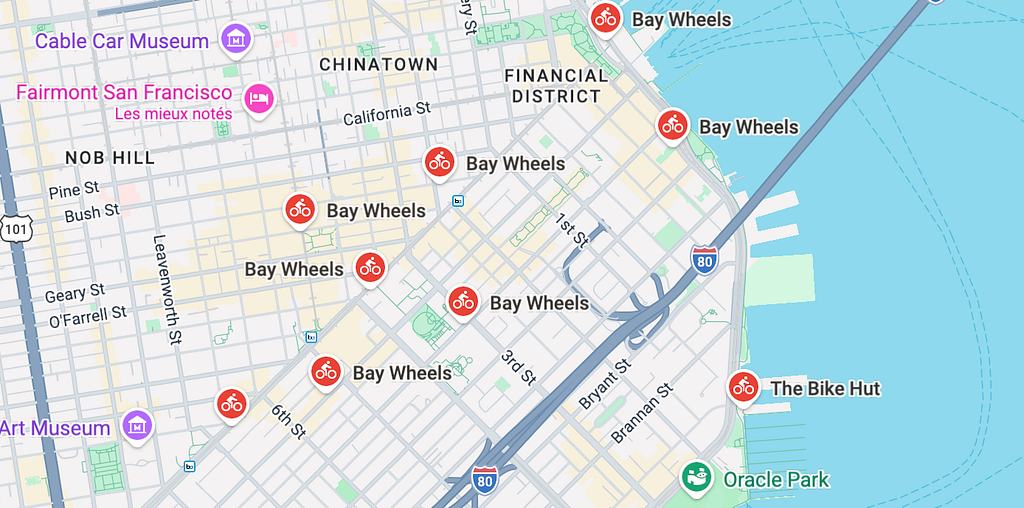
Google recently rolled out BigQuery Graph in preview, bringing native graph querying directly into the data warehouse through the GQL and SQL/PGQ standard. Before this, running graph algorithms at scale meant extracting rows out of BigQuery, piping them through Python, and pushing the results back. Now you write a MATCH clause in SQL and let the engine traverse in place.
In this article I’ll walk through a complete, concrete example: computing closeness centrality — in both directions — on San Francisco’s bike sharing network, then combining the two into a source–sink classification that a logistics team can actually use.
The punchline I want to set up early: a single centrality score tells you which stations are “important”, but the asymmetry between out-closeness and in-closeness is what tells you what to do with them.
Why Two Directions Matter
The usual framing of closeness centrality is unidirectional: “from this node, how efficiently can I reach the rest of the network?” In a bike share context, that’s the perspective of a bike leaving a station. Call it out-closeness.
But there’s a symmetric question just as worth asking: “from the rest of the network, how efficiently does everyone converge toward this node?” That’s the perspective of a bike arriving at a station: in-closeness.
In a flat, symmetric network, the two metrics roughly coincide. In a network with real geography (hills, one-ways, commuter patterns) they diverge, and the gap between them classifies each station into one of four operational roles:
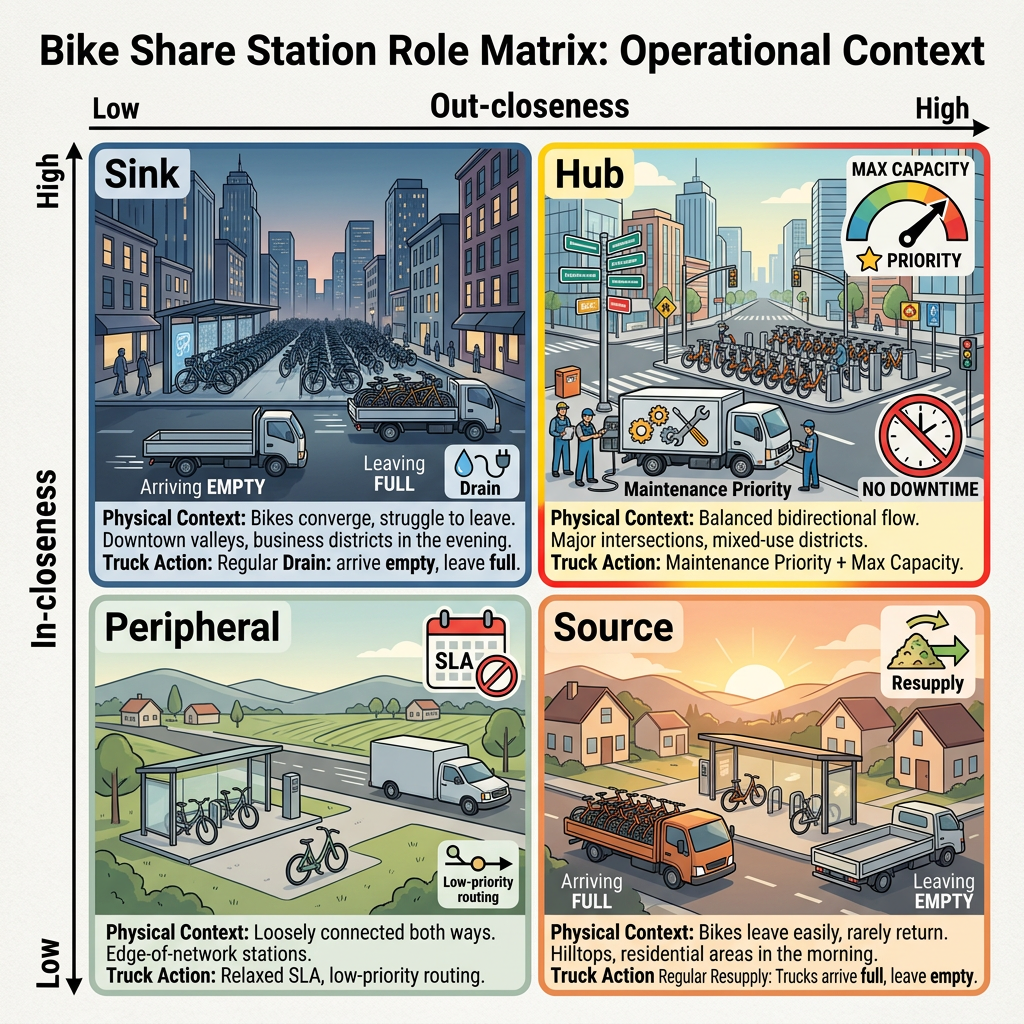
This typology turns a centrality report into a fleet playbook. Getting there takes one extra query and some thoughtful aggregation, let’s build it.
The Dataset
The bigquery-public-data.san_francisco_bikeshare dataset is a natural fit:
- Nodes come from bikeshare_station_info — one row per physical station, with name, capacity, latitude, longitude.
- Edges come from bikeshare_trips — one row per trip, with start station, end station, duration, timestamp.
One caveat worth handling upfront: the dataset includes stations from San José and Oakland alongside those of San Francisco proper. For a clean analysis focused on the SF peninsula, we’ll filter with a bounding box.
Preparing the Data
Property graphs in BigQuery require strict type alignment between node keys and edge source/destination keys, and you can’t cast inside the DDL. The standard move is to build a thin preparation layer with two views: one for nodes, one for edges.
A second concern is subtler. When we later use ANY CHEAPEST to find shortest paths, the engine picks the cheapest single edge per pair. Leave the raw trips table as is, and a station pair with 500 historical trips (ranging, say, from 3 to 25 minutes) gets its distance computed from the fastest outlier — not representative of typical flow. So we pre-aggregate: one edge per (origin, destination) pair, carrying the average duration.
For simplicity, I already created a dataset named bikeshare in my GCP project. Both concerns are handled in these two views:
-- Nodes: San Francisco stations only (bounding box excludes Oakland, Berkeley, San José)
CREATE OR REPLACE VIEW `bikeshare.vw_sf_stations` AS
SELECT
  station_id,
  name,
  lat,
  lon,
  capacity
FROM `bigquery-public-data.san_francisco_bikeshare.bikeshare_station_info`
WHERE lon BETWEEN -122.55 AND -122.35
  AND lat BETWEEN 37.70  AND 37.85;
-- Edges: one row per (origin, destination) pair, average trip duration as weight
CREATE OR REPLACE VIEW `bikeshare.vw_sf_trips_aggregated` AS
SELECT
  CONCAT(CAST(t.start_station_id AS STRING), '_',
         CAST(t.end_station_id   AS STRING)) AS pair_id,
  CAST(t.start_station_id AS STRING)         AS start_station_id,
  CAST(t.end_station_id   AS STRING)         AS end_station_id,
  AVG(t.duration_sec)                         AS avg_duration_sec,
  COUNT(*)                                    AS trip_count
FROM `bigquery-public-data.san_francisco_bikeshare.bikeshare_trips` t
INNER JOIN `bikeshare.vw_sf_stations` s1
  ON CAST(t.start_station_id AS STRING) = s1.station_id
INNER JOIN `bikeshare.vw_sf_stations` s2
  ON CAST(t.end_station_id   AS STRING) = s2.station_id
WHERE t.start_station_id IS NOT NULL
  AND t.end_station_id   IS NOT NULL
  AND t.start_station_id <> t.end_station_id   -- no self-loops
GROUP BY t.start_station_id, t.end_station_id;
The INNER JOIN on both ends of the edge guarantees that no SF↔Oakland or SF↔San José arc leaks into the graph.
Building the Property Graph
CREATE OR REPLACE PROPERTY GRAPH `bikeshare.BikeshareGraph`
  NODE TABLES (
    `bikeshare.vw_sf_stations` AS Station
      KEY (station_id)
  )
  EDGE TABLES (
    `bikeshare.vw_sf_trips_aggregated` AS Trip
      KEY (pair_id)
      SOURCE KEY      (start_station_id) REFERENCES Station (station_id)
      DESTINATION KEY (end_station_id)   REFERENCES Station (station_id)
      LABEL RIDE_TO
  );
One property of this model worth calling out: the edges here are directed arcs, not undirected edges. The SOURCE KEY/DESTINATION KEY split enforces directionality, and the -> in our MATCH patterns respects it. This matters because in SF, trip durations are sharply asymmetric — descending Nob Hill takes 3 minutes, climbing it takes 15. An undirected model would average these and lose the signal. The directed model preserves it, which is exactly what lets out- and in-closeness carry different information.
First Pass: Out-Closeness (Departure Hubs)
The classical (Bavelas) closeness centrality of node x is:
C(x) = (N − 1) / Σ d(y, x)
where d(y, x) is the shortest path distance from every other node. We compute it with the ANY CHEAPEST path search prefix, which returns a single least-cost path per source/destination pair. The COST keyword in the edge pattern tells the engine what metric to minimize — here, travel time in seconds.

Three things to be aware of before running it:
A hop quantifier is required. ANY CHEAPEST must be paired with {1, K}. For a dense bike share network, 5 or 6 hops covers nearly all reachable pairs. The resulting metric is closeness centrality bounded by K hops — the standard trade-off at this scale.
Unreachable pairs drop out. Pairs that can’t be connected within the hop budget simply don’t appear. This mirrors how harmonic centrality handles disconnected components — it’s a feature.
All-pairs shortest paths is quadratic. Tractable for ~400 SF stations, but watch it on bigger graphs.
Here’s the full query:
WITH out_paths AS (
  SELECT *
  FROM GRAPH_TABLE(
    `bikeshare.BikeshareGraph`
    MATCH ANY CHEAPEST
      (src:Station)
      -[e:RIDE_TO COST e.avg_duration_sec]->{1,5}
      (dst:Station)
    WHERE src.station_id <> dst.station_id
    LET total_seconds = SUM(e.avg_duration_sec)
    RETURN
      src.station_id AS station_id,
      src.name       AS station_name,
      src.lat        AS station_lat,
      src.lon        AS station_lon,
      dst.station_id AS other_id,
      total_seconds
  )
),
raw_scores AS (
  SELECT
    station_name,
    ST_GEOGPOINT(MIN(station_lon), MIN(station_lat)) AS station_geography,
    COUNT(DISTINCT other_id) / NULLIF(SUM(total_seconds) / 60.0, 0) AS raw_score
  FROM out_paths
  GROUP BY station_name
)
SELECT
  station_name,
  station_geography,
  raw_score,
  ROUND(
    (raw_score - MIN(raw_score) OVER())
    / NULLIF(MAX(raw_score) OVER() - MIN(raw_score) OVER(), 0) * 100,
    2
  ) AS out_closeness_index
FROM raw_scores
ORDER BY out_closeness_index DESC
The raw score is in units of “stations reached per minute of cumulative shortest-path travel time”. Min-max normalization via window functions turns that into a readable 0–100 index: the best-positioned departure hub scores 100, the worst 0.
By itself, this ranks the stations you’d want to inject bikes into — bikes dropped here disperse through the network most efficiently.
Second Pass: In-Closeness (Convergence Points)
Now flip the question. Instead of “how fast do bikes leaving here reach the rest of the network?”, ask “how fast does the rest of the network converge here?”.
In graph terms: how fast can every other node reach this node along shortest paths? That’s in-closeness, and the query is a single character different from the previous one: flip the arrow direction.
WITH in_paths AS (
  SELECT *
  FROM GRAPH_TABLE(
    `bikeshare.BikeshareGraph`
    MATCH ANY CHEAPEST
      (src:Station)
      <-[e:RIDE_TO COST e.avg_duration_sec]-{1,5}     -- arrow reversed
      (dst:Station)
    WHERE src.station_id <> dst.station_id
    LET total_seconds = SUM(e.avg_duration_sec)
    RETURN
      src.station_id AS station_id,
      src.name       AS station_name,
      src.lat        AS station_lat,
      src.lon        AS station_lon,
      dst.station_id AS other_id,
      total_seconds
  )
),
raw_scores AS (
  SELECT
    station_name,
    ST_GEOGPOINT(MIN(station_lon), MIN(station_lat)) AS station_geography,
    COUNT(DISTINCT other_id) / NULLIF(SUM(total_seconds) / 60.0, 0) AS raw_score
  FROM in_paths
  GROUP BY station_name
)
SELECT
  station_name,
  station_geography,
  raw_score,
  ROUND(
    (raw_score - MIN(raw_score) OVER())
    / NULLIF(MAX(raw_score) OVER() - MIN(raw_score) OVER(), 0) * 100,
    2
  ) AS in_closeness_index
FROM raw_scores
ORDER BY in_closeness_index DESC
This ranks the stations you’d want to collect bikes from — bikes naturally converge here through user behavior. Their intersection and difference is where the real signal lives.
The Real Insight: The Source–Sink Map
Combine both passes in a single query and classify each station using median splits on both axes:
WITH out_paths AS (
  SELECT *
  FROM GRAPH_TABLE(
    `bikeshare.BikeshareGraph`
    MATCH ANY CHEAPEST
      (src:Station) -[e:RIDE_TO COST e.avg_duration_sec]->{1,5} (dst:Station)
    WHERE src.station_id <> dst.station_id
    LET total_seconds = SUM(e.avg_duration_sec)
    RETURN
      src.station_id AS station_id, src.name AS station_name,
      src.lat AS station_lat, src.lon AS station_lon,
      dst.station_id AS other_id, total_seconds
  )
),
in_paths AS (
  SELECT *
  FROM GRAPH_TABLE(
    `bikeshare.BikeshareGraph`
    MATCH ANY CHEAPEST
      (src:Station) <-[e:RIDE_TO COST e.avg_duration_sec]-{1,5} (dst:Station)
    WHERE src.station_id <> dst.station_id
    LET total_seconds = SUM(e.avg_duration_sec)
    RETURN
      src.station_id AS station_id, src.name AS station_name,
      dst.station_id AS other_id, total_seconds
  )
),
out_raw AS (
  SELECT
    station_name,
    ST_GEOGPOINT(MIN(station_lon), MIN(station_lat)) AS station_geography,
    COUNT(DISTINCT other_id) / NULLIF(SUM(total_seconds) / 60.0, 0) AS score
  FROM out_paths GROUP BY station_name
),
in_raw AS (
  SELECT
    station_name,
    COUNT(DISTINCT other_id) / NULLIF(SUM(total_seconds) / 60.0, 0) AS score
  FROM in_paths GROUP BY station_name
),
normalized AS (
  SELECT
    o.station_name,
    o.station_geography,
    ROUND((o.score - MIN(o.score) OVER())
      / NULLIF(MAX(o.score) OVER() - MIN(o.score) OVER(), 0) * 100, 2) AS out_index,
    ROUND((i.score - MIN(i.score) OVER())
      / NULLIF(MAX(i.score) OVER() - MIN(i.score) OVER(), 0) * 100, 2) AS in_index
  FROM out_raw o
  INNER JOIN in_raw i USING (station_name)
),
with_thresholds AS (
  SELECT
    *,
    PERCENTILE_CONT(out_index, 0.5) OVER () AS out_median,
    PERCENTILE_CONT(in_index,  0.5) OVER () AS in_median
  FROM normalized
)
SELECT
  station_name,
  station_geography,
  out_index,
  in_index,
  (out_index - in_index) AS asymmetry,
  CASE
    WHEN out_index >= out_median AND in_index >= in_median  THEN 'Hub'
    WHEN out_index >= out_median AND in_index <  in_median  THEN 'Source'
    WHEN out_index <  out_median AND in_index >= in_median  THEN 'Sink'
    ELSE 'Peripheral'
  END AS station_role
FROM with_thresholds
ORDER BY ABS(out_index - in_index) DESC;
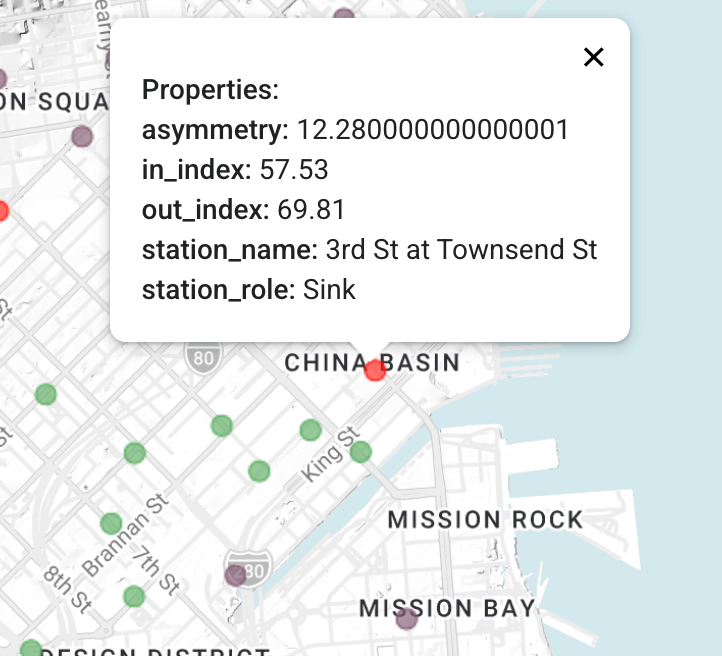
Each station now carries four pieces of information: the two centrality indexes, the signed asymmetry between them, and a role label. That’s the raw material for the truck playbook.
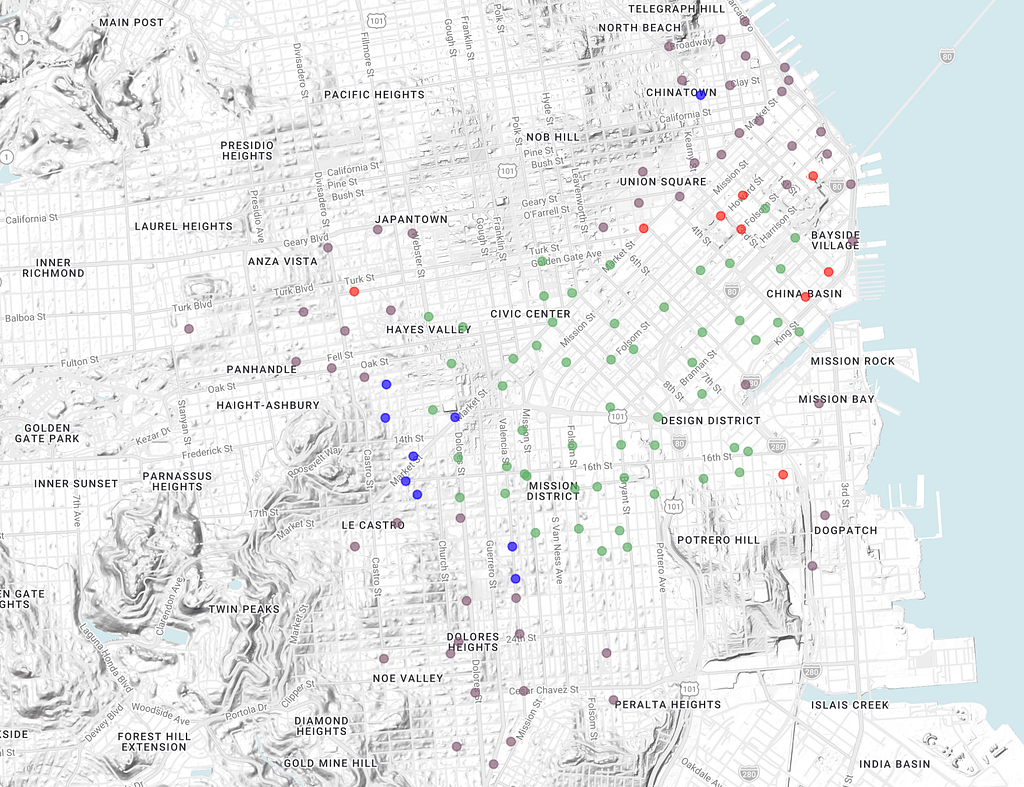
What the Map Reveals About San Francisco
San Francisco’s geography almost guarantees a rich source–sink pattern. A few predictions worth verifying when you run this:
Sources should cluster on elevated terrain and in residential neighborhoods: bikes roll downhill easily, but users rarely pedal back up, so these stations export more than they receive. Morning-heavy residential zones like the Mission’s western edge should show up too.
Sinks should cluster in the downtown valley and around multimodal interchanges. The area around Caltrain and the Ferry Building are particularly strong sinks because arriving riders switch to trains or ferries and leave their bikes behind.
Hubs should be the mixed-use backbone. Market Street corridor stations, Hayes Valley, the denser parts of the Mission — places where bidirectional flow is continuous.
Peripheral stations sit on the network’s edge — Le Castro, Peralta Heights. Loosely connected both ways, lower operational priority.
From Classification to Truck Routing
The four roles translate directly into four distinct fleet operations:
Sources receive morning deliveries. A truck arrives full, unloads, leaves empty (possibly heading to a sink next). The logistics challenge here is vertical — often literal, in SF — so these routes tend to be expensive per unit and worth optimizing carefully.
Sinks receive evening collections. A truck arrives empty, picks up accumulated bikes, leaves full. Skipping this step is what produces the classic bad experience of a rider reaching their destination, finding the dock full, and watching their rental meter keep running.
Hubs are served by short, frequent circuit routes rather than single large visits. They’re also the stations where dock and bike maintenance quality matters most — there’s no low-activity window to service them without user impact, so redundancy and reliability carry more weight than throughput.
Peripheral stations are served last, typically by a catch-up route that sweeps through once or twice a day.
Notice how this differs from the naive reading of a single centrality metric. If you only had out-closeness, you’d know where to drop bikes, but not where to pick them up — and you’d miss the whole sink half of the operation. If you only had in-closeness, vice versa. It’s the intersection of the two that yields an actionable schedule.
Wrapping Up
A few patterns worth carrying forward:
Directional graphs preserve operationally meaningful asymmetry. BigQuery Graph models edges as directed arcs, which at first feels like a constraint but turns out to be exactly what reveals the source/sink structure. In any network where going one way costs something different than going the other — topographic, temporal, behavioral — this matters.
Two passes of the same algorithm, once forward and once reversed, is a powerful general pattern. Out/in centrality here, but the same idea applies to PageRank (reverse PageRank for “authority” vs “hub”), reachability, influence propagation. Whenever a graph metric is defined in one direction, ask what its counterpart in the other direction would mean.
The metric is not the deliverable — the classification is. A single score ranks stations. The 2×2 matrix of out vs in classifies them, and classification is what logistics teams can build processes around. Whenever possible, push past “who scores highest” to “what role does each node play”.
One honest caveat: what we’ve computed here is an average over the whole dataset. A station’s role isn’t necessarily stable through the day — a quiet residential corner can be a strong Source at 8am and fade into Peripheral by noon. If that time dimension matters for your use case, the natural extension is to segment the edge view by hour-of-day and run the same three queries per window. The structure is identical; only the filtering clause changes. Worth the effort if you’re actually going to dispatch trucks off the output.
Beyond that, the same machinery — pre-aggregated directed edges, ANY CHEAPEST with a cost, min-max normalized output — transfers directly to any operational network where asymmetry matters: customer flow between product tiers, inter-warehouse supply routing, ticket escalation paths.
Bike share is a convenient illustration, but the pattern is the thing.
Final words
Thanks for sticking around — graph queries aren’t the lightest read. Thoughts? Pushback? A weird result when you ran the queries on your own project? Tell me about it, I read every message.
Let’s connect on LinkedIn. Drop a note about what you’re working on — always curious to see other people’s data problems.
Graph Analytics in BigQuery: Mapping the Source-Sink Structure of a Bike Sharing Network was originally published in Google Cloud – Community on Medium, where people are continuing the conversation by highlighting and responding to this story.
Source Credit: https://medium.com/google-cloud/graph-analytics-in-bigquery-mapping-the-source-sink-structure-of-a-bike-sharing-network-8c95386e0780?source=rss—-e52cf94d98af—4
About the Author