Most AI agent demos have a short memory. The agent tracks your conversation, remembers your preferences, builds up context across turns, and then the process restarts and everything vanishes. On stateless runtimes like Cloud Run, this happens every time a container recycles. The agent starts fresh with no recollection of past interactions.
Google’s Agent Development Kit (ADK) has a deliberate answer to this problem. It separates agent memory into distinct layers with different lifetimes and scopes, and it lets you swap the storage backend without touching agent code. Before walking through a working example, let’s try to understand the underlying model.
Sessions: The Container for a Conversation
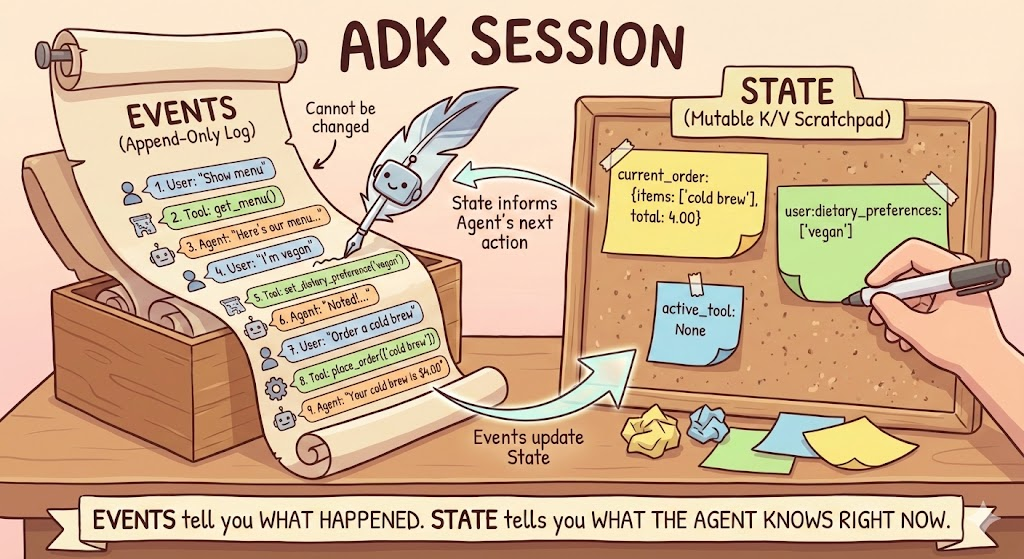
Every ADK conversation lives inside a Sessionobject. A session is created when a user starts a new conversation and tracks two distinct things: events and state. These are fundamentally different data structures that serve different purposes, and understanding the distinction is key to building agents that remember the right things in the right way.
Events: The Immutable Transcript
Events are the chronological log of everything that happens in a conversation. Every user message, every agent response, every tool call and its return value gets recorded as an Eventand appended to the session’s events list. Events are immutable: once recorded, they never change.
Each event carries metadata that tells you what it represents. The event.author field identifies who produced the event (user or the agent name like cafe_concierge). The event.content.parts array holds the actual payload, which can be text, function calls, or function responses. And event.actions carries side effects like state changes and control flow signals.
When processing events programmatically (for custom runners or logging), you can identify the type of each event:
# Pseudocode: Basic event identification (Python)
async for event in runner.run_async(...):
    print(f"Event from: {event.author}")
    if event.content and event.content.parts:
        if event.get_function_calls():
            print("  Type: Tool Call Request")
        elif event.get_function_responses():
            print("  Type: Tool Result")
        elif event.content.parts[0].text:
            if event.partial:
                print("  Type: Streaming Text Chunk")
            else:
                print("  Type: Complete Text Message")
    elif event.actions and (event.actions.state_delta or event.actions.artifact_delta):
        print("  Type: State/Artifact Update")
    else:
        print("  Type: Control Signal or Other")
In the ADK dev UI, all of this is visualized. Each event shows its author, type, and contents. Clicking a tool_call event reveals the function name and arguments; clicking the corresponding tool_response shows the return value.
State: The Mutable Scratchpad
While events are the full transcript, state is a key-value scratchpad that the agent reads and writes during a conversation. Unlike events, state is mutable: values change as the conversation evolves. State is where the agent stores structured data it needs to act on, like a running order, a customer’s dietary restrictions, or a computed total.
Tools read and write state through ToolContext, an object that ADK automatically injects into any tool function that declares it as a parameter. You don’t create it yourself.
The connection between events and state matters. When a tool writes to tool_context.state, ADK records that change as a state_delta inside the event:
state_delta: {"user:dietary_preferences": ["lactose intolerant"]}
Every state change is traceable back to the specific event that caused it. For example, if you have a restaurant concierge agent and you need to debug why a user preference was set or an order was modified, the event log tells you exactly when and what triggered it.
State Prefixes: Controlling Scope and Lifetime
State keys use prefixes to control how far data reaches:
|  Prefix  |          Scope             | Survives restart? (with DB) |
|----------|----------------------------|-----------------------------|
| *(none)* | Current session only       | Yes                         |
| `user:`  | All sessions for this user | Yes                         |
| `app:`   | All sessions, all users    | Yes                         |
| `temp:`  | Current invocation only    | No                          |
This is invisible in the code: both session-scoped and user-scoped state use the same tool_context.state dictionary. The prefix on the key name is what controls the behavior. A key like current_order (no prefix) exists only in the current session and disappears when the conversation ends. A key like user:dietary_preferences is shared across every session for that user.
Putting It Into Practice: A Cafe Concierge
To see these concepts in action, I built a cafe concierge agent, a friendly barista that takes coffee orders and remembers dietary preferences. The agent uses two state scopes:
- current_order (session-scoped): tracks the order within a single conversation
- user:dietary_preferences (user-scoped): persists dietary restrictions across all conversations
Here’s the order placement tool, which writes to session-scoped state:
def place_order(tool_context: ToolContext, items: list[str]) -> dict:
    """Places an order for the specified menu items.

    Use this tool when the customer confirms they want to order something.

    Args:
        tool_context: Provided automatically by ADK.
        items: A list of menu item names the customer wants to order.
    """
    valid_items = []
    invalid_items = []
    total = 0.0

    for item in items:
        item_lower = item.lower()
        if item_lower in CAFE_MENU:
            valid_items.append(item_lower)
            total += CAFE_MENU[item_lower]["price"]
        else:
            invalid_items.append(item)

    if not valid_items:
        return {"error": f"None of these items are on our menu: {invalid_items}"}

    order = {"items": valid_items, "total": round(total, 2)}
    tool_context.state["current_order"] = order

    result = {"order": order}
    if invalid_items:
        result["warning"] = f"These items are not on our menu: {invalid_items}"
    return result
And here’s the preference tool, which writes to user-scoped state via the user: prefix:
def set_dietary_preference(tool_context: ToolContext, preference: str) -> dict:
    """Saves a dietary preference that persists across all conversations.

    Use this tool when the customer mentions a dietary restriction or
    preference (e.g., "I'm vegan", "I'm lactose intolerant",
    "I have a nut allergy").

    Args:
        tool_context: Provided automatically by ADK.
        preference: The dietary preference to save (e.g., "vegan",
            "lactose intolerant", "nut allergy").
    """
    existing = tool_context.state.get("user:dietary_preferences", [])
    if not isinstance(existing, list):
        existing = []

    preference_lower = preference.lower().strip()
    if preference_lower not in existing:
        existing.append(preference_lower)

    tool_context.state["user:dietary_preferences"] = existing
    return {
        "saved": preference_lower,
        "all_preferences": existing,
    }
The agent’s system prompt can also reference state directly using a template: {user:dietary_preferences?}. ADK injects the current value at runtime, and the ? suffix prevents errors when the key doesn’t exist yet.
Session Persistence
The Local Storage Trap
In recent version, ADK stores all session data in a local SQLite file at {agent_module}/.adk/session.db by default. This works during development, but the data disappears when you delete the file or deploy to a stateless environment. For example, on Cloud Run, every container restart wipes the local filesystem.
Persisting to Cloud SQL
If you want to test this using the adk webcommand, changing the session persistence requires zero changes to agent code. ADK’s DatabaseSessionService takes over when you pass a connection URI like shown below :
uv run adk web --session_service_uri postgresql+asyncpg://postgres:${DB_PASSWORD}@127.0.0.1:5432/${DB_NAME}
ADK handles schema creation automatically, building tables for sessions, events, app states, and user states:
                List of relations
 Schema |         Name          | Type  |  Owner
--------+-----------------------+-------+----------
 public | adk_internal_metadata | table | postgres
 public | app_states            | table | postgres
 public | events                | table | postgres
 public | sessions              | table | postgres
 public | user_states           | table | postgres
(5 rows)
After restarting the agent with Cloud SQL backing, user-scoped state like dietary preferences survives across restarts and new sessions. Session-scoped state like current_order still resets with each conversation, which is the expected behavior.
Try It Yourself
If you are interested to try and experimenting this concept by yourself, the full hands-on walkthrough, including Cloud SQL provisioning, proxy setup, and testing across sessions, is available in this codelab: Building Persistent AI Agents with ADK and CloudSQL. Afraid that you never access the GCP before? Don’t worry! We cover each step by step and even give you trial billing account to start building right away! Happy exploring!
How ADK Agents Remember: Sessions, Events, and Scoped-State was originally published in Google Cloud – Community on Medium, where people are continuing the conversation by highlighting and responding to this story.
Source Credit: https://medium.com/google-cloud/how-adk-agents-remember-sessions-events-and-persistent-state-742e06e9568c?source=rss—-e52cf94d98af—4
About the Author