Tracing LangGraph Agents on Agent Engine: OpenTelemetry from Deployment to Custom Spans
The visibility gap hiding inside your AI agents — and how to close it.
The Problem: Agent Engine Is Invisible by Default
Google Cloud’s Agent Engine is a powerful managed runtime for deploying LangGraph agents at scale.
You package your agent, call a create API, and the platform handles the rest: autoscaling,checkpointing, serverless execution. But open Cloud Trace after your first deployment and you’ll see… nothing. That’s because Agent Engine does not automatically instrument your LangGraph agent with observability.
There’s no built-in tracing, no span tree, no LLM call latency — nothing you can drill into when a user says “why did my agent take 30 seconds?” or “it gave a wrong answer?”
This post walks through a general approach to solve this end-to-end: from wiring OpenTelemetry at agent startup, to decorating every critical function with custom spans, to shipping traces into
Cloud Trace — all without requiring changes from the agent YAML author.
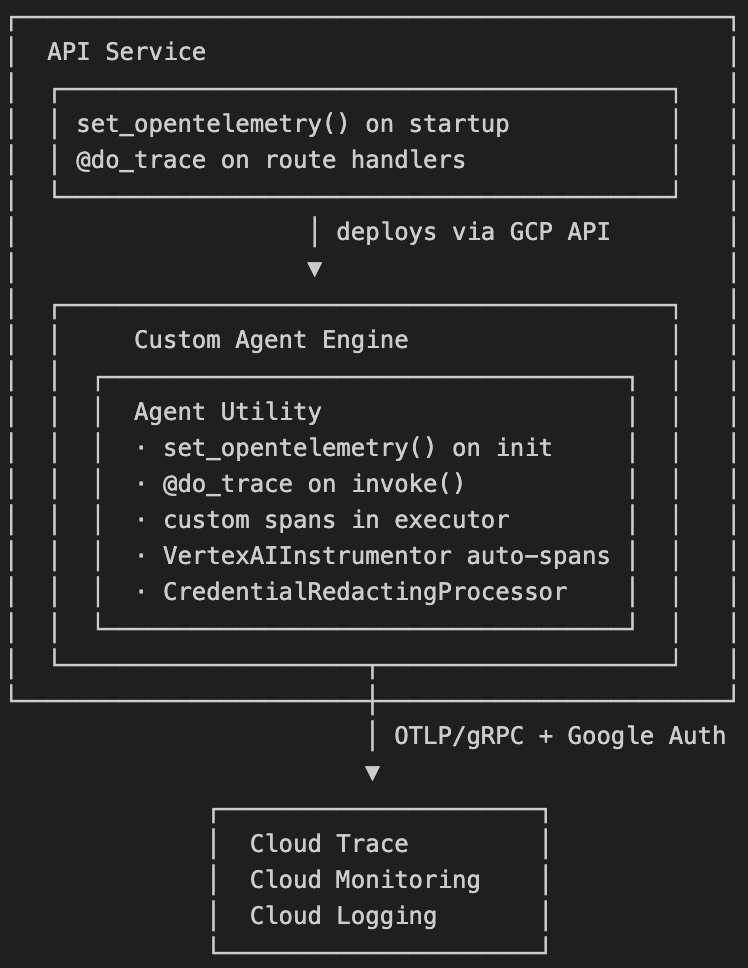
Architecture Overview
Part 1: Enabling Tracing — Call ‘set_opentelemetry’
When your LangGraph agent starts inside a Custom Agent Engine environment, there is no web server lifecycle to hook into. The agent process boots cold from a serialized runnable. The first thing your initialization code must do is call `setup_opentelemetry()` with a service name:
set_opentelemetry("my-agent-service")
A single call wires up all three OTel signals:
- Traces → Cloud Trace via OTLP/gRPC
- Logs → Cloud Logging
- Metrics → Cloud Monitoring
The function is idempotent — safe to call multiple times across code paths without reinitializing the provider stack. And it is designed to be non-fatal: if credentials are missing or an IAM role is absent, a warning is logged and the agent continues serving traffic. OTel misconfiguration must never take down a production agent. It resolves GCP credentials via Application Default Credentials (ADC) automatically, so no additional credential wiring is needed in Agent Engine where the service account is attached to the runtime.
Part 2: ‘set_opentelemetry’ — The Full Stack
All three signals are set up with independent error handling — a failure in metrics never prevents traces from working:
def set_opentelemetry(service_name: str) -> None:
    global _initialized
    if _initialized:
        return
    _initialized = True
    os.environ["OTEL_PYTHON_LOGGING_AUTO_INSTRUMENTATION_ENABLED"] = "true"
    os.environ["OTEL_INSTRUMENTATION_GENAI_CAPTURE_MESSAGE_CONTENT"] = "true"
    os.environ["OTEL_SERVICE_NAME"] = service_name
    gcp_creds, project_id = google.auth.default(
        scopes=["https://www.googleapis.com/auth/cloud-platform"]
    )
    service_resource = Resource.create({
        SERVICE_NAME: service_name,
        "gcp.project_id": project_id,
    })
    auth_plugin = AuthMetadataPlugin(credentials=gcp_creds, request=Request())
    grpc_channel_creds = grpc.composite_channel_credentials(
        grpc.ssl_channel_credentials(),
        grpc.metadata_call_credentials(auth_plugin),
    )
    try:
        tracer_provider = TracerProvider(resource=service_resource)
        tracer_provider.add_span_processor(CredentialRedactingSpanProcessor())
        tracer_provider.add_span_processor(
            BatchSpanProcessor(
                OTLPSpanExporter(
                    credentials=grpc_channel_creds,
                    endpoint="https://telemetry.googleapis.com:443/v1/traces",
                )
            )
        )
        trace.set_tracer_provider(tracer_provider)
    except Exception as exc:
        logger.warning("Trace export setup failed: %s", exc)
        trace.set_tracer_provider(TracerProvider(resource=service_resource))
    try:
        log_provider = LoggerProvider(resource=service_resource)
        log_provider.add_log_record_processor(BatchLogRecordProcessor(CloudLoggingExporter()))
        logs.set_logger_provider(log_provider)
        event_log_provider = EventLoggerProvider(log_provider)
        events.set_event_logger_provider(event_log_provider)
    except Exception as exc:
        logger.warning("Cloud Logging export setup failed: %s", exc)
    try:
        metrics_exporter = CloudMonitoringMetricsExporter()
        metric_reader = PeriodicExportingMetricReader(metrics_exporter)
        meter_provider = MeterProvider(metric_readers=[metric_reader], resource=service_resource)
        metrics.set_meter_provider(meter_provider)
    except Exception as exc:
        logger.warning("Cloud Monitoring metrics setup failed: %s", exc)
    for cls, name in (
        (HTTPXClientInstrumentor, "httpx"),
        (SQLite3Instrumentor, "sqlite3"),
        (VertexAIInstrumentor, "vertexai"),
    ):
        try:
            cls().instrument()
        except Exception as exc:
            logger.warning("Instrumentation skipped for %s: %s", name, exc)
Why ‘telemetry.googleapis.com’ not the standard OTLP collector?
GCP’s Telemetry API (‘telemetry.googleapis.com’) is the recommended OTLP ingestion endpoint for Cloud Trace. It accepts standard OTLP/gRPC, authenticates with Google OAuth2, and writes directly to Cloud Trace. No OTel Collector sidecar required — which is perfect for Agent Engine’s serverless model.
The security layer: `CredentialRedactingSpanProcessor`
LangGraph’s OpenInference instrumentation serializes the full agent state dict as span attributes. That state can contain runtime credentials (API keys, tokens for enterprise tools). Before any span leaves the process, a custom span processor scrubs them:
class CredentialRedactingSpanProcessor(SpanProcessor):
    _REDACT_KEYS = frozenset({"_runtime_credentials"})

    def on_end(self, span) -> None:
        attrs = getattr(span, "attributes", None)
        if not attrs:
            return
        for key, val in attrs.items():
            if not isinstance(val, str):
                continue
            if not any(f'"{k}"' in val for k in self._REDACT_KEYS):
                continue
            try:
                data = json.loads(val)
                if _redact_dict_recursive(data):
                    attrs[key] = json.dumps(data)
            except Exception:
                for k in self._REDACT_KEYS:
                    val = re.sub(
                        rf'"{re.escape(k)}"\s*:\s*(?:\{{[^{{}}]*\}}|"[^"]*")',
                        f'"{k}": "[REDACTED]"',
                        val,
                    )
                attrs[key] = val
This processor is registered before `BatchSpanProcessor` so credentials are never queued for export.
Part 3: Custom Spans with ‘@do_trace’
Auto-instrumentation gives you HTTP spans and Vertex AI spans. But you won’t see your business logic: “how long did agent deployment take?”, “which agent took 45s?”, “did the query succeed or fail?” That requires custom spans.
A ‘@do_trace’ decorator works on both sync and async functions:
def do_trace(fn:callable | None = None, *, span_name: str | None = None) -> callable:
    def decorator(f:callable) -> callable:
        @functools.wraps(f)
        async def _async_wrap(*args, **kwargs):
            tracer = trace.get_tracer(f.__module__)
            active_span_name = span_name or _build_span_name(f, *args, **kwargs)
            with tracer.start_as_current_span(active_span_name) as current_span:
                _set_span_attributes(current_span, f, *args, **kwargs)
                try:
                    return_value = await f(*args, **kwargs)
                    current_span.set_attribute("execution.success", True)
                    current_span.set_status(trace.Status(trace.StatusCode.OK))
                    _set_span_response(current_span, return_value)
                    return return_value
                except Exception as exc:
                    current_span.set_attribute("execution.success", False)
                    current_span.record_exception(exc)
                    current_span.set_status(trace.Status(trace.StatusCode.ERROR))
                    raise

        @functools.wraps(f)
        def _sync_wrap(*args, **kwargs):
            tracer = trace.get_tracer(f.__module__)
            active_span_name = span_name or _build_span_name(f, *args, **kwargs)
            with tracer.start_as_current_span(active_span_name) as current_span:
                _set_span_attributes(current_span, f, *args, **kwargs)
                try:
                    return_value = f(*args, **kwargs)
                    current_span.set_attribute("execution.success", True)
                    current_span.set_status(trace.Status(trace.StatusCode.OK))
                    _set_span_response(current_span, return_value)
                    return return_value
                except Exception as exc:
                    current_span.set_attribute("execution.success", False)
                    current_span.record_exception(exc)
                    current_span.set_status(trace.Status(trace.StatusCode.ERROR))
                    raise

        if inspect.iscoroutinefunction(f):
            return _async_wrap
        return _sync_wrap
    if fn is None:
        return decorator
    return decorator(fn)
How span names are built automatically
If you don’t provide a ‘span_name’, the decorator extracts ‘agent_id’, ‘resource_id’, and ‘version’ from the function arguments to build a meaningful span name:
def _build_span_name(func, *args, **kwargs) -> str:
    bound = _bind_partial_safe(func, *args, **kwargs)
    parts = []
    agent_id = bound.arguments.get("agent_id")
    resource_id = bound.arguments.get("resource_id")
    version = bound.arguments.get("version")
    if agent_id:
        parts.append(str(agent_id))
    elif resource_id:
        parts.append(str(resource_id))
    if version:
        parts.append(str(version))
    parts.append(func.__name__)
    return ".".join(parts) if parts else f"LanggraphAgent.{func.__name__}"
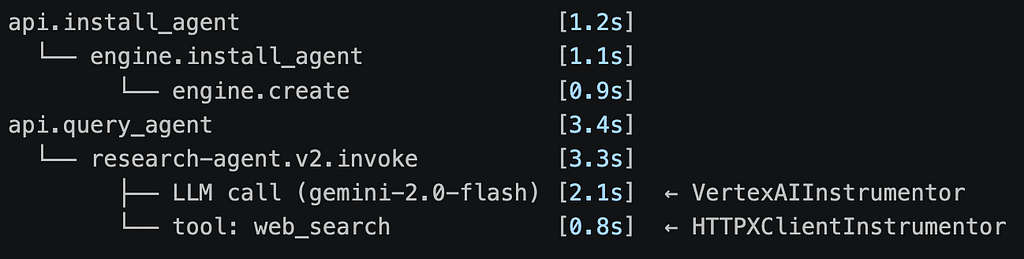
Result: a span named ‘research-agent.v2.invoke’ rather than just ‘invoke’. In Cloud Trace you can instantly see which agent and version is slow.
Span attributes: query input and response
The decorator also records the query input and response directly on the span (truncated to safe lengths):
def _set_span_attributes(span, func, *args, **kwargs) -> None:
    bound = _bind_partial_safe(func, *args, **kwargs)
    span.set_attribute("code.function", func.__name__)
    span.set_attribute("code.module", func.__module__)
    for attr in ("agent_id", "resource_id", "version"):
        val = bound.arguments.get(attr)
        if val:
            span.set_attribute(f"execution.{attr}", str(val))
    request = bound.arguments.get("request")
    if request is not None:
        raw_input = getattr(request, "input", None)
        if raw_input is not None:
            span.set_attribute("query.input", str(raw_input)[:1000])
        session_id = getattr(request, "session_id", None)
        if session_id:
            span.set_attribute("query.session_id", str(session_id))
Part 4: Applying Spans at Every Layer if required
The API Service layer
@do_trace(span_name="api.install_agent")
async def install_agent(agent_id: str, request: DeploymentRequest):
The agent executor
@do_trace
def invoke(self, messages, config=None, thread_id="default", ...):
    active_span = trace.get_current_span()
    if active_span and hasattr(self.config, "metadata"):
        for key, value in self.config.metadata.model_dump().items():
            active_span.set_attribute(f"agent.metadata.{key}", str(value))
        active_span.set_attribute("agent.id", self.config.metadata.id)
    ...
The result in Cloud Trace looks like this (conceptually):
Part 5: The Deployment Package — Shipping OTel with Your Agent
When you install to Agent Engine, the platform creates a fresh Python environment. The Agent Utility (and its OTel dependencies) must be packaged explicitly alongside the agent definition.
The deployment service copies the library into a temp directory and includes it as ‘extra_packages’:
def _setup_deployment_directory(self, agent_definition: str):
    temp_dir = tempfile.mkdtemp(prefix="agent_install_")
    temp_path = Path(temp_dir)
    yaml_path = temp_path / "agent_definition.yaml"
    yaml_path.write_text(agent_definition)
    import agent_utility
    lib_src = Path(agent_utility.__file__).parent
    shutil.copytree(lib_src, temp_path / "agent_utility")
    return temp_dir, "agent_definition.yaml", lib_src
Agent Engine does not install dependencies from local directory copies — they must be listed as
explicit package requirements:
runtime_deps = self._get_library_dependencies(lib_src)
requirements = [
"google-cloud-aiplatform[agent_engines]>=1.120.0",
"langchain>=0.2.0",
"langchain-google-vertexai>=2.0.0",
] + runtime_deps
The agent is created with ‘enable_tracing=True’, which activates OpenInference LangGraph instrumentation:
agent = LanggraphAgent(
    model="gemini-2.0-flash",
    runnable_builder=runnable_builder_fn,
    enable_tracing=True,
)
Inside the runnable builder, the executor is loaded with tracing enabled. Note ‘use_sync_nodes=True’
is required — Agent Engine’s execution model is synchronous:
def runnable_builder_fn(model, *, tools=None, checkpointer=None, **kwargs):
    executor = load_agent_from_yaml(
        "agent.yaml",
        enable_tracing=True,
        use_sync_nodes=True,
    )
    return RunnableLambda(input_adapter) | executor.graph
Key Takeaways
- Agent Engine has zero built-in tracing for langgraph.You must instrument from scratch.
- Call ‘setup_opentelemetry()’ at agent init — it’s the entry point for Agent Engine, not a web server lifecycle hook.
- Use ‘telemetry.googleapis.com:443’ for OTLP/gRPC to Cloud Trace — no collector needed.
- Make OTel setup non-fatal — a missing IAM role must never bring down your agent.
- Credential redaction is not optional. LangGraph state serialized into spans can contain secrets. Scrub before export.
- Package OTel dependencies explicitly in ‘requirements’ — Agent Engine doesn’t install them from local directory copies.
- ‘@do_trace’ + named spans gives you meaningful, searchable trace trees rather than generic function names.
Required IAM Roles for the Agent’s Service Account
For full observability, the Agent Engine service account needs:
Roles:
- roles/cloudtrace.agent
- roles/logging.logWriter
- roles/monitoring.metricWriter
The ‘set_opentelemetry’ implementation probes for Cloud Monitoring permissions before enabling the metric exporter — so a missing ‘monitoring.metricWriter’ only disables metrics, it doesn’t fail traces.
Tracing LangGraph Agents on Agent Engine was originally published in Google Cloud – Community on Medium, where people are continuing the conversation by highlighting and responding to this story.
Source Credit: https://medium.com/google-cloud/tracing-langgraph-agents-on-agent-engine-09b900420abc?source=rss—-e52cf94d98af—4
About the Author