Whenever someone mentions ad-blocking on a home networking forum, the collective answer is to set up a Pi-hole. It is a polished and well-documented DNS sinkhole that has been around long enough to earn that reputation. But running it on a Raspberry Pi (4 or 5) or a mini PC is like hunting a fly with a cannon — It’s capable, but overkill for most home setups.
If you want to block ads and trackers across every device on your network, you can run a cheaper, leaner, and low-power solution that fits in the palm of your hand: an ESP32 board.
To run the ESP32_AdBlocker project, you’ll need an ESP32-S3, preferably with more PSRAM to run a larger blocklist.
5 reasons a Pi-hole isn’t enough to protect your home network
The humble Pi-hole is great for ad blocking but it’s only part of a well-designed home network protection system.
What is ESP32_AdBlocker?
Pi-hole’s younger kin

The ESP32_AdBlocker project by s60sc turns an ESP32 microcontroller into a functional DNS sinkhole without a full Linux system. The ESP32_AdBlocker processes the DNS queries from your router and devices, checks them against the blocklist, and flags any ad or tracker with the 0.0.0.0 address. Everything else passes through your router’s upstream DNS server, like Google, Cloudflare, Quad9, NextDNS, or others.
It supports both hosts and AdBlock-style blocklist files. Aggregated lists like the one Steven Black maintains are a good starting point. The web interface lets you add only a single blocklist URL and update at a defined time.
Beyond that, the web interface lets you monitor blocked and allowed requests, add a custom domain on the fly, and cover most settings without needing a terminal.
Why the ESP32-S3 is the right board for this project
Higher PSRAM for more blocklist storage

For this project, an ESP32 with a decent PSRAM is recommended. Because standard ESP32 boards truncate the blocklist and run lookups at around 100 microseconds. The ESP32-S3-N16R8 is a better fit, with 8MB of PSRAM that lets it load aggregated blocklists while cutting down lookup time to under 50 microseconds. That makes a meaningful difference when you want every DNS query on your network to pass through this board.
The ESP32-S3 models are easily available on Amazon, AliExpress, and similar marketplaces for under $8. Along with the microcontroller, you’ll need a USB Type-C cable for data transfer, not just charging. A regular 5V charger that can easily power the ESP32 board and most phone chargers will do the trick without any issues.
Customize as per your ESP32 board
Picking the right board
The ESP32-S3-N16R8 is the recommended board for this project, but other ESP32-S3 variants can be used with a few caveats. The key variable is the PSRAM. The more PSRAM, the faster lookups and the support for larger blocklists.
The default partition scheme gives you only 1.5MB of filesystem storage. Good enough for basic blocklists, but too tight for large aggregated ones. The N16R8 board offers 16MB of flash, which lets you switch to the 16MB FATFS partition scheme to unlock 12.5MB of storage for your blocklists.
To make that switch, you’ll need to modify globals.h, appGlobals.h, and utilsFS.cpp files to replace LittleFS references with FFat equivalents. Although the project doesn’t mention it directly, you can change the partition labels.
If you plan to make the FFat switch, here are the Arduino IDE’s Tool menu options that work:
- USB CDC on Boot: Enabled
- Erase All Flash Before Sketch Upload: Enabled (first flash only)
- Flash Mode: DIO 80MHz
- Flash Size: 16MB
- Partition Scheme: 16M Flash (2MB APP/12.5MB FATFS)
- PSRAM: OPI SRAM
- Upload Speed: 115200
Once everything is set up, ensure you’ve selected the correct ESP32 board in the Arduino IDE and installed its files from the Board Manager. Flash the firmware to the ESP32-S3 and check the Serial Monitor — it will show you a URL (http://192.168.4.1) to open in a browser on your phone, tablet, or PC and enter your Wi-Fi credentials so that it latches onto your network.
Picking the right blocklist for the board
One URL and a custom blocklist file
With the 12.5MB of FFat storage available, you can load a large consolidated blocklist beyond what the default partition scheme allows. The project accepts only a single URL for blocklists, so if you want to combine multiple sources — Steven Black’s list, OISD Small list, and AdGuard DNS list — merge them into a single file offline. Then strip the duplicates. You can host it online or upload it to the device directly via the file upload option in the web interface.
Alternatively, you can leave the default blocklist URL in place and maintain a separate offline custom.txt file with the custom domains. Again, you can upload this file directly to the device from the web interface.
Adding a custom file directly to the ESP32 device means it will never touch a third-party server, since it lives on the device. The only issue is that you’ll need to update it often.
Caveats you should know about the ESP32-based adblocker
Not a plug-and-play experience

While a pocketable AdBlocker sounds great in theory, there are a few practical drawbacks. For starters, an ESP32 board handles only one blocklist file at a time. While you can upload a consolidated file, the ESP32’s flash storage limits the file size based on available space.
There’s no IPv6 DNS support for your router or any devices. Not only that, browsers like Chrome, Edge, and Firefox with Secure DNS (DoH) can easily bypass your tiny DNS sinkhole. The workaround is to disable Secure DNS on your browsers or a firewall rule on your router to filter everything from any browser.
Just like Pi-hole, you need to wait for the initial blocklist download to complete after the ESP32 boots for the first time. It takes a couple of minutes, depending on your blocklists, and subsequent downloads are much faster.
5 powerful DNS servers you can self-host to supercharge your home network
Elevate your self-hosting journey with a DNS server that suits your needs.
ESP32’s real benefit is a tiny package that’s always-on
You can still consider Pi-hole if you need per-device ads and tracker blocking through a polished dashboard. It lets you write regex-based rules, conditional forwarding, and elaborate logs that you can audit. Besides, you can run Pi-hole on a Pi Zero 2W and call it a day.
But if you want a dedicated, cheap hardware that consumes very little power, boots quickly, and never gives you microSD card corruption woes, the $8 ESP32-S3 is a compelling choice. You can plug it directly into your router’s USB port, which reliably delivers 5V, and set the ESP32’s IP address as your router’s DNS. After that, the router and DNS sinkhole work together, and you won’t have to think about it again.
Getting the ESP32-based AdBlocker to work requires dealing with partition schemes, filesystem driver changes, and a couple of things the project doesn’t document. Once you get it running, it just works. After that, you don’t need to keep checking a dashboard, update the OS, or worry about a microSD card.
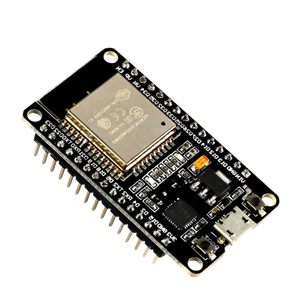
- Brand
-
AITRIP
- Connectivity Features
-
UART, USB
The ESP32 is a fantastic development board that combines solid specs with an affordable price. Despite being cheaper than Arduino and Raspberry Pi Pico, it outperforms most of its rivals. Plus, the ESP32 even has Wi-Fi and Bluetooth functionality built into every board, making it great for projects where you can’t physically keep the microcontroller connected to your PC at all times.
About the Author