How Goals, Instructions, Examples, and Smart Orchestration Are Redefining Conversational AI — and Why Every CX Practitioner Should Master Them in 2026
As a Developer focused on Conversational AI, I’ve spent years building production-grade agents across Dialogflow CX, and now the generative capabilities in Google’s Conversational Agents platform. The introduction of Playbooks represents one of the most significant leaps in how we design, maintain, and scale intelligent conversations.
If you’re still thinking of agents purely in terms of intents, flows, and pages, it’s time to expand your mental model. Playbooks bring the power of large language models directly into agent design — while giving you the structure and control that pure “chat with an LLM” approaches lack.
What Exactly Is a Playbook?
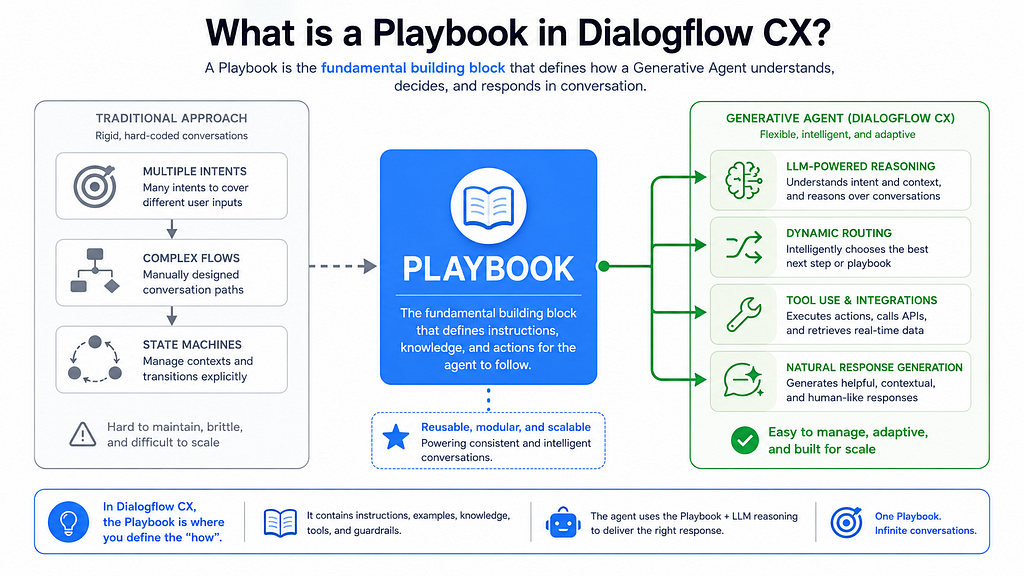
A playbook is the fundamental building block of generative agents in Dialogflow CX (now part of the broader Conversational Agents experience).
Instead of hand-crafting dozens of intents and complex state machines for every possible user journey, you define high-level goals and step-by-step instructions in natural language. The LLM then handles the reasoning, routing, tool use, and response generation at runtime.
“A playbook is the basic building block of generative agents. A generative agent typically has many playbooks, where each playbook is defined to handle specific tasks.” — Google Cloud Documentation
This modular approach lets you break complex domains into focused, reusable units — much like microservices for conversation.
https://medium.com/media/1cbacefa4d6276031d62345a591cd94d/href
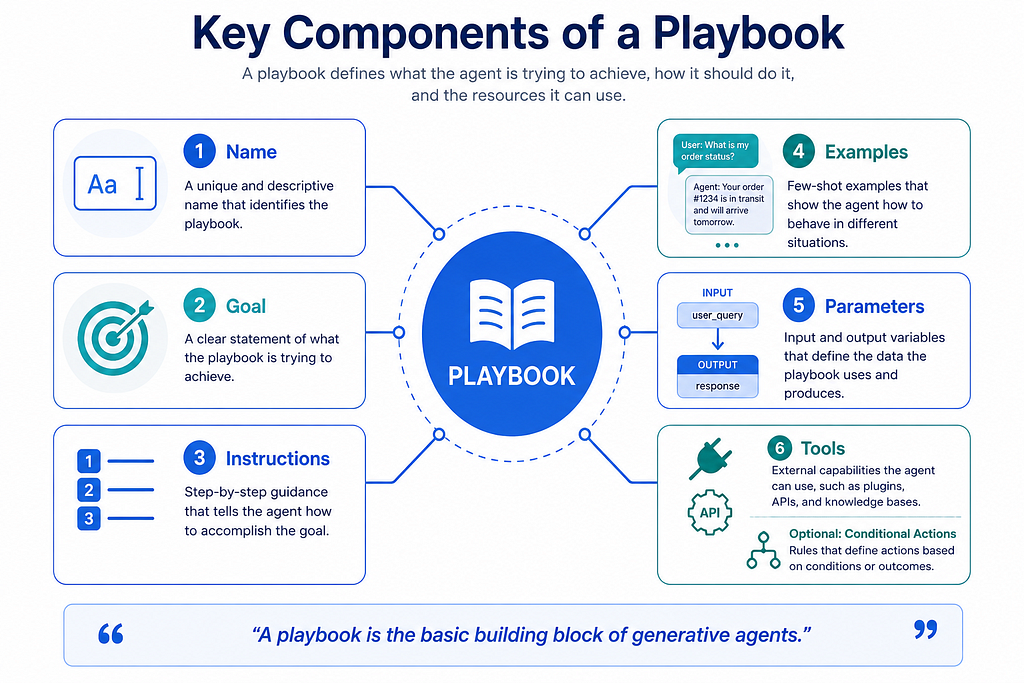
Key components of every playbook:
- Name — Clear, natural-language identifier (keep it under 64 characters)
- Goal — High-level description of what the playbook should accomplish
- Instructions — Structured, step-by-step process (the real “prompt engineering” layer)
- Examples — Few-shot conversation samples (often more important than perfect instructions)
- Parameters — Explicit input/output context variables
- Tools — Connections to data stores, APIs, or external systems
- Conditional Actions — Optional explicit control layer for triggers and deterministic behavior
The Heart of It All: Playbook Goals
A goal is a concise, high-level description of the playbook’s purpose.
Example from the docs:
“Help customers to book flights and hotels.”
You can also embed response-style instructions directly in the goal:
“You’re a helpful assistant that uses your knowledge to generate code, compare products, find images, or other. Return your responses in markdown format.”
With this goal, users can naturally ask:
- “Compare Google Pixel 7 versus Google Pixel 8 in a table.”
- “Find a picture of two people high fiving.”
GDE Tip: Treat the goal as your north star. It sets the tone, personality, and output format expectations for the entire playbook. Keep it focused — one clear objective per playbook.
https://medium.com/media/00f811b5849db52c889dfe1a37ca057e/href
Instructions: Where the Magic (and Control) Happens
This is where most of the prompt engineering power lives. Instructions define the process the LLM should follow to achieve the goal.
They support:
- Simple natural language steps
- Routing to other playbooks using ${PLAYBOOK: playbook_name}
- Invoking tools with ${TOOL: tool_name}
- Handing off to traditional flows with ${FLOW: flow_name}
- Referencing parameters with $parameter_name
- Calling code blocks
- Hierarchical numbering and strict sequencing (“Do not proceed until…”)
Excellent real example from Google’s documentation (flight booking style):
- Step 1. Greet the user and ask how you can assist them today.
- Step 2. Collect the user's basic flight information in the following order...
  - Step 2.1 The traveler's $origin city. Do not proceed until...
  - Step 2.2 The traveler's $destination city...
  - Assume the user is an adult.
This level of explicit sequencing dramatically reduces hallucinations and off-track behavior.
Pro Tip: The quality and quantity of your examples usually matter more than hyper-polished instructions. Google explicitly states that if a playbook behaves unpredictably, the first thing to improve is your examples.
Routine vs Task Playbooks: Choosing the Right Pattern
https://medium.com/media/81d805bc92b8057cab2eb40bede1c5f9/href
Dialogflow CX now offers two playbook types — understanding the difference is crucial for production performance:
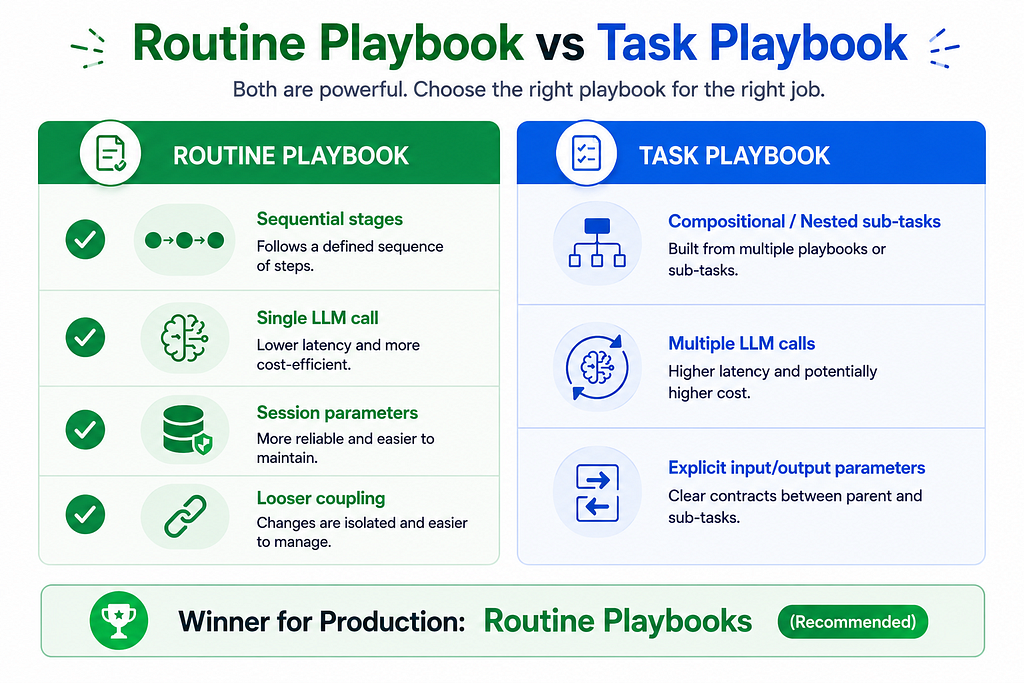
My recommendation: Start with Routine playbooks for most new agents. They offer better latency and cleaner session state handling. Use Task playbooks when you need heavy reusable sub-task composition.
A Practical Example: Shirt Store Agent (from Google’s Quickstart)
Google’s own quickstart demonstrates a clean three-playbook architecture:
- Default Playbook — Greets the user and routes to the right specialist.
- Information Playbook — Answers store hours and location.
- Order Playbook — Guides the customer through size/color selection and confirmation.
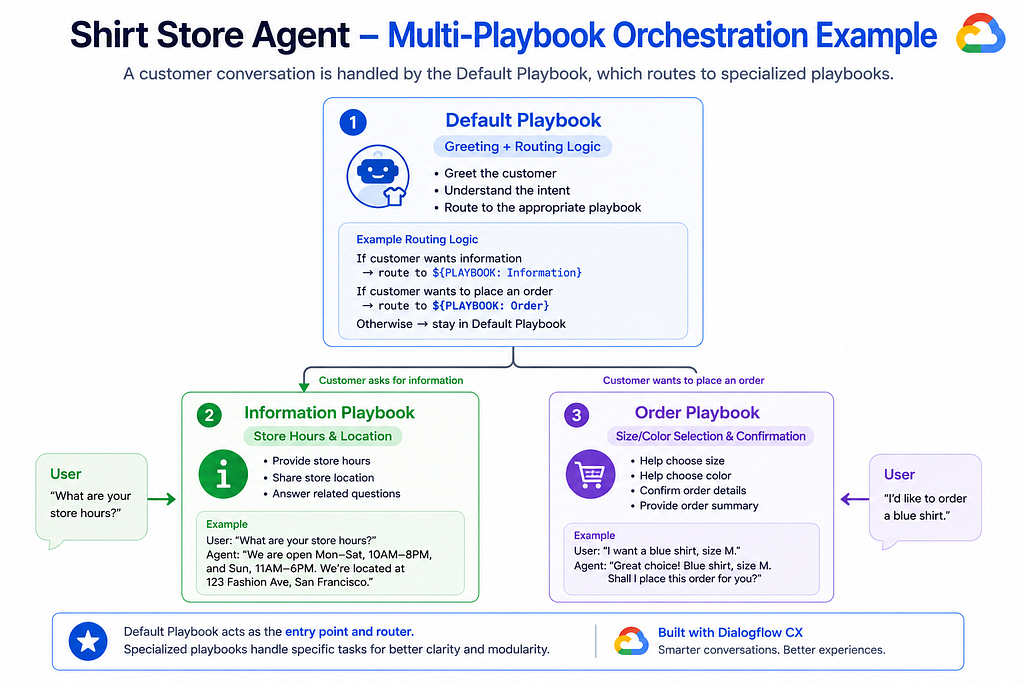
The Default playbook’s instructions contain clean routing logic:
- If the customer wants information about the store, route them to ${PLAYBOOK: Information}.
- If the customer wants to purchase a shirt, route them to ${PLAYBOOK: Order}.
This is the power of playbooks: clean separation of concerns with natural language orchestration.
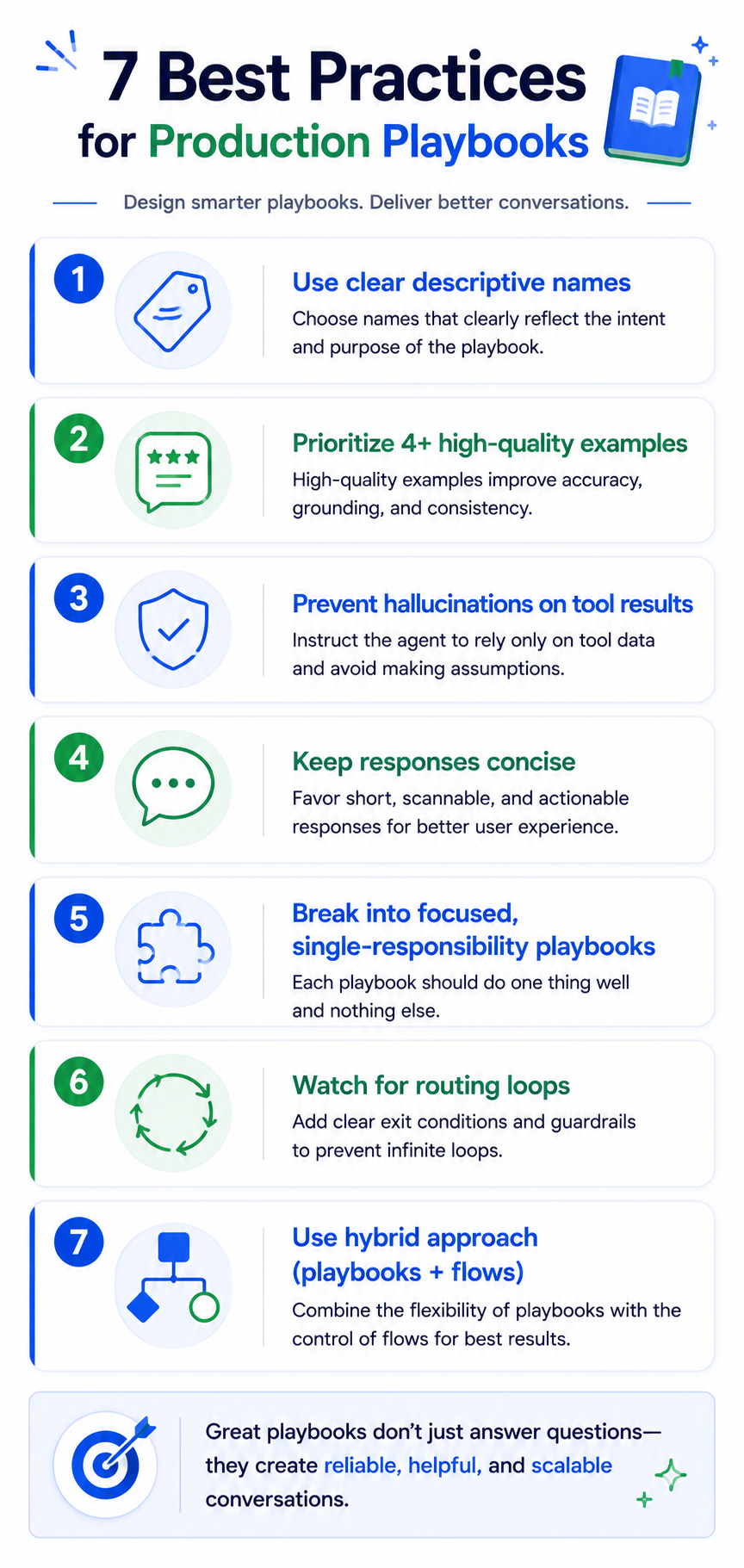
Best Practices I’ve Learned Building Production Agents
- Naming matters — Use clear, descriptive English names (e.g., “Customer Help Center” not “company_specialist”).
- Prioritize examples — Aim for at least 4 high-quality examples per playbook, including happy paths and tool usage.
- Prevent hallucinations on tool results — Explicitly instruct: “If you don’t get any data back from the tool, respond that you don’t know the answer.”
- Keep responses concise — Instruct the model to be brief. Output length has a massive impact on latency.
- Avoid giant monolithic playbooks — Break complex domains into focused, single-responsibility playbooks.
- Watch for routing loops — Never route back to an ancestor playbook.
- Hybrid is powerful — Use playbooks for flexible, open-ended parts of the conversation and traditional flows for high-stakes deterministic paths (payments, compliance, order confirmation).
The Road Ahead: Consolidation & The Future of Agent Design
Google is actively consolidating generative playbook features with traditional flows into a single, unified console experience. This is excellent news — it means we’ll soon have the best of both worlds: the reliability and control of flows and the natural flexibility of playbooks in one place.
Getting Started Today
- Go to the Conversational Agents console.
- Create a new agent and choose Playbook as the conversation start option.
- Create your first Routine playbook.
- Write a clear goal + 3–4 strong examples.
- Test extensively in the simulator and save good conversations as examples.
Playbooks aren’t just a new feature — they represent a fundamental shift in how we architect conversational experiences. They reward clear thinking, good prompt engineering, and modular design.
If you’re building customer support, internal tools, or industry-specific agents, mastering playbooks will give you a significant edge in both development speed and user experience quality.
What’s your experience with Playbooks so far? Have you tried Routine vs Task patterns, or built any interesting multi-playbook orchestrations? I’d love to hear your stories and answer questions in the comments.
Playbooks in Dialogflow CX: The Building Blocks of Truly Intelligent Generative Agents was originally published in Google Cloud – Community on Medium, where people are continuing the conversation by highlighting and responding to this story.
Source Credit: https://medium.com/google-cloud/playbooks-in-dialogflow-cx-the-building-blocks-of-truly-intelligent-generative-agents-3c3d89b2dd77?source=rss—-e52cf94d98af—4
About the Author