Includes insights from Pushkar Khadilkar, Software Engineer, Google
Executing AI functions over millions of database rows is notoriously slow and expensive. If you’ve ever tried running a sentiment analysis model, text embedding, or classification task either directly inside SQL or from your application layer using remote LLM calls on millions of records, you know the pain: network round-trip overhead, strict rate limits, skyrocketing token costs, loops and batches that run for hours.
Traditional indexing speeds up retrieval, but when every row requires a non-deterministic inference call to a frontier LLM, standard database optimizations break down.
To bridge this gap, AlloyDB AI introduces two architectural paradigms for operational AI at scale: Smart Batching and Proxy Models.
Smart Batching groups row-by-row LLM requests into intelligent batches, drastically improving throughput and lowering costs. The database’s query engine automatically calculates the optimal batch size. Provides better throughput improvements over traditional row-by-row processing.
The Proxy Model concept replaces expensive, high-latency remote LLM calls with an ultra-lightweight, specialized machine learning model trained and executed natively inside the database. Instead of routing every single database row to an external frontier model (like Gemini), AlloyDB uses the primary LLM to train a fast, local “proxy” classifier to do the bulk of the heavy lifting.
In this deep dive, we’ll break down the mechanics of these two techniques, walk through a real-world e-commerce sentiment pipeline setup, and benchmark the performance using SQL code.
The Analogy: The Post Office Problem
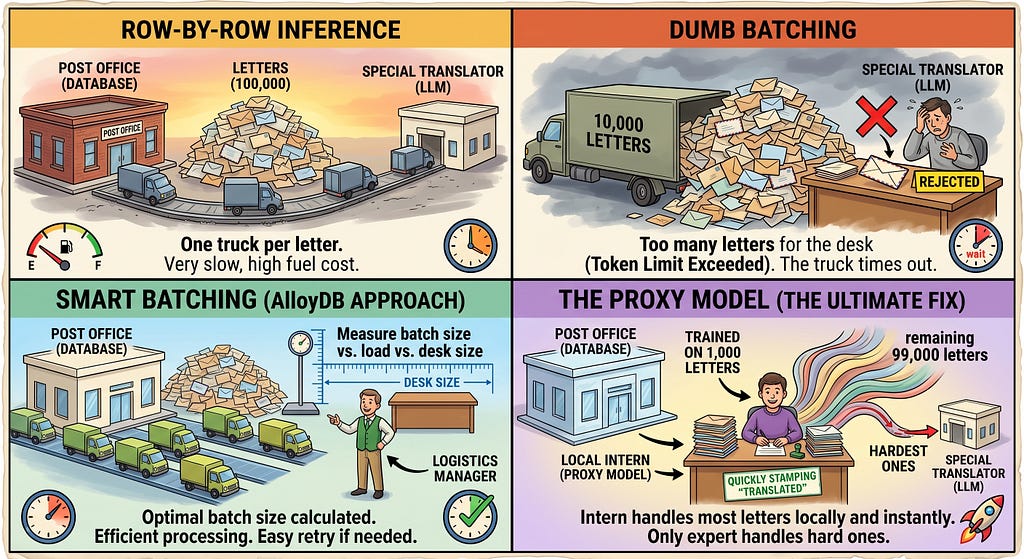
Imagine you run a massive postal distribution center (your database) and need to translate 100,000 letters using a highly specialized off-site translator (the LLM).
- Row-by-Row Inference: You hire a delivery truck for every single letter. The truck drives to the translator, waits, and drives back. It takes forever, and you go bankrupt paying for gas.
- Dumb Batching: You shove 10,000 letters into a truck. It arrives at the translator, but the pile is too big for their desk (token limits exceeded). They reject the whole batch, or it takes so long to process that the truck driver times out.
- Smart Batching (AlloyDB’s Approach): The logistics manager automatically calculates the exact optimal number of letters per truck based on the translator’s desk size and speed. If a truck breaks down, only that truck is retried.
- The Proxy Model (The Ultimate Fix): You take the first 1,000 letters the expert translator finished, and you use them to train a sharp, local intern (the Proxy Model). Now, the intern sits inside your post office and translates the remaining 99,000 letters instantly, only asking the expert for the hardest ones.
Let’s see how this translates to your database architecture.
Indexing, Smart Batching, and the Proxy Model
Before we look at the code, let’s establish the mechanics of how AlloyDB handles these workloads.
1. Indexing
In AI workloads (like semantic search), you rely heavily on vector embeddings. Without an index, the database must perform a sequential scan, comparing your search vector against every row. By utilizing AlloyDB’s ScaNN index (a highly optimized vector index), you map the data efficiently so the database only scans relevant neighborhoods, vastly reducing the compute required before inference even begins. We have already covered this in many of our blogs and projects in the past.
In this article, we’ll talk about Smart Batching and Proxy Models — 2 brand new performance and cost optimization features in AlloyDB that help bring advanced AI to your data much more elegantly.
2. Smart Batching
When you invoke a remote model like Gemini from within SQL, AlloyDB’s query engine automatically groups these row-by-row requests.
- Intelligent Sizing: It dynamically calculates the optimal batch size. If batches are too small, latency gains are lost; if too big, prompts bloat and risk exceeding token limits.
- Efficiency: It deduplicates overhead and features automatic retries for pipeline robustness.
- The ROI: This yields up to 2,400x throughput improvements over traditional row-by-row processing.
3. The Proxy Model
High-volume tasks like binary classification, sentiment analysis, or routing, hit physical latency limits due to network round-trips. The Proxy Model concept replaces expensive, high-latency remote LLM calls with an ultra-lightweight, specialized machine learning model trained and executed natively inside the database. Instead of routing every row to the frontier model, AlloyDB uses the LLM to train a fast, local “proxy” classifier to do the heavy lifting.
The ROI: Pushes operational performance up to 100,000 rows processed per second (a 23,000x throughput increase) and cuts token expenses by up to 6,000x.
The Real-World Use Case: E-Commerce Product Review Bulk Analysis
Imagine we have an e-commerce platform that just ingested 100,000 raw product descriptions from third-party vendors. We need to identify if they are positive or negative sentiment based on the review text.
Let’s build this.
Step 1: Provision the AlloyDB Cluster & Instance
To follow along, we need an AlloyDB cluster.
- Head over to the Google Cloud Console.
- Follow this quick setup Codelab: Quick AlloyDB Setup.
- Once your cluster and primary instance are up, navigate to AlloyDB Studio in the console.
Step 2: Enable Extensions and Define Schema
In AlloyDB Studio, we first need to enable our AI integrations and build our table.
-- Enable the ML integration extension
CREATE EXTENSION IF NOT EXISTS google_ml_integration;

-- 1. Create the base table for product reviews
CREATE TABLE IF NOT EXISTS customer_reviews (
    review_id BIGSERIAL PRIMARY KEY,
    product_id VARCHAR(50) NOT NULL,
    review_text TEXT NOT NULL,
    created_at TIMESTAMP WITH TIME ZONE DEFAULT CURRENT_TIMESTAMP,
    -- Target columns populated via AI functions
    batch_sentiment VARCHAR(20),
    proxy_sentiment VARCHAR(20)
);
Step 3: Ingest Bulk Data (Simulating Scale)
To prove the power of Smart Batching and Proxy models, 10 rows won’t cut it. We need volume. We’ll use PostgreSQL’s generate_series to synthetically generate 500,000 rows of dummy product descriptions.
-- 2. Ingest 100,000 bulk records with realistic customer feedback variations
INSERT INTO customer_reviews (product_id, review_text)
SELECT
    'PROD-' || (1 + floor(random() * 500))::int,
    CASE (i % 5)
        WHEN 0 THEN 'Absolute garbage quality! Broke down on day one. Requesting an immediate refund.'
        WHEN 1 THEN 'Decent product for the price point. Packaging was slightly damaged but works fine.'
        WHEN 2 THEN 'Hands down the best purchase I made this year! Flawless build quality and super fast shipping.'
        WHEN 3 THEN 'Average performance. It gets the job done, but nothing to write home about.'
        ELSE 'Terrible customer support and defective item. Do not buy this under any circumstances.'
    END || ' [Ref ID: ' || md5(i::text) || ']'
FROM generate_series(1, 100000) AS i;

-- Check record count
SELECT count(*) FROM customer_reviews;
Step 4: The Smart Batching Flag
Let’s set up the flag. Open Cloud Shell Terminal from your Google Cloud Console. Replace YOUR_PROJECT_ID with your project id, also check your cluster and instance and replace accordingly.
Note: The gcloud alloydb command for flag update has a quirk in that it replaces all flags instead of appending or modifying specific ones. So make sure to include the flags that are already “on” in your cluster in the command comma separated. Users will have to copy their existing flags and append the new flags. (sorry!)
gcloud alloydb instances update my-primary-inst \
--cluster=my-alloydb-cluster \
--region=us-central1 \
--project=YOUR_PROJECT_ID \
--database-flags="google_ml_integration.enable_ai_function_acceleration=on"
Traditionally, calling an LLM in SQL looked like this, passing one row at a time. Thanks to AlloyDB’s integration, when you run this query, the query engine automatically applies Smart Batching under the hood.
The query we are trying to run:
select product_id, review_text from customer_reviews WHERE
ai.if('Is the following a positive review: ' || review_text)
limit 1000;
Since we have already enabled smart batching, we get the below result:
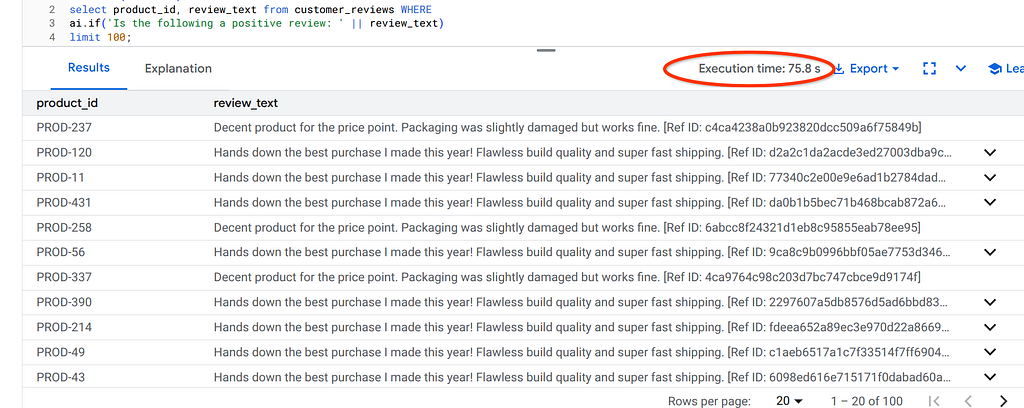
Here is the query plan:
QUERY PLAN
Limit (cost=1000.00..22060063.24 rows=100 width=136)
-> Gather (cost=1000.00..7352948549.06 rows=33333 width=136)
Workers Planned: 1
-> AI Function Apply (cost=0.00..7352944215.76 rows=19608 width=136)
Filter: ai.if((('Is the following a positive review: '::text || review_text)), NULL::character varying)
-> Parallel Seq Scan on customer_reviews (cost=0.00..7352944215.76 rows=19608 width=136)
In the above Query Plan for the ai.if() query we ran in the instance with Smart Batching ON, we see the “AI Function Apply’ node in the plan. That is the indication of use of AI Function Acceleration.
Here is the same query I ran from another instance where this flag was set to OFF:
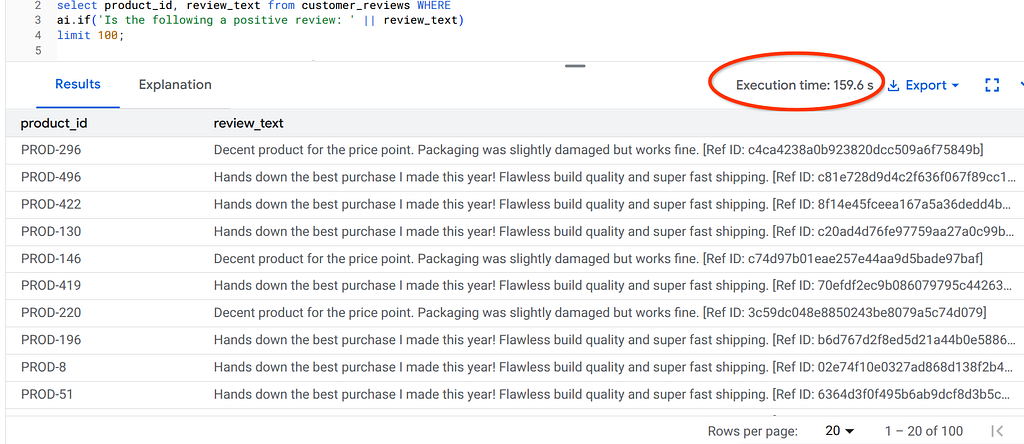
Here is the query plan where there is NO Smart Batching:
QUERY PLAN
Limit (cost=1000.00..22060063.24 rows=100 width=136)
-> Gather (cost=1000.00..7352948549.06 rows=33333 width=136)
Workers Planned: 1
-> Parallel Seq Scan on customer_reviews (cost=0.00..7352944215.76 rows=19608 width=136)
Filter: ai.if(('Is the following a positive review: '::text || review_text), NULL::character varying)
That is the indication of use of AI Function Acceleration.
Step 5: Implementing the Proxy Model Pattern for Ultra-High Throughput
AlloyDB AI functions like ai.if() can have high latency due to remote calls to large language models (LLMs). Optimized functions address this latency issue by using smaller, locally-trained proxy models to process your queries. These models are trained on a sample of your data, using the LLM's output as the source of truth. For true ultra-scale performance (e.g., 100s of 1000s of records/sec), we transition routine classifications to a Proxy Model.
What happens when we use proxy models?
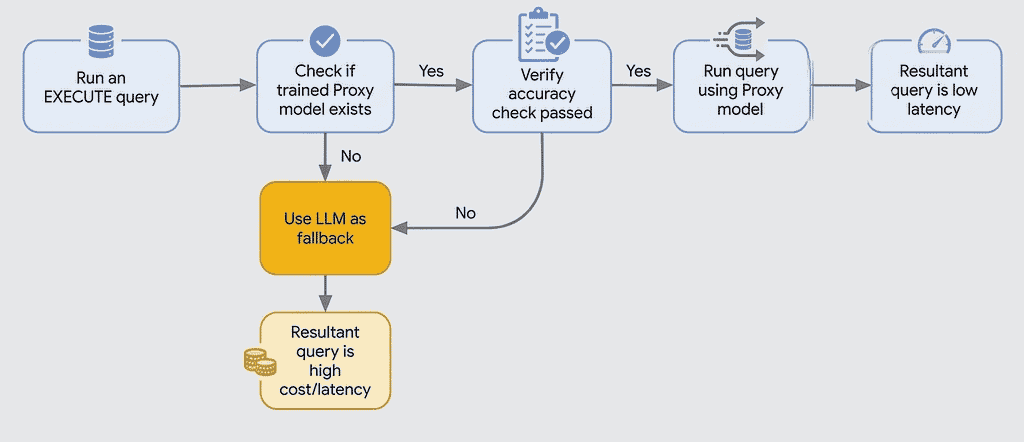
Accuracy checks are performed at runtime on a sample of rows using the LLM. To perform this check, AlloyDB uses the LLM to generate labels for the sample rows and compares them with the proxy model’s predictions to verify accuracy. If the accuracy check fails, the query falls back to using the LLM.
When you use an optimized function, AlloyDB does the following:
- Trains a proxy model: AlloyDB trains a lightweight proxy model on a sample of your data. This happens in the background when you use the PREPARE statement with ai.if() function to train the model for optimized queries.
- Executes the query: when you use the EXECUTE statement, AlloyDB uses the trained proxy model to process the query locally.
- Falls back to the LLM: if the accuracy of the model is low, or if AlloyDB can’t find a model, AlloyDB automatically falls back to using the LLM.
AlloyDB, being an operational database that targets sub-second latencies, avoids the online proxy model training and the online evaluation. Rather, the query’s proxy models are computed ahead of time in a PREPARE statement, thus moving the cost of sampling, labelling and training out of the critical query path. This enables the offline creation of a big pool of PREPARE statements, while the application chooses the proper PREPARE statement and executes it in the online path.
When to use?
Proxy Models work well for prompts that can be decided by detecting semantic notions in the embedding space.
When not to use?
They will fail for complex prompts that require forms of reasoning that go beyond detecting patterns in the embedding model.
The good news is that, in practice, we have observed that proxy models work for a large class of AI+SQL queries. The SIGMOD26 paper provides a comprehensive evaluation, showing that proxies worked in 11 benchmarks.
Here is the workflow to operationalize Proxy Models in SQL:
5a) Ensure that the following database flags are enabled:
- google_ml_integration.enable_model_support
- google_ml_integration.enable_ai_query_engine
- google_ml_integration.enable_cost_optimized_ai_functions
You can run the following command to do that (remember to replace YOU_PROJECT_ID with your project id:
gcloud alloydb instances update my-primary-inst \
  --cluster=my-alloydb-cluster \
  --region=us-central1 \
  --project=YOUR_PROJECT_ID \
  --database-flags="bigquery_fdw.enable_vector_downcasting=on,bigquery_fdw.enabled=on,password.enforce_complexity=on,google_ml_integration.enable_ai_function_acceleration=on,google_ml_integration.enable_model_support=on,google_ml_integration.enable_ai_query_engine=on,google_ml_integration.enable_cost_optimized_ai_functions=on"
5b) Create the Embeddings Column (review_embedding)
In the same table, let’s add another field to store embeddings.
alter table customer_reviews add review_embedding VECTOR(768);
5c) Populate embeddings
Let’s populate that field with text embeddings with AlloyDB’s native Embedding fuction:
UPDATE "customer_reviews" target
SET "review_embedding" = "google_ml"."embedding"('text-embedding-005', target."review_text")::"vector"
FROM (
    SELECT ctid
    FROM "customer_reviews"
    WHERE "review_text" IS NOT NULL AND "review_embedding" IS NULL
    LIMIT 1000
) batch
WHERE target.ctid = batch.ctid;
5d) Now let's run the Proxy Model statements:
PREPARE positive_reviews_query AS
SELECT *
FROM customer_reviews r
WHERE ai.if('Is the following a positive review? Review: ' || r.review_text,r.review_embedding)
limit 100;

EXECUTE positive_reviews_query;
Run the above statements together in your AlloyDB Studio editor and look at the performance in the screenshot below:
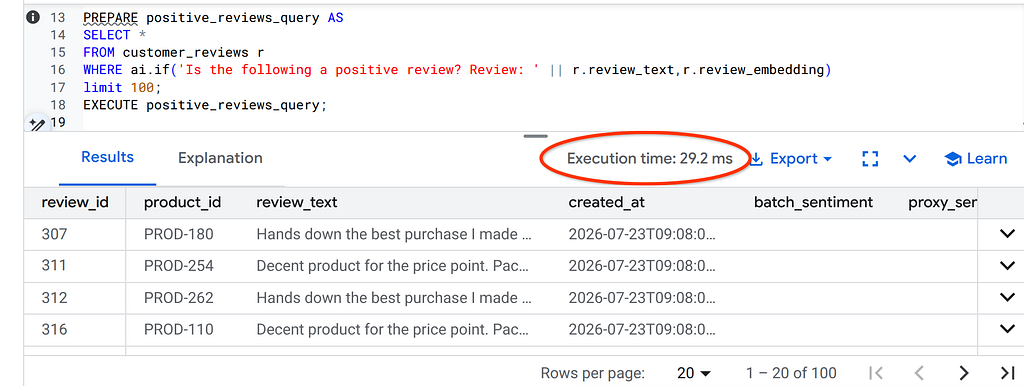
29.2 ms!!! Remarkable performance.
How does this work?
There is key consideration I want to call out. You may have noticed that we used the embeddings field in the ai.if() function in the proxy model approach. Wonder why?
- Offline Preparation (PREPARE): Unlike BigQuery’s online execution, running PREPARE positive_reviews_query triggers sampling, labeling, and training ahead of time to keep operational query latencies under a second.
- LLM Seed Labeling: AlloyDB selects a sample from customer_reviews and uses Gemini to label them as TRUE or FALSE based on your prompt: "Is the following a positive review?".
- Feature Extraction from Embeddings: The engine treats each dimension of your pre-computed r.review_embedding vector as an input feature for training.
- Proxy Model Classifier: It trains an internal, lightweight model — conceptually drawing a hyper-plane through the embedding space to separate “positive review” semantic clusters from negative/neutral ones.
- Confidence & Fallback Evaluation: The proxy model evaluates its own accuracy on a test sample, high-confidence rows use the instant local proxy, while ambiguous edge cases automatically fall back to Gemini.
- Zero-Latency Online Execution (EXECUTE): When you run EXECUTE positive_reviews_query, the pre-built proxy model executes natively inside the database engine at sub-millisecond speeds—bypassing remote LLM network calls entirely.
For more details on retraining and limitation details go through the documentation.
Conclusion
Bringing generative AI to your data is no longer about writing endless Python middleware to pipe rows back and forth. By leveraging the database’s native execution planner with Smart Batching and falling back on specialized, native Proxy Models for bulk operations, you can build enterprise-grade AI pipelines that are dramatically cheaper, faster, and infinitely more resilient.
What are your thoughts on running local proxy models vs. hitting frontier models for bulk data classification?
Handling Bulk AI Workloads with Smart Batching & Proxy Models in AlloyDB was originally published in Google Cloud – Community on Medium, where people are continuing the conversation by highlighting and responding to this story.
Source Credit: https://medium.com/google-cloud/handling-bulk-ai-workloads-with-smart-batching-proxy-models-in-alloydb-5420e468a854?source=rss—-e52cf94d98af—4
About the Author