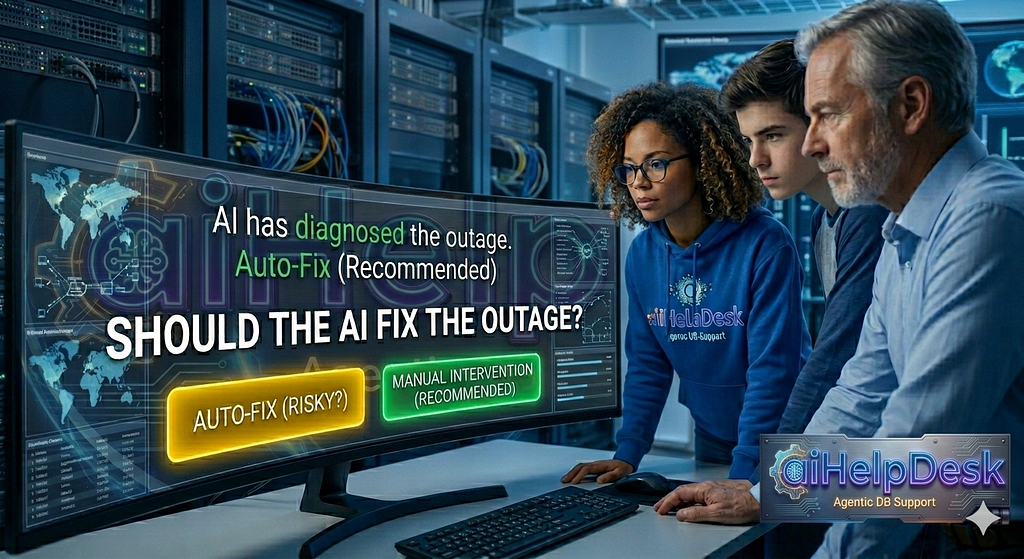
How Decision Hub puts a human at every boundary between knowing and doing. And how we tried to override our own governance model and it said no. Twice.
This blog post presents our argument on a three-rung rhetorical ladder.
⚡ Here’s rung#1: Does your AI know how to triage your particular database, on your particular infrastructure and in your particular environment (storage, CPU, memory, network)? Or does it confidently give you a general lecture vaguely related to your prompt that can take you to ten different directions?
If the latter, we call it “stranger on the Web” ChatGPT recommendation. It may be right on the money or may give you an idea to explore or… it may take you completely off course. With no accountability, of course, no decision audit, but most importantly, with no guarantees of any kind that the recommendation you receive is consistent from one run to the next. Refresh your screen, feed it the same question/prompt… and you may be surprised to see a different recommendation. Fun!
⚡ Here goes our rung#2: Let’s assume that your AI is properly grounded into your specific environment and uses not just your prompt for troubleshooting. Does it use a structured, guided playbooks or its free to run the unconstrained analysis on its own? If the latter, you may get a brilliant answer, exactly the one you are looking for. Or you may not. In contrast to ChatGPT, aka the “stranger on the Web”, the grounded AI agent’s advice is audited, has access to the same tools as you do and hopefully isn’t allowed to run arbitrary SQL (if it is, run away from it because one day it’s going to create a mess out of your database).
But ask your AI vendor if they are willing to slap a decision SLO on their product? If not, you are at the mercy of a model. And you are vendor locked into it. Change a model/vendor and you may get completely different results. It may work most of the time, except when you need it most. It’s still a gamble (although audited and reconstructable after the fact). If you think that LLMs are autonomous reasoners, read this piece.
We have a name for it. We call it Crystal Ball. We’ve written about it, see here, here, here and here. It’s also fun (just a different kind). Until it isn’t.
⚡ Finally, rung#3: But let’s further assume that your AI is not just properly grounded, but also follows a structured, guided path. So that you get the same, tested and consistent recommendation all the time. Irrespective of the model used. Fully audited.
Not just with the audit of the commands it ran, but with the decision audit as well. What artifacts it reviewed. What parts of those artifacts it found relevant. What hypotheses it came up with. How confident it was on each hypothesis. How it reasoned about rejecting some of its hypotheses and narrowing down to one or two. How confident it is in the best hypothesis it chose. And if it isn’t, how it decides to proceed, like escalate to another agent to take over for gathering additional information. Or if totally stuck, escalate to a human. But under no circumstances, it should hallucinate a half baked answer and peddle it as a confident diagnosis.
If your AI vendor doesn’t offer this, demand it. It’s table stakes. Don’t settle for anything less.
⚡⚡ But let’s assume that you get the triage nailed down. Correct. Consistent. With the clear reasoning on how it was arrived at. Indepent of the model’s mood swings. The next obvious question after the triage becomes this: does your AI then stop there or does it offer you to fix the problem at hand too on your behalf? If it doesn’t, that means that you’ll still be up at 2am scrambling to figure out what that page was for and what this AI diagnosis is all about.
And if it does offer you a way to fix it, does it also offer you a way to run it step-by-step or stop at the critical write or destructive operations?
This is the standard we hold ourselves to. And here’s what it looks like in practice:
The Problem With AI Agents and Autonomous Action
There’s a seductive promise at the center of every AI operations pitch: the agent will handle it. Database lock chain blocking 40 connections? The agent identifies the root blocker, assesses cascade risk, terminates the session, verifies recovery. Done. Crisis averted. And the best part? You get to hear about it in a Slack channel on the next morning… when you are fully awake and leisurely sip your favorite caramel macchiato. Not at 2am.
That sales pitch comes with a polished demo too. An impressive one to say the least. But there’s a part of the pitch that sometimes gets hand-waved: what does “the agent handles it” actually mean for your governance model? Who approved the termination? Who reviewed the blast radius? And the killer one: if the agent was wrong about the cascade risk, who owns that rollback?
In a world where an AI agent can call terminate_connection on a session that has 47 uncommitted rows of financial data, “the model decided it was fine” is not an acceptable audit trail. You need a human at the boundary. On the other hand, that situation may happen 2am, from a K8s Job, in a CI pipeline, in a Docker container with no TTY. Do you want a human to be reachable at that ungodly hour?
Well, isn’t what the on-call is there for, right? Sure, except that the avalanche is coming and as result, these 2am adventures are to happen more and more often. Are you ready for them? If our prediction of the upcoming avalanche of AI coded sloppy apps with no Swapnil, the core senior engineer who knows and reviewed every line of that app… you’d better have a plan. Because you can’t ask Swapnil. Or you can rely on hope as a strategy (your SREs would love that) 😉.
Decision Hub
That tension is what the approval model in aiHelpDesk was built to resolve. The answer we’ve been building toward is the Decision Hub. We believe in the single, unified surface for every decision that an AI agent wants to make, but shouldn’t make unilaterally. Gates between triage and remediation. Step-level approvals for destructive operations. Fleet campaign sign-offs. All pending decisions in one place. All resolvable through one API. All with a full audit trail of who saw what and when.
Starting with release v0.15, the Decision Hub is the backbone of how aiHelpDesk handles the handoff from “here’s what I found” to “here’s what I’m going to do about it”.
And the interesting thing is that the path to shipping this feature involved, accidentally, the best security model demo I’ve seen in a while. All courtesy of a configuration mistake that I made myself on a K8s cluster while trying to prove that the feature worked as designed.
But I’m getting ahead of myself, so let me back up a bit…
If you want to reproduce the findings presented in this blog post, please feel free to check out this doc page for details on the commands to run, but the excerpts below should be sufficient to make our point:
The Approval Model: A Human Gets to Read the Room First
The core insight behind aiHelpDesk Decision Hub is that the most dangerous moment in AI-driven operations isn’t the action. It’s the transition between knowing and doing.
A triage agent can run get_blocking_queries [code link] and get_session_info [code link] all day long. Reading is safe (well, sort of, unless your database is overloaded to the point that you really don’t need additional query load from some rogue AI agents… but that’s a story for another day). But I think we all can agree that what’s not safe is the gap between “I’ve identified root blocker PID 103989 with an 8-minute uncommitted transaction and three downstream sessions that will cascade-rollback on termination” and the moment terminate_connection [code link] actually executes. That gap, today, is where most AI operations tools either ask you nothing or ask you everything.
aiHelpDesk splits it cleanly into two layers you can tune independently.
The Informed Gate sits at the triage-to-remediation boundary. When -gate-escalation is set, the Gateway intercepts the triage playbook’s ESCALATE_TO or TRANSITION_TO signal and returns status: pending_gate instead of automatically chaining to the remediation playbook.
The triage findings — structured: root blocker PID, cascade risk, confidence level — are preserved and surfaced at the gate. The operator reviews them and approves or denies the handoff. Only then does the remediation playbook start. And yes, it starts with those findings already loaded as context, so the remediation agent doesn’t re-run discovery from scratch (not only wasting tokens, but sometimes coming to a different diagnosis too 😉).
INFORMED GATE - review before remediation
 ══════════════════════════════════════════
 Findings: Root blocker PID 103989 (active, pg_sleep(3600), has_writes=yes)

 3-level chain; terminate_connection required to release cascade locks
 Resolve at: POST /api/v1/decisions/gate:plr_314dd2b0/resolve
Step-level approvals sit inside the remediation playbook itself. With –approval-mode manual, the agent queues each tool call as a step and waits for explicit operator approval before executing. Read-only steps (get_blocking_queries, get_session_info) can be auto-approved or reviewed;. Destructive steps (terminate_connection, kill_idle_connections) go through the approval loop with the agent’s reasoning surfaced inline:
pending step: terminate_connection [destructive]
 reason: "Root blocker 103989 (has_writes=true, 8m 26s transaction);
 intermediate 103990 (has_writes=true) will cascade-rollback -
 operator confirmation required before execution"
 approval_id: apr_16fe1b5c
Both layers are visible in the Decision Hub. GET /api/v1/decisions aggregates pending gates, step approvals and fleet campaign approvals into one response. You don’t need to know which type of decision is pending. You just poll one endpoint, review what’s there and POST to resolve.
Emit and Wait
This is a new mode that can be triggered by setting the -emit-and-wait flag and it’s designed to replace the terminal prompt (no more /dev/tty needed!) with HTTP polling. When a gate opens or a step is queued for approval, the process logs the run_id and the Decision Hub resolve URL then polls the Gateway every 15 seconds until an operator acts from anywhere. From a terminal, a Slack bot that wraps the API, a Git merge to an approved/gate/<runID> branch via the Git webhook adapter. The fault injection test Job keeps polling until it gets an answer. No TTY required.
Gate pending - run_id=plr_1a89f306
 Findings: Root blocker PID 104290 (active, pg_sleep, has_writes=yes); 3-level chain
 Resolve at: POST http://helpdesk-gateway:8080/api/v1/decisions/gate:plr_1a89f306/resolve
 faultlib: gate poll run_id=plr_1a89f306 outcome=gate_pending
 faultlib: gate poll run_id=plr_1a89f306 outcome=gate_pending
 faultlib: gate poll run_id=plr_1a89f306 outcome=transitioned
Sixteen seconds between polls. Gate approved from a laptop or from anywhere, while the Job waited in K8s.
The Config Mistake That Became a Security Demo
With the above intro out of the way, I can finally get to my story 😉.
Getting to a clean first run on K8s was, charitably, an adventure in configuration archaeology. The injection worked. The triage ran. The gate fired. I approved it from a separate terminal while the Pod polled. The remediation agent stepped through the chain, identified correctly the root blocker, two intermediates and one leaf and correctly assessed the corresponding has_writes and cascade risk at each node. Then it queued terminate_connection [code link] for a human operator review and approval.
agent_approve: remediation incomplete
 summary="Termination DENIED by policy 'pii-data-protection' rule 2:
 destructive operations on PII databases prohibited.
 DBA + Legal approval required."
Hmm. Except that it outright denied the call to terminate.
The problem was that the target database cluster for this test was accidentally tagged with sensitivity: [“pii”, “internal”]. I had copy-pasted from a production template (hence the sensitivity tags) and later added the “chaos” moniker to make it eligible for fault injection. And so I ended up with a “production” database that was carrying PII sensitivity tags.
Grr… so I messed up. OK, my first instinct was to override it. Just add -set faulttest.approvalMode=force, right? That force option bypasses the step-approval wait loop, so that the agent proceeds through all steps without pausing for external approval on each one.
And so I did. And the test ran, except that I got now this message back:
level=WARN msg="gateway warning"
 "approval_mode clamped to 'manual': override to 'force' requires
 one of roles [dba_lead, oncall_senior] (caller: gateway)"
Grrr. Of course. This is layer 1 security that kicked in at this point because force is a privileged mode. The infra entry for this database specifies approval_override_roles: [dba_lead, oncall_senior]. My operator identity carries neither role. As so the Gateway, being no fool, clamped my requested force mode back to manual and logged it (in the terminal, in the logs and, obviously, in the audit trail). Not an error. A deliberate authorization check on every playbook run.
OK, fine. I’ll run it as one of the DBA leads:
$ kubectl get secret -n helpdesk-system helpdesk-users -o jsonpath='{.data.users\.yaml}' | base64 -d|grep -B1 dba_lead
  - id: alice@example.com
    roles: [dba, dba_lead, sre, operator]
Well hello, Alice! Alice has a Lead DBA role and so running as Alice should satisfy the layer 1 security and avoid clamping back my requested force mode to manual. Easy and so I added this flag to my fault injection test run -set faulttest.operator=alice@example.com.
W00t, this time there’s no clamping warning and my force request was accepted. Step approvals processed automatically, no prompts, each one firing within seconds of the last. The agent moved through the six steps in under two minutes. No waiting, no external approval requests. So far so good.
Then it hit the terminate_connection again to resolve the blocking lock.
agent_approve: remediation incomplete
 summary="Termination DENIED by policy 'pii-data-protection' rule 2:
 destructive operations on PII databases require DBA + Legal contact.
 Escalation required."
May be I spoke too soon. It went so good up until this point.
The thing is that bypassing the layer 1 security isn’t enough to allow running destructive operations on PII databases. That’s layer 2 security in action and it’s where the policy enforcement is unconditional.
Layer 2 doesn’t check Alice’s roles. It doesn’t check approval mode. It runs at tool execution time, below the approval layer and the only thing it consults is the policy file. The two layers are independent by design:
- Layer 1 controls who can authorize which approval modes. Role-based. Enforced by the Gateway on every playbook invocation.
- Layer 2 controls what tools can execute against what data. Policy-based. Enforced at the tool level, after approval, unconditionally.
You can be authorized to skip the approval wait loop. You cannot be authorized to ignore a data protection policy.
The fix for the actual problem is trivial: just remove PII from the sensitivity list on a database that is designated as eligible for the fault injection testing (via the chaos tag). If you have access to the infra.json file that is. Because in the Enterprise Mode, the infra.json file is hosted centrally by your faithful IT department and aiHelpDesk doesn’t run any commands against the database targets not listed in the infra file.
So yes, if it’s a legitimate change and some clumsy clown fat-fingered a Production PII database with the chaos tag, making it eligible for the fault injection testing (yes, that would be me), just delete one line in infra.json and voila, the remediation also succeeds!
The (Bad) Three Runs, Summarized
Here’s the summary of the three failed test runs:
  ┌─────┬──────────┬──────────────────┬──────────────────────────────────┬───────────────────────────────────────────┐
  │ Run │ Operator │  Approval mode   │         Layer 1 outcome          │              Layer 2 outcome              │
  ├─────┼──────────┼──────────────────┼──────────────────────────────────┼───────────────────────────────────────────┤
  │ 1   │ boris    │ force requested  │ Clamped to manual — role missing │ Moot                                      │
  ├─────┼──────────┼──────────────────┼──────────────────────────────────┼───────────────────────────────────────────┤
  │ 2   │ boris    │ manual (clamped) │ Steps ran, terminate queued      │ Policy blocked terminate_connection       │
  ├─────┼──────────┼──────────────────┼──────────────────────────────────┼───────────────────────────────────────────┤
  │ 3   │ alice    │ force accepted   │ No clamping — dba_lead present   │ Policy still blocked terminate_connection │
  └─────┴──────────┴──────────────────┴──────────────────────────────────┴───────────────────────────────────────────┘
What A Good Run Looks Like End-to-End
So we’ve seen the three bad test runs (bad, as in: with the diagnosis completed successfully, but remediation faltering because of the security mechanisms). The full flow of a successful fault injection test with the properly governed remediation on K8s looks like this:
- Fault injected (shell_exec, no Docker required, pure libpq).
- Triage playbook runs against live cluster; findings are recorded.
- At the triage→remediation boundary, the Gateway intercepts and returns a pending_gate, waiting for approval (if -set faulttest.gateEscalation=true mode is requested).
- The faulttest logs the gate details and the resolve URL and starts polling every 15s for the answer to the authorization request to proceed with the remediation steps.
- An authorized operator reviews the triage findings and resolves the gate via the Decision Hub. If approved, a remediation can continue.
- The faulttest detects outcome=transitioned, which immediately unblocks the remediation playbook to review with triage findings pre-loaded as context. This is one of the key items. The remediation starts where triage ended. Not from scratch, running its own diagnostics.
- The agent steps through discovery and queues destructive actions one at a time. Depending on the requested approval mode for the run (see -set faulttest.approvalMode, which can be set to manual, review, auto or force), either all or just the destructive actions get human attention.
- Each destructive action goes through step-level approval and, as we’ve seen in this post, unauthorized operators or policy violations are blocked at tool execution.
- The faulttest verifies recovery by running the SQL commands appropriate for a given fault and reports pass/fail with timing and scores.
The K8s Job finishes, the Helm hook reports success or failure, and the whole run — including triage findings, tool calls, step approvals, policy decisions, and the final outcome — is in the audit trail.
The Config Mistake That Made It Real
The production PII tag on a database that was made eligible for the fault injection testing via the “chaos” tag, was obviously a mistake. The right fix is removing it. But I’m glad I didn’t catch it immediately, because the three runs that followed it, showed something a documentation page never could: the security model holds even when the person probing it is the person who wrote it 😉.
To me, that’s the only bar that matters.
And this this is the blog post in a nutshell: Decision Hub + Informed Gate + Emit-and-Wait as the answer to the rhetorical ladder we set up at the opening sentence, followed by the K8s story as proof-under-fire.
aiHelpDesk is open source. Everything mentioned in this post and the Git webhook adapter (that we didn’t get to describe yet) to approve a gate by merging a branch named approved/gate/<runID>, ships in the same release.
Why aiHelpDesk Playbooks are trustworthy?
Because we give you, the customer, an ability to vet, verify and improve them through the methodology that we refer to as Operational SRE/DBA Flywheel, see here and here for details.
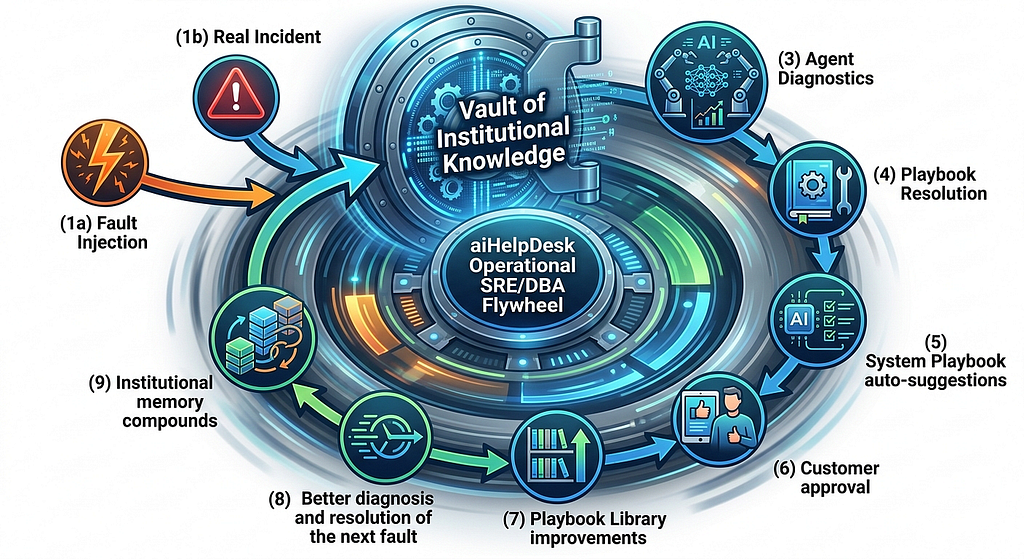
And yes, as a customer, you can not only confirm that the playbooks that you get with aiHelpDesk out of the box work for your environment, but you can easily bring your own. Both: BYO playbooks (by either importing your existing runbooks or cloning and customizing one of our’s or by creating one from scratch) + BYO faults as well.
Because nobody knows your specific databases, your environment and your workload with your upstream/downstream apps better than you do. You know how your database fails. Vendors don’t. At aiHelpDesk, we give you an option to create your own faults and add your own playbooks to triage and rectify them (in addtion to the system playbooks we ship, of course).
And yes, we don’t depend on a particular model or a model provider. aiHelpDesk is model agnostic. From our standpoint, the LLMs are a disposable commodity. Flip from Gemini to Anthropic and aiHelpDesk should continue to give you exactly the same diagnosis and remediation. Anything shorter than that is a P0 bug.
Related Reading
- aiHelpDesk Flywheel official documentation
- Your SRE On-Call Runbook Is Already Obsolete. Here’s Why That’s Not Your Fault: Introducing aiHelpDesk Operational SRE/DBA Flywheel
- The Missing Test Suite for AI Database Operations: You’re about to bet your SRE/DBA on-call rotation on an AI agent. Want to know if it’s any good before the 2am page goes off?
- Runbooks Rot. Playbooks Learn: Operational SRE/DBA Flywheel: Ops Knowledge That Compounds. Automatically. Improving with every incident
- We Wanted a Dramatic AI Agent Failure. We Got Something Better:
When the Flywheel works: The K8s WAL fault that made us rethink what playbooks are for - AI Database Troubleshooting: the PostgreSQL Stat That Looks Like Good News (But Ain’t): What a bgwriter incident taught us about the difference between reading data and understanding it
- AI troubleshooted DB pileup and reported success. The locks didn’t care: It’s the story that shows that the model wasn’t bad at reasoning. But it reasoned without the right knowledge.
As of this writing, aiHelpDesk is available in Beta. If you’re running PostgreSQL in production and would like to get help in preparing for the avalanche, consider aiHelpDesk. Reach out to us at info@aiHelpDesk.biz and we’ll be happy to show you what it looks like in practice.
Your AI Just Diagnosed the Outage. Should It Fix It Too? was originally published in Google Cloud – Community on Medium, where people are continuing the conversation by highlighting and responding to this story.
Source Credit: https://medium.com/google-cloud/your-ai-just-diagnosed-the-outage-should-it-fix-it-too-ff6a43ec475f?source=rss—-e52cf94d98af—4
About the Author