
SQL Is All You Need: A Complete RAG Pipeline in SQL with BigQuery
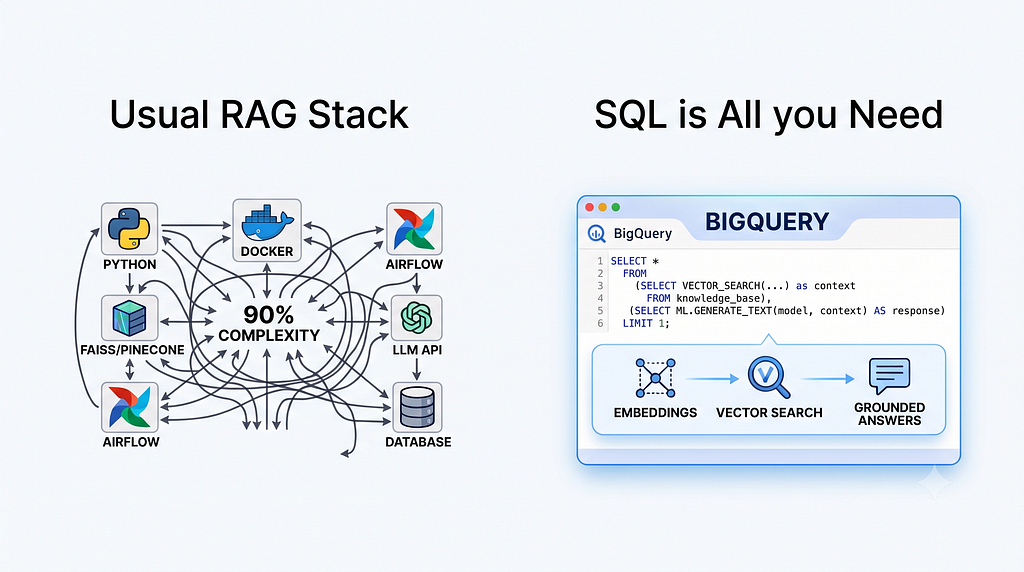
Your RAG stack is 90% unnecessary. Here’s the receipts, reproducible on a public dataset.
Vector database. Orchestrator. Embedding service. API keys everywhere. Three containers to answer questions about your own documents.
That’s the architecture we all normalized for Retrieval-Augmented Generation. And in 2026, for a large class of use cases, it’s obsolete.
BigQuery’s AI functions turn the LLM into a SQL operators, the same way JOIN or WHERE are operators. Embeddings, vector search, and structured generation all run where your data already lives, with your existing IAM, audit logs, and cost controls. And no, it's not a Gemini-only walled garden: you can bring Claude, Llama, Mistral, or an open-source model from Hugging Face.
In this article, I’ll build the pipeline twice, on a real public dataset you can query right now:
- The one-shot version (GA): batch-embed a corpus, search it, generate grounded answers
- The living version (Preview): a corpus that keeps itself embedded as data arrives, because production data doesn’t hold still
Then, I’ll show you exactly where this approach breaks and when Python remains the right answer.
Everything below runs on bigquery-public-data.bbc_news.fulltext. Open a BigQuery tab or the Google Cloud Data Agent Kit plugin in your IDE and follow along.
The stack we all normalized
A “standard” RAG architecture in most tutorials looks like this:
- An embedding service: a hosted API, or a model endpoint you deploy and babysit
- A vector database: one more SaaS, one more billing account, one more sync pipeline to keep consistent with your source of truth
- An orchestrator: LangChain, LlamaIndex, or hand-rolled glue code
- An LLM API: with its rate limits and quota management
- Deployment: typically two or three containers to build, ship, and patch
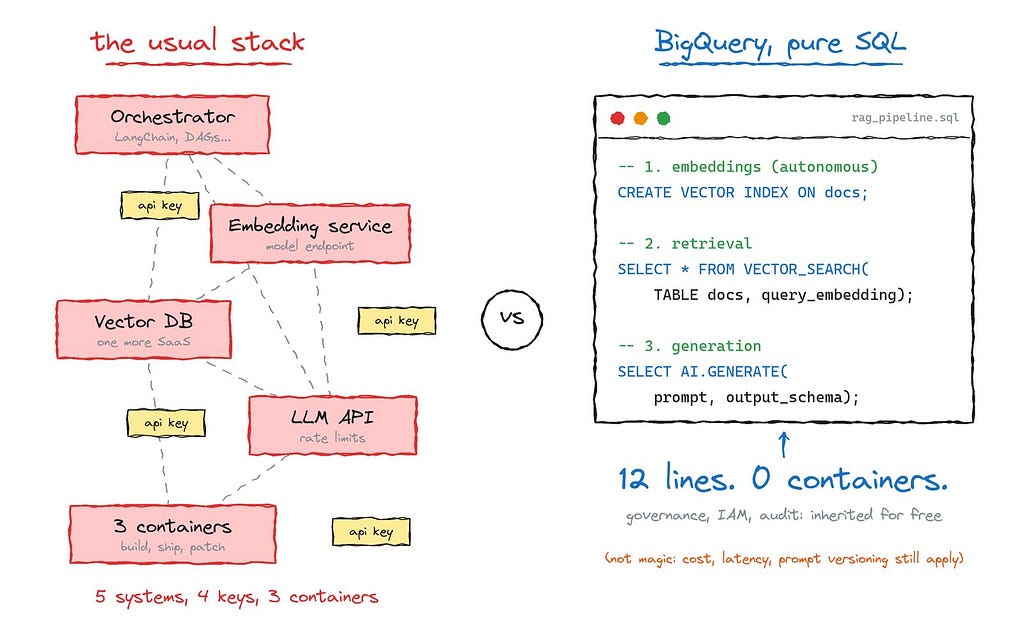
Count the moving parts: five systems, at least three API keys, and (the part nobody talks about) your data leaves the warehouse. Every governance rule, every row-level security policy, every audit requirement you carefully built in BigQuery? Gone the moment you export chunks to an external vector store.
We built this architecture because we had no choice. That premise is no longer true.
What changed: the LLM is now a SQL operator
The BigQuery AI.* function family reached general availability. Three capabilities matter for RAG:
- AI.GENERATE_EMBEDDING: batch-generate embeddings from any table
- VECTOR_SEARCH: a native GoogleSQL function for semantic retrieval, with optional IVF or TreeAH indexes (the latter built on Google's ScaNN algorithm)
- AI.GENERATE: a scalar, row-wise generation function with structured output via output_schema, usable anywhere a value fits: SELECT, WHERE, even JOIN conditions
No API key in your code. Authentication goes through a BigQuery connection, a managed service account you grant a role once. There’s even a default connection now, which removes the setup ceremony entirely.
Not just Gemini
A common objection: “so I’m locked into Gemini?” No, and this deserves precision because it’s widely misunderstood.
BigQuery’s AI functions come in two flavors:
- General-purpose functions (AI.GENERATE_TEXT, AI.GENERATE_TABLE, AI.GENERATE_EMBEDDING with a MODEL): you have full control over the model choice. Supported remote models include the Gemini family, but also Anthropic Claude, Meta Llama, and Mistral AI as managed model-as-a-service endpoints, plus open-source models from Hugging Face or the Agent Platform (ex Vertex AI) Model Garden. For open models, the CREATE MODEL statement can even auto-deploy the model for you. Same SQL, your model.
- Managed functions (AI.IF, AI.CLASSIFY, AI.SCORE, and the scalar AI.GENERATE with an endpoint argument): these are Gemini-powered convenience functions where BigQuery handles model selection and prompt engineering for you.
Want your embeddings from a self-hosted multilingual E5 or Qwen model for compliance reasons, and your generation from Claude?
Both start with one CREATE MODEL statement. For embeddings, that's the whole switch: nothing else in the pipeline moves. For generation, one honest caveat: the typed output_schema used in Step 3 is a feature of the managed AI.GENERATE (Gemini).
To generate with Claude, Llama, or Mistral, you swap to AI.GENERATE_TEXT over your model (or AI.GENERATE_TABLE when you still want structured columns). Same warehouse, same governance, your model. The generation call is the one line you adapt, not the architecture.
Let’s build.
Path 1: the one-shot pipeline (GA)
This is the pattern for batch and analytical workloads: a corpus you embed once (or on a schedule), then query.
Step 0. One-time setup
Before the model, one prerequisite that most warehouse-native tutorials skip: the connection. It’s the managed service account BigQuery uses to call the models, and you set it up once.
The fast path, if you have the BigQuery Admin role, is the default connection: just write WITH CONNECTION DEFAULT (as below) and BigQuery provisions it and grants its service account the right roles on first use. Nothing else to do.
The explicit path, if you’d rather own your connection (this is the us.my_connection referenced in Path 2), is two commands: create a Cloud resource connection, then grant its service account the Agent Platform User role (roles/aiplatform.user, formerly "Vertex AI User"):
PROJECT_ID=my-poject-id

# 1. Create a Cloud resource connection (its location must match your dataset)
bq mk --connection --location=US --project_id=$PROJECT_ID \
  --connection_type=CLOUD_RESOURCE my_connection

# 2. Grant the connection's service account the Agent Platform User role
gcloud projects add-iam-policy-binding $PROJECT_ID \
  --member="serviceAccount:$(bq show --format=prettyjson \
    --connection $PROJECT_ID.US.my_connection | jq -r .cloudResource.serviceAccountId)" \
  --role=roles/aiplatform.user
Grant the role in the project where you create the model (when the endpoint is a model name) or in the project named in the endpoint URL (when you pass a full URL). That’s the whole auth setup: one role, no keys.
Now the embedding model, using the default connection:
CREATE OR REPLACE MODEL `rag_demo_us.emb_model`
  REMOTE WITH CONNECTION DEFAULT
  OPTIONS (ENDPOINT = 'gemini-embedding-001');
That’s the entire “embedding service deployment”. No container, no endpoint to scale, no key to rotate. (Swap the endpoint for an Agent Platform URL if you deployed an open-source model.)
Step 1. Embed the corpus
We’ll embed BBC News articles. One statement:
CREATE OR REPLACE TABLE `rag_demo_us.news_emb` AS
SELECT *
FROM AI.GENERATE_EMBEDDING(
  MODEL `rag_demo_us.emb_model`,
  (
    SELECT title, body AS content
    FROM `bigquery-public-data.bbc_news.fulltext`
    WHERE category = 'tech'
  ),
  STRUCT('RETRIEVAL_DOCUMENT' AS task_type)
);
Two details tutorials often miss:
- The input query must expose a column named content (alias it if needed). Including a title column improves embedding quality with RETRIEVAL_DOCUMENT.
- task_type matters: RETRIEVAL_DOCUMENT for the corpus, RETRIEVAL_QUERY for the user's question. Asymmetric embeddings measurably improve retrieval.
The output table carries your passthrough columns plus three generated ones: embedding (the vector), statistics (a JSON with token_count and truncated), and status.
Note the names: the newer AI.GENERATE_EMBEDDING returns embedding, not the ml_generate_embedding_result you'll see in older ML.GENERATE_EMBEDDING tutorials. Mixing up the two column layouts is a classic copy-paste failure.
Pitfall #1: silent partial failures. A batch embedding job can succeed while individual rows fail (quota pressure, service hiccups). BigQuery reports this per row in the status column; an empty status means success. Always check it (WHERE status = ''). If parallel batches hit RESOURCE EXHAUSTED errors, Google ships remote-inference retry scripts and a Dataform package specifically to iterate until every row is processed. It's documented, because it happens.
Pitfall #1bis: silent truncation. Look at statistics: each row reports its token_count and a truncated flag. A BBC article sits comfortably around a couple hundred tokens, but feed the function documents longer than the model's input limit and it will embed a truncated version without failing. If your corpus has long documents, monitor LAX_BOOL(statistics.truncated) and chunk upstream.
Step 2. (Optional) Index it
For small corpora, skip this: VECTOR_SEARCH falls back to brute-force exact search. At scale:
CREATE OR REPLACE VECTOR INDEX news_idx
ON `rag_demo_us.news_emb`(embedding)
OPTIONS (index_type = 'IVF', distance_type = 'COSINE');
Know before you’re surprised: index maintenance is fully managed and asynchronous, new rows remain searchable immediately (BigQuery brute-forces the not-yet-indexed tail), tables under 10 MB don’t get a populated index, and indexes aren’t supported on the Standard edition.
Step 3. Retrieval + generation, one query
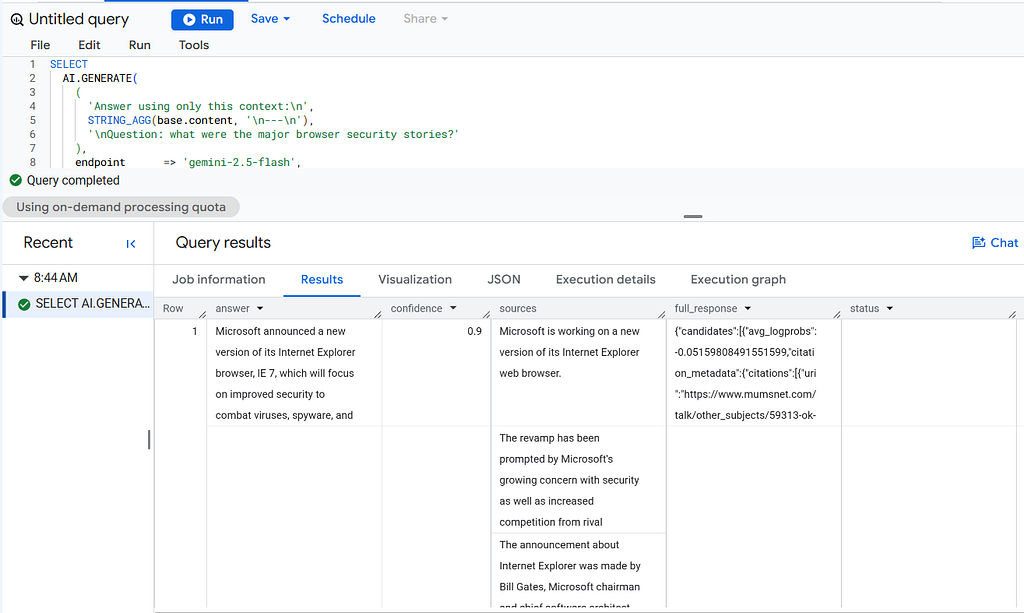
Embed the question, retrieve the top 5 articles, ground the prompt, generate a typed answer:
SELECT
  AI.GENERATE(
    (
      'Answer using only this context:\n',
      STRING_AGG(base.content, '\n---\n'),
      '\nQuestion: what were the major browser security stories?'
    ),
    endpoint      => 'gemini-2.5-flash',
    output_schema => 'answer STRING, confidence FLOAT64, sources ARRAY<STRING>'
  ).*
FROM VECTOR_SEARCH(
  TABLE `rag_demo_us.news_emb`, 'embedding',
  (
    SELECT embedding
    FROM AI.GENERATE_EMBEDDING(
      MODEL `rag_demo_us.emb_model`,
      (SELECT 'major browser security stories' AS content),
      STRUCT('RETRIEVAL_QUERY' AS task_type)
    )
  ),
  top_k => 5
);
Count the core pipeline: a dozen lines. No LangChain. No Pinecone. No deployment. And output_schema returns typed columns (answer, confidence, sources), not a JSON blob to parse and pray over.
But here’s the honest limitation of Path 1, and it’s a big one.
The one-shot pattern has a production problem: data doesn’t hold still. New articles arrive, descriptions get edited, tickets get updated. With Path 1, every insert or update means re-running the embedding statement, detecting deltas, handling retries, monitoring staleness.
Path 2: the living corpus (Preview)
This is exactly what autonomous embedding generation solves. You declare the embedding as a generated column, and BigQuery maintains it:
CREATE TABLE `rag_demo_us.news_live` (
  title STRING,
  body  STRING,
  body_embedding STRUCT<result ARRAY<FLOAT64>, status STRING>
    GENERATED ALWAYS AS (
      AI.EMBED(
        body,
        connection_id => 'us.my_connection',
        endpoint      => 'gemini-embedding-001')
    ) STORED OPTIONS (asynchronous = TRUE)
);
Now just insert data, from anywhere:
INSERT INTO `rag_demo_us.news_live` (title, body)
SELECT title, body
FROM `bigquery-public-data.bbc_news.fulltext`
WHERE category = 'tech';
Read that DDL again, because the design is elegant:
- GENERATED ALWAYS AS AI.EMBED(…): the embedding is table metadata, not pipeline code. Insert or update the source column, and BigQuery generates or refreshes the vector in the background.
- asynchronous = TRUE: your INSERTs don't block on model calls. Embedding jobs run on background slots (you'll see them prefixed gc_ in your job history).
- The column is a STRUCT<result, status>: failures are visible per row, not swallowed.
A word on the model choice: I use gemini-embedding-001 here because it's GA and tops the MTEB multilingual leaderboard. The canonical AI.EMBED doc example uses text-embedding-005, which is also perfectly valid; I'm picking the more recent, higher-quality option. One consequence to plan for: its default output is 3072 dimensions versus 768 for the text-embedding models, which raises storage and index cost. If that matters, request a smaller dimension via AI.EMBED's model_params (the model is Matryoshka-trained, so it truncates cleanly to 768 or 256).
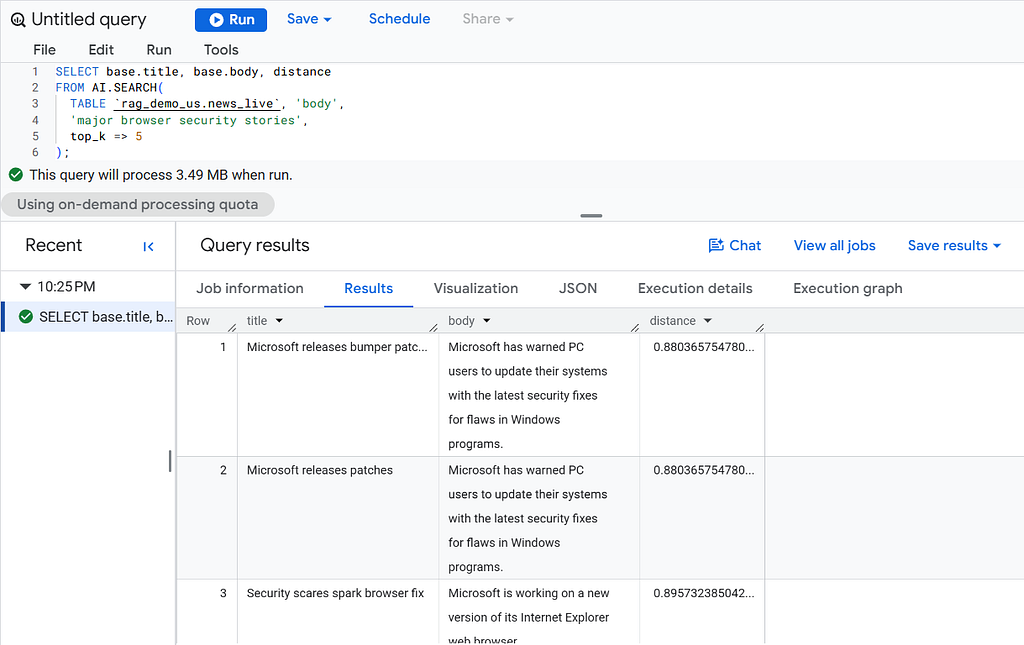
And retrieval gets simpler, because the new AI.SEARCH function knows which model the table uses and embeds your query string automatically:
SELECT base.title, base.body, distance
FROM AI.SEARCH(
  TABLE `rag_demo_us.news_live`, 'body',
  'major browser security stories',
  top_k => 5
);
No manual query embedding. No model bookkeeping. You search text against a text column, and the warehouse handles the vector plumbing. Vector indexes integrate too: create one on the source column and index training starts once 80% of rows have embeddings.
This is the version that matters for anything that lives in production. The one-shot pattern is a demo; a corpus that keeps itself embedded is an architecture.
One label, though: this is Preview (Pre-GA terms, subject to change). Also worth knowing before you commit: one auto-generated embedding column per table, batch your inserts rather than trickling frequent DML (concurrent DML can delay generation), and copies, clones, and snapshots carry the data but not the generation config. Per the latest release notes, you can enable it on new or existing tables via CREATE TABLE or ALTER TABLE. As always, the BigQuery release notes are the only authoritative source for status; check them before you build.
What you inherit for free
This is the part that should matter most to data teams, and it’s the least discussed:
- Row-level and column-level security apply to VECTOR_SEARCH. If a user can't see a row, they can't retrieve it as RAG context. Try implementing that correctly across an external vector DB sync.
- IAM is the only auth model. No API keys in environment variables, no rotation runbooks for the pipeline itself.
- Audit logs, cost attribution, quotas: all the boring, load-bearing infrastructure your platform team already operates. You can even trace per-job Agent Platform charges in Cloud Billing via the bigquery_job_id_prefix label.
- No sync pipeline. The embeddings live next to the source rows. There is no “vector store drifted from the warehouse” incident, because there is no second store. With autonomous embeddings, there isn’t even a refresh job to own.
The best infrastructure is the one you don’t deploy.
Where this breaks
I promised receipts, not religion:
1. Cost is per token, and Gemini 2.5 charges for thinking. Generation on Gemini 2.5 models bills the thinking tokens on top of output. For classification-style tasks, set the thinking budget to 0 via model_params: lower latency, lower bill. Ignore this and batch jobs get expensive quietly. AI.COUNT_TOKENS exists to estimate before you run.
2. Row count surprises on complex queries. With JOINs or ORDER BY … LIMIT, the number of rows actually sent to the model can differ from what you expect. Google's own recommendation: materialize your input to a table first, then run inference on it. Do it.
3. Quotas are real. Embedding throughput is governed by tokens-per-minute quotas (a few million by default). Fine for most workloads; a “let’s embed the whole data lake tonight” job needs planning (or Provisioned Throughput via request_type => 'dedicated'), not enthusiasm.
4. VECTOR_SEARCH bills bytes scanned. On-demand pricing charges for base table, index, and query scans. Use STORING columns in your index to avoid expensive joins back to the base table, and pre-filter with WHERE clauses on stored columns.
5. Prompt versioning doesn’t exist. Your prompt is a string inside a SQL query. No registry, no A/B testing, no evaluation harness. For a production assistant iterating on prompts weekly, this gap is real, and it’s where a thin Python layer (or dbt, with prompts as versioned config) earns its keep.
GA or Preview? Read the label
As of this writing:
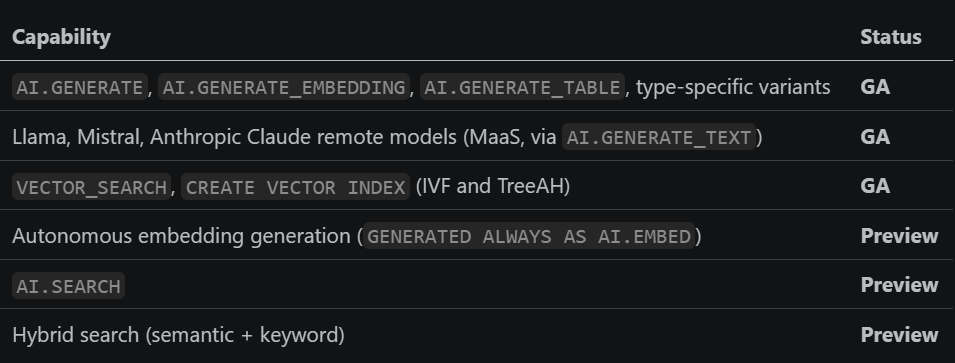
AI.GENERATE and AI.GENERATE_TABLE reached GA in late January 2026; the partner models (Claude, Llama, Mistral) went GA in the first half of 2025. Statuses change; release notes don't lie.
So… is SQL all you need?
Three takeaways:
1. For batch and analytical RAG: yes, seriously consider it. Document classification, semantic deduplication, enrichment pipelines, internal Q&A over governed data: the warehouse-native approach wins on governance, simplicity, and total cost of ownership. And you keep your model choice.
2. For a living corpus, autonomous embeddings change the calculus. The hard part of production RAG was never the search; it was keeping vectors in sync with reality. Declaring the embedding as a generated column deletes that entire problem class. It’s Preview today, but it’s clearly where the platform is going.
3. The skill isn’t the syntax; it’s knowing where the line sits. Sub-second user-facing chat still wants a serving layer. Prompt lifecycle still wants versioning. Cost per token still wants monitoring. These constraints didn’t disappear; they moved.
I’m putting this to the test on the BBC News corpus: cost per 1,000 documents, end-to-end latency, retrieval recall with and without an index, and how fast autonomous embeddings actually converge after a bulk insert. That’s the follow-up article. If there’s a specific scenario you want benchmarked, tell me.
If you enjoyed this, I write about Data, AI, BigQuery, Cloud Run and a lot of cool stuffs.
References:
- Generative AI overview (model support matrix)
- CREATE MODEL for partner and open LLMs
- The AI.GENERATE function
- The AI.GENERATE_EMBEDDING function
- Autonomous embedding generation
- The AI.SEARCH function
- Search functions (VECTOR_SEARCH)
- Manage vector indexes
- BigQuery release notes
SQL Is All You Need: RAG without a Vector Database in a Dozen Lines of BigQuery was originally published in Google Cloud – Community on Medium, where people are continuing the conversation by highlighting and responding to this story.
Source Credit: https://medium.com/google-cloud/sql-is-all-you-need-rag-without-a-vector-database-in-a-dozen-lines-of-bigquery-ff08ed5d3ac4?source=rss—-e52cf94d98af—4
About the Author


