💡 This post is part of a series on Antigravity configuration:
- Where does Antigravity look for Agent Skills?
- Where does Antigravity look for MCP Servers?
- Where does Antigravity look for Rules and Workflows?
- Where does Antigravity look for Hooks?
In today’s post, I’ll talk about Hooks in Antigravity, what they are, how to configure them, and some shortcomings.
Hooks
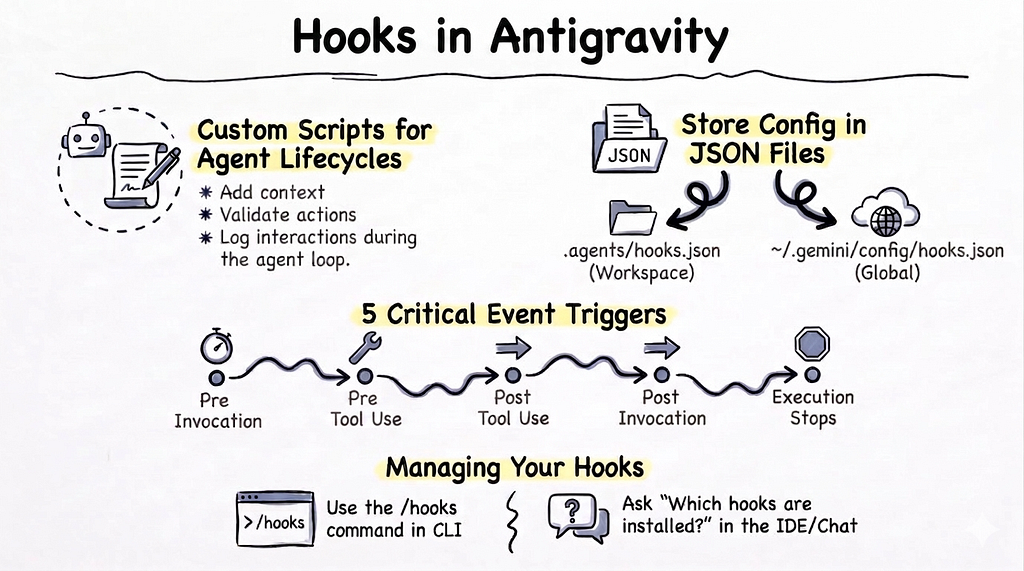
Hooks allow you to run custom scripts or programs at specific points in the Antigravity agent lifecycle, such as before or after model or tool calls. They are a way to extend the functionality of the agent. Hooks run synchronously as part of the agent loop and they can be useful for things like adding context, validating actions, enforce policies or logging interactions.
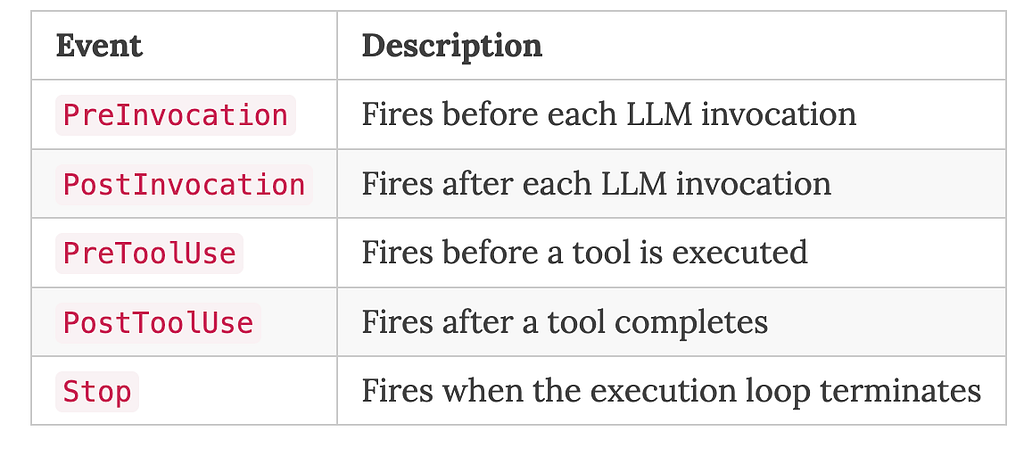
In Antigravity, there’s a limited number of events you can hook into:
Configuration
Hooks can be applied globally or per workspace and currently saved to the following locations for all 3 flavours: AGY, AGY CLI, and AGY IDE.
- Workspace: .agents/hooks.json
- Global: ~/.gemini/config/hooks.json
hooks.json has a list of event handlers with a list of hook events that it listens to.
For PreInvocation, PostInvocation, and Stop events, the structure is quite simple with command being the only supported type currently and a default timeout of 30 seconds:
{
  "my-hook": {
    "enabled": true,
    "PreInvocation": [
      {
        "type": "command",
        "command": "./scripts/my_custom_script.sh",
        "timeout": 30
      }
    ],
  }
  ...
For PreToolUse and PostToolUse events, you can further filter with matcher based on the tool type:
{
  "my-hook": {
    "PreToolUse": [
      {
        "matcher": "*",
        "hooks": [
          {
            "type": "command",
            "command": "./scripts/my_custom_script.sh"
          }
        ]
      }
    ],
You can see the documentation on hooks for more details.
Support in AGY, AGY CLI, and AGY IDE
Once you define hooks in the right file and folders I mentioned above, all 3 flavours of AGY will recognize them. However, the UI support to manage hooks is lacking.
In AGY and AGY IDE, you can simply ask: Which hooks are installed? and it will tell you but there's no UI to view, add, or edit hooks.
In AGY CLI, there’s a /hooks command that you can use to manage hooks.
A sample event logger hook
The best way to learn about hook events is to have an event logger.
First, I created an event logger Python script:
#!/usr/bin/env python3
"""Script to log hook events and return decisions to the agent framework."""

import json
import sys

LOG_FILE = "hook_events.log"

def main():
    """Read hook event and payload, log them, and output a control decision."""

    # Read hook input from stdin
    hook_input = sys.stdin.read()

    try:
        data = json.loads(hook_input)
    except json.JSONDecodeError:
        data = {"raw_input": hook_input}

    # Read and add hook event name from command-line arguments since AGY does not add it
    hook_event_name = sys.argv[1] if len(sys.argv) > 1 else "Unknown"
    data = {"hookEventName": hook_event_name, **data}

    # Filter out PostToolUse with a null toolCall
    if hook_event_name == "PostToolUse" and data.get("toolCall") is None:
        print("{}")
        return

    with open(LOG_FILE, "a", encoding="utf-8") as f:
        f.write(json.dumps(data) + "\n")

    # Return a valid JSON based on hook event type
    if hook_event_name == "PreToolUse":
        print('{"decision": "allow"}')
    elif hook_event_name == "Stop":
        print('{"decision": "stop"}')
    else: # "PreInvocation" or "PostInvocation" or "PostToolUse" or "Unknown"
        print("{}")


if __name__ == "__main__":
    main()
Notice that the script is a little more involved because AGY doesn’t include the hook event name in the events for some reason, so I added it in as a command-line argument. Also, it filters out PostToolUse events with a null toolCall because they're not useful and it returns the right JSON response based on the hook event type (it prints JSON to stdout).
Next, I defined a hook configuration with hooks.json:
{
  "event-logger": {
    "PreInvocation": [
      {
        "type": "command",
        "command": "python3 ./scripts/log_hook_event.py PreInvocation",
        "timeout": 30
      }
    ],
    "PostInvocation": [
      {
        "type": "command",
        "command": "python3 ./scripts/log_hook_event.py PostInvocation"
      }
    ],
    "PreToolUse": [
      {
        "matcher": "*",
        "hooks": [
          {
            "type": "command",
            "command": "python3 ./scripts/log_hook_event.py PreToolUse"
          }
        ]
      }
    ],
    "PostToolUse": [
      {
        "matcher": "*",
        "hooks": [
          {
            "type": "command",
            "command": "python3 ./scripts/log_hook_event.py PostToolUse"
          }
        ]
      }
    ],
    "Stop": [
      {
        "type": "command",
        "command": "python3 ./scripts/log_hook_event.py Stop"
      }
    ]
  }
}
Lastly, I put the script and the hook configuration into .agents/ folder of the workspace:
<workspace-root>/
└── .agents/
    ├── hooks.json
    └── scripts/
        └── log_hook_event.py
Hook Events
Now, we’re ready to see what hook events are logged. In AGY, I start a new chat and ask: Create a Hello World Python script.
I start seeing the PreInvocation events. It tells me that the model is being called but apart from that, there's not much information to act upon there:
{
  "hookEventName": "PreInvocation",
  "artifactDirectoryPath": "/Users/atamel/.gemini/antigravity-ide/brain/8591815f-ddcd-42e2-a41f-4d5a7a03091b",
  "conversationId": "8591815f-ddcd-42e2-a41f-4d5a7a03091b",
  "initialNumSteps": 1,
  "invocationNum": 0,
  "transcriptPath": "/Users/atamel/.gemini/antigravity-ide/brain/8591815f-ddcd-42e2-a41f-4d5a7a03091b/.system_generated/logs/transcript.jsonl",
  "workspacePaths": [
    "/Users/atamel/dev/local/testing/antigravity/hooks"
  ]
}
Then, I see PreToolUse and PostToolUse events which are more useful to see which tools are being called:
{
  "hookEventName": "PreToolUse",
  "artifactDirectoryPath": "/Users/atamel/.gemini/antigravity-ide/brain/8591815f-ddcd-42e2-a41f-4d5a7a03091b",
  "conversationId": "8591815f-ddcd-42e2-a41f-4d5a7a03091b",
  "stepIdx": 4,
  "toolCall": {
    "args": {
      "DirectoryPath": "/Users/atamel/dev/local/testing/antigravity/hooks"
    },
    "name": "list_dir"
  },
  "transcriptPath": "/Users/atamel/.gemini/antigravity-ide/brain/8591815f-ddcd-42e2-a41f-4d5a7a03091b/.system_generated/logs/transcript.jsonl",
  "workspacePaths": [
    "/Users/atamel/dev/local/testing/antigravity/hooks"
  ]
}{
  "hookEventName": "PostToolUse",
  "artifactDirectoryPath": "/Users/atamel/.gemini/antigravity-ide/brain/8591815f-ddcd-42e2-a41f-4d5a7a03091b",
  "conversationId": "8591815f-ddcd-42e2-a41f-4d5a7a03091b",
  "error": "",
  "stepIdx": 4,
  "toolCall": {
    "args": {
      "DirectoryPath": "/Users/atamel/dev/local/testing/antigravity/hooks",
      "toolAction": "Listing workspace directory",
      "toolSummary": "Listing directory"
    },
    "name": "list_dir"
  },
  "transcriptPath": "/Users/atamel/.gemini/antigravity-ide/brain/8591815f-ddcd-42e2-a41f-4d5a7a03091b/.system_generated/logs/transcript.jsonl",
  "workspacePaths": [
    "/Users/atamel/dev/local/testing/antigravity/hooks"
  ]
}
After a few tool calls, you’ll see the end of the invocation:
{
  "hookEventName": "PostInvocation",
  "artifactDirectoryPath": "/Users/atamel/.gemini/antigravity-ide/brain/8591815f-ddcd-42e2-a41f-4d5a7a03091b",
  "conversationId": "8591815f-ddcd-42e2-a41f-4d5a7a03091b",
  "initialNumSteps": 1,
  "invocationNum": 0,
  "transcriptPath": "/Users/atamel/.gemini/antigravity-ide/brain/8591815f-ddcd-42e2-a41f-4d5a7a03091b/.system_generated/logs/transcript.jsonl",
  "workspacePaths": [
    "/Users/atamel/dev/local/testing/antigravity/hooks"
  ]
}
The events continue for a while with more model and tool calls until the execution stops with the Stop event:
{
  "hookEventName": "Stop",
  "artifactDirectoryPath": "/Users/atamel/.gemini/antigravity-ide/brain/8591815f-ddcd-42e2-a41f-4d5a7a03091b",
  "conversationId": "8591815f-ddcd-42e2-a41f-4d5a7a03091b",
  "error": "",
  "executionNum": 0,
  "fullyIdle": true,
  "terminationReason": "NO_TOOL_CALL",
  "transcriptPath": "/Users/atamel/.gemini/antigravity-ide/brain/8591815f-ddcd-42e2-a41f-4d5a7a03091b/.system_generated/logs/transcript.jsonl",
  "workspacePaths": [
    "/Users/atamel/dev/local/testing/antigravity/hooks"
  ]
}
Hopefully, this gives you an idea on what kind of events AGY emits.
I found AGY hook events quite limited. I expect more events to become available in the future for before/after session, agent, model, tool calls with richer payloads but as of today, that’s all we have in AGY.
Now that you have a better understanding on the hook events and their payloads, you can start looking into implementing hooks to do more useful checks.
Summary
In this blog post, I did a quick recap of hooks. Here’s a summary of my last 4 blog posts on where AGY saves hooks, skills, MCP servers, rules, and workflows:
~/.gemini/
├── GEMINI.md                      # Global rules
├── config/
│   ├── global_workflows/          # Global workflows
│   ├── hooks.json                 # Global hooks
│   ├── mcp_config.json            # Global MCP servers
│   └── skills/                    # Global agent skills
├── antigravity/
│   ├── builtin/skills/            # Built-in agent skills (AGY)
│   └── mcp/                       # Cached MCP servers (AGY)
├── antigravity-cli/
│   ├── builtin/skills/            # Built-in agent skills (AGY CLI)
│   └── mcp/                       # Cached MCP servers (AGY CLI)
└── antigravity-ide/
    └── mcp/                       # Cached MCP servers (AGY IDE)

<workspace-root>/
└── .agents/
    ├── hooks.json                 # Workspace hooks
    ├── mcp_config.json            # Workspace MCP servers
    ├── rules/                     # Workspace rules
    ├── skills/                    # Workspace agent skills
    └── workflows/                 # Workspace workflows
Originally published at https://atamel.dev.
Where does Antigravity look for Hooks? was originally published in Google Cloud – Community on Medium, where people are continuing the conversation by highlighting and responding to this story.
Source Credit: https://medium.com/google-cloud/where-does-antigravity-look-for-hooks-c9e9f57f167f?source=rss—-e52cf94d98af—4
About the Author