Declarative LangGraph Agents from YAML — Schema, Graph Construction, and LLM/Tool Abstraction. Stop writing LangGraph boilerplate. Declare your agent in YAML and let the builder wire the graph.
The Problem: LangGraph Is Powerful but Verbose
LangGraph gives you fine-grained control over agentic workflows. But building even a simple tool-using agent means writing a lot of code every time: defining state, constructing the graph, wiring conditional edges, instantiating LLM providers, registering tools, and managing the tool-call routing loop.
Every agent ends up with the same structural scaffolding. When you want to swap from OpenAI to Vertex AI, or add a new tool, you’re back editing Python. When a non-developer wants to create an agent, they’re locked out entirely.
A declarative YAML approach solves this. You describe what the agent does — its LLM, its tools, its workflow topology — and the builder handles how to wire it into a LangGraph ‘StateGraph’.
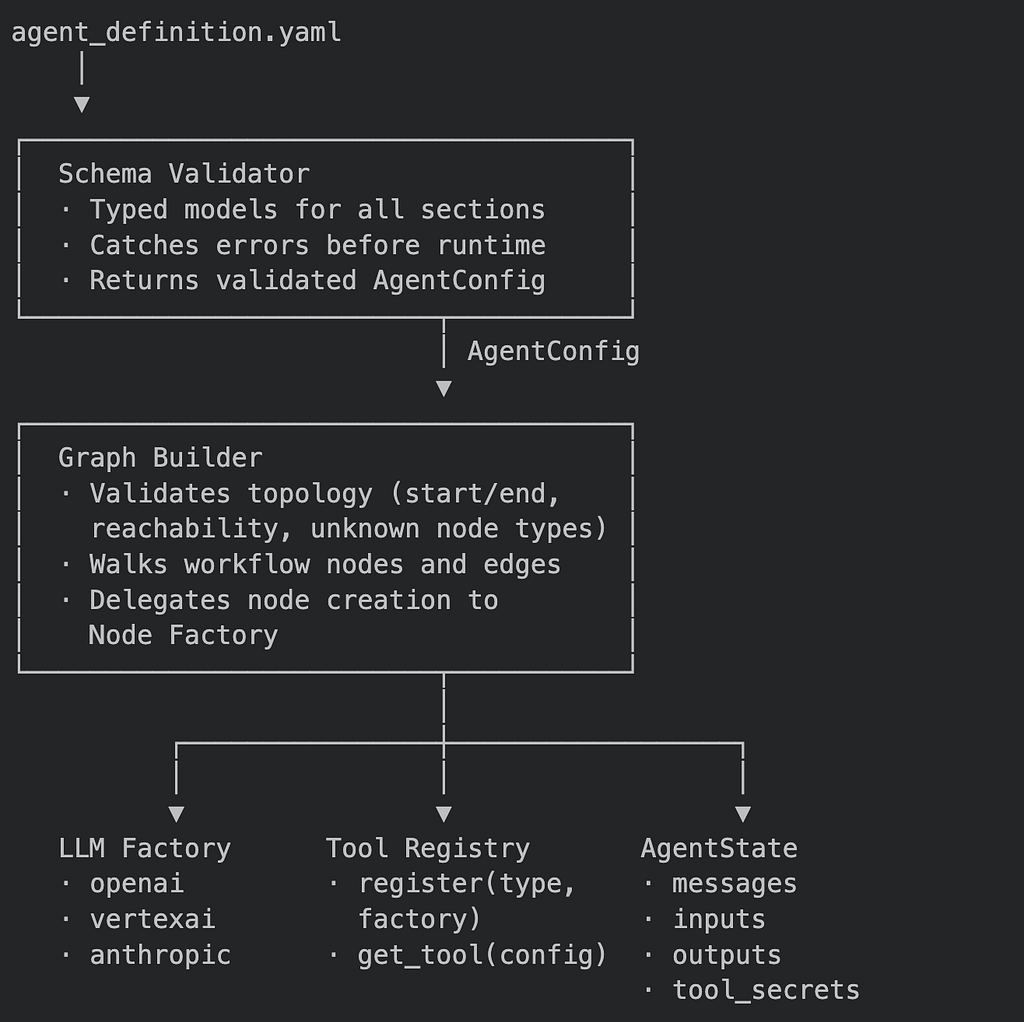
The Architecture
The YAML Schema
The YAML is the entire contract. An agent author only needs to write this — no code required:
metadata:
  name: research-assistant
  version: 1.0.0
  description: Searches the web and summarises results
  author: platform-team
  tags:
    - research
    - web-search

spec:
  llms:
    - id: primary-llm
      provider: vertexai
      model: gemini-2.0-flash
      temperature: 0.3
      project_id: my-gcp-project
      location: us-central1

  tools:
    - id: web-search
      type: search
      config:
        max_results: 5

  observability:
    log_level: INFO
    trace_enabled: true

workflow:
  nodes:
    - id: start
      type: start

    - id: researcher
      type: llm
      config:
        llm_id: primary-llm
        tool_ids:
          - web-search
        system_prompt:
          You are a research assistant. Use the web search tool to find
          accurate, up-to-date information. Summarise your findings clearly.

    - id: end
      type: end

  edges:
    - from: start
      to: researcher
    - from: researcher
      to: end
Three top-level sections govern everything:
- metadata — identity and versioning
- spec — the resources the agent can use (LLMs, tools, observability settings)
- workflow — the graph topology (nodes and edges)
Part 1: Schema Validation — Catching Problems Before Runtime
The first step when loading any agent is parsing the YAML and validating its structure before any graph construction, LLM connection, or tool instantiation begins. Every section of the YAML maps to a typed schema model.
What each model validates
LLM config — each entry under ‘spec.llms’:
LLMConfig:
id → string, required
provider → one of: openai | vertexai | anthropic
model → string, required
temperature → float, 0.0–2.0, default 0.7
max_tokens → integer or null
api_key_env → env-var name holding the API key (openai, anthropic)
project_id → GCP project ID (vertexai only, required)
location → GCP region, default "us-central1"
Tool config — each entry under ‘spec.tools’:
ToolConfig:
id → string, required (used as reference in node config)
type → string, must match a registered tool type
config → key-value pairs passed to the tool factory
Node config — each entry under ‘workflow.nodes’:
NodeConfig:
id → string, unique across the workflow
type → one of: start | end | llm | tool | custom
config:
llm_id → references an id in spec.llms
tool_ids → list of ids from spec.tools
system_prompt → freeform string
inputs → list of declared input parameters
outputs → list of declared output parameters
Edge config — each entry under ‘workflow.edges’:
EdgeConfig:
from → source node id (YAML keyword; accessed as .source in code)
to → target node id (YAML keyword; accessed as .target in code)
Note: ‘from’ is a reserved keyword in most languages, but it is the natural word in YAML.
The schema maps ‘from’ → an internal ‘source’ field so authors write readable YAML while the builder works with unambiguous field names.
Root config — the full document:
AgentConfig:
metadata → MetadataConfig
spec → SpecConfig (llms, tools, knowledge, secrets, observability)
workflow → WorkflowConfig (nodes, edges)
The validation call
function validate_yaml(content):
  if content is a string:
    parse it as YAML into a dictionary
    validate the dictionary against AgentConfig schema
    return a typed AgentConfig object
# on any violation, raise a descriptive error:
# "spec.llms[0].provider: value 'gpt' is not one of [openai, vertexai, anthropic]"
# "workflow.nodes[2].config: llm_id is required for llm node type"
Every field violation produces a structured error pointing to exactly which section and field failed. The agent never starts with a broken or ambiguous configuration.
Part 2: Topology Validation — Before Any LLM or Tool Is Touched
Schema validity is necessary but not sufficient. A YAML file can be structurally correct and still describe a graph that can never run. Topology validation is a second, independent pass:
function validate_topology(config):
  count start nodes → must be exactly 1
  count end nodes → must be exactly 1
  build a set of all declared node IDs
  for each edge:
    assert edge.source exists in node IDs
    assert edge.target exists in node IDs
      add edge.target to adjacency list of edge.source
      reachable = depth_first_search(start_node, adjacency_map)
      unreachable = all_node_ids - reachable
      if unreachable is not empty:
        raise error: "Node(s) not reachable from start: <list>"
This catches authoring mistakes before a single network connection is made:
- A node declared in YAML but with no path leading to it from start
- An edge whose source or target references a node ID that was mistyped
- Two `start` nodes (the builder would not know which to use as the entry point)
- An agent with no `end` node (the graph would never terminate)
Part 3: LLM Abstraction — The Factory Pattern
Once the config is validated, the builder needs a live LLM instance for each llm node.
The provider field drives which backend is instantiated:
function create_llm(llm_config):
    if provider is "openai":
        read API key from environment variable named by api_key_env
        return OpenAI chat model (model, api_key, temperature, max_tokens)
    if provider is "vertexai":
        require project_id → raise error if missing
        return Vertex AI chat model (model, project, location, temperature, max_tokens,
            content safety settings)
    if provider is "anthropic":
        read API key from environment variable named by api_key_env
        return Anthropic chat model (model, api_key, temperature, max_tokens)
    raise error: "Unknown provider: <value>"
All provider-specific initialisation — safety settings, regional endpoints, authentication mechanisms — lives inside this one function. Everything else in the builder treats the result as a generic “chat model that accepts messages and returns messages”.
Switching an agent from OpenAI to Vertex AI is a single YAML change:
# Before
- id: primary-llm
provider: openai
model: gpt-4o
# After
- id: primary-llm
provider: vertexai
model: gemini-2.0-flash
project_id: my-gcp-project
No code changes. No redeployment of shared infrastructure. The rest of the workflow YAML, including tool bindings and system prompts, stays exactly the same.
LLM instances are cached by ‘id’ inside the builder. If two different `llm` nodes declare the same ‘llm_id’, they reuse one instance rather than opening duplicate connections.
Part 4: Tool Registry — Register Once, Resolve by Type
Tools follow a registry pattern. The registry is populated once at application startup. At build time, the builder resolves ‘tool_ids’ from node configs into live tool instances.
class ToolRegistry:
    factories: map of tool_type → factory_function
    register(tool_type, factory_function):
        factories[tool_type] = factory_function
    get_tool(tool_config):
        factory = factories.get(tool_config.type)
        if factory not found:
            raise ToolNotFoundError(tool_config.type, available_types)
        return factory(tool_config)
At startup, each supported tool type is registered alongside a factory that knows how to build it from a ‘ToolConfig’:
registry.register("search", → factory that builds a web search tool)
registry.register("web_browser", → factory that builds a browser navigation tool)
registry.register("code_runner", → factory that builds a sandboxed code executor)
registry.register("openapi", → factory that builds an OpenAPI-driven HTTP tool)
When the builder processes a node with ‘tool_ids: [web-search]’ it:
- Finds the ‘ToolConfig’ with ‘id: web-search’ in ‘spec.tools’
- Passes that config to ‘registry.get_tool()’ — the ‘type’ field selects the factory.
- Caches the resulting tool instance by its ‘id’.
- Binds it to the LLM node so the model can call it during inference.
An agent author never writes tool instantiation code. They declare the tool type and its configuration options in YAML, and the registry handles the rest. Adding a new tool type to the platform means registering one new factory — existing agents remain unchanged.
Part 5: Graph Construction — Walking Nodes and Edges
With topology validated, LLMs instantiated, and tools resolved, the builder constructs the LangGraph ‘StateGraph’. It walks the validated config in two passes: nodes first, then edges.
Pass 1 — Add nodes
function build(config):
    validate_topology(config)
    graph = new StateGraph(AgentState)
    tool_executor_map = {} ← tracks which LLM nodes got a hidden executor
    for each node in config.workflow.nodes:
        if node.type is "start":
            graph.add_node(node.id, start_node_function)
        if node.type is "end":
            graph.add_node(node.id, end_node_function)
        if node.type is "llm":
            graph.add_node(node.id, llm_node_function(node))
            tool_ids = node.config.tool_ids (default [])
            knowledge_ids = node.config.knowledge_ids (default [])
            if tool_ids or knowledge_ids are not empty:
                executor_id = node.id + "_tool_executor"
                graph.add_node(executor_id, tool_executor_function(node.id, tool_ids, knowledge_ids))
                tool_executor_map[node.id] = executor_id
Pass 2 — Wire edges
for each edge in config.workflow.edges:
    if edge.source has an entry in tool_executor_map:
        executor_id = tool_executor_map[edge.source]
        graph.add_conditional_edges(
            source = edge.source,
            condition = "route to executor if last message has tool_calls, else next",
            routes = { "tools": executor_id, "next": edge.target }
        )
        graph.add_edge(executor_id → edge.source) ← loop back after tool runs
    else:
        graph.add_edge(edge.source → edge.target)
set entry point = start node
connect end node → graph END terminal
return graph.compile()
The hidden routing loop
The key insight: the agent author never declares the tool-call routing loop. The builder detects that an ‘llm’ node has ‘tool_ids’ and silently:
- Creates a companion ‘<node_id>_tool_executor’ node
- Adds a conditional edge — if the model’s last message contains tool calls, route to the executor; otherwise proceed to the declared next node
- Adds a return edge from the executor back to the LLM node
In the YAML, this entire mechanism is invisible. The author simply writes:
- id: researcher
type: llm
config:
llm_id: primary-llm
tool_ids:
- web-search
The compiled graph looks like this internally:
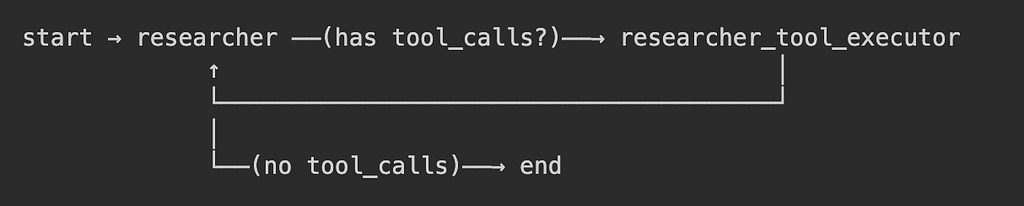
The researcher node runs, the model decides whether to call a tool, the executor runs it and feeds the result back, and the model runs again — all from three lines of YAML.
Part 6: AgentState — The Shared Execution Contract
Every agent built from YAML uses the same state shape. All nodes read from and write to this shared structure as the graph executes:
AgentState:
messages → full conversation history (append-only, accumulates across turns)
inputs → structured input parameters declared in node YAML
outputs → structured output results populated after execution
tool_secrets → per-tool resolved secrets, injected at execution time
file_uploads → list of uploaded file references available to tools
credentials → runtime-injected platform credentials for enterprise integrations
The first three fields are what agent authors interact with indirectly through their YAML definitions. The last three are platform-managed — injected by the execution layer before the graph runs and never visible in the YAML.
The append-only ‘messages’ field is what makes multi-turn tool use work without any special wiring: each time the tool executor adds a tool result message and the graph loops back to the LLM node, the model sees the full history and decides what to do next.
What You Get
Two calls turn a YAML string into a running LangGraph agent:
```
config = validate_yaml(yaml_content)
graph = build(config)
# Single-turn invocation
result = graph.invoke(initial_state)
# Streaming
for each chunk in graph.stream(initial_state):
process(chunk)
```
The compiled graph is a standard LangGraph object. It works with any LangGraph-compatible checkpointer for persistence, any memory store for long-term recall, and any observability integration — including the OpenTelemetry tracing setup covered in Blog 1 of this series.
No special wrappers needed.
Key Takeaways
- Declare, don’t code. A YAML file is the complete agent definition — topology, LLM choice, tool bindings, and observability settings in one place. No Python required to create or modify an agent.
- Validate in two stages. Schema validation (are all fields correct?) and topology validation (is the graph actually runnable?) are separate concerns. Both must pass before any LLM or tool is touched.
- The factory and registry patterns isolate provider-specific code. Everything outside the factory treats LLMs and tools as generic interfaces. Switching providers or adding new tool types requires no changes to the builder or the state machine.
- The tool-call routing loop is auto-injected. Any ‘llm’ node with ‘tool_ids’ gets a hidden executor node and conditional edges wired in automatically. Agent authors never write routing logic.
- A single shared state schema is the execution contract. It connects the YAML declaration, the graph runtime, and the platform’s credential and secret injection. Stability here is what makes the whole system composable.
- The output is a plain LangGraph compiled graph. It inherits full LangGraph compatibility — checkpointers, streaming, and any instrumentation layer you already have.
Declarative LangGraph Agents from YAML and deployment to GCP Agent Engine was originally published in Google Cloud – Community on Medium, where people are continuing the conversation by highlighting and responding to this story.
Source Credit: https://medium.com/google-cloud/declarative-langgraph-agents-from-yaml-and-deployment-to-gcp-agent-engine-4ca05803f93d?source=rss—-e52cf94d98af—4
About the Author