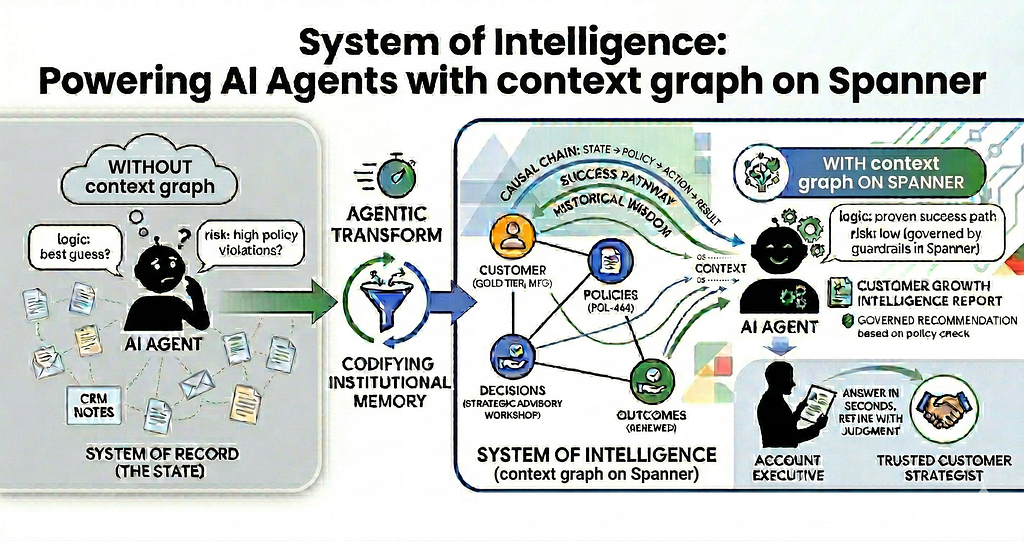
AI agents often underperform because they lack “Institutional Memory” — the ability to recollect which organizational decisions led to success and which led to costly mistakes. For organizations building enterprise grade agents, a standard system of record is not good enough; we need to empower agents with data that provides the context of past actions. This context of past actions acts as a System of intelligence also called a context graph.
A context graph empowers the AI Agent to learn from organizational experience. While a system of record reflects current facts — such as a customer’s status (The State) — a “system of intelligence” (context graph) stores the reasoning of facts: the specific decisions made, the policies that governed them, and the actual outcomes that followed (The Context). By capturing this chain: State → Policy → Action → Result — you equip your AI with the historical wisdom to understand not just what happened, but why, allowing agents to ground every action in proven reality.
Using Spanner Graph to break the cycle of churn
For a demo example in this blog, let’s step through a scenario of a Customer Growth Strategist Agent for a global SaaS company. The agent will be triggered by a customer’s drop in usage below a certain threshold and the agent’s goal is to recommend proven interventions before customers churn. These interventions will be based on the historical context of which decisions worked and which didn’t to prevent customer churn.
The Drop in usage signal
The Usage Signal Detection is powered by Spanner — a fully managed, mission-critical relational database service that provides strong consistency, high availability (up to 99.999% SLA), and virtually unlimited horizontal scaling. For the scenario mentioned above, Spanner’s relational engine allows us to run standard SQL queries that monitor real-time telemetry such as logins, API calls, and feature utilization, to identify friction points across a global user base. When telemetry crosses a critical threshold, it triggers the Growth Strategist Agent. To keep our focus on the context graph and ‘Institutional Memory,’ in this blog, we won’t build the real-time monitoring service here; instead, you will see these signals already persisted in nodes within the graph ready for the Agent to analyze.
The power of context graph
In a standard agentic system with no access to historical context, the AI is effectively blind to the past, suggesting one size fits all solution. In this demo we will show how a context graph can be built on Spanner Graph to enable an agent traverse years of organizational memory in milliseconds. The context graph will identify similar customer profiles who faced identical declines and easily find the specific actions that led to an increase in usage for those customers.
The Outcome: Empowering the Account Executive
The agent packages this Institutional Wisdom from the context graph into a high-fidelity Intelligence Report for the Account Executive (AE). Instead of the AE spending hours digging through fragmented CRM notes, email threads or pinging peers to find what worked for them, the context graph built on Spanner delivers the answer in seconds. The AE then refines the offer based on their judgement and customer understanding. This agent empowers every Account Executive to spend their time building customer relationship and be a trusted Customer Strategist.
Customer Growth Intelligence Report
Let’s discuss the Intelligent Report in action. The AI agent generates the Governed Intelligence Report based on the historical context graph stored in Spanner. By analyzing this context graph, the agent reconciles successful historical outcomes aligned with current corporate policies.
Crucially, the agent ensures every recommendation is within the guardrails of Margin Protection Policy (more details about Policies in implementation section below) before it reaches the Account Executive. Below is a sample recommendation generated for a Gold tier Manufacturing customer exhibiting low usage signals:
==================================================
🔍 CUSTOMER GROWTH INTELLIGENCE REPORT
Account: CUST-101 | Signal: LOW_ADOPTION
⚠️ HISTORICAL FRICTION (The ‘What to Avoid’)
Avoid offering immediate discounts without understanding the root cause of low adoption, as this may lead to churn.
✅ THE SUCCESS PATHWAY (The ‘Institutional Wisdom’)
For Manufacturing (Gold Tier) accounts showing ‘LOW_ADOPTION’, a ‘Strategic Advisory Workshop’ focused on ROI justification has proven successful in reversing the trend and leading to account expansion.
🛡️ GOVERNED RECOMMENDATION
Per Policy ‘POL-444’ (Margin Protection Rule), discounts exceeding 15% for Gold accounts are prohibited without a Value-Based Roadmap or Strategic Advisory Workshop. Initiate a Strategic Advisory Workshop to demonstrate the ROI of routing automation and justify the current cost-of-service.
==================================================
Notice what happened in that report:
- The Identification: The Agent correctly mapped the customer and its specific LOW_ADOPTION signal.
- The Context Lookup: It traversed the Spanner Graph, made sure it did not repeat the failed paths of the past. Instead based on the Spanner Graph it surfaced the Institutional Wisdom and recommended a Strategic Advisory Workshop based on the history of similar customer profiles.
- The Governance: The Agent performed a Real time Compliance Check. It didn’t just suggest a workshop; it verified against the POL-444 policy to ensure the strategy was financially safe before presenting it to the AE.
The agent would not have been able to generate this precise report without having the historical context. Here is the difference between an AI Agent without context and an Agent that reasons based on historical context:
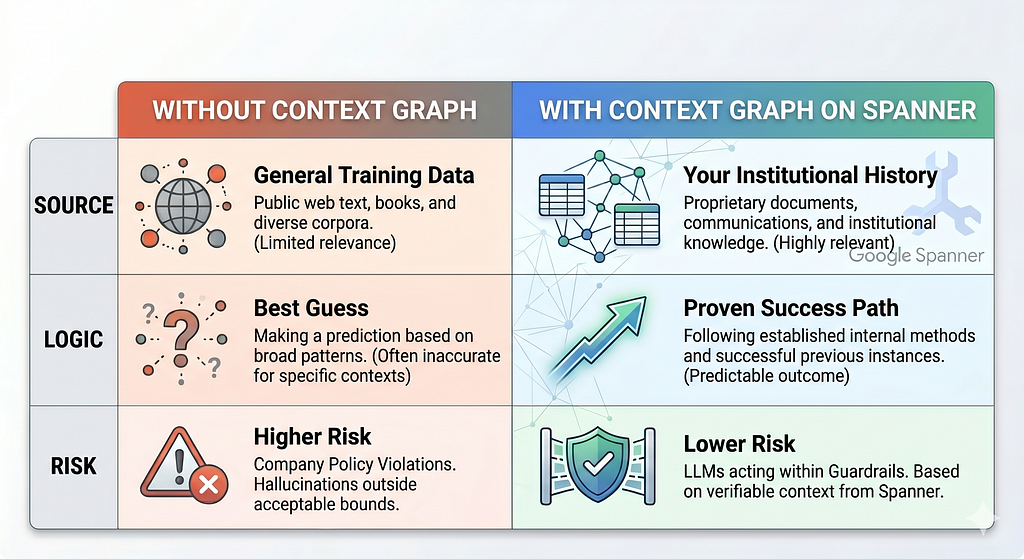
Spanner: System of Intelligence for Enterprise AI
Now that we have discussed how having access to context differentiates this agent, lets discuss why we chose Spanner for storing the context graph. Spanner offers a unique multi-model architecture that unifies operational data (the “State”) in relational tables and reasoning history (the “Context”) in Spanner Graph. By housing SQL and Graph data under one roof — backed by an industry-leading 99.999% SLA — we eliminate the friction of data silos and the latency of ETL overhead. Spanner’s architecture ensures the Agent is reasoning over the latest and complete state of the business, providing the scalable foundation required to transform raw enterprise data into a living context graph. The virtually unlimited scaling available in Spanner ensures that this context graph can be scaled seamlessly for the entire enterprise.
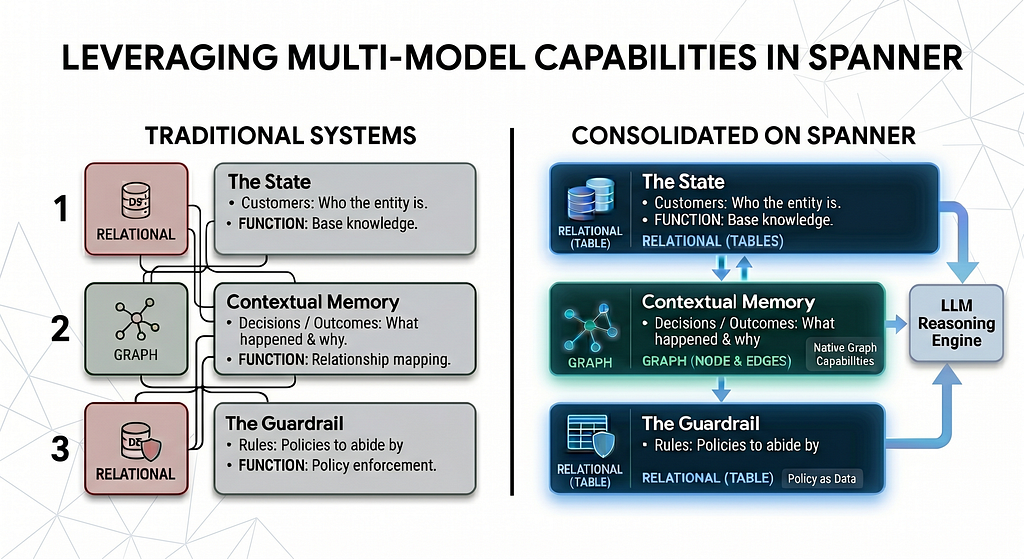
The Implementation: Building Institutional Memory
Now that we have seen the impact of the Governed Intelligence Report and why Spanner was chosen as the data platform of choice for context graph, let’s walk through the implementation that makes this possible. The following three steps demonstrate how to build, populate and query a context graph in Spanner for use by the AI agent.
You can follow along with complete codebase here:
- Architecting the Foundation: We establish a context graph schema in Spanner using dedicated node tables (Customers, Policies, Decisions, Outcomes) and interleaved edge tables. This lean schema is designed for a rapid start and we share strategies for expanding it to meet enterprise scale complexity.
- Codifying the Institutional Memory: Once the schema is defined, we shift to data ingestion. Using an Agentic Ingestion approach powered by the ADK (Agent Development Kit), we intelligently map unstructured CRM logs into structured graph relationships. By using an upsert strategy, this pipeline remains reusable and ensures your context graph evolves automatically as new decisions and outcomes are recorded in the CRM.
- Real Time Context Discovery: We leverage GQL (Graph Query Language) to simplify multi-hop analysis. By traversing the graph, the Agent instantly identifies successful patterns across the entire organization. Such discoveries would be computationally expensive and complex with traditional relational queries.
Architecting the Foundation
1. Designing for the “Causal Chain”
For a Customer Growth Agent to be effective, the context graph schema must go beyond simple customer profile data; it must capture the “Institutional Wisdom” of the organization.
Defining the Scope: Start Small, Think Enterprise wide
While a context graph can eventually feed an entire organization, it makes sense to start with a focused scope that delivers immediate ROI. We begin by addressing the high-stakes questions faced by the Customer Success team responsible for protecting and growing the company’s core revenue.
By focusing on a specific scope, we design the schema to answer the most critical questions:
- “When usage drops for a Gold Tier client, what intervention has the highest probability of a full-price renewal?”
- “Does a recommendation (e.g. deep discount) actually prevent churn, or does it simply delay it?”

To answer these questions, we center the graph schema around the Decision node, acting as the bridge between current state and historical results.
- Decisions (The Hub): Captures the reasoning, logic, and timestamp of an action.
- Outcomes (The Result): The final impact (Renewed, Churned, or Revenue Impact).
- Policies (The Governance): The organizational guardrails that state which actions can be taken.
- Customers (The State): The entity affected by the decisions (e.g., a “Gold Tier” client from the Manufacturing domain).
Defining the Causal Topology in Spanner GQL:
CREATE PROPERTY GRAPH MarketingContextGraph
  NODE TABLES (
    Customers, Policies, Decisions, Outcomes
  )
  EDGE TABLES (
    AboutCustomer  SOURCE KEY (decision_id) REFERENCES Decisions
                   DESTINATION KEY (customer_id) REFERENCES Customers,
    FollowedPolicy SOURCE KEY (decision_id) REFERENCES Decisions
                   DESTINATION KEY (policy_id) REFERENCES Policies,
    ResultedIn     SOURCE KEY (decision_id) REFERENCES Decisions
                   DESTINATION KEY (outcome_id) REFERENCES Outcomes
  );
To jumpstart your implementation, you can find the complete SQL schema and table definitions in this github link. Also, these GQL queries demonstrate how seamlessly this schema can traverse complex relationships to answer the two critical questions defined above.
By structuring data in this way, you have a Causal Chain. This chain allows an AI agent to traverse the graph and ‘remember’ that a specific decision, for example the decision of offering a 50% discount ultimately resulted in a negative outcome (Churn). This reasoning trace allows the Agent to avoid hallucinating a strategy and instead retrieve a proven one.
2. Evolving Schema
With Spanner Graph supporting a flexible and evolving schema, you aren’t locked into your initial design. Once the Customer Growth use case is proven, you can seamlessly expand the graph to support other departments such as:
- Product Management: Add Feature_Launch nodes to see how specific updates impacted long-term Outcomes.
- Marketing: Connect Campaign_Touchpoints to Decisions to see which marketing motions led to the most successful renewals.
- Finance: Link Contract_Terms to Outcomes to optimize pricing models based on historical success paths.
This “Start Small” approach ensures that the Customer Growth Agent is successful today, while the Spanner Graph foundation ensures it can become the Institutional Brain for the entire enterprise as the use cases expand.
Codifying Institutional Memory: From CRM to context graph
To populate the context graph we synthesize the data from two disparate sources: unstructured Activity Logs from CRM and corporate Policy PDFs. This process transforms raw, messy operational history into a structured map of cause and effect.
While a CRM is a System of Record for customer facing data, it is not an effective System of Intelligence for an AI agent. To bridge this, we used an Agentic Workflow (powered by the ADK framework) to transform flat rows exported from a CRM tool into a Causal Chain of graph.
The Agentic Transformation Logic:
- Semantic Extraction: We use Gemini to parse messy notes and activity logs, extracting the strategic metadata of decisions and their reasoning.
- Contextual Upserts: The ingestion agent provides upsert capabilities by intelligently mapping the CRM log record to the correct Decision and Outcome nodes based on timestamps and customer IDs.
- Disparate unstructured data ingestion in Spanner Graph: While the CRM provides the action, another script extracts governance rules from Policy PDFs, ensuring the graph knows not just what decisions were made, but which ones are permitted. By ingesting policies we move governance data into the context layer itself.
Link to view the ingestion code and sample files on GitHub
To summarize we use following AI tools to extract data from unstructured notes and ingest data in Spanner:
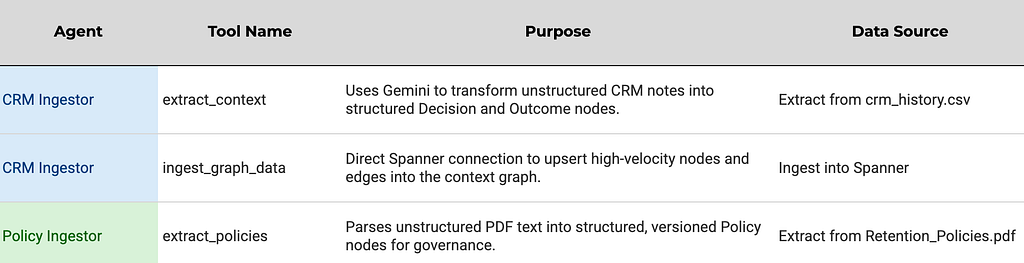
The Hybrid Ingestion Pattern
Not all data is created equal. This section offers a quick discussion to balance agentic intelligence with performance while performing ETL in Spanner:
Agentic ETL: Best for unstructured, high-context data (e.g. messy CRM notes). This uses Gemini to extract insights from the Account Executive notes before transforming the data into graph relationships. If you are interested in benchmarking & performance implications of this agentic pipeline, there are more details in the Performance Insights & Benchmarking section below.
Latency implications & Insights of the Agentic Ingestion Pipeline
To evaluate the latency implications of this agentic ingestion pipeline, we tested the pipeline with a few records with varying document sizes. You can find the sample code here for testing. The ingestion rate is primarily governed by Inference Latency (the time Gemini takes to extract insights, which depends on the document size) while the Ingestion Latency in Spanner remains fairly consistent.
It is worth noting that for high volume environments, Google Cloud Document AI is a recommended solution for summarizing large documents which provides significantly faster processing and advanced features like semantic chunking that maintain the structural integrity of titles and chapters.
Deterministic (Bulk Loading): Best for high-volume, structured data (e.g., millions of historical transaction records). This uses Spanner’s native high speed bulk loading tools for maximum throughput.
The Gemini Preprocessor (The Bridge): For vast amounts of unstructured data, it would be better to use Gemini to pre-process and structure the data into clean csv files first. This would enable us to benefit from the speed of bulk loading the clean csv files while capturing AI-extracted context during pre-processing.
Benefits of transforming CRM’s flat records into context graph
Coming back to the Codifying Institutional Memory discussion, below are the benefits of context graph over CRM flat records:
a. CRM Data is flat, Context is a Chain
The CRM view represents a Timeline of Events; the context graph view represents a Hierarchy of Reason.
- The CRM View: A list of activities: “Call made,” “Discount offered,” “Closed Lost.”
- The context graph View: A Causal Chain. The graph explicitly links a Company Policy (e.g., Margin Protection) to a Decision (Value Workshop) and follows it directly to the Outcome (Renewal).
b. Extracting Insights from years of notes
An Account Executive might have to read years of notes to understand a client, but this context graph helps capture each customer’s insights from their extended notes to easily determine its impact on the outcomes. By codifying notes into Decision and Outcome nodes, we filter out the noise and create a clean library of context.
c. The Spanner Speed Advantage: Traversal in milliseconds
While a CRM is optimized for transactional single record lookups, Spanner Graph is optimized for relationship discovery. Finding customer behavioral twins across millions of records which typically would be a slow, cross-object SQL join, becomes a sub-second traversal in Spanner. The agent can look back at the history of 10,000 similar customers and find the winning path, saving the Account Executive multiple hours.
3. Real-Time Decision Insights
Next step in the workflow for this demo will be getting insights from this graph. For this demo, the scenario is to recommend options which have worked in the past to increase usage for similar customer profiles. Below is an example of GQL query which gives us exactly that:
GRAPH MarketingContextGraph
MATCH (c:Customers {{industry: '{industry}', tier: '{tier}'}})<-[:AboutCustomer]-(d:Decisions {{signal_type: '{signal_type}'}})-[:ResultedIn]->(o:Outcomes)
WHERE o.result = 'Renewed'
RETURN
 d.timestamp AS Date,
 d.decision_type AS Action_Type,
 d.reasoning_text AS Success_Logic
ORDER BY d.timestamp DESC

--Sample Query with values
GRAPH MarketingContextGraph
MATCH (c:Customers {industry: 'Manufacturing', tier: 'Gold'})<-[:AboutCustomer]-(d:Decisions {signal_type: 'LOW_ADOPTION'})-[:ResultedIn]->(o:Outcomes)
WHERE o.result = 'Renewed'
RETURN
 d.timestamp AS Date,
 d.decision_type AS Action_Type,
 d.reasoning_text AS Success_Logic
ORDER BY d.timestamp DESC
Note: {industry}, {tier} and {signal_type} are dynamic variables passed by the agent.
In plain English, this query performs a ‘Behavioral Twin’ lookup: “Find me every Gold-tier manufacturing client who faced this same friction but ended up renewing — what was the winning strategy?” This query performs a three-hop traversal: Customer → Decision → Outcome demonstrating how easily we can identify similar customer profiles who achieved a specific, positive outcome.
Because Spanner Graph leverages schema level interleaving, these hops are executed as high-speed local lookups rather than expensive, distributed joins. This ensures that even as your Institutional Memory grows to billions of nodes, the Account Executive receives their intelligence report in milliseconds.
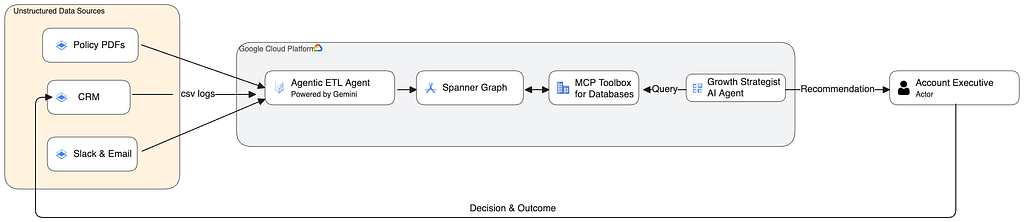
Finally, the Growth Strategist Agent built using ADK (Agent Development Kit) extracts this context in a secured and governed manner using the MCP (Model Context Protocol) Toolbox for Databases (sample code). By reconciling historical “Success Pathways” with active corporate guardrails, the Agent provides the Account Executive with the final Governed Intelligence Report.
A Virtuous Cycle of Intelligence
Instead of the Account Executive (AE) spending hours digging through fragmented CRM notes & activities or pinging peers to find what worked for them, the Spanner context graph provides the recommendation based on the Institutional Context in milliseconds. After receiving the Governed Intelligence Report, the AE then refines the offer based on their judgement and customer understanding. This human-in-the-loop interaction ensures that empathy and judgment remain at the heart of the customer relationship while Spanner’s multi-model architecture powers the data driven intelligence at scale. When the AE chooses a strategy and logs the outcome back into the CRM, the Ingestion Agent automatically updates the Spanner Graph.
- If the recommendation worked: The “Success Path” for that customer profile is strengthened in the graph.
- If the recommendation failed: The ingestion agent records a new “Friction Point” in the graph, preventing the Agent from suggesting that specific path to other AEs in the future.
Conclusion
By adding Policies, Decisions, and Outcome nodes, we transformed the database from a System of Record to a System of Intelligence containing historical reasoning of facts. We codified the institutional wisdom of the business directly inside Spanner. Spanner eliminates the friction of data silos, allowing the operational state (Relational) and Institutional Memory (context graph) to thrive in a single, globally consistent environment. Spanner’s architecture ensures that as your business evolves, your AI agents inherit the business context instantly, delivering governed, high-fidelity strategic insights at planetary scale.
Ready to build your own System of Intelligence? Explore the context graph on Spanner Repository on GitHub and start building your Institutional context graph on Spanner.
From System of Record to System of Intelligence: Powering AI Agents with context graph on Spanner was originally published in Google Cloud – Community on Medium, where people are continuing the conversation by highlighting and responding to this story.
Source Credit: https://medium.com/google-cloud/from-system-of-record-to-system-of-intelligence-powering-ai-agents-with-context-graph-on-spanner-a501158d7711?source=rss—-e52cf94d98af—4
About the Author