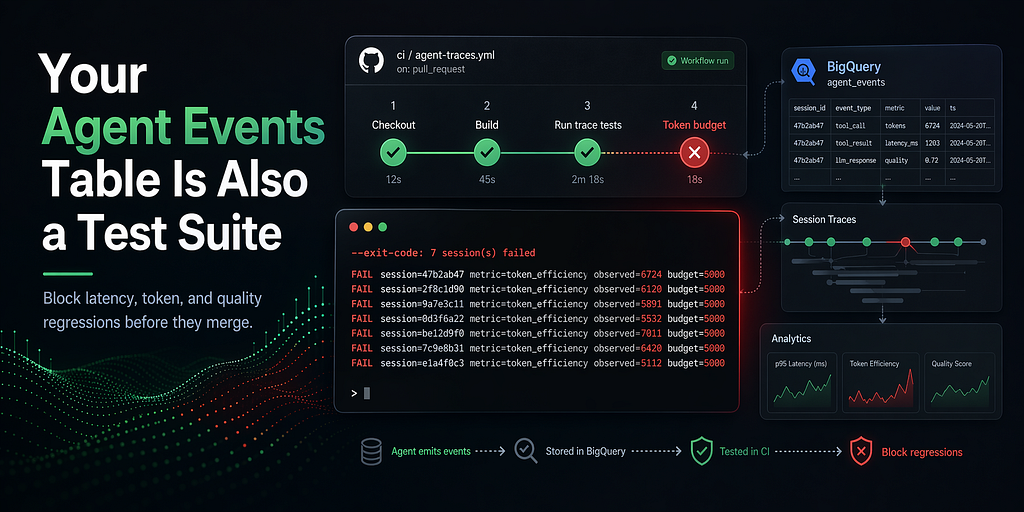
BigQuery Agent Analytics Series 2: Use BigQuery Agent Analytics, GitHub Actions, and production traces to block latency, token, and quality regressions before they merge.
1. Hook
“p95 token usage spiked 5x after merge #842. Rollback in progress.” This is avoidable. Your agent_events table already has the data that would have caught it before the merge landed. The gate is one short GitHub Actions workflow.
If you haven’t seen your traces as a graph yet, start here — post #1 in this series. This post picks up where that one left off, with a closing line that made a promise:
Spoiler: client.evaluate_categorical(…) plus three lines of CategoricalMetricDefinition gets you a CI gate. Your agent_events table is also a test suite.
Time to cash that in.
By the end, you’ll have:
- A GitHub Actions workflow that gates every PR against yesterday’s production traces.
- Deterministic gates for latency, token usage, tool errors, and turn count.
- A categorical quality gate for “useful enough” responses.
- BigQuery cost visibility for every SDK-backed CI run, via a single INFORMATION_SCHEMA pivot.
2. The problem in one paragraph
Golden-set tests catch the shapes you thought to test. Production traffic is bigger, weirder, and moves faster than any golden set you’ll ever maintain by hand. You can unit-test your agent’s tool signatures all day long and still ship a system-prompt change that more than doubles p95 token usage on real sessions. The agent_events table already has that ground truth — every tool call, every LLM response, every retry — for every session your agent has served in the last 24 hours. The only missing piece is "compare last 24 hours to the budget, block the merge if it regresses." That piece already exists too.
3. The SDK is already CI-friendly
The SDK’s CodeEvaluator knows how to score sessions on six deterministic metrics — latency, turn count, tool error rate, token efficiency, TTFT, cost per session — with zero LLM tokens on the deterministic path. Cheap enough to run on every PR, not just every deploy.
The gate command:
bq-agent-sdk evaluate \
  --project-id="$PROJECT_ID" \
  --dataset-id="$DATASET_ID" \
  --evaluator=latency \
  --threshold=5000 \
  --last=24h \
  --agent-id=calendar_assistant \
  --exit-code
Three things to know about that command:
- –threshold=5000 is a raw budget, not a normalized score. A session fails iff avg_latency_ms > 5000. If every session is under 5 seconds, the run passes. If any session exceeds 5 seconds, the run fails.
- –exit-code turns the pass/fail into a process exit code. Exit 0 means every session stayed within budget; exit 1 means at least one session regressed; exit 2 means configuration error (bad dataset, missing auth, unreadable metrics file). GitHub Actions, Cloud Build, and every other CI runner honor exit codes natively. No extra glue.
- The failure output points at the specific session. When exit 1 fires, you get one line per failing session on stderr with the raw observed value and the budget it blew through — so the CI log is scannable without scrolling.
Real failure output, captured against the sandbox project’s last 24 hours:
{"dataset":"agent_analytics_demo","evaluator_name":"latency_evaluator","total_sessions":15,"passed_sessions":6,"failed_sessions":9,"pass_rate":0.4,...}

--exit-code: 9 session(s) failed (of 15 evaluated)
  FAIL session=7effb72f metric=latency observed=5747 budget=5000 score=0 threshold=1
  FAIL session=4ca31e85 metric=latency observed=6441 budget=5000 score=0 threshold=1
  FAIL session=1588bdac metric=latency observed=6248 budget=5000 score=0 threshold=1
  FAIL session=d292f060 metric=latency observed=6918 budget=5000 score=0 threshold=1
  FAIL session=67e2eeb2 metric=latency observed=5981 budget=5000 score=0 threshold=1
  ... 4 more failing session(s) (raise --limit or see --format=json for full list)
Nine sessions in the last 24 hours blew past 5 seconds. Five of them are named on stderr. Copy a session_id into client.get_session_trace(…).render() from post #1 and you're inside the failure in ten seconds.
4. The demo — the token-budget regression that should have been caught
Here’s a real scenario, pulled from the same Calendar-Assistant demo agent as post #1.
A feature PR changes the agent’s system prompt to add more few-shot examples. Locally it looks fine — the golden set of five handcrafted test sessions still passes. What the golden set doesn’t cover: every real user phrasing. In production traffic, the longer prompt gets repeated on every turn, and multi-turn sessions stack up tokens fast.
Merged. Deployed. Per-session token usage more than doubles.
Here’s the workflow YAML that would have caught it:
# .github/workflows/evaluate_thresholds.yml
name: Agent quality gate

on:
  pull_request:
    paths:
      - 'agents/**'
      - 'prompts/**'
jobs:
  gate:
    runs-on: ubuntu-latest
    steps:
      - uses: actions/checkout@v4
      - uses: actions/setup-python@v5
        with: { python-version: '3.12' }
      # Pin to the first release with the raw-budget --threshold
      # semantics, the tight --exit-code failure output, and the
      # categorical-eval gate flags. Releases before 0.2.2 shipped a
      # normalized score + 0.5 cutoff, which fires every gate at
      # roughly half the budget you typed.
      - run: pip install 'bigquery-agent-analytics>=0.2.2,<0.3.0'
      - uses: google-github-actions/auth@v2
        with: { credentials_json: '${{ secrets.GCP_SA_KEY }}' }
      - name: Latency budget
        run: >
          bq-agent-sdk evaluate --evaluator=latency --threshold=5000
          --last=24h --agent-id=calendar_assistant --exit-code
          --project-id=${{ vars.PROJECT_ID }}
          --dataset-id=${{ vars.DATASET_ID }}
      - name: Token budget
        run: >
          bq-agent-sdk evaluate --evaluator=token_efficiency --threshold=5000
          --last=24h --agent-id=calendar_assistant --exit-code
          --project-id=${{ vars.PROJECT_ID }}
          --dataset-id=${{ vars.DATASET_ID }}
      - name: Tool error rate
        run: >
          bq-agent-sdk evaluate --evaluator=error_rate --threshold=0.1
          --last=24h --agent-id=calendar_assistant --exit-code
          --project-id=${{ vars.PROJECT_ID }}
          --dataset-id=${{ vars.DATASET_ID }}
      - name: Turn count
        run: >
          bq-agent-sdk evaluate --evaluator=turn_count --threshold=10
          --last=24h --agent-id=calendar_assistant --exit-code
          --project-id=${{ vars.PROJECT_ID }}
          --dataset-id=${{ vars.DATASET_ID }}
If you only copy one thing from this post, copy the workflow above. Change four values — project ID, dataset ID, agent ID, and the four thresholds — and you have a working gate. Gist.
Four thresholds. Each runs as its own step, so when one blows, the PR status tells you which gate fired. The –last=24h window means you're testing against what your users actually did yesterday, not against what you thought to test last quarter.
On our regressed PR, the workflow goes red on step “Token budget”:
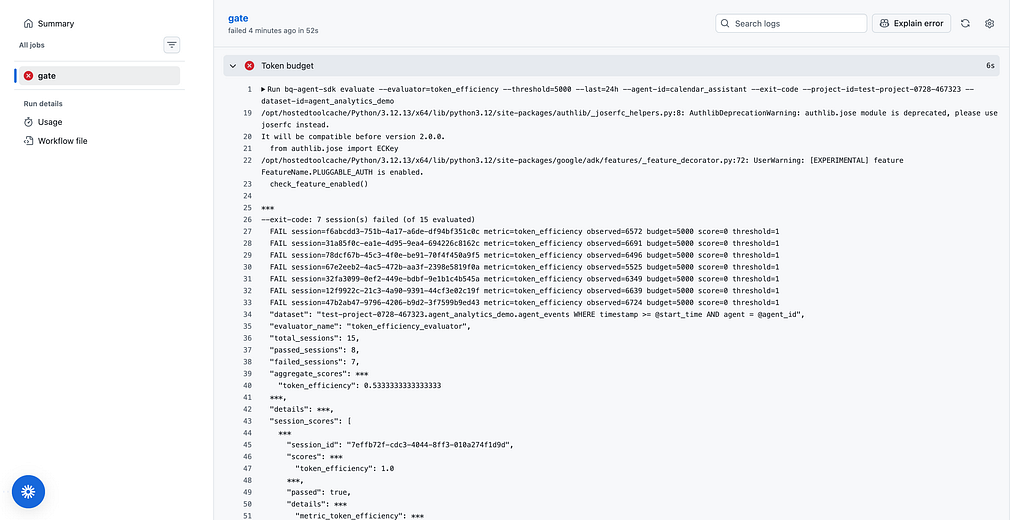
--exit-code: 7 session(s) failed (of 15 evaluated)
  FAIL session=47b2ab47 metric=token_efficiency observed=6724 budget=5000 score=0 threshold=1
  FAIL session=31a85f0c metric=token_efficiency observed=6691 budget=5000 score=0 threshold=1
  FAIL session=12f9922c metric=token_efficiency observed=6639 budget=5000 score=0 threshold=1
  FAIL session=f6abcdd3 metric=token_efficiency observed=6572 budget=5000 score=0 threshold=1
  FAIL session=78dcf67b metric=token_efficiency observed=6496 budget=5000 score=0 threshold=1
  ... 2 more failing session(s) (raise --limit or see --format=json for full list)
Nearly half of yesterday’s sessions went over the 5,000-token budget. Baseline sessions from two days earlier (before the prompt change) averaged 1,900 tokens; yesterday’s regressed fleet averages 4,800. The prompt change roughly 2.5x’d per-session token usage. The fix on the original PR: scope the new few-shot block to the ~30% of sessions that actually needed the guidance, not all of them. Push the fix, watch the gate flip green, merge.
Golden-set tests catch what you thought to test. Production traffic catches the rest.
Sidebar: how to pick thresholds
Run the gate commands once against the last 30 days of production traffic, without –exit-code, and read the report. A defensible starting point for each threshold: the p95 of the last 30 days plus a 10% buffer. Revisit after week one — any gate that blocks PRs it shouldn't is noise; any gate that lets real regressions through is the wrong number.
For latency-p95 specifically, the SDK’s per-session –threshold isn't the right shape — it fails any individual session that blows the budget, which in tail-heavy distributions is most of them. Use BigQuery directly for percentile math. agent_events doesn't store a pre-computed per-session average, so the query groups by session_id first, then takes the p95 over the resulting per-session distribution:
LATENCY_P95=$(bq query --format=csv --nouse_legacy_sql "
  WITH per_session AS (
    SELECT
      session_id,
      AVG(CAST(JSON_VALUE(latency_ms, '\$.total_ms') AS FLOAT64)) AS avg_latency_ms
    FROM \`${PROJECT_ID}.${DATASET_ID}.agent_events\`
    WHERE timestamp > TIMESTAMP_SUB(CURRENT_TIMESTAMP(), INTERVAL 24 HOUR)
      AND agent = 'calendar_assistant'
    GROUP BY session_id
  )
  SELECT APPROX_QUANTILES(avg_latency_ms, 100)[OFFSET(95)] FROM per_session" \
  | tail -1)

if (( $(echo "$LATENCY_P95 > 5500" | bc -l) )); then
  echo "FAIL latency_p95=${LATENCY_P95}ms budget=5500ms"
  exit 1
fi
The same JSON_VALUE(latency_ms, '$.total_ms') extraction is what the SDK's SESSION_SUMMARY_QUERY uses under the hood to produce the avg_latency_ms field the –evaluator=latency gate runs against — so the SQL side and the SDK side stay on the same definition of "per-session latency."
Your agent_events table is the test suite. Some tests are Python. Some are SQL. Both are cheap, both run on every PR, both say pass or fail in under a minute against real production traffic.
5. Going deeper — add a categorical gate
The deterministic gate catches regressions in things you can put a number on. For “did the agent give a useful response,” you want a categorical judge. The SDK ships one.
Three lines of metric definition:
{
  "metrics": [
    {
      "name": "response_usefulness",
      "definition": "Did the assistant give a useful, actionable answer?",
      "categories": [
        {"name": "useful", "definition": "Direct, complete answer."},
        {"name": "partially_useful", "definition": "Answer is partial or missing key info."},
        {"name": "not_useful", "definition": "Refusal, hallucination, or off-topic."}
      ]
    }
  ]
}
One command to run the gate:
bq-agent-sdk categorical-eval \
  --metrics-file=metrics.json \
  --last=24h --agent-id=calendar_assistant \
  --pass-category=response_usefulness=useful \
  --pass-category=response_usefulness=partially_useful \
  --min-pass-rate=0.9 \
  --exit-code \
  --project-id="$PROJECT_ID" --dataset-id="$DATASET_ID"
–pass-category response_usefulness=useful (repeatable) tells the gate which classifications count as passing. Multiple values for the same metric OR together — so "useful" and "partially_useful" both pass, "not_useful" fails. –min-pass-rate=0.9 means the run passes iff at least 90% of the last 24 hours of sessions land in a pass category.
On a failing run:
--exit-code: 1 metric(s) under min-pass-rate 0.9
  FAIL metric=response_usefulness pass_rate=0.82 (102/124) min=0.9 pass_categories=partially_useful,useful
Eighty-two percent useful isn’t awful. It’s not 90%. The PR that regressed it gets blocked, and the CI log points at the exact number.
One thing worth calling out: if the classification step itself fails — a parse error, a missing category, the model returning garbage — the gate counts that session as failing, not as unknown. A broken classification run doesn’t silently pass CI. That’s the difference between a gate and a lint check.
Cross-link back to post #1’s fleet filter: the ambiguity pattern from post #1 (Calendar-Assistant asking “which Priya?” when the contact book has three matches) is itself a candidate for a categorical gate — “did this PR push the multi-match rate above 20%?” Same shape, different metric.
6. What the plugin labels show over time
The SDK labels every BigQuery query with the feature that issued it. Point INFORMATION_SCHEMA at your CI project and you can see exactly what the gate is costing:
SELECT
  (SELECT value FROM UNNEST(labels) WHERE key = 'sdk_feature') AS sdk_feature,
  COUNT(*) AS runs,
  ROUND(SUM(total_bytes_processed) / POW(1024, 3), 3) AS gb_processed,
  ROUND(AVG(total_slot_ms), 0) AS avg_slot_ms
FROM `region-us`.INFORMATION_SCHEMA.JOBS_BY_PROJECT
WHERE creation_time >= TIMESTAMP_SUB(CURRENT_TIMESTAMP(), INTERVAL 24 HOUR)
  AND EXISTS (
    SELECT 1 FROM UNNEST(labels)
    WHERE key = 'sdk' AND value = 'bigquery-agent-analytics'
  )
GROUP BY sdk_feature
ORDER BY runs DESC;
Real output against the sandbox project after a day of evaluate runs and trace pulls:
+-------------+------+--------------+-------------+
| sdk_feature | runs | gb_processed | avg_slot_ms |
+-------------+------+--------------+-------------+
| eval-code   |    7 |          0.0 |       103.0 |
| trace-read  |    4 |         0.01 |        75.0 |
+-------------+------+--------------+-------------+
Seven eval-code runs (the four gates from section 4 ran twice, with a couple of ad-hoc local runs on top) read essentially zero bytes — the summary query over 24 hours of this sandbox's agent_events is too small for BQ to even round up to 0.01 GB. trace-read is me pulling a few of the failing sessions with client.get_session_trace(…).render() from post #1, straight off the stderr output; four reads, one cent of a cent. Add a bq-agent-sdk categorical-eval step to the workflow and a third eval-categorical row appears with a higher avg_slot_ms because the model call dominates.
CI should be a budget line, not a surprise bill. The sdk_feature label gives you the pivot to keep it that way — when a new feature ships, you'll see its runs appear in this table, and you'll see what it costs before it matters.
7. Try it
The gate is one short GitHub Actions workflow and the table you already have. Four actions:
- Enable the BigQuery Agent Analytics plugin (5-minute quickstart). If you have an ADK agent running, the plugin is a 5-minute wire-up and it starts populating agent_events immediately.
- Fork the workflow file — drop it into .github/workflows/ in any agent repo, plug in the four –threshold numbers, watch your next PR run the gate.
- Pick your four thresholds from the last 30 days of prod. Use the sidebar query in section 4 as a starting point.
- Star the SDK repo if this made your next release safer.
If you haven’t seen the tree view yet, post #1 is Your BigQuery Agent Analytics table is a graph. Same SDK, different job: one turns rows into readable traces, the other turns rows into a CI gate. Post #3 in this series picks up the semantic side — LLM-as-judge for the things that don’t fit a budget.
Your Agent Events Table Is Also a Test Suite was originally published in Google Cloud – Community on Medium, where people are continuing the conversation by highlighting and responding to this story.
Source Credit: https://medium.com/google-cloud/your-agent-events-table-is-also-a-test-suite-999fbef885ed?source=rss—-e52cf94d98af—4
About the Author