Welcome back to our GenMedia Agent series! In Part 1, we built a foundational tool using the Google GenAI SDK and Imagen 4 to generate stunning images from natural language prompts.
Today, we are tackling a massive bottleneck in conversational media agents: Context Bloat. If a user generates an image and then asks follow-up questions like “Can you change the background to blue?” or “What is the aspect ratio of this asset?”, standard agent architectures pass the full image payload back into the model on every single turn. Your latency spikes, your cloud bill goes up, and your agent slows down.
Let’s look at how the Google Agent Development Kit (ADK) solves this cleanly using Artifacts.
The Solution: Offloading Media to Artifacts
The core philosophy behind ADK Artifacts is simple: Don’t feed raw media bytes to the LLM unless it explicitly needs them. Instead, when an image is generated, we store it securely behind the scenes as a persistent “Artifact.”
We then give the LLM a tiny text token reference (like a filename). If the user asks a question requiring the actual image data, the agent can use ADK’s native tools to dynamically load it on demand.
Here is how we update our generate_image_tool to leverage this power using the ToolContext.
The Code Update
To support this, we need to make two major changes to our tool:
- Make it Async: The ADK Artifact Service methods are asynchronous, so our tool function must be declared with async def.
- Use save_artifact: We offload the generated image bytes and return a lightweight confirmation string to the model.
💡 Note: For the full foundational project setup, SDK installations, and complete code, check out Part 1 of this series.
# gen_media_agent/sub_agents/image_generation_agent/tools.py

import os
import logging
import time
from google.adk.agents import Agent
from google.adk.tools import ToolContext
from google.genai import types
from google import genai
from .config import IMAGE_GENERATION_AGENT_MODEL, IMAGE_GENERATION_TOOL_MODEL

logger = logging.getLogger(__name__)

async def generate_image_tool(
  tool_context: ToolContext,
  prompt: str,
  aspect_ratio: str = "1:1",
) -> types.Content:
  """Generates a new image based on a text prompt.
  Use this tool when the user wants to create a completely new image from a description.
  """
  logger.info(f"generate_image_tool called with prompt='{prompt}', aspect_ratio='{aspect_ratio}'")
  supported_ratios = ["1:1", "3:4", "4:3", "9:16", "16:9"]

  if not prompt:
    raise ValueError("Prompt is required for image generation.")

  if aspect_ratio not in supported_ratios:
    raise ValueError(f"Aspect ratio {aspect_ratio} is not supported. Supported ratios are {supported_ratios}")

  try:
    # Initialize the client for the Google GenAI SDK (Vertex AI enabled)
    client = genai.Client(
      vertexai=True,
      project=os.getenv("GOOGLE_CLOUD_PROJECT"),
      location=os.getenv("GOOGLE_CLOUD_LOCATION"),
    )

    response = client.models.generate_images(
        model=IMAGE_GENERATION_TOOL_MODEL,
        prompt=prompt,
        config=types.GenerateImagesConfig(
          number_of_images=1,
          aspect_ratio=aspect_ratio,
          person_generation="ALLOW_ADULT"
        )
    )

    if response.generated_images:
        image_bytes = response.generated_images[0].image.image_bytes
        filename = f"generated_{int(time.time())}.jpg"

        # Wrap the binary image bytes into a GenAI Part object
        part = types.Part(
            inline_data=types.Blob(
                mime_type="image/jpeg",
                data=image_bytes
            )
        )

        ### THE CRITICAL ADK CHANGE ###
        # Instead of returning raw bytes directly to the chat thread,
        # we persist it safely as an artifact within the ToolContext.
        version = await tool_context.save_artifact(
            filename=filename,
            artifact=part
        )
        logger.info(f"Image saved as artifact: {filename} (version {version})")

        # Return a simple text reference to the Agent.
        return types.Content(
            parts=[
                types.Part(
                    text=f"Image generated successfully and saved as an artifact with filename: {filename}"
                )
            ]
        )

    else:
        raise RuntimeError("No images were returned by the model.")

  except Exception as e:
    logger.error(f"Failed to generate image or save artifact: {e}")
    raise e
What Changed Under the Hood?
Instead of bloating the model’s history payload, we did two key things:
- await tool_context.save_artifact(…): This registers the file binary into the ADK’s session storage system. It's safe, indexed, and persistent.
- Returning Text, Not Media: The function returns a lightweight string: "Image generated successfully and saved as an artifact with filename: generated_12345.jpg".
The LLM now knows the file exists and knows its name, but it doesn’t have to carry the massive weight of those image bytes into subsequent chat turns.
Seeing it in Action: Tracing the Execution
When we deploy this within the ADK environment, we can trace exactly how our orchestration layer coordinates this process without handling raw media blobs in the core chat logs.
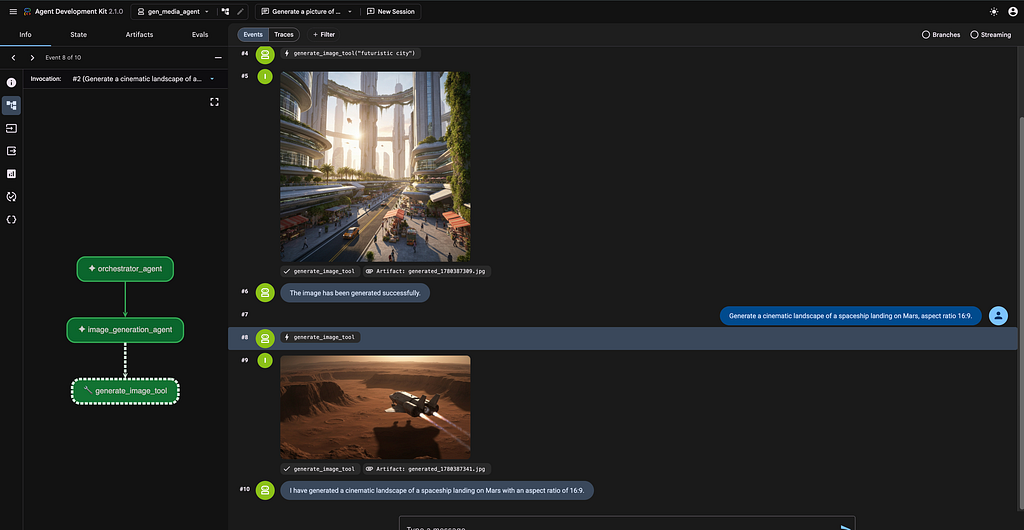
As shown in below image, the multi-agent execution flows smoothly from the orchestrator_agent down to the specialized image_generation_agent, which seamlessly triggers our custom generate_image_tool.
Notice the visual layout in the trace UI: when a tool execution completes, the raw output is neatly bound to a dedicated tag like Artifact: generated_1780387341.jpg. The conversation pipeline remains purely textual, preserving optimal execution performance.
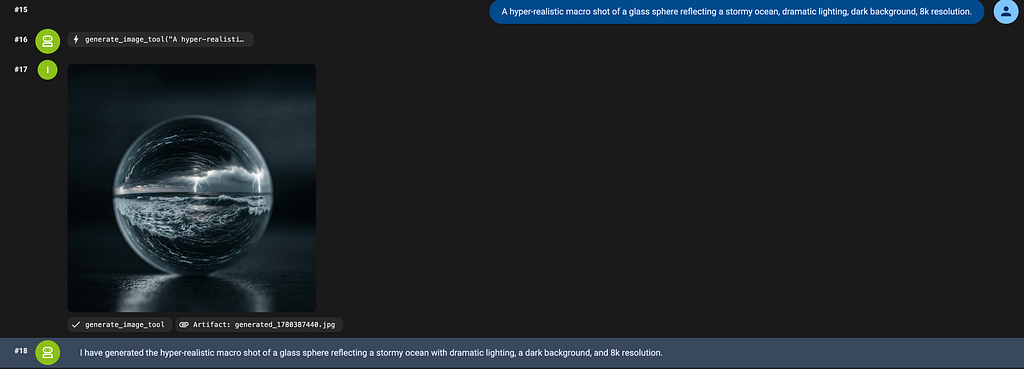
Even when making complex, highly detailed prompt demands, the agent performs smoothly.
Where Do the Assets Live?
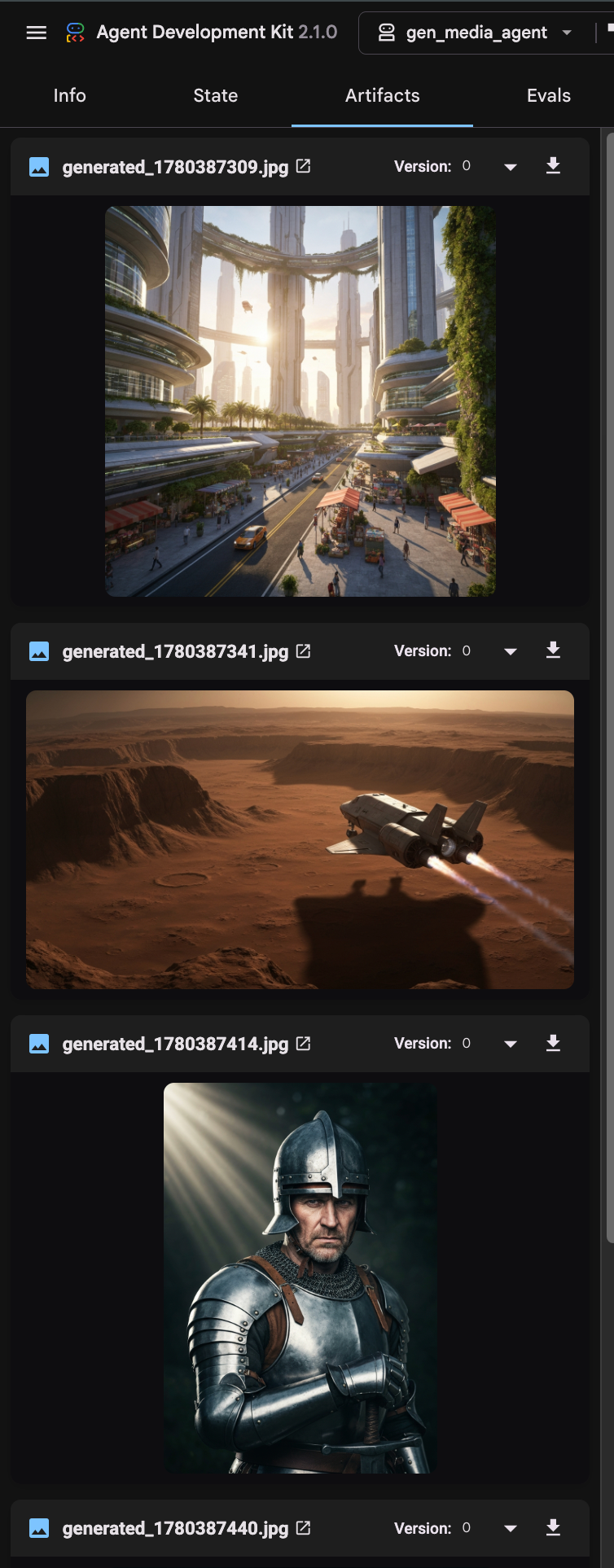
If the images are completely stripped out of the main chat logs to optimize performance, how do we track them?
ADK provides a dedicated, native Artifacts inspector pane that acts as your centralized session storage vault:
💡 The Missing Piece: Do we need to call load_artifact?
A question that naturally arises is: If we are saving it here, when do we load it?
In the generate_image_tool above, we do not need to call load_artifact. This tool is the producer; its job is to create the asset and store it.
However, when we build our Image Editing Agent in the next part, that agent will be the consumer. When a user says “Change the background of generated_12345.jpg to blue”, the editing agent will receive that filename and use:
artifact_part = await tool_context.load_artifact("generated_12345.jpg")
This allows the editing tool to fetch the bytes on demand, process the edit, and save a new version!
Next Up in Part 3
Now that our media assets are stored safely as artifacts, how do we modify them? In Part 3, we will look into Image Editing and Image-to-Image workflows, showing how an agent can pull an existing artifact, modify it based on user feedback, and save a brand new version.
See you there!
Building an End-to-End GenMedia Agent: Part 2 — Saving Memory and Costs with ADK Artifacts was originally published in Google Cloud – Community on Medium, where people are continuing the conversation by highlighting and responding to this story.
Source Credit: https://medium.com/google-cloud/building-an-end-to-end-genmedia-agent-part-2-saving-memory-and-costs-with-adk-artifacts-d0b967ec7b16?source=rss—-e52cf94d98af—4
About the Author