
AlloyDB Performance Snapshots, featuring the new Top N SQL capability, is a built-in performance tool designed to help you quickly identify and debug workload bottlenecks. This tutorial guides you through using Performance Snapshots to troubleshoot performance issues, using a real-world success story as an example.
Performance Snapshots provide visibility by listing the top 50 SQL queries based on total elapsed time, read I/O, and standard deviation of elapsed time.
1. Simulate the Problematic Workload
The user of AlloyDB was performing high-volume data loading, running an insert into schemax.”tablex” statement thousands of times per second on a table with triggers, which resulted in high CPU usage. The initial assumption was that the top-level insert statement was consuming the most computing resource.
To demonstrate the usage of top SQL, we simulate the workload using the widely available pgbench tool. Since the workload is a CPU intensive high-volume bulk insert ,we use 256 clients to perform the insertion into the pgbench_history table.
Database Tables
The simulation primarily interacts with two permanent tables, pgbench_history and auditTable and creates two temporary tables per transaction
- Main Table: pgbench_history.
- Audit Table: auditTable.
- Temporary Tables: old_pgbench_history and diff_pgbench_history.
Trigger Logic
The temporary tables are created as part of the trigger, while old_pgbench_history is a snapshot of pgbench_history created before insert statement, diff_pgbench_history is the “after” comparison. While technically we can use postgres transition table feature to refer to the diff table, this example acts as a simplified version of the more complex business workload.
Imagine we need to audit the max delta value over the rows of each insert statement, after every insert statement, we store the max delta value of diff_pgbench_history inside the auditTable. The detailed implementation is attached below in the pgbench init script.
Prepare empty Pgbench tables
Install pgbench tool on the client machine
$ sudo apt-get update
$ sudo apt-get install postgresql-contrib
$ pgbench --version
Create pgbench database
$ PGHOST=10.16.0.2 # this is a internal ip address for the AlloyDB server VM
$ psql -d postgres -h $PGHOST -U postgres

postgres=> create database pgbench;
CREATE DATABASE
[Optional] Verify that the pgbench tables are empty
$ psql -d pgbench -h $PGHOST -U postgres

pgbench=> SELECT 'pgbench_accounts' AS tbl, count(*) FROM pgbench_accounts
UNION ALL
SELECT 'pgbench_branches', count(*) FROM pgbench_branches
UNION ALL
SELECT 'pgbench_tellers', count(*) FROM pgbench_tellers
UNION ALL
SELECT 'pgbench_history', count(*) FROM pgbench_history;
       tbl        | count
------------------+-------
 pgbench_accounts |     0
 pgbench_branches |     0
 pgbench_tellers  |     0
 pgbench_history  |     0
(4 rows)
Run the init script for the simulated workload
Create the custom init script insert_with_trigger_init.sql as follows
CREATE OR REPLACE FUNCTION create_old_pgbench_history()
RETURNS trigger
LANGUAGE plpgsql
AS $$
BEGIN
    EXECUTE 'CREATE TEMP TABLE IF NOT EXISTS old_pgbench_history ON COMMIT DROP AS SELECT * FROM pgbench_history';
    RETURN NEW;
END;
$$;

CREATE OR REPLACE FUNCTION create_diff_pgbench_history()
RETURNS trigger
LANGUAGE plpgsql
AS $$
BEGIN
    EXECUTE 'CREATE TEMP TABLE IF NOT EXISTS diff_pgbench_history ON COMMIT DROP AS
        SELECT * FROM pgbench_history
        EXCEPT
        SELECT * FROM old_pgbench_history';
    RETURN NULL;
END;
$$;

-- BEFORE INSERT

CREATE TRIGGER create_old_pgbench_history_trigger
BEFORE INSERT ON pgbench_history
FOR EACH STATEMENT
EXECUTE FUNCTION create_old_pgbench_history();
-- AFTER INSERT
CREATE TRIGGER create_diff_pgbench_history_trigger
AFTER INSERT ON pgbench_history
FOR EACH STATEMENT
EXECUTE FUNCTION create_diff_pgbench_history();


CREATE TABLE auditTable (
  insertTime timestamptz,
  maxDelta int
);
Execute the script as follows
$ psql -h $PGHOST -U postgres -d pgbench -f ./insert_with_trigger_init.sql
[Optional] check that the table auditTable and triggers are created on the pgbench_history table
$ psql -d pgbench -h $PGHOST -U postgres
Password for user postgres:
psql (15.15 (Debian 15.15-0+deb12u1), server 16.9)
WARNING: psql major version 15, server major version 16.
         Some psql features might not work.
SSL connection (protocol: TLSv1.3, cipher: TLS_AES_256_GCM_SHA384, compression: off)
Type "help" for help.

pgbench=> \dt
              List of relations
 Schema |       Name       | Type  |  Owner
--------+------------------+-------+----------
 public | audittable       | table | postgres
 public | pgbench_accounts | table | postgres
 public | pgbench_branches | table | postgres
 public | pgbench_history  | table | postgres
 public | pgbench_tellers  | table | postgres
(5 rows)

pgbench=> \df *pgbench*
                                  List of functions
 Schema |            Name             | Result data type | Argument data types | Type
--------+-----------------------------+------------------+---------------------+------
 public | create_diff_pgbench_history | trigger          |                     | func
 public | create_old_pgbench_history  | trigger          |                     | func
(2 rows)

pgbench=> \d pgbench_history
                    Table "public.pgbench_history"
 Column |            Type             | Collation | Nullable | Default
--------+-----------------------------+-----------+----------+---------
 tid    | integer                     |           |          |
 bid    | integer                     |           |          |
 aid    | integer                     |           |          |
 delta  | integer                     |           |          |
 mtime  | timestamp without time zone |           |          |
 filler | character(22)               |           |          |
Triggers:
    create_diff_pgbench_history_trigger AFTER INSERT ON pgbench_history FOR EACH STATEMENT EXECUTE FUNCTION create_diff_pgbench_history()
    create_old_pgbench_history_trigger BEFORE INSERT ON pgbench_history FOR EACH STATEMENT EXECUTE FUNCTION create_old_pgbench_history()
Taking performance snapshots to gain insights (begin)
Take two performance snapshots, and give it some time in between to record meaningful computation.
The prerequisite is to install the pg_stat_statements extension in the postgres database where the performance snapshots tool is installed.
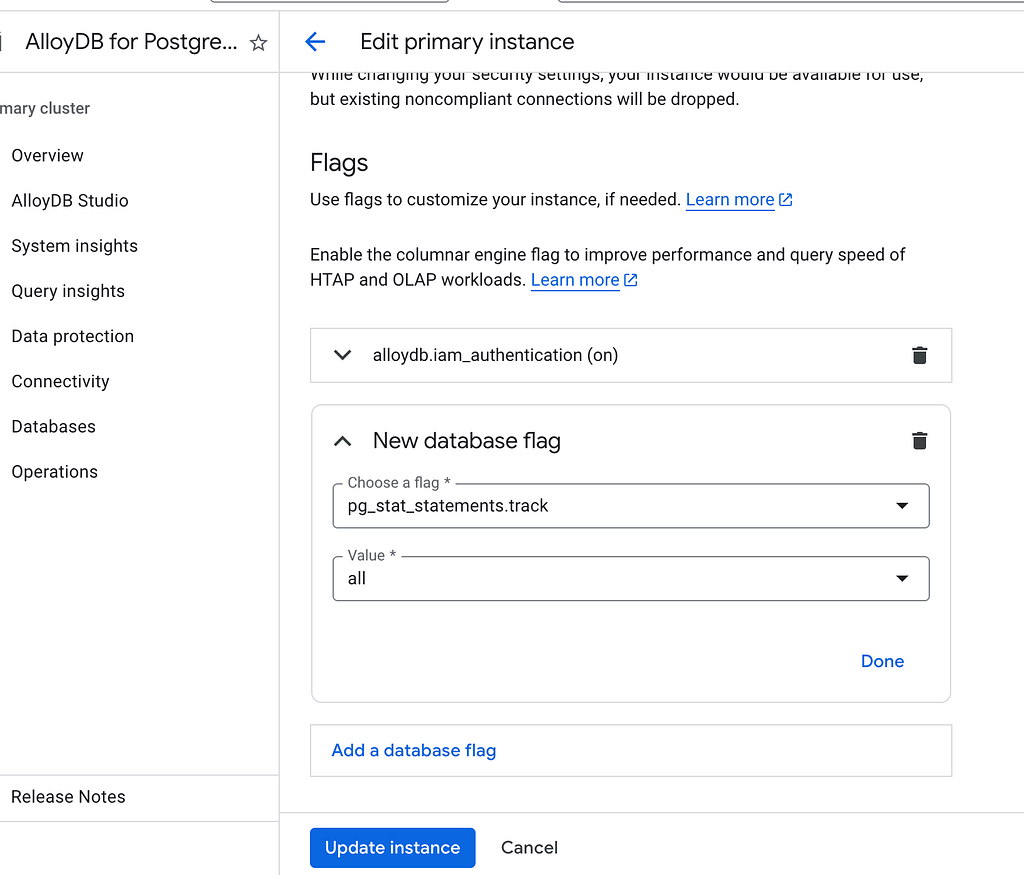
[optional] Tune the relevant setting such as pg_stat_statements.track to ALL to track nested query /functions/procedures other than the top level statements. Setting this flag does not require system restart. This step is generally optional but are critical for the specific workload in this blog where nested procedures are heavily used.
Wait for the update to finish

Create the pg_stat_statements extension in postgres database and create the begin performance snapshot
psql > CREATE EXTENSION pg_stat_statements;

psql> SHOW pg_stat_statements.track;
 pg_stat_statements.track
--------------------------
 all
(1 row)

psql > SELECT perfsnap.snap();
snap_id
-------
      1
Run the simulated workload
Create the execution script insert_with_trigger_exec_script.sql as shown below.
This is the main script for the simulated insert workload which
\set aid random(1, 1000000000)
\set bid random(1, 1000000000)
\set tid random(1, 1000000000)
\set delta random(-500000000, 500000000)
\set aid2 random(1, 1000000000)
\set bid2 random(1, 1000000000)
\set tid2 random(1, 1000000000)
\set delta2 random(-500000000, 500000000)
BEGIN;
INSERT INTO pgbench_history (tid, bid, aid, delta, mtime) VALUES
  (:tid, :bid, :aid, :delta, CURRENT_TIMESTAMP),
  (:tid2, :bid2, :aid2, :delta2, CURRENT_TIMESTAMP);

INSERT INTO auditTable (insertTime, maxDelta)
SELECT CURRENT_TIMESTAMP, MAX(delta)
FROM diff_pgbench_history;

END;
Now run the bulk insert workload using 256 clients for 5 minutes in total
$ sudo nohup pgbench --host=$PGHOST --user=postgres --file=./insert_with_trigger_exec_script --time=300 --jobs=256 --client=256 --progress=1 pgbench
Pgbench results from the terminal:
transaction type: /insert_with_trigger_exec_script
scaling factor: 1
query mode: simple
number of clients: 256
number of threads: 256
duration: 300 s
number of transactions actually processed: 46882
latency average = 1642.195 ms
latency stddev = 1285.266 ms
tps = 155.431182 (including connections establishing)
tps = 155.558420 (excluding connections establishing)
Taking performance snapshots (end)
psql > SELECT perfsnap.snap();
snap_id
-------
      2
2. Creating Top SQL report to identify the problem in the code
Now that we have the begin snapshotsand the end snapshot that covers the run period.
psql > SELECT perfsnap.report(1,2);
Here is an extract of the snippet of the top SQL section from the performance snapshot report. For the purpose of space, here we only extract the part of the top 50 statements from the original report.
SQL Report
 ~~~~~~~~~~
 NOTE: Query might be empty if query ID does not have a match in pg_stat_statements at report time. This is expected if the query is not run recently.
 Per Query Information (Top 50) By Total Elapsed Time
 ~~~~~~~~~~~~~~~~~~~~~~~~~~~~~~~~~~~~~~~~~~~~~~~~~~~~
 Query Text                                                                                                 UserID         DBID          DBName          QueryID            Total Elapsed Time(ms)    Execution Count       Avg Elapsed Time(ms)
 ------------------------------------------------------------------------------------------------------------------------------------------------------------------------------------------------------------------------------------------------
  CREATE TEMP TABLE IF NOT EXISTS old_pgbench_history ON COMMIT DROP AS SELECT * FROM pgbench_history        17558        21315         pgbench      -3912373365055122481            55760856.3763               11406                 4888.7302
 INSERT INTO pgbench_history (tid, bid, aid, delta, mtime) VALUES ($1, $2, $3, $4, CURRENT_TIMESTAMP)        17558        21315         pgbench       8362447542551798646            52885794.1445               11386                 4644.8089
 CREATE TEMP TABLE IF NOT EXISTS diff_pgbench_history ON COMMIT DROP AS SELECT * FROM pgbench_history        17558        21315         pgbench       8976902542507926181               12442.1005                   1                12442.1005

 Per Query Information (Top 50) By Read IO
 ~~~~~~~~~~~~~~~~~~~~~~~~~~~~~~~~~~~~~~~~~~~~
 Query Text                                                                                                 UserID         DBID          DBName          QueryID            Total ReadIO Time(ms)        Execution Count    Avg ReadIO Time(ms)    Total buffer hits         Avg buffer hits    Total blk reads         Avg blk reads
 -------------------------------------------------------------------------------------------------------------------------------------------------------------------------------------------------------------------------------------------------------------------------------------------------------------------------------------
 INSERT INTO pgbench_history (tid, bid, aid, delta, mtime) VALUES ($1, $2, $3, $4, CURRENT_TIMESTAMP)        17558        21315         pgbench       8362447542551798646              112276.8324               11386                    9.8610            85199685         7482.846038995257             1353377  118.86325311786405
 CREATE TEMP TABLE IF NOT EXISTS diff_pgbench_history ON COMMIT DROP AS SELECT * FROM pgbench_history        17558        21315         pgbench       8831403048556502609                   0.0000                   1                    0.0000                3286                      3286                   0                   0

 Per Query Information (Top 50) By Standard Deviation of Elapsed Time
 ~~~~~~~~~~~~~~~~~~~~~~~~~~~~~~~~~~~~~~~~~~~~~~~~~~~~~~~~~~~~~~~~~~~~~
 Query Text                                                                                                 UserID         DBID          DBName          QueryID            Begin STDDEV Elapsed Time(ms)  End STDDEV Elapsed Time(ms)
 --------------------------------------------------------------------------------------------------------------------------------------------------------------------------------------------------------------------------------------
  CREATE TEMP TABLE IF NOT EXISTS old_pgbench_history ON COMMIT DROP AS SELECT * FROM pgbench_history        17558        21315         pgbench      -3912373365055122481                    2058.4700                    2248.4620
 INSERT INTO pgbench_history (tid, bid, aid, delta, mtime) VALUES ($1, $2, $3, $4, CURRENT_TIMESTAMP)        17558        21315         pgbench       8362447542551798646                    1479.3860                    1865.9929
                                                                                                BEGIN        17558        21315         pgbench       2645559135916542692                       0.1161                       0.1254
                                                                                                  END        17558        21315         pgbench      -8287479840767988664                       0.0990                       0.1028
 CREATE TEMP TABLE IF NOT EXISTS diff_pgbench_history ON COMMIT DROP AS SELECT * FROM pgbench_history        17558        21315         pgbench       8831403048556502609                       0.0000                       0.0000
The Top SQL report leads us directly to the problematic statement, that is one of the trigger statement run before every insert statement: CREATE TEMP TABLE IF NOT EXISTS old_pgbench_history ON COMMIT DROP AS SELECT * FROM pgbench_history. This statement shows up at the first of top 50 statements by total elapsed time.
Note: the execution count is around 11k because the report above cover 3 minutes of the full 5 minutes of the pgbench run.
3. Propose fixes and verify with performance snapshots and Top SQL report
From the above Top SQL report, we realized that the CREATE TEMP TABLE trigger consumes most of the elapsed time of the workload. Noticing that this statement has the overhead of creating and destroying the temporary table structure for every transaction. The natural solution is to avoid this overhead on every transaction by replacing the statement with ON COMMIT DELETE ROWS to reuse the temporary table structure across transactions. As for this specific workload it’s natural to propose fixes, for other queries that are less obvious, it’s suggested to use tools such as auto_explain or run EXPLAIN ANALYZE to investigate the change in query plan.
Now, with the proposed fix, we rerun the workload. Let’s see what we got.
Since we already created the database and tables, now we just need to re-define the trigger we have defined just now.
First drop the old triggers, create a script insert_with_trigger_rollback.sql
DROP TRIGGER IF EXISTS create_old_pgbench_history_trigger ON pgbench_history;
DROP TRIGGER IF EXISTS create_diff_pgbench_history_trigger ON pgbench_history;

DROP FUNCTION create_old_pgbench_history CASCADE;
DROP FUNCTION create_diff_pgbench_history CASCADE;

DROP TABLE auditTable;
Execute the rollback script
$ psql -h $PGHOST -U postgres -d pgbench -f ./insert_with_trigger_rollback.sql
Now create the new triggers that might fix our performance issue, create a script insert_with_trigger_init_new.sql
CREATE OR REPLACE FUNCTION create_old_pgbench_history()
RETURNS trigger
LANGUAGE plpgsql
AS $$
BEGIN
    EXECUTE 'CREATE TEMP TABLE IF NOT EXISTS old_pgbench_history ON COMMIT DELETE ROWS AS SELECT * FROM pgbench_history';
    RETURN NEW;
END;
$$;

CREATE OR REPLACE FUNCTION create_diff_pgbench_history()
RETURNS trigger
LANGUAGE plpgsql
AS $$
BEGIN
    EXECUTE 'CREATE TEMP TABLE IF NOT EXISTS diff_pgbench_history ON COMMIT DELETE ROWS AS SELECT * FROM pgbench_history EXCEPT SELECT * FROM old_pgbench_history';
    RETURN NULL;
END;
$$;

-- BEFORE INSERT

DROP TRIGGER IF EXISTS create_old_pgbench_history_trigger ON pgbench_history;
CREATE TRIGGER create_old_pgbench_history_trigger
BEFORE INSERT ON pgbench_history
FOR EACH STATEMENT
EXECUTE FUNCTION create_old_pgbench_history();
-- AFTER INSERT
DROP TRIGGER IF EXISTS create_diff_pgbench_history_trigger ON pgbench_history;
CREATE TRIGGER create_diff_pgbench_history_trigger
AFTER INSERT ON pgbench_history
FOR EACH STATEMENT
EXECUTE FUNCTION create_diff_pgbench_history();


CREATE TABLE auditTable (
  insertTime timestamptz,
  maxDelta int
);
To make sense of what changes in the SQL execution statistics after we implemented the fix, we create another pair of begin and end performance snapshots.
psql > SELECT perfsnap.snap();
snap_id
-------
      3
Now run the same workload using the below command
$ sudo nohup pgbench --host=$PGHOST --user=postgres --file=./insert_with_trigger_exec_script --time=300 --jobs=256 --client=256 --progress=1 pgbench
Results from the pgbench output: Notice that the number of transactions actually processed has increased by 102 times after we implemented the fix.
scaling factor: 1
query mode: simple
number of clients: 256
number of threads: 256
duration: 300 s
number of transactions actually processed: 4809134
latency average = 15.957 ms
latency stddev = 19.612 ms
tps = 16027.927784 (including connections establishing)
tps = 16041.347235 (excluding connections establishing)
Create an end snapshot.
psql > SELECT perfsnap.snap();
snap_id
-------
      4
Here is an extract of the snippet of the top SQL section from the performance snapshot report for the run with our implemented fix.
Note that the previous bottleneck SQL statement CREATE TEMP TABLE IF NOT EXISTS old_pgbench_history ON COMMIT DROP AS SELECT * FROM pgbench_history average elapsed time has reduced by 50k times after we changed it to CREATE TEMP TABLE IF NOT EXISTS old_pgbench_history ON COMMIT DELETE ROWS AS SELECT * FROM pgbench_history and from the value in the previous SQL report generated before we had implemented the fix. And this has been proved that the previous bottleneck of our simulated bulk insert workload has been removed!
SQL Report
 ~~~~~~~~~~
 NOTE: Query might be empty if query ID does not have a match in pg_stat_statements at report time. This is expected if the query is not run recently.
 Per Query Information (Top 50) By Total Elapsed Time
 ~~~~~~~~~~~~~~~~~~~~~~~~~~~~~~~~~~~~~~~~~~~~~~~~~~~~
 Query Text                                                                                                 UserID         DBID          DBName          QueryID            Total Elapsed Time(ms)    Execution Count       Avg Elapsed Time(ms)
 ------------------------------------------------------------------------------------------------------------------------------------------------------------------------------------------------------------------------------------------------
 INSERT INTO pgbench_history (tid, bid, aid, delta, mtime) VALUES ($1, $2, $3, $4, CURRENT_TIMESTAMP)        17533        21373         pgbench       3174442489092942947             1318212.0589             4809134                    0.2741
 CREATE TEMP TABLE IF NOT EXISTS old_pgbench_history ON COMMIT DELETE ROWS AS SELECT * FROM pgbench_h        17533        21373         pgbench      -8333372725570277654              451457.9722             4809134                    0.0939
                                                                                                BEGIN        17533        21373         pgbench       2645559135916542692               45552.5113             4809134                    0.0095
                                                                                                  END        17533        21373         pgbench      -8287479840767988664               41868.1573             4809134                    0.0087
 CREATE TEMP TABLE IF NOT EXISTS diff_pgbench_history ON COMMIT DELETE ROWS AS SELECT * FROM pgbench_        17533        21373         pgbench      -2021604286661157217                2814.8630               22217                    0.1267
 CREATE TEMP TABLE IF NOT EXISTS diff_pgbench_history ON COMMIT DELETE ROWS AS SELECT * FROM pgbench_        17533        21373         pgbench       6607682101117465416                2672.2871               22109                    0.1209


 Per Query Information (Top 50) By Read IO
 ~~~~~~~~~~~~~~~~~~~~~~~~~~~~~~~~~~~~~~~~~~~~
 Query Text                                                                                                 UserID         DBID          DBName          QueryID            Total ReadIO Time(ms)        Execution Count    Avg ReadIO Time(ms)    Total buffer hits         Avg buffer hits    Total blk reads         Avg blk reads
 -------------------------------------------------------------------------------------------------------------------------------------------------------------------------------------------------------------------------------------------------------------------------------------------------------------------------------------
 SELECT count(*) as count, CASE WHEN t.typtype NOT IN ($1, $2, $3) THEN CASE WHEN t.typtype = $4 THEN           10            5        postgres      -8439086261049136948                   0.0000                  10                    0.0000                1830                       183                   0                   0
 CREATE TEMP TABLE IF NOT EXISTS diff_pgbench_history ON COMMIT DELETE ROWS AS SELECT * FROM pgbench_        17533        21373         pgbench       8679245295569025767                   0.0000               17487                    0.0000                 684        0.0391147709727226                   15.7185337679418995e-05
 CREATE TEMP TABLE IF NOT EXISTS diff_pgbench_history ON COMMIT DELETE ROWS AS SELECT * FROM pgbench_        17533        21373         pgbench       8427578061598506514                   0.0000               18538                    0.0000                 355      0.019149854353220412                   1 5.394325169921243e-05
    SELECT default_version, installed_version FROM pg_catalog.pg_available_extensions WHERE name = $1           10        21373         pgbench       8239728931485073025                   0.0000                  35                    0.0000                  35                         1                   0                   0
 CREATE TEMP TABLE IF NOT EXISTS diff_pgbench_history ON COMMIT DELETE ROWS AS SELECT * FROM pgbench_        17533        21373         pgbench       8137272759501391161                   0.0000               22197                    0.0000                 332      0.014956976167950624                   0                   0


 Per Query Information (Top 50) By Standard Deviation of Elapsed Time
 ~~~~~~~~~~~~~~~~~~~~~~~~~~~~~~~~~~~~~~~~~~~~~~~~~~~~~~~~~~~~~~~~~~~~~
 Query Text                                                                                                 UserID         DBID          DBName          QueryID            Begin STDDEV Elapsed Time(ms)  End STDDEV Elapsed Time(ms)
 --------------------------------------------------------------------------------------------------------------------------------------------------------------------------------------------------------------------------------------
 INSERT INTO pgbench_history (tid, bid, aid, delta, mtime) VALUES ($1, $2, $3, $4, CURRENT_TIMESTAMP)        17533        21373         pgbench       3174442489092942947                     486.8398                     172.2496
 CREATE TEMP TABLE IF NOT EXISTS old_pgbench_history ON COMMIT DELETE ROWS AS SELECT * FROM pgbench_h        17533        21373         pgbench      -8333372725570277654                      16.2717                       5.7067
 CREATE TEMP TABLE IF NOT EXISTS diff_pgbench_history ON COMMIT DELETE ROWS AS SELECT * FROM pgbench_        17533        21373         pgbench      -5312672662593541865                       0.0000                       5.8296
 CREATE TEMP TABLE IF NOT EXISTS diff_pgbench_history ON COMMIT DELETE ROWS AS SELECT * FROM pgbench_        17533        21373         pgbench       6478830853586449000                       0.0000                       5.2399
The Performance Snapshot Top SQL report significantly accelerates the debugging process. While identifying a problematic query traditionally requires multiple troubleshooting cycles, this feature streamlines the workflow, bringing you much closer to a resolution in fewer steps.
Conclusion
To be able to identify workload bottlenecks straight to the problem in your code, to make good use of the Top SQL performance snapshot report is the way to go! Try it out just like our example use case here and you will find it valuable for debugging your database performance issues.
Debugging Performance Bottleneck with AlloyDB Performance Snapshots Top SQL was originally published in Google Cloud – Community on Medium, where people are continuing the conversation by highlighting and responding to this story.
Source Credit: https://medium.com/google-cloud/debugging-performance-issues-with-alloydb-performance-snapshots-top-sql-53d8a0fee8e6?source=rss—-e52cf94d98af—4
About the Author





